Is the Free Version of Meeting Record AI Sufficient? Differences Between Free and Paid Plans|Recommended Meeting Recording Software
Compare the free quotas of Otter.ai, Notta.ai, Teams, and Google Meet, analyze the three major limitations of the free version and when to upgrade to paid, and recommend the permanently free plan for 10 users from 管理王 AI Meeting Record.
The free version of meeting recording AI can serve as a "starter but not a primary" tool for most people. Mainstream tools like Otter.ai offer a free plan limited to 300 minutes per month, with a maximum of 30 minutes per session; Notta.ai is stricter with only 120 minutes per month and a maximum recording time of 3 minutes per session. The transcript features of Microsoft Teams and Google Meet cannot be activated under free accounts and require a business license purchase. If your company holds at least two meetings a week, the free quota will quickly run out. The real question is not "should I pay?" but rather "how long will the free version last, and what functionalities are missing?" This article clarifies with numbers.
What Can the Free Version of Meeting Record AI Accomplish?
Most AI meeting recording tools' free plans offer the following core functionalities for users to try:
Voice-to-Text (Transcription)
This is the most basic function that almost all free versions provide. The tools convert audio recordings or live microphone input into text, with varying support for mixed Chinese and English.
AI Summary and Action Item Extraction
Some tools provide limited AI summary occurrences in their free versions (e.g., Notta.ai allows 10 per month). The 管理王 free plan includes a one-time AI point, allowing users to experience the summarization feature.
Basic Export
The free version typically supports only TXT or some format exports; PDF and Word formats generally require payment.
Multilingual Recognition
Notta.ai's free version supports 58 languages, including traditional Chinese; Otter.ai's free version primarily focuses on English, with limited recognition for traditional Chinese; 管理王 optimizes for business terms used in Taiwan and mixed Chinese-English scenarios.
In a Nutshell
The free version of AI meeting recording is suitable for "no more than 5 meetings per month, each under 30 minutes" scenarios; exceeding these parameters needs to be calculated for cost-effectiveness of the paid version.
Comprehensive Comparison of Free Quotas of Mainstream Tools
The following organizes publicly available information as of November 2026, depending on each tool's latest offers.
Table: Comparison of Free Plans of Mainstream AI Meeting Recording Tools
| Tool | Monthly Quota | Per Session Limit | AI Summary | Traditional Chinese | Notes |
|---|---|---|---|---|---|
| Otter.ai | 300 minutes | 30 minutes | Limited | Weaker | Audio file uploads limited to 3 times (lifetime) |
| Notta.ai | 120 minutes | 3 minutes | 10 times per month | Supported | Custom vocabulary limited to English and Japanese |
| Microsoft Teams | None | None | None | Business version required | Requires Microsoft 365 Business Standard or higher |
| Google Meet | None | None | None | Business version required | Requires Google Workspace Business Standard or higher |
| 管理王 (Free) | One-time points | No forced limits | Includes AI points | Optimized for Taiwanese terminology | Permanent free for up to 10 users |
From this table, it is clear that the free "transcript" features provided by Teams and Google Meet are misleading—the so-called free live captions do not equal a post-meeting accessible text record, and the actual transcripts and summaries are locked behind business licensing.
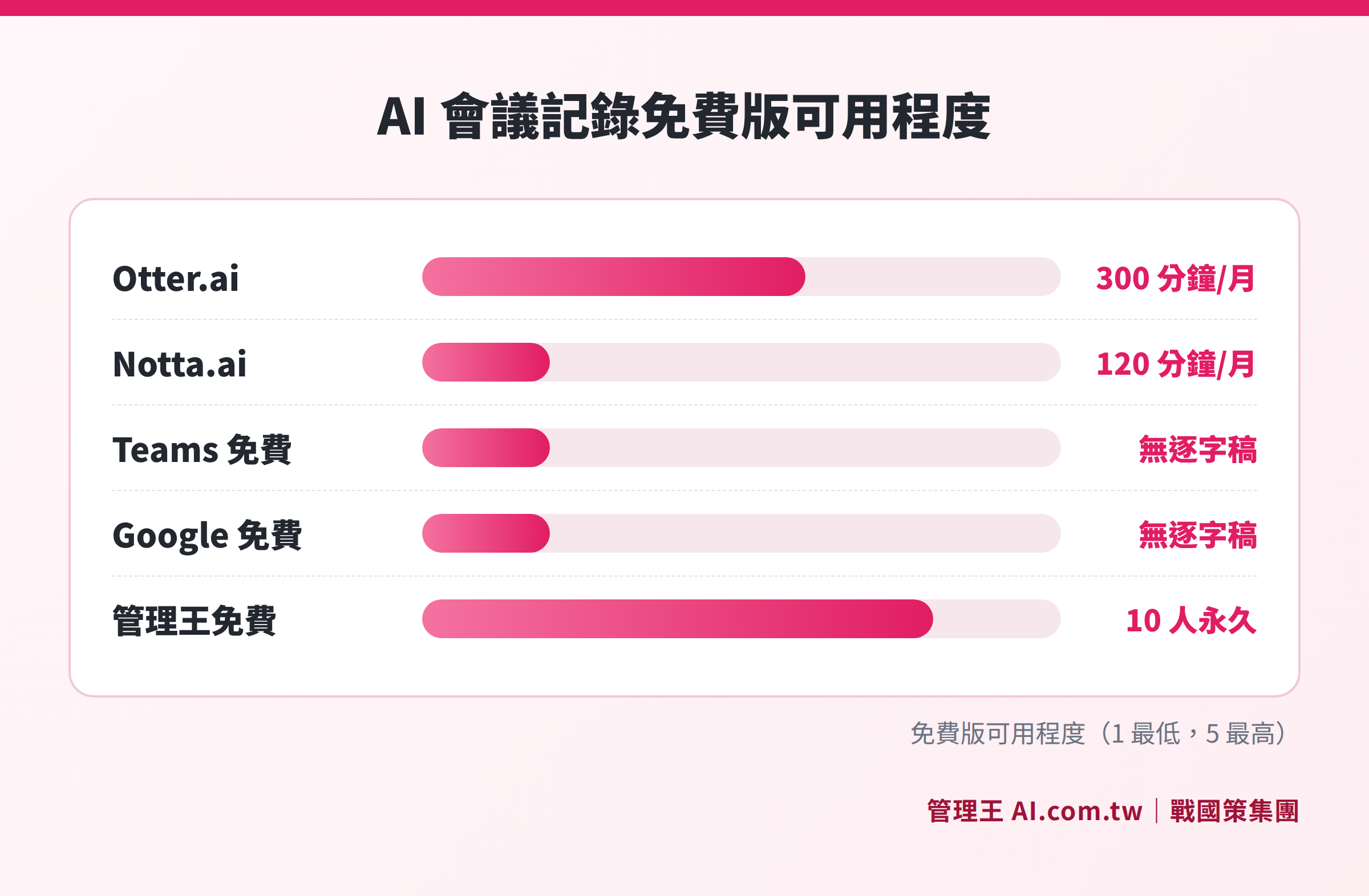
Monthly free quotas (in minutes) and per session limits for major AI meeting recording tools
Three Major Hard Limitations of the Free Version
Limitation 1: Session Time Limit is Too Short
The Notta.ai free version allows a maximum recording time of 3 minutes per session, which is a fatal flaw for any formal meeting. Otter.ai's 30-minute limit is better, but still insufficient for cross-departmental coordination meetings or client proposal meetings. After exceeding the time limit, the system stops recording automatically, leaving the subsequent discussion completely blank.
Limitation 2: The Accumulated Quota Depletes Quickly
Suppose a 10-person company holds 2 departmental meetings and 1 sales follow-up meeting per week, averaging 45 minutes each, which totals about 540 minutes per month. The 300-minute free tier of Otter.ai is insufficient, leaving a deficit of about 240 minutes each month. Notta.ai exceeds its quota in the first week.
Limitation 3: Integration Capability is Nearly Zero
Free versions typically do not offer CRM integration, task system integration, or automatic tracking of action items. Transcripts are merely documents; "who is responsible for what" after the meeting still has to be manually extracted from the text, and manual task creation severely undermines integration efficiency.
When is the Free Version Sufficient?
Based on the analysis above, the following situations can generally be handled by the free version:
- Freelancers or individuals working alone (1 to 2 people): With few meetings each month and short session times, Otter.ai's 300 minutes are more than sufficient.
- Occasionally needing to record client interviews: Holding 3 to 5 meetings a month, each no longer than 20 minutes, can utilize Notta.ai's free quota.
- Testing AI recognition quality before deciding to pay: Running a few meetings with the free version to confirm the accuracy of Chinese recognition before assessing an upgrade.
In reality, many small and medium business owners choose the strategy of "starting with the free version and reassessing after three months." One flaw with this approach is that it is difficult to realistically evaluate the tool's efficiency under the free version's limitations. Recording can only last 3 to 30 minutes, and one cannot experience the automation of generating complete summaries after a 2-hour strategy meeting. Without task integration, it is also hard to feel the fluidity of having "action items directly in the to-do list." If your evaluation goal is whether this tool is worth formally adopting, it is recommended to directly apply for a paid trial period rather than judging based on the free version's experience.
It is strongly recommended to consider the paid version directly in the following situations:
- The company has more than 5 people regularly participating in meetings.
- There are more than 3 cross-departmental or client meetings weekly.
- There is a need for automatic distribution of action items to the task system.
- There is a requirement for meetings in multiple languages (Chinese, English, Japanese).
- There are requirements to meet personal data protection laws and data sovereignty demands.
What Functions Does the Paid Version Offer Over the Free Version?
Table: Core Differences Between Paid and Free Versions
| Function Item | Free Version | Paid Version |
|---|---|---|
| Monthly Recording Quota | Strict limits | Large or unlimited |
| Time per Session | Usually 3–30 minutes | 1–4 hours or more |
| AI Summary Occurrences | Limited (or none) | Large or unlimited |
| Speaker Identification (Voiceprint) | Most do not support | Support |
| Multilingual Real-Time Recognition | Limited | Complete |
| CRM/Task System Integration | None | Complete |
| Export Formats | TXT/Some formats | PDF, Word, CSV, etc. |
| Data Retention Period | Short (e.g., 25 items) | Long-term retention |
| Priority Customer Service | None | Available |
| Data Sovereignty Choices | Usually stored overseas | Some tools allow selection in Taiwan |
It is particularly worth noting the "data sovereignty" column. Taiwan's Personal Data Protection Act stipulates that collecting personal information must obtain the consent of the parties involved; companies using AI meeting recording tools that store data on overseas servers may face additional risks during compliance audits. Paid tools (especially local vendors) usually offer the option to store data in Taiwan.
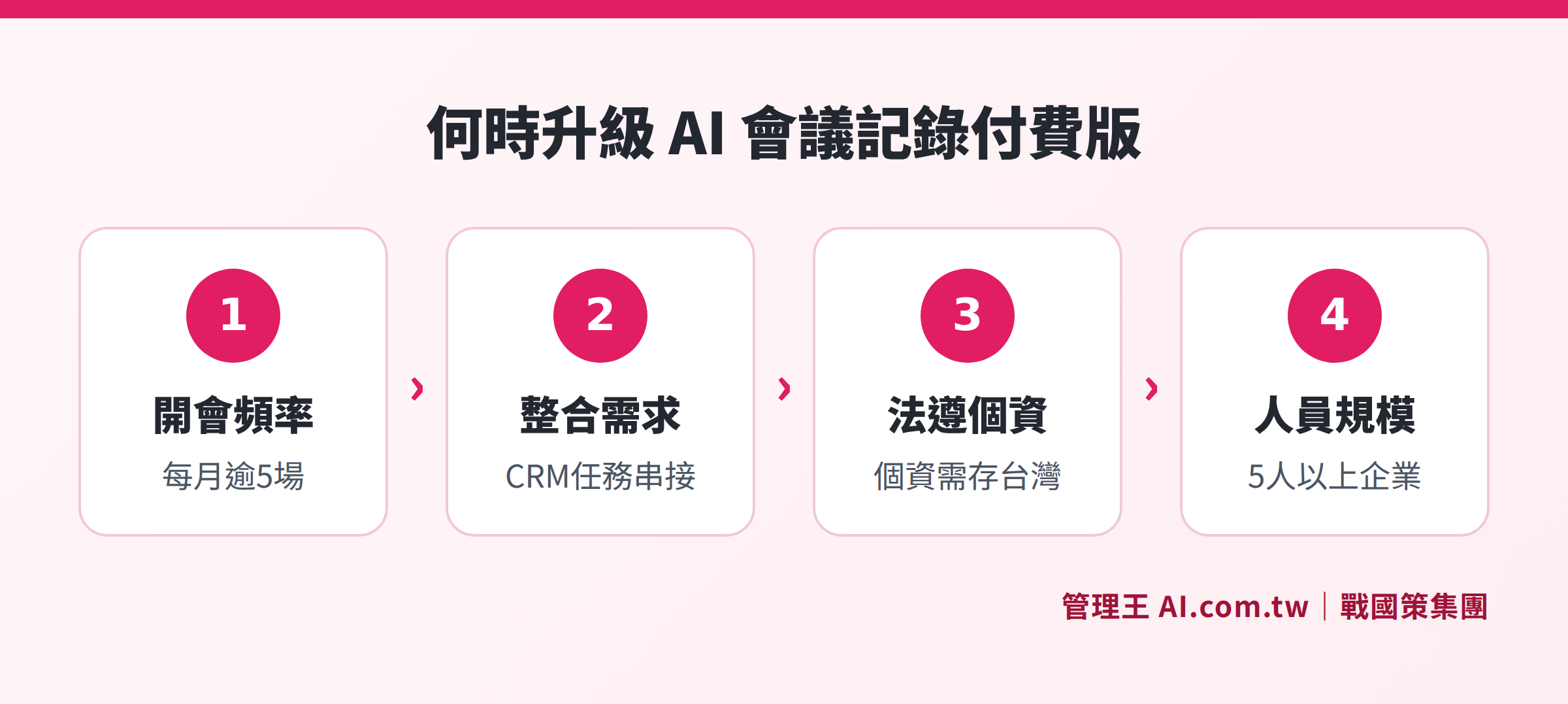
Four key conditions to determine when to upgrade from the free version to the paid version
How to Use 管理王 AI Meeting Record? Free Plan Available Forever
管理王 AI Meeting Record offers a free plan for up to 10 members, available indefinitely, including a one-time AI point for full functionality experience. The following is the actual operation process:
Step 1: Create a meeting and start recording
In the 管理王 backend, create a "meeting record," and choose the audio source (microphone, Zoom, Google Meet import, or upload MP3/WAV/M4A audio files). The system supports real-time recognition in Chinese, English, and Japanese, allowing foreign attendees to see subtitles in real-time.
Step 2: AI Automatically Generates Summary and Action Items
After recording finishes, the AI generates a summary within minutes and automatically extracts "who is responsible, what to do, and due dates" as to-do items, organizing them into a structured record that can be directly sent.
Step 3: One-Click Sending and Task Integration
Clicking "Send to Participants" allows all attendees to receive a summary email, enabling even those who were absent to quickly grasp the decisions made. Action items automatically enter the task management system, where responsible parties can see them upon logging in next time, without manual to-do creation.
Step 4: CRM Association and Full Text Search
If it's a client visitation meeting, the record automatically associates with the CRM customer profiles. If you need to find certain contract terms from a meeting three months later, full-text search can pinpoint it in a second without having to sift through emails for attachments.
Compared to Otter.ai or Notta.ai, 管理王's biggest difference is that it is not a standalone transcription tool, but an integrated system with over 100 functions. Transcripts, summaries, tasks, CRM, and approval/signature are all on the same platform, ensuring data flows naturally without needing to pay extra for integration or hit APIs.
Advanced features (like voiceprint recognition matching real names, unlimited AI summaries, cross-department collaboration) are unlocked above the economical plan (NT$5,000/month for 30 users), with an annual payment offering discounts for 14 months. Detailed plan comparisons can be found on the 管理王 pricing page.
Five Key Indicators for Choosing an AI Meeting Recording Tool
Before choosing a tool, ask these five questions:
- Chinese Recognition Accuracy: Is it optimized for Taiwan's traditional Chinese and business terminology? Can it recognize instances of "Taiwanese mixed with Mandarin"?
- Monthly Total Meeting Duration: After calculating this, check against each tool’s free quota to determine the need for a paid plan.
- Depth of Integration: After transcripts are generated, how are action items tracked? Is there integration with CRM or task systems?
- Compliance with Personal Data Protection Laws: Where are the recordings and transcripts stored? Can you choose a local server in Taiwan? Is there support for informing participants?
- Transparency of Billing Model: Is it per minute, per seat, or a flat rate? Will exceeding usage result in automatic charges?
Regarding compliance with personal data protection laws, special attention must be noted: Taiwan’s Personal Data Protection Act states that collecting recordings containing personal information (such as participants' names and voice features) constitutes personal data collection behavior, requiring companies to inform all participants of the recording purpose and obtain consent before meetings. Some international tools do not provide standardized notification templates, and companies need to design their own. The 管理王 AI meeting record functionality page provides practical operation instructions to help companies establish compliant notification processes.
管理王 employs a "point system" to prevent runaway bills: the free plan offers 100 points per month (once-off trial quota), with each AI use consuming 5 to 25 points. Points can be purchased in packages (NT$300 / 100 points), with no automatic deductions.
For a more detailed purchasing guide, you can refer to How to Choose an AI Meeting Record Tool? Accuracy, Privacy, and Key Points for Chinese Recognition, as well as the complete Meeting Record Format and Tool Overview.
Free Trial of 管理王 AI Meeting Record
Consultants are available to explain the scope of the free plan and differences in AI points between various paid plans, helping you assess the most suitable upgrade time for your company.
Free consultation hotline: 0800-003-191
LINE Official Account: @119m
Official website: app.AI.com.tw
Free trial: Apply for 管理王 now
Frequently Asked Questions
How many minutes can I use with the free version of Meeting Record AI each month?
There are significant differences between tools: Otter.ai's free version allows for 300 minutes per month (with a 30-minute limit per session); Notta.ai's free version permits 120 minutes per month (with a 3-minute limit per session); the transcription features of Microsoft Teams and Google Meet are not available under free accounts and require a business plan. The 管理王 free plan includes a one-time AI point, allowing basic functionality to be used for up to 10 users indefinitely.
Is the AI summary function on the free version usable?
Some are, but there are limitations on occurrences. Notta.ai's free version allows 10 AI summaries per month; Otter.ai's summary feature is limited. The 管理王 free version can experience AI summarization and action item extraction with one-time AI points, while paid plans provide monthly point packages.
Where will the data from the meeting record AI tools be stored?
Otter.ai and Notta.ai store data on US servers. Microsoft Teams and Google Meet's data storage location depends on the rented data center region. The 管理王 data is stored at the 戰國策 Group's Taiwan data center (with dual data center redundancy, ISO 27001 compliance), meeting the requirements of Taiwan's Personal Data Protection Act for data sovereignty, making it more suitable for companies with regulatory compliance needs.
Is upgrading from free to paid version worthwhile?
If the company regularly holds more than three meetings per week or has task system integration needs, the ROI from the paid version is typically recovered quickly. For example, the 管理王 economical plan at NT$5,000/month covers 30 members, averaging about NT$167 per person per month, which is much lower than the labor costs employees spend manually organizing meeting records each month.
Can the free version recognize different speakers during group meetings?
Most free versions do not support speaker diarization. Otter.ai's free version has basic speaker distinction but requires manual association with names. Notta.ai's free version does not support this. The 管理王 paid version supports speaker diarization and automatically matches participants' real names, displaying comments like "Manager Zhang says: ..." without the need for manual sorting afterwards.
For comparisons of other Taiwanese tools like 雅婷逐字稿, or to directly try out 管理王 AI Meeting Record, you can go to the official website to apply for free, where you can create an account in 30 seconds without needing to bind a credit card.
Data Sources
- Otter.ai Official Pricing Page (Checked November 2026)
- Notta.ai Official Pricing Page (Checked November 2026)
- Microsoft Teams Plan Comparison—Microsoft Official (Checked November 2026)
- Google Workspace Plan Comparison—Google Official (Checked November 2026)
- 管理王 AI Meeting Record Function Page—app.ai.com.tw/features/ai-meeting-record
- 管理王 Service Plans and Pricing—app.ai.com.tw/pricing