How to Manage Business Cards? A Guide to Digitalizing Business Cards and Customer Records|Recommended Business Card Management

Business card management refers to the systematic process of converting physical business cards into CRM customer data, which includes four core steps: AI recognition, data consolidation, tagging, and follow-up tracking. This article explains the pain points of traditional business card management, criteria for tool selection, compliance with personal data regulations, and techniques for bulk processing at exhibitions.
Business card management refers to the systematic transfer and classification of contact information from physical business cards into the customer relationship management (CRM) process. Digitalizing business card management allows a single card to go from "scanning/photo" to "designated sales follow-up" in just thirty seconds, ensuring that no potential customer leads are left languishing in a corner of the desk or in a business card box. For small and medium-sized enterprises with high sales volume, frequently attending exhibitions or client visits, establishing a systematic business card management process is the first checkpoint in managing the sales funnel.
What Does Business Card Management Really Involve? Understand the Core Concepts
Business cards are the first data points in business interactions, yet they are the easiest to lose. The business cards generated each year from exhibitions, visits, and networking events can quickly vanish in a desk drawer if there is no systematic management process in place. The core tasks of business card management consist of three layers:
First Layer: Digitalization, transforming physical information into a searchable and analyzable electronic format, eliminating the "only the salesperson who collected the card knows this client" information silo.
Second Layer: Data Consolidation, as there may be multiple contacts from the same company, the system should automatically consolidate multiple contact records under the same client to avoid data chaos caused by duplicate entries.
Third Layer: Follow-Up Actions, the ultimate purpose of a business card is not for reference, but to trigger the next steps: assigning follow-up tasks, setting reminders, sending outreach emails, and incorporating them into marketing automation processes. Digitalizing cards without subsequent actions is as meaningless as having them piled in a drawer.
In a nutshell
The essence of business card management is not storing cards but transforming networking assets into trackable business opportunities.
The Four Major Pain Points of Traditional Business Card Management – How Many Do You Face?
Salespeople come across a large number of business cards each year but often feel frustrated with business card management. Common issues can be summarized in the following four points:
Pain Point One: Manual Input is Time-Consuming and Labor-Intensive. Manually entering all fields for one business card typically requires two to three minutes. To process a hundred cards received from an exhibition, just creating records alone would take three to five hours, leaving little time for proposal preparation the next day. This is why most business cards ultimately end up untouched in a business card box.
Pain Point Two: Data is Dispersed Across Personal Phones. Salespeople often use personal smartphone apps to scan cards and save them in their own contacts. Once an employee leaves, the customer list goes with them. Without systematic management by the company, corporate networking assets are stored on personal devices.
Pain Point Three: Duplicate Entries and Dirty Data. The same client, Mr. Zhang, may be scanned and entered as separate records by Salesperson A and Salesperson B, which could lead to automated marketing sending the same email twice, creating a negative impression for the customer.
Pain Point Four: Cards are Entered but Lacking Follow-Up. Business card tools lacking CRM integration result in a static data card once scanned, requiring salespeople to remember to follow up, set reminders, or send emails—ultimately leaving many tasks undone.
Four Steps of Business Card Digitalization: From Scanning to CRM
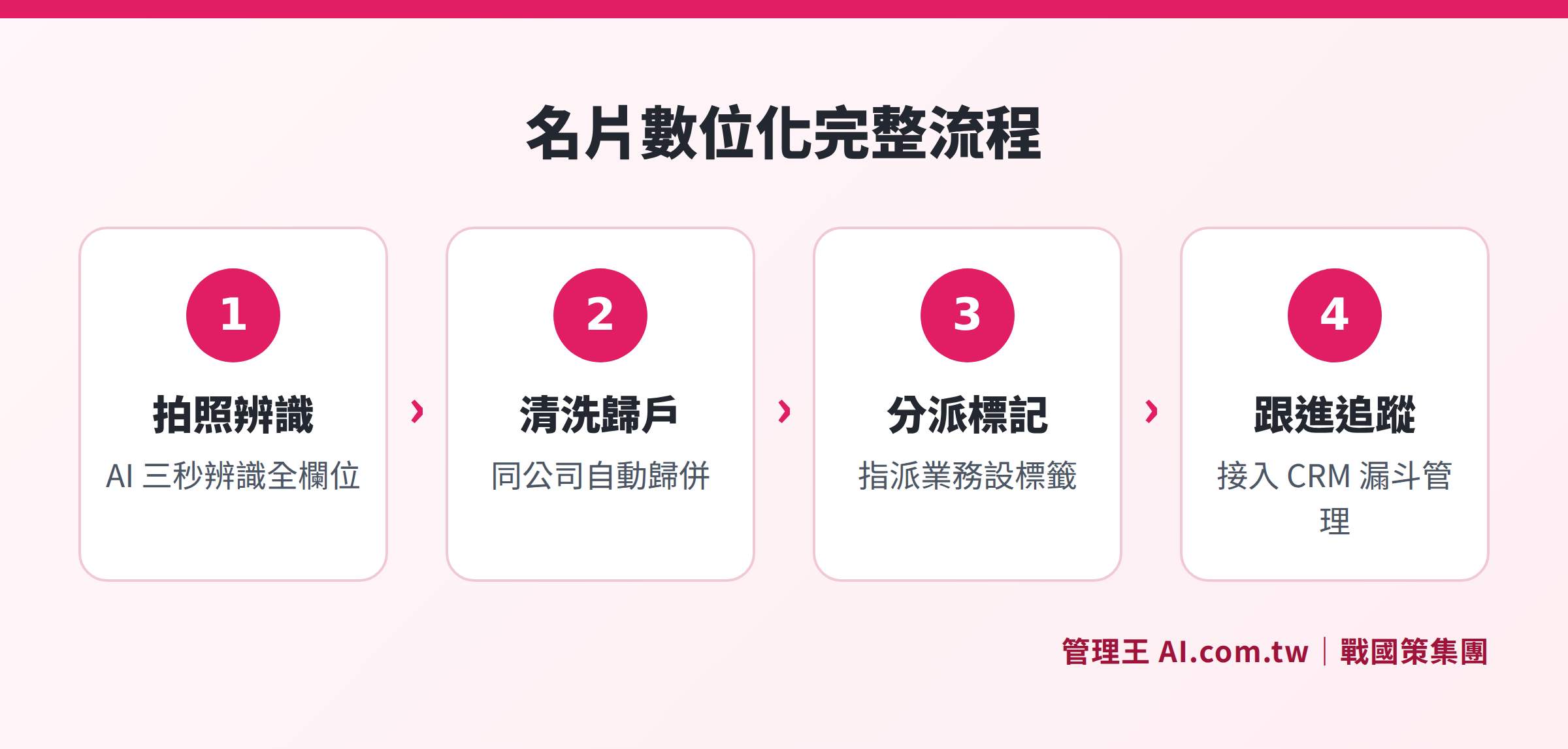
The complete process from scanning recognition, data cleansing, tagging to tracking
Step One: Scanning and Recognition (Completed in Three Seconds)
Modern AI business card recognition supports photographing with mobile phones or uploading scanned files, with recognized fields including company name, name, position, landline, mobile, email, address, website, LINE ID, and social media accounts. High-quality recognition engines can also handle multi-language cards in traditional Chinese, simplified Chinese, English, Japanese, and various formats such as portrait, landscape, and double-sided cards.
Step Two: Data Cleansing and Consolidation
After recognition, the system automatically detects duplicates: new contacts from the same company are automatically consolidated under existing client contact fields; if the same person is scanned again, an alert pops up to avoid duplicate creation. For poorly recognized fields, advanced systems can supplement with online queries to automatically fill in missing email or website information.
Step Three: Tagging and Adding to the Sales Funnel
Once records are established, a single action can assign the responsible salesperson, set follow-up tags (e.g., potential leads from the exhibition, quoted, awaiting budget confirmation), and trigger subsequent automated tasks, allowing the business card to officially become the starting point of the sales funnel rather than a static reference material.
Step Four: Standard Format Export and Cloud Backup
A complete business card management tool supports exporting in vCard (RFC 6350 standard) format, allowing one-click addition to mobile contacts or import into other systems; it also retains the original business card image for future reference, and all data is backed up in the corporate cloud so employee changes do not affect the company’s grasp of this client.
AI Recognition vs. Manual Input: A Comparison of Efficiency
Table: Comparison of AI Recognition and Manual Input
| Comparison Items | Manual Input | AI Business Card Recognition |
|---|---|---|
| Time per Record | 2 to 3 minutes | About 3 to 10 seconds |
| Time for 100 Cards | About 3 to 5 hours | About 15 to 30 minutes |
| Multi-Language Support | Depends on personnel's ability | Traditional Chinese, Simplified Chinese, English, Japanese, etc. |
| Recognition Accuracy | Depends on the typist's attention | AI auto-recognition with manual review options |
| Consolidation and De-duplication | Requires manual comparison | System auto-detection |
| CRM Integration | Requires separate copying and pasting | Directly enters CRM post-scan |
| Batch Processing at Exhibitions | Linear cumulative time consumption | Continuous shooting mode for simultaneous batch recognition |
Overall, AI recognition shows significant advantages in speed and standardization, particularly suitable for companies frequently attending exhibitions and business visits.
How to Choose a Business Card Management Tool? Six Key Evaluation Criteria
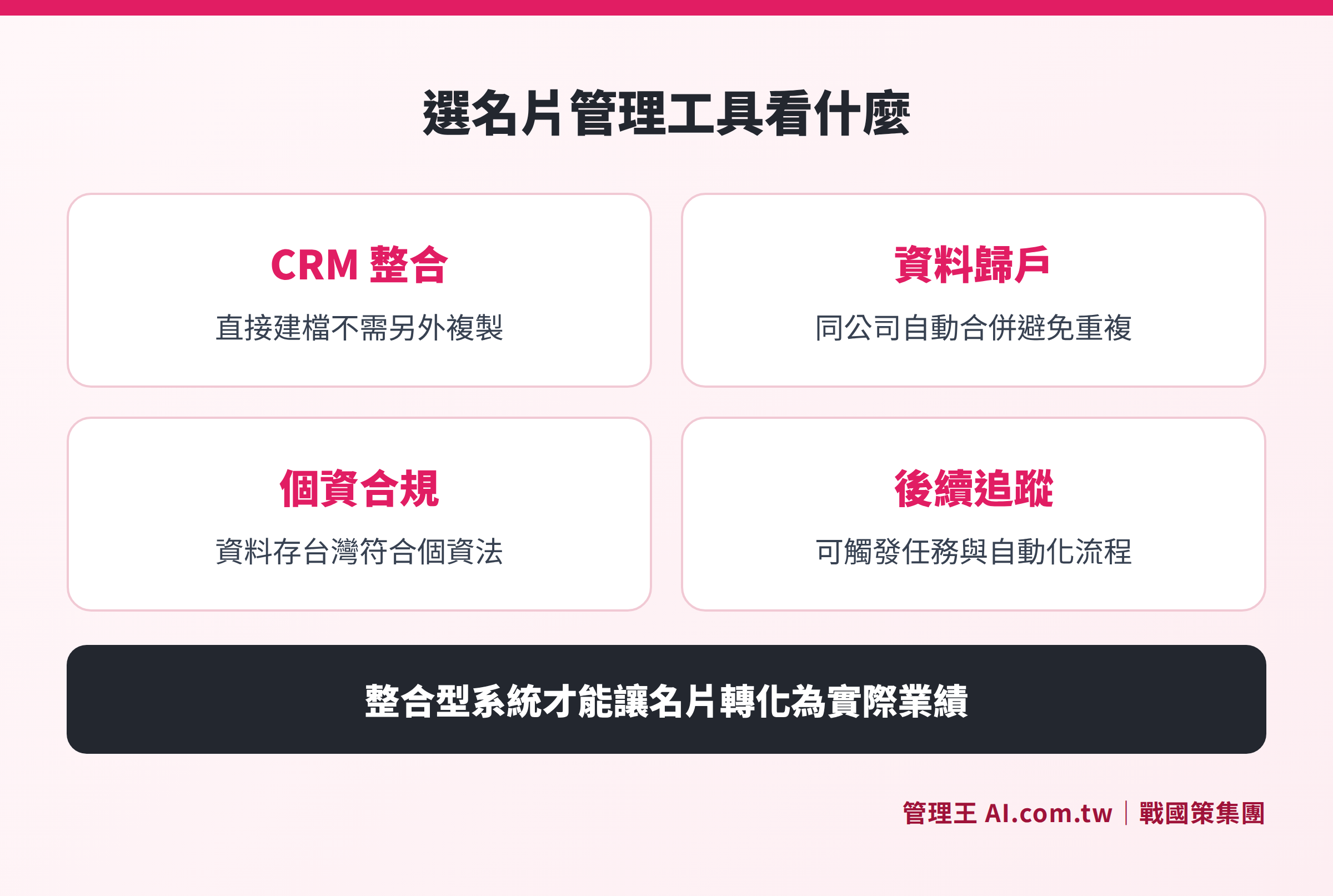
Depth of CRM integration, multi-language support, personal data compliance, batch processing, data consolidation, and follow-up tracking are six evaluation dimensions
When selecting a business card management tool, it is advised that companies evaluate based on the following six dimensions:
Table: Six Key Evaluation Aspects for Business Card Management Tools
| Evaluation Dimension | Description | Importance to SMEs |
|---|---|---|
| Depth of CRM Integration | Does it directly enter the customer database after scanning, or only save in the mobile app? | ★★★★★ |
| Multi-Language and Format Support | Does it support traditional Chinese, Japanese, English business cards, and both portrait and landscape formats? | ★★★★☆ |
| Data Consolidation and De-duplication | Can multiple contacts from the same company auto-consolidate to avoid duplicate entries? | ★★★★★ |
| Personal Data Compliance Capability | Is the data stored in Taiwan and does it meet data protection law security maintenance obligations? | ★★★★★ |
| Batch Processing at Exhibitions | Does it support continuous shooting batch recognition, suitable for exhibition situations? | ★★★☆☆ |
| Follow-Up Tracking Integration | Can it trigger tasks, reminders, and automated marketing processes? | ★★★★★ |
Special Reminder: Pure scanning apps (only for digitalization) and integrated CRM business card management systems have a significant functional gap. The former is responsible for "storing data," while the latter is responsible for "leveraging data for sales effect." For SMEs, an integrated system that allows for follow-up tracking is the truly worthwhile investment.
Moreover, data export flexibility is another important consideration. Quality systems should support common formats such as CSV, Excel, and the vCard (RFC 6350) standard format to prevent incurring high transfer costs due to data being locked within a single platform when switching systems in the future. It is essential to confirm that the selected system allows complete export of your business card data as a basic prerequisite to protect corporate networking assets.
What Personal Data Regulations Must Business Card Digitalization Comply With?
In Taiwan, collecting and storing personal information from customer business cards falls under the purview of the Personal Data Protection Act. According to Article 5 of the Data Protection Law, the collection, processing or use of personal data should "respect the rights of the person concerned" and "not exceed the necessary scope of specific purposes." In other words, while entering business card information into the system is not illegal, the subsequent use of this data must comply with the original business collection purpose.
When establishing a business card management system, companies must pay special attention to the following points:
Clarity of Collection Purpose: The purpose of digitizing business card information must align with the reasonable and necessary scope of business dealings and cannot be repurposed for uses beyond the initial communication scope (e.g., selling lists without consent or using customer data for completely unrelated marketing activities).
Security Maintenance Obligations: According to Article 18 of the Data Protection Law, non-governmental organizations must implement security measures to prevent personal data from being stolen, altered, destroyed, lost, or leaked. This means that the system storing customer business card data needs appropriate access controls and encryption mechanisms, limiting access to authorized personnel only.
Rights of the Individual: Individuals have the right to request inquiries, corrections, or deletions of their personal data. The Data Protection Law states that businesses should respond to inquiry or copy requests within fifteen days and to correction or deletion requests within thirty days. The business card management system should support modification and deletion operations for individual customer data to respond to customer data requests appropriately.
Data Storage Locations: The Data Protection Law has special regulations concerning cross-border data transmission. Companies should confirm whether the data in the business card management tool is stored locally in Taiwan or on overseas servers to assess compliance risks. Choosing a system that stores data in a local data center in Taiwan is generally more convenient during compliance reviews and audits by regulatory authorities.
Punishment for Violations: Failing to take appropriate security maintenance measures can result in fines from NT$20,000 to NT$2,000,000; if a data leak occurs and corrections are refused, fines can reach NT$150,000 to NT$15,000,000, along with civil liabilities. This emphasizes that compliance in business card management is not a trivial administrative task.
- Source of laws: Personal Data Protection Act (National Regulations Database)
This article is for general information only and does not constitute legal advice; actual compliance is subject to the latest announcements from regulatory authorities.
What to Do with a Large Number of Cards Collected at Exhibitions? Batch Processing Practical Techniques
Exhibitions, seminars, and business matchmaking events are the scenes where business cards are collected most intensively; below are suggestions for a systematic processing workflow:
At the Exhibition: Use an app that supports continuous batch shooting to photograph business cards in succession. Do not spend time confirming each card individually on-site; instead, queue all cards for recognition, allowing sales staff to focus on dialog and interaction. In scenarios with a large volume of cards collected (e.g., collecting over a hundred at an exhibition), batch mode can ensure all cards are already queued for system recognition before the close of the event.
Same Day Post-Event: Upon returning, immediately double-check recognition results and correct a few misrecognized fields, utilizing fresh memories of the exhibition location, talking points, etc., to label each business card (e.g., "Interested in Plan A," "Need to contact again in a week," "Decision-maker has confirmed"). Supplement notes while the memory is still fresh, enabling salespeople to enter the conversation precisely during follow-ups.
The Next Day: Group contacts based on labels, set follow-up tasks or trigger marketing automation processes, ensuring every business card has a clear next action, rather than waiting for salespeople to remember to follow up. Prioritize based on importance: arrange phone follow-ups for those expressing clear purchase intent first, add interested but yet-to-evaluate contacts to the newsletter, and mark merely for networking as long-term relationship maintenance.
Regular Cleanup: Clean records of business cards with no interaction for over six months each quarter, deciding whether to convert them into a dormant customer reactivation process or remove them from the list, allowing the CRM database to remain healthy. When field sales visit clients, they can also document visit locations and notes through the field visit clock-in function to create a complete customer contact history with business card data.
Using 管理王 AI.com.tw for Business Card Management
管理王 AI Business Card Management is one of the built-in AI tools in 管理王, designed as "Capture and Create CRM Entry." Sales staff can take photos of business cards with their mobile phones; AI recognizes all fields in three seconds and directly adds them to the CRM customer database, requiring no manual input.
The main operational flow is as follows:
- Open the 管理王 App on your mobile phone and enter the "AI Business Card Management" module
- Take a photo or upload an image of the business card (supports exhibition continuous shooting batch mode)
- AI automatically populates fields such as company name, name, title, phone, email, address, etc.
- The system auto-detects if there are duplicates with existing clients and automatically consolidates multiple contacts from the same company
- Confirm the data, and with one click, add it to the CRM, assign a salesperson, and set follow-up tags
- Subsequent follow-up can be tracked through the Sales Daily Report
管理王 supports recognition of traditional Chinese, simplified Chinese, English, and Japanese business cards, as well as handling portrait, landscape, and double-sided cards. The AI Employee can automatically generate personalized outreach email suggestions after card entry, allowing sales staff to review and send, saving time from writing from scratch.
After integrating business cards into CRM, sales can connect with the quotation system for opportunity tracking or link to contract management, ensuring the entire path from business card to deal completion is trackable within the same system.
戰國策 Group serves over 30,000 businesses, with all data stored in Taiwanese data centers (ISO 27001 compliant), meeting personal data security maintenance requirements. The free plan is available for permanent use, with unlimited feature experience, ideal for SMEs to try before deciding to upgrade.
The AI Knowledge Base function can collate business card notes, customer preferences, and other information, enabling all sales staff to quickly review customer backgrounds before client visits, eliminating the information silo where "only the responsible salesperson knows this client."
Transform Every Business Card into a Sales Opportunity
管理王 consultants help you establish a business card digitalization process, from scanning recognition to CRM tracking in one go, with the free plan available for permanent use.
Free consultation hotline: 0800-003-191
LINE official account: @119m
Official website: app.AI.com.tw
Free trial: Apply for 管理王 now
Frequently Asked Questions
What is the difference between Business Card Management Apps and CRM systems?
Business card management apps generally focus on the "digitalization" step: recognizing the text from physical business cards and storing them in electronic format. CRM systems manage the entire customer relationship lifecycle, including customer segmentation, interaction records, opportunity tracking, quotation and contract management, etc. High-quality integrated systems (like 管理王 AI Business Card Management) can merge both, with business card scanning immediately entering the CRM, eliminating the need for data synchronization between the two systems.
Will business card data be taken away if a salesperson leaves?
This is precisely why companies need to systematically manage business cards. If cards only exist on a salesperson's personal phone or private account, recovering the data upon departure is indeed challenging. By managing all business card data through a corporate system, all records belong to the company account. Data remains intact after a salesperson leaves, allowing the incoming colleague to directly inherit the customer's historical records without affecting subsequent follow-ups.
Do you need customer consent to scan business cards?
According to Taiwan's personal data law, personal data on business cards in the context of business dealings is usually collected based on a proper legal foundation for the purpose of "contract or related contractual relationship." However, companies should still be cautious: they must not use business card data for purposes beyond the original collection purposes (e.g., reselling lists), and they must fulfill security maintenance obligations per personal data laws. For specific compliance advice, please consult a legal advisor.
If you collect two hundred business cards in one day at an exhibition, how long will it take to process them all?
Using an AI business card recognition tool that supports batch processing, recognizing and storing two hundred business cards can usually be completed within about one hour (including a small amount of manual confirmation and correction), compared to manual entry which would take six to ten hours, greatly enhancing efficiency.
Is the recognition accuracy of business cards high enough? What should be done for creatively designed cards?
Modern AI recognition engines are already quite accurate for standard format cards, but creatively designed cards (large logos, minimal text, diagonal layouts) can indeed have recognition discrepancies. 管理王's solution is to flag uncertain fields for user verification and support auto-completion of missing fields from the internet. It is suggested to review and confirm once upon return after quickly queuing the cards at the exhibition.