Recommended Timekeeping Apps: Location Features, Timecard Fraud Prevention, and Payroll Integration|Timekeeping System Recommendations

From fraud prevention mechanisms and location methods (GPS, IP, WiFi, NFC, facial recognition) to payroll integration, we compile the key points for selecting timekeeping apps and provide practical advice for various scenarios, assisting small and medium-sized enterprises in Taiwan to find suitable cloud attendance tools.
Timekeeping apps are cloud attendance tools that leverage smartphones, allowing employees to clock in directly using their phones without the need for fingerprint machines or magnetic cards, while managers can instantly monitor attendance from the backend. For small and medium-sized business owners in Taiwan, there are three core questions when selecting a timekeeping app: Is the fraud prevention mechanism reliable? Does the location verification cover multiple branches and field scenarios? And can overtime pay be automatically integrated with payroll, reducing errors during manual consolidation at the end of the month? According to Article 30 of the Labor Standards Act, employers must maintain attendance records for employees for five years, and records must be kept daily, documented to the minute. The Ministry of Labor also clearly states that as long as mobile apps, GPS, and cloud systems accurately record work hours, they are all legal methods for clocking in. This article starts from the actual needs of business owners, organizing the key functionalities of timekeeping apps, fraud prevention mechanisms, location options, and payroll integration methods to help you find the most suitable solution for your company size.
What’s the difference between timekeeping apps and traditional time clocks?
The biggest issues with traditional time clocks (fingerprint machines, magnetic card machines) are their high hardware costs, maintenance troubles, and isolated data. A fingerprint machine can cost anywhere from several thousand to tens of thousands; multiple branches require multiple installations. Data is stored locally on the machine, requiring HR to manually export and input the data into the payroll system at the end of the month, which is time-consuming and prone to errors.
Timekeeping apps move attendance records to the cloud, addressing these pain points:
- No hardware costs: Employees use their smartphones as time clocks without needing additional equipment.
- Real-time monitoring: Managers can view attendance statuses at any time from the backend, with alerts for any irregularities.
- Automatic data flow to payroll: Working hours are sent directly to payroll calculations, eliminating the need for manual consolidation.
- Centralized management for multiple branches: One backend manages all store employees without the need to visit different locations.
Table: Comparison of Traditional Time Clocks vs Timekeeping Apps
| Comparison Item | Traditional Time Clock | Timekeeping App |
|---|---|---|
| Hardware Costs | Several thousand to tens of thousands per unit | None (employees use personal phones) |
| Management of Multiple Branches | Each store operates independently | Cloud-based centralized management |
| Data Access | Stored locally, requires manual export | Real-time querying and downloading from the cloud |
| Fraud Prevention Mechanism | Fingerprint fraud prevention (single verification) | Multiple verifications using GPS + WiFi + facial recognition |
| Payroll Integration | Requires manual or additional integration | Native integration with automatic calculations |
| Documents for Labor Inspections | Manually compiled | One-click PDF export |
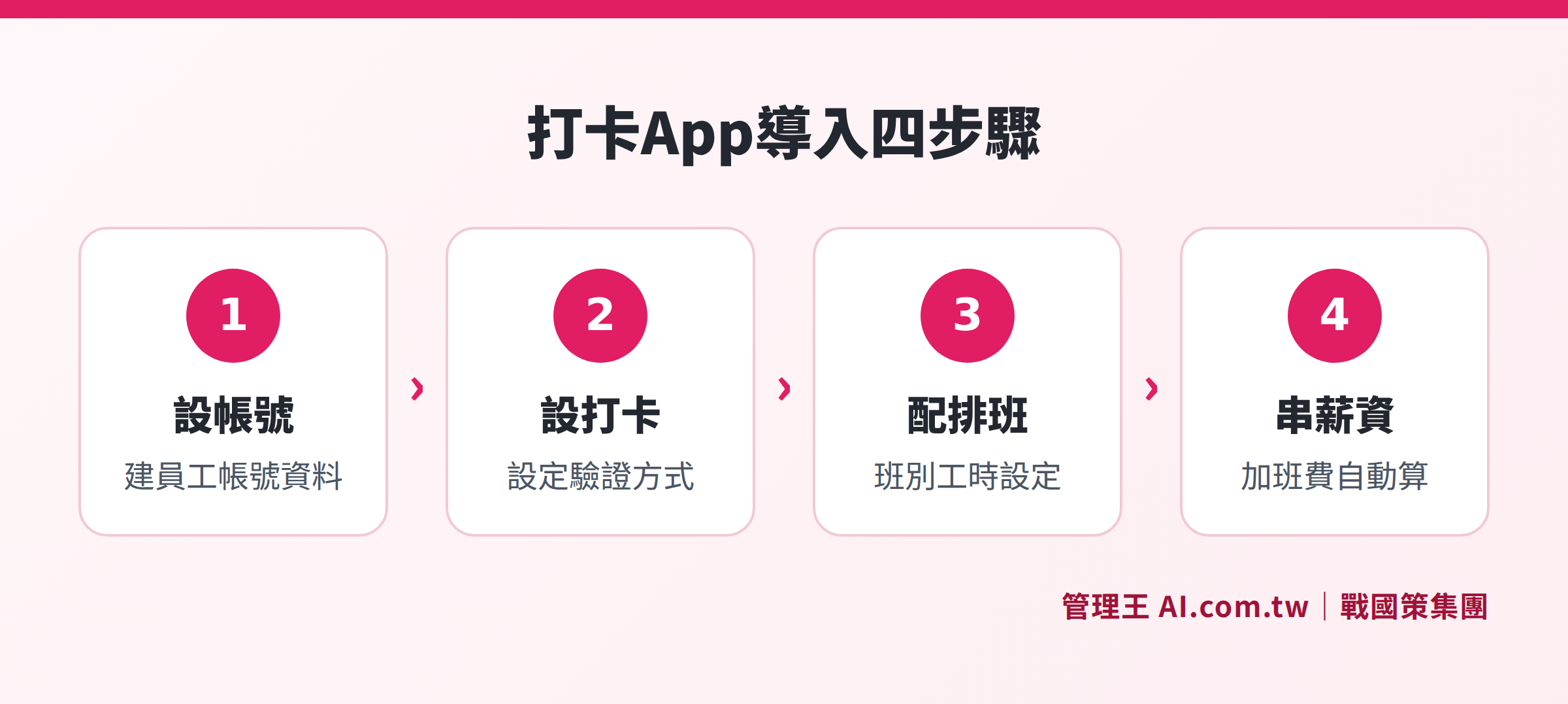
A comprehensive flowchart from account setup to payroll integration
How do timekeeping apps address fraud prevention, which is of utmost concern to bosses?
Time clock fraud is the most common loophole in attendance management, especially severe in scenarios like shift work, chain stores, and outsourced cleaning or security services. Traditional magnetic cards can easily be borrowed to clock in for someone else; although fingerprint machines are hard to bypass, field personnel might not even have access to them.
The core of the timekeeping app's fraud prevention is multiple overlapping verifications, significantly increasing the difficulty and cost of potential fraud:
- GPS Location Verification: Clocking in must occur within a designated range (e.g., within a 100-meter radius of the company address); if GPS drift exceeds this range, it is flagged as an anomaly.
- WiFi Restrictions: Clocking in is only possible when connected to the company's designated WiFi, ensuring the employee is on-site.
- Facial Recognition: Matches the employee's photo in real-time; the same face cannot be used to clock in for someone else.
- AI Anomaly Detection: For consistent clocking behavior that is precise to the second for many consecutive days, the system automatically flags it and alerts supervisors.
In a Nutshell
There is no perfect fraud prevention system, but multiple verifications make it prohibitively expensive to commit fraud, making it the most effective strategy in practice.
In practice, most companies opt for GPS + WiFi dual verification to balance convenience and security; in high-security scenarios (such as warehouses or specific positions), facial recognition serves as a third layer of verification. The Management King timekeeping system supports mixed multiple verifications, which can be configured with different rules depending on department or position, avoiding the need for a one-size-fits-all standard across the company.
How to choose among GPS, IP, WiFi, and NFC for location verification? A comparison of scenarios
Timekeeping apps offer various technologies for location verification, each suitable for different scenarios. Choosing the wrong method can not only fail to prevent fraud but also cause unnecessary trouble for employees.
Table: Comparison of Five Timekeeping Location Methods
| Timekeeping Method | Suitable Scenarios | Fraud Prevention Strength | Implementation Difficulty |
|---|---|---|---|
| GPS Location | Field work, store visits, sales calls | Medium (can be strengthened with other verifications) | Low (no hardware needed) |
| IP Restricted Range | Fixed office locations | High (must be on the same network segment) | Low (just need to set the IP) |
| WiFi Restrictions | Multiple branches, factories | High (must connect to designated AP) | Low (just need to set the SSID) |
| Facial Recognition | High-security scenarios, manufacturing industry | Very High | Medium (requires pre-setting) |
| NFC/QR Code | Manufacturing sites, construction sites | Medium-High (requires physical contact for reading) | Medium (requires configuring reading points) |
Practical Suggestions for Each Scenario:
- Office Employees: IP or WiFi restrictions are the simplest; set it once, and it won't interfere with employees' operating habits.
- Employees at Multiple Branches: Set up independent WiFi SSIDs for each store; employees will automatically match the system when they arrive at a store, allowing for seamless cross-store identification.
- Field Sales: Clock in upon arriving at the client’s location, automatically recording GPS coordinates and timestamps, with the option to take photos as evidence.
- Manufacturing Sites: Use NFC sensing cards or QR codes combined with facial recognition, once at the start and end of each shift, balancing efficiency and security.
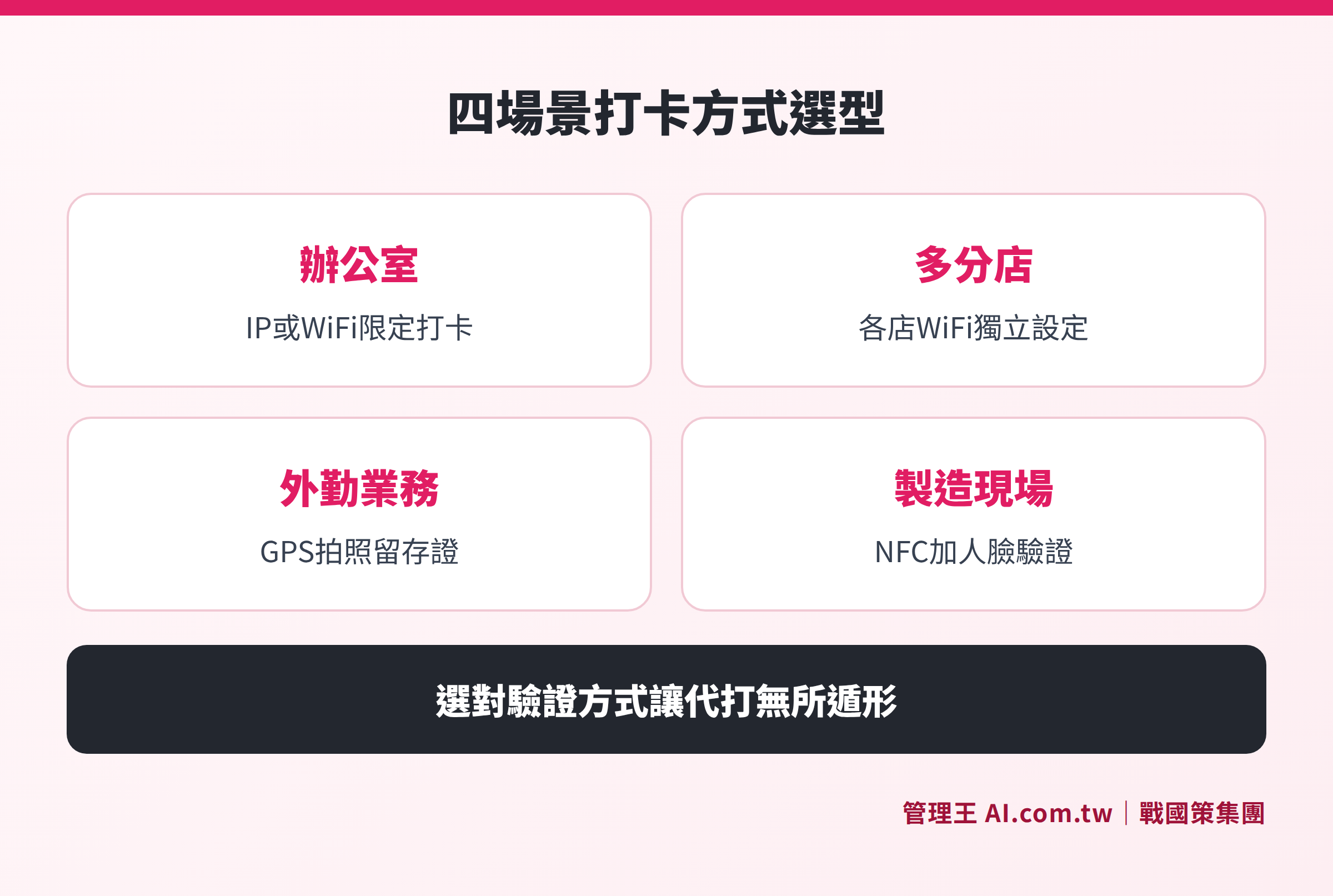
The best timekeeping verification methods for offices, multiple branches, field sales, and manufacturing sites
How can field sales use the timekeeping app? How important is GPS evidence?
Field work is a scenario that traditional time clocks cannot manage at all. Sales personnel at client sites, security guards on patrol, and installation workers at construction sites can only rely on paper sign-in logs later, which are not reliable and hard to verify in disputes.
The timekeeping app's GPS field clocking has completely changed this situation:
- Clocking in at the client’s location: Automatically records GPS coordinates and timestamps, allowing supervisors to see all field workers' current locations on the backend map.
- Photo Evidence: Take a photo upon arrival, which is saved along with GPS coordinates and the clock-in time, tamper-proof.
- Route Records: For multiple client visits in one day, a complete travel route is preserved, facilitating billing, verification, and performance tracking.
- Employees in Different Time Zones: For employees on overseas business, the system automatically converts to local time, preventing confusion in attendance records caused by time zone differences.
According to Article 30 of the Labor Standards Act, employers must retain attendance records for five years, and field GPS clocking data counts as formal attendance records, suitable for labor inspections. With the attendance analysis ranking feature, managers can further see field workers' visit frequencies and work hour distributions.
How do timekeeping apps automatically calculate overtime pay?
Overtime pay calculation is a pivotal aspect of the integration between timekeeping apps and payroll systems. According to Article 24 of the Labor Standards Act, the overtime pay calculation standards in Taiwan are as follows:
- Regular weekday overtime for the first two hours: Added pay of at least one-third of the hourly wage (i.e., hourly wage × 1.34 times).
- Regular weekday overtime beyond two hours: Added pay of at least two-thirds of the hourly wage (i.e., hourly wage × 1.67 times).
- Overtime on rest days for the first two hours: 1.34 times; for the 3rd to 8th hours: 1.67 times; for the 9th to 12th hours: 2.67 times.
When the timekeeping app is natively integrated with the payroll system, if employees clock more than their scheduled hours, the system automatically generates overtime requests for electronic approval by supervisors; upon supervisor approval, overtime hours are sent directly to payroll calculations without needing manual conversion by HR.
It should be noted that the Ministry of Labor stipulates, "Employers have the right to refuse payment for overtime not approved by supervisors." Therefore, the electronic approval process in the timekeeping app is crucial—without supervisor approval, the overtime pay calculation cannot be triggered, thus avoiding subsequent disputes. The electronic approval feature allows overtime request processes to be set up, enabling supervisors to approve requests via their mobile devices without being restricted by their locations.
How is the timekeeping data integrated into payroll systems?
Many companies that implement timekeeping apps find that when entering attendance data into payroll software, they still need to manually export and import it, which doesn’t save time. There is a fundamental difference between native integration (where timekeeping and payroll are part of the same system) and API integration (where the two systems communicate):
Native Integration: Attendance hours flow directly into payroll calculations without needing to export or import. Set the salary structure once (base salary, allowances, health insurance rates), and the system automatically calculates the monthly payroll. This is the most time-efficient and least error-prone method.
API Integration: The timekeeping app uses an API to push attendance data to the payroll software. This requires technical configuration but offers greater flexibility and maintains the existing operation habits of the payroll software.
Manual Export and Import: At month-end, export from the timekeeping app to Excel, then paste it into the payroll software. This method is prone to errors and is not recommended for long-term use; it is suitable only as a transitional approach.
The Management King payroll system is natively integrated with the timekeeping system, with attendance hours flowing directly into payroll calculations, eliminating the need for manual aggregation by HR at month-end, thus allowing HR to focus on more value-added work.
Are free timekeeping apps sufficient? What are the limitations on features?
There are many tools in the market that claim to be "free timekeeping apps," but "free" often comes with user limits or restrictions on core features. Before choosing, be sure to verify the following five points:
- Free plan user limits: Typically, the free version is limited to 5–10 users, and exceeding this will require an upgrade.
- Is there GPS location verification?: Some free tools only offer basic clocking in without location verification, which cannot prevent timecard fraud.
- Retention period for historical data: Free versions might only retain data for 3–6 months, which does not comply with the labor law's five-year retention requirement.
- Can attendance reports be exported?: Documents for labor inspection must be exported as PDFs; free versions may not support this feature.
- Is there payroll integration?: Automatic calculation of overtime pay is usually a paid feature, with free versions typically requiring manual handling.
The Management King timekeeping system offers a free plan available for permanent use, supporting companies with up to 10 users, including GPS location, IP restrictions, and basic attendance reports, with attendance records stored indefinitely in compliance with labor law requirements. For more users, AI anomaly detection, multi-branch management, or payroll integration, paid plans can be upgraded; for a full comparison of plans, see the Management King pricing page.
How to use the Management King AI.com.tw timekeeping system?
The Shihgate Group services over 30,000 enterprises, and the Management King AI.com.tw timekeeping system is an integrated attendance solution designed specifically for small and medium enterprises in Taiwan, focusing on several practical operation points:
Set Clock-in Rules: The backend allows for setting different clock-in methods (GPS range, WiFi SSID, or IP segment) for each department or store, enabling automatic detection of employees entering the premises without the need for manual selection, thus incurring zero learning costs.
Define Flexible Work Hours: Set fixed shifts, flexible shifts, or rotating shifts based on position; the system automatically marks lateness and early departures. If an employee forgets to clock in, a process for late clocking requests follows, requiring supervisor approval for amendment, keeping an audit log with records of changes.
Automatic Notification of Anomalies: If continual lateness or unusual clocking occurs, LINE or push notifications automatically alert supervisors to ensure they can address issues promptly rather than discovering expanded problems at the end of the month.
Labor Inspection Readiness: Monthly attendance details can be exported as PDFs with one click, fully complying with the employer's obligations as stipulated in Article 30 of the Labor Standards Act to allow for prompt responses to labor inspections.
Coupled with shift scheduling, roster management, and HR systems, attendance, scheduling, and payroll processes are interconnected under a single account, facilitating seamless data flow without requiring APIs. The free plan is available for permanent use, allowing companies with less than 10 employees to try out all features at no cost.
For more selection strategies on timekeeping systems, refer to the complete guide on timekeeping systems.
Find the Most Suitable Timekeeping App Solution
Consultants offer free assessments on GPS location, fraud prevention settings, and payroll integration processes to confirm implementation direction in 30 minutes.
Free consultation hotline: 0800-003-191
LINE Official Account: @119m
Official Website: app.AI.com.tw
Free Trial: Apply for Management King Now
Frequently Asked Questions
Is the timekeeping app compliant with labor laws?
Yes, it is legal. The Ministry of Labor clearly states, "Records made by any tool that accurately records labor attendance time can serve as attendance records for workers," including mobile apps, GPS location, and cloud systems. The key is that records must be documented daily to the minute and retained for five years, and employees have the right to request copies, which employers cannot refuse.
What if an employee forgets to clock in?
Most timekeeping apps have a clock-in adjustment request feature: Employees fill in the reason for the adjustment and the intended clock-in time within the app, submitting it for supervisor approval, and only after approval will the entry be adjusted, with all modifications logged in an audit log. You can set a monthly limit on adjustment requests to prevent management loopholes caused by bulk adjustments at the end of the month.
Can GPS clocking be faked?
GPS can be spoofed through mobile location simulation functions, making complete prevention difficult. In practice, combining WiFi verification or facial recognition for multiple verifications can significantly raise the cost of fraud and the likelihood of detection. Management King also has AI anomaly detection, automatically marking suspicious clocking behavior (for instance, consistent clock-ins precisely to the second for many consecutive days) and notifying supervisors.
Is the data security of the timekeeping app sufficient? How is employee personal data protected?
Choose service providers that store data in Taiwan and comply with ISO 27001 standards; employee attendance data is protected under Taiwan’s Personal Data Protection Act while meeting the requirements for inspections by supervising authorities. Ensure that the service provider offers complete data export rights to prevent being locked into their system upon discontinuation. Management King stores data at dual data centers in Taiwan, compliant with ISO 27001 standards.
Is a free timekeeping app sufficient for companies with less than 10 employees?
Usually, it is sufficient, given that you confirm the free plan supports three basic functions: GPS or IP location verification, unlimited data retention (complying with the labor law's five-year retention requirement), and the ability to export reports for inspection. Companies with more than 10 employees or with multiple branches that require automatic payroll integration are advised to upgrade to paid plans.
Data Sources
- Article 30 of the Labor Standards Act - National Regulations Database (Obligation to maintain attendance records for five years, recorded daily to the minute)
- Ministry of Labor: Announcement on Tools for Recording Attendance (Mobile apps and GPS are legal timekeeping methods)
- Article 24 of the Labor Standards Act - National Regulations Database (Overtime pay rates: Regular weekday overtime at 1.34 times, 1.67 times; Rest day overtime at a maximum of 2.67 times)