Complete Guide to Clock-in Systems: How to Choose Between Cloud, Mobile, and LINE to Avoid Pitfalls|Clock-in System Recommendations
Clock-in systems are essential tools for businesses to manage employee attendance, calculate payroll, and comply with labor laws. This article covers the comparison between cloud and traditional clock-in methods, analysis of five clock-in technologies, purchasing differences across industries, common implementation questions, and how to use clock-in data to support management decisions, serving as a complete procurement guide for small and medium-sized business owners.
Clock-in systems are essential tools for businesses to manage employee attendance, calculate payroll, and comply with labor laws. According to Article 30 of the Labor Standards Act, employers must record employee attendance down to the minute daily and retain these records for 5 years; violations can incur fines of up to NT$450,000. Modern cloud clock-in systems have replaced traditional fingerprint machines and paper attendance sheets, supporting multiple verifications through GPS, Wi-Fi, IP addresses, and facial recognition, enabling office staff, multi-store chains, field workers, and remote employees to clock in, request leave, and submit overtime in one system, with automatic monthly payroll calculations, significantly reducing HR processing time and risk of labor disputes.
What is a Clock-in System? Differences Between Cloud and Traditional Fingerprint Machines
Traditional clock-in methods include paper attendance sheets, fingerprint machines, and magnetic card sensors. These devices can be prone to issues with hardware failures, proxy clock-ins, and multi-location management, and still require manual data aggregation at month-end for payroll calculations.
The core change in cloud clock-in systems is "data uploaded to the cloud in real-time, and multi-point synchronization": Employees clock in using a mobile app or LINE Bot, with GPS location automatically attached, and data is transmitted back to the cloud in real-time; supervisors can view real-time attendance status from any device; month-end payroll is directly generated from attendance data without the need for manual transcription.
Table: Comparison of Traditional Clock-in vs. Cloud Clock-in Systems
| Item | Traditional Fingerprint Machine / Paper | Cloud Clock-in System |
|---|---|---|
| Risk of Hardware Failure | High, requires on-site repair | Low, mobile phone serves as the clock-in device |
| Prevention of Proxy Clock-ins | Difficult, only verifies fingerprints | GPS + Wi-Fi + facial recognition for multi-verification |
| Multi-location Management | Requires installation at each location | Single system manages all branches across Taiwan |
| Compliance with Labor Standards Act | Requires manual Excel compilation | One-click PDF export, always ready for review |
| Payroll Calculation | Manual integration, prone to errors | Attendance data directly linked to payroll module |
| Implementation Cost | Higher hardware costs | Free plans available to start using |
Understand in One Sentence
Cloud clock-in systems minimize attendance management from "3 to 5 days of month-end sorting" to "data generated instantly, with automatic month-end settlement."
Labor Standards Act Requirement: Why Employers Must Use Clock-in Systems?
Many small and medium business owners believe that clock-in systems are optional management tools, but the Labor Standards Act clearly mandates that employers must maintain attendance records.
Article 30, Sections 5 and 6 of the Labor Standards Act states:
- Employers must prepare workers' attendance records, recording daily attendance down to the minute
- Attendance records must be retained for 5 years
- Employers cannot refuse to provide copies of attendance records when requested by workers
Violating the attendance record obligation under Article 30 subjects employers to penalties according to Article 79 of the Labor Standards Act:
- Failure to maintain attendance records: fines between NT$20,000 and NT$1,000,000
- For serious violations, the name of the violating business and responsible individuals may be published under Article 80-1
The Ministry of Labor has clearly stated that as long as employers can accurately record attendance down to the minute daily, any recording method is legal, including mobile apps, GPS systems, electronic communication software, etc. Therefore, choosing a cloud clock-in system aligns with regulations while reducing management costs.
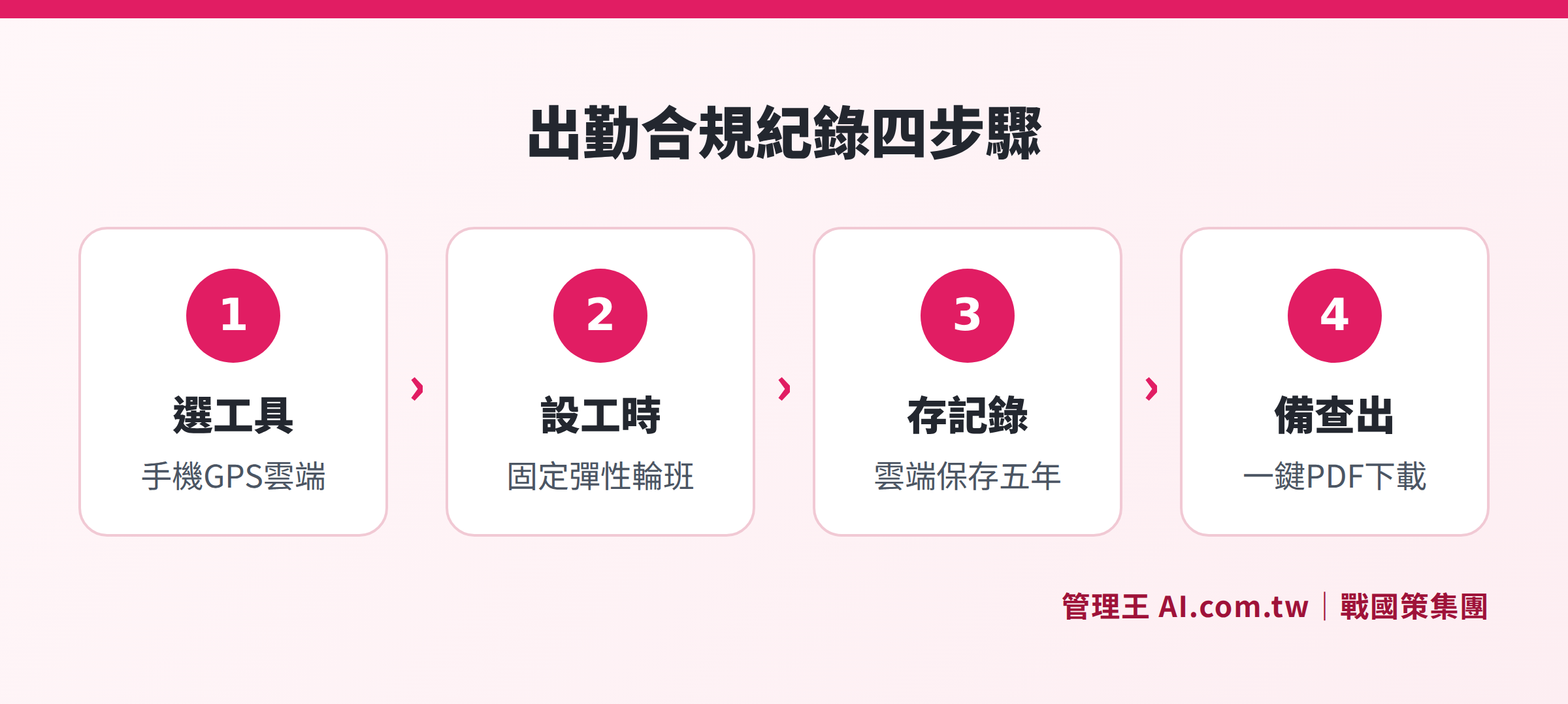
Flowchart of the four-step compliance process for cloud clock-in systems under Article 30 of the Labor Standards Act
What Types of Clock-in Systems Exist? Analysis of Five Clock-in Methods
Different work scenarios require different clock-in methods. Modern clock-in systems typically support five modes, which can be used individually or in combination based on company policy:
1. GPS Location Clock-in (Suitable for Field Workers, Construction Sites)
When employees arrive at the designated location, their mobile phones automatically capture the GPS coordinates. If they exceed the set range, they cannot clock in. Sales visits to clients and presence at construction sites provide accurate geographical evidence. Managers can see the real-time location of all field workers on a map.
2. Wi-Fi Limited Clock-in (Suitable for Multi-Store Chains)
Employees can only clock in when connected to the specified store's Wi-Fi, eliminating the need for hardware purchases, as they can use their mobile phones. This is particularly suitable for chain restaurants and retailers, where each branch can set its own Wi-Fi whitelist.
3. IP Range Limited Clock-in (Suitable for Office Staff)
Clock-ins are restricted to fixed company IP addresses, effectively preventing employees from proxy clock-ins from home. This is suitable for staff in stable work environments.
4. Facial Recognition Clock-in (Suitable for Manufacturing, High Security Needs)
Using tablets or specific devices, facial recognition confirms the identity of the individual, preventing proxy clock-ins. This method is particularly suitable for large factories and storage locations.
5. NFC / QR Code Clock-in (Suitable for No-Phone Policies)
Employees complete clock-ins by scanning an NFC card or QR code, suitable for environments that do not allow employees to use personal phones.
Table: Applicable Scenarios for the Five Clock-in Methods
| Clock-in Method | Proxy Clock-in Prevention Strength | Suitable Scenarios | Requires Additional Hardware |
|---|---|---|---|
| GPS Location | High | Field, Sales, Construction Sites | No (Mobile) |
| Wi-Fi Limited | Medium-High | Multi-Store Chains, Restaurant Retail | No (Wi-Fi Router) |
| IP Range Limited | Medium | Office Staff | No |
| Facial Recognition | Highest | Manufacturing, Warehousing, Security | Yes (Camera or Tablet) |
| NFC / QR Code | Medium | No-Phone Policy Environments | Yes (NFC Card Reader) |
How to Choose the Right Clock-in System? Four Key Points for Purchase
1. Completeness of Proxy Clock-in Prevention Mechanism
Single clock-in verification can be easily compromised: only GPS can be deceived by mobile screenshots, and only fingerprints can be substituted by silicone molds. When purchasing, confirm if it supports multiple verifications (e.g., simultaneous GPS + Wi-Fi + facial recognition) and whether AI anomalies detection is available (for example, automatic notifications for patterns with precise clock-ins for 30 consecutive days).
2. Support for Multiple Stores and Field Work
Chain brands and companies with field employees need to confirm whether cross-store clock-ins are automatically identified, whether there is a GPS map to view the real-time location of all field personnel, and whether field visit management is integrated with clock-in.
3. Automatic Integration with Payroll Calculation
If clock-in data cannot automatically flow into the payroll system, manual reconciliation will still be required at month-end, leaving the problem unsolved. Confirm whether overtime calculations are automatically executed according to the Labor Standards Act Article 24 rates, whether absentee deductions are automatically calculated, and whether payslips are generated directly from attendance data.
4. Leave and Compensation Application Processes with Audit Log
A complete attendance management system needs processes for employees to apply for compensation for missed clock-ins and for supervisors to electronically approve these requests, with all modifications leaving an audit trail. Systems without Audit Logs can be problematic in labor disputes. Whether the Approval Center integrates with attendance is an important evaluation point.
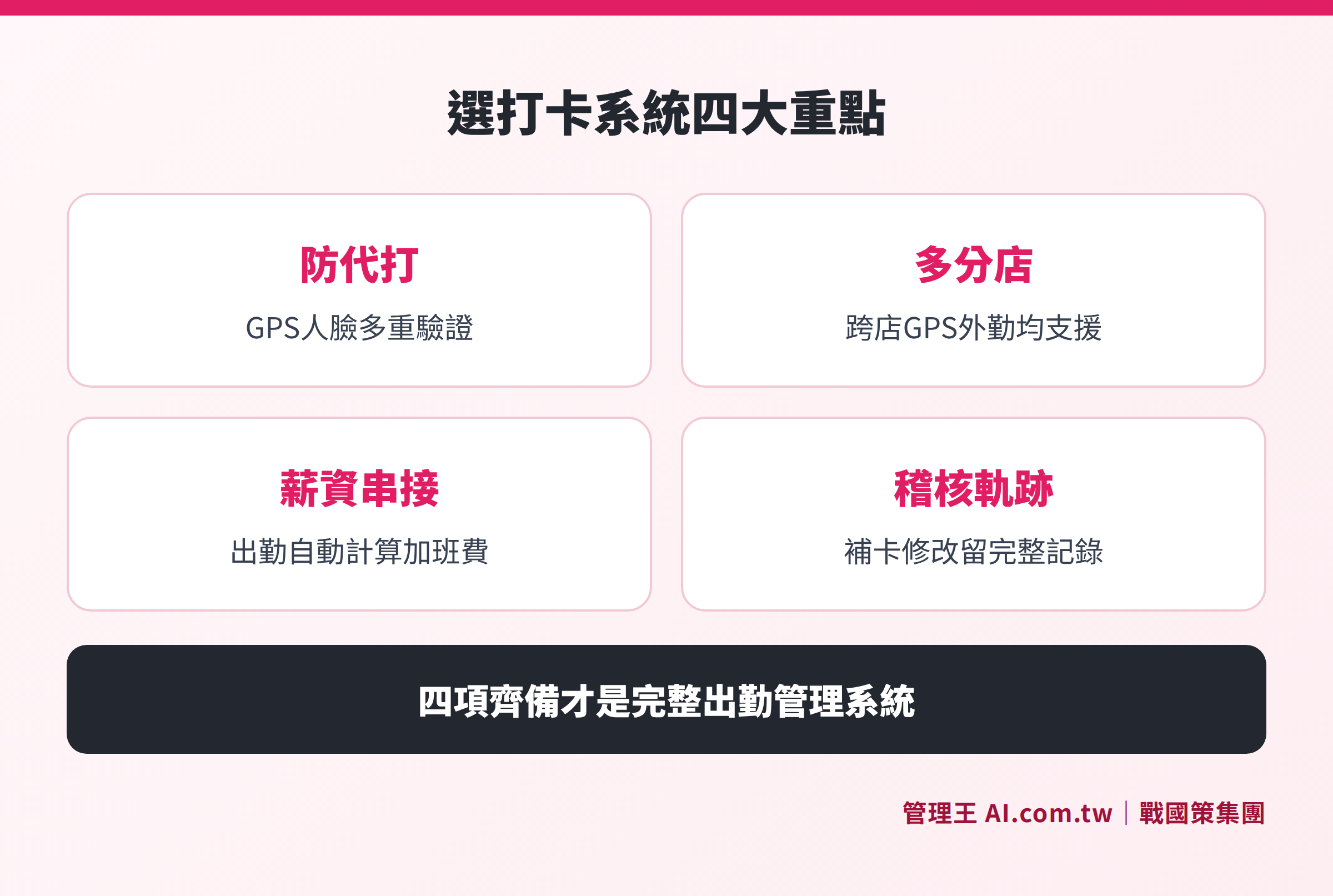
Card images with four key evaluation indicators for choosing a corporate clock-in system
Clock-in Systems Combined with Scheduling: A Must-See for Chain Enterprises
For businesses with rotating shifts or multiple locations, having a clock-in system alone is insufficient; it must be paired with a scheduling system to achieve true automation in attendance management.
The integration of scheduling and clock-in operates as follows:
- Managers create schedules (fixed, rotating, flexible) in the scheduling system
- Employees clock in according to assigned schedules, and the system automatically matches to scheduled times
- Lateness, early departures, and absences are automatically flagged, and supervisors receive notifications in real time
- Support personnel clock in at different locations, with overtime calculated separately
- At month-end, schedules and attendance are merged to generate payroll calculation bases
The shift management function allows schedule managers to view all employees' monthly schedules at a glance and quickly adjust for substitutes and shift changes without needing to communicate manually in LINE groups.
Differences in Clock-in System Needs Across Industries
Different industries have vastly different needs for clock-in systems. Understanding the specific requirements of your industry before purchasing will prevent acquiring products that cannot be utilized or lacking necessary functions.
Manufacturing and Factories
The most common issue in manufacturing is the three-shift rotation system, alongside many operators who find it inconvenient to use mobile phones. Key needs include:
- NFC cards or QR Code clock-ins located at factory entrances
- Support for shift scheduling (automatic switching between early, afternoon, and night shifts)
- Accurate overtime calculations according to labor laws (different rates for night shift overtime)
- Integration of attendance data with piece-rate pay or performance calculations
Restaurant and Retail Chains
The core pain point for chain brands is the complexity of multi-store management, which can lead to easy mistakes in calculating work hours when employees support across different locations. Key needs include:
- Wi-Fi limited clock-ins, independently set for each store
- Cross-store clock-ins automatically identify which store is currently clocked in, and overtime is calculated separately
- Flexible scheduling for part-time workers, with automatic conversion of hourly wages
- Rapid onboarding and offboarding processes for highly mobile employees
Field Sales and Service Industries
Sales personnel, security staff, and delivery workers require GPS verification, with managers needing to track field personnel movements. Key needs include:
- GPS visit clock-ins that automatically record arrival and departure times
- Field visit management integrated with CRM customer data
- Real-time display of all field personnel locations on a map
- Automatic application of daily travel calculations and cross-location allowances
Technology and Startups
Knowledge workers such as engineers and designers often have flexible hours or responsibility-based systems, requiring flexible attendance management without losing records. Key needs include:
- Flexible working hour settings (only core hours need to be completed)
- Remote work clock-ins by IP range or declaration
- Overtime application processes (unapproved overtime is not compensated)
- Integration of attendance with project management to understand time allocations
Three Major Challenges and Solutions in Implementing a Clock-in System
Many businesses encounter resistance when introducing clock-in systems, not due to technical issues but because of employee acceptance and process adjustments. Below are the three most common challenges along with recommended practices:
Challenge 1: Longstanding Employees Reluctant to Change Habits
Traditional fingerprint machines or paper attendance records have been in use for years, and employees see it as an extra procedure. Recommended practices:
- Start with the simplest clock-in method (e.g., scanning a QR code) to lower the operational threshold
- Emphasize that "compensation for missed clock-ins, checking salaries, and applying for overtime" are all within the same app, benefiting employees
- Run the old system alongside the new one for a week or two before switching to help employees familiarize themselves
Challenge 2: Supervisors Reluctant to Approve Compensation Requests
If the compensation request process is cumbersome, supervisors will see it as an additional burden. Recommended practices:
- Batch approval functionality allows multiple compensation requests to be approved at once
- Set monthly limits on compensation requests (e.g., 3 times), requiring special review and notes for any beyond that
- Set up quick options for common reasons for compensation requests (e.g., forgetting to bring a mobile phone during a meeting)
Challenge 3: Data Mismatch When Importing for Payroll
If the clock-in system is from a different vendor than the payroll system, regular manual export and import are required, which can lead to errors. Recommended practices:
- Prioritize choosing integrated solutions where clock-in and payroll are on the same platform
- If integration is impossible, at least ensure the clock-in system can export in standard formats (CSV including date, time, employee ID)
- Run comparison reports before importing to ensure the number of individuals and total hours match expectations
How Can Attendance Data Aid Management Decisions?
Modern clock-in systems are not just compliance tools, they are also a source of management insights. Attendance analytics rankings can provide:
- Late Arrival Rates Ranking: Identify employees who habitually arrive late or problematic shifts
- Distribution of Overtime Hours: Identify departments working long hours long-term, avoiding burnout and hidden overtime costs
- Full Attendance Records: Automatically calculate the basis for full attendance bonuses without manual checks
- Absenteeism Trends: Early intervention for abnormal absenteeism rates on specific dates (e.g., Mondays, around holidays)
- Cross-store Work Hours Summary: Monthly work hours overview of multi-store employees at each location
These data can integrate with the HR System as direct references for performance assessment and salary adjustments.
In addition to routine management, attendance data is crucial evidence in labor disputes. When an employee files a labor arbitration for "unpaid overtime," employers must present complete attendance records as proof. The Ministry of Labor practically requires employers to bear the "burden of proof"; if attendance records are incomplete or modified without audit trails, employers often find themselves at a disadvantage. Thus, attendance data is not just a management tool but also a legal safeguard for the business.
It is recommended that businesses export attendance reports quarterly for archiving and confirm that database backups are functioning properly to ensure compliance with the 5-year retention requirement of the Labor Standards Act. One of the benefits of using a cloud clock-in system is that the service provider is responsible for data backup, alleviating the need for businesses to manage hardware themselves.
How to Use the Management King Clock-in System?
Management King's Clock-in System is a attendance management solution developed by 戰國策 Group that serves over 30,000 enterprises, designed specifically with Taiwan's Labor Standards Act and the actual needs of small to medium enterprises in mind.
Implementation Process:
- Free registration of an account, activation completed in 30 seconds
- Set company clock-in rules (GPS range, Wi-Fi SSID, IP whitelist, start and end times)
- Invite employees to join; they can clock in using the mobile browser or LINE Bot
- Supervisors can see attendance status in real-time on the backend, with automatic notifications for abnormalities
- Month-end attendance data automatically flows into payroll calculations, with one-click PDF export for review
The free plan can be used permanently, suitable for small businesses with 10 or fewer employees to try out. Businesses with multiple branches, scheduling, or field work needs can choose the economical plan (NT$5,000/month for up to 30 people) or the business plan (NT$10,000/month for up to 60 people), which includes advanced features like AI automatic summaries and smart anomaly detection. All data is stored in data centers in Taiwan, complying with personal data protection laws and data sovereignty requirements.
View complete service plans and pricing, or call the free consultation line at 0800-003-191, where consultants can assist in evaluating the most suitable attendance management solution.
Free Trial of the Clock-in System, Activate in 30 Seconds
Consultants assist in evaluating the most suitable attendance management solution for your company, supporting GPS, multi-branch, and field work needs; the free plan is permanently available
Free consultation hotline: 0800-003-191
LINE official account: @119m
Official website: app.AI.com.tw
Free trial: Apply for Management King Now
Frequently Asked Questions
Do clock-in systems have to buy hardware devices?
Not necessarily. Cloud clock-in systems use employees' mobile phones as clock-in devices, eliminating the need for additional fingerprint machines or sensors. Hardware such as tablets or NFC card readers is only needed for high-security needs (like facial recognition) or in manufacturing contexts where personal phones are not allowed. Regular offices and chain stores usually just need to install the app or join the LINE Bot to start using it.
What if employees forget to clock in?
Modern clock-in systems offer a "compensation application" process: Employees fill in the reason and time for compensation in the app, and supervisors review online through the Approval Center. The system logs the time of submission, the time of supervisor review, and the result, creating a complete audit log. Many systems also set a monthly limit for compensation requests to prevent management loopholes from a concentrated number of late compensation requests at month-end.
Can clock-in systems prevent proxy clock-ins?
No system can 100% prevent proxy clock-ins, but multi-verification methods significantly increase the difficulty and cost of proxy clock-ins. Requiring GPS location + Wi-Fi + facial recognition simultaneously means that proxy clock-ins would require the individual's phone, being in a designated location, and having matching appearance, making it virtually impossible to execute. An AI anomaly detection feature will also automatically flag statistics such as "clocking in at the same second every day" and notify managers for review.
How many years must employers retain attendance records according to labor laws?
According to Article 30 of the Labor Standards Act, employers must retain employees' attendance records for 5 years, with records needing to be accurate down to the minute. Employers cannot refuse to provide copies of attendance records upon request by employees. Using a cloud clock-in system allows the data to be automatically stored in the cloud, and it can be exported as a PDF at any time, meeting labor inspection requirements.
Can clock-in systems be integrated with payroll systems?
Yes. Integrated cloud management systems (like 管理王) have both the clock-in module and payroll module within the same platform, automatically feeding attendance data into payroll calculations, including overtime pay (automatically applying according to Labor Standards Act Article 24 rates), absentee deductions, and full attendance bonuses. If using separate clock-in software, API or CSV export and import will be necessary for integration, so it's advisable to evaluate integration costs before making a decision.
Source of Information
- Labor Standards Act Article 30 — National Regulations Database (Ministry of Labor)
- Penalties under Labor Standards Act Article 79 — National Regulations Database
- Ministry of Labor: Explanation of Attendance Record Keeping Methods
- Management King Clock-in System Features Page
This article is for general informational purposes only and does not constitute legal or tax advice; actual content is based on the latest announcements from regulatory authorities.