How to Create a Department Daily Report? A Complete Guide to Reports and Systems that Supervisors Can Understand|Daily Report System Recommendations

The department daily report is a management tool that allows supervisors to grasp department dynamics in just 10 to 15 minutes each day. It includes KPI tracking, anomaly alerts, and summarization of employee contributions, helping supervisors free up time from collecting numbers to focus on decision-making.
The department daily report is a core tool for supervisors to grasp department dynamics and detect problems early. In simple terms, it automatically compiles the daily work, achievement numbers, and anomalies for every member of the department into a report to be delivered to the supervisor before the end of the workday, eliminating the need for oral questioning at morning meetings or reminders in LINE groups. For small and medium-sized enterprises, implementing a daily report system not only improves management efficiency but also allows them to identify potential risks of not meeting targets before the end of the month, enabling managers to focus their time on decision-making rather than data collection. This article provides a complete operational guide from "Why Daily Reports Are Needed" to "How Each Department Should Design KPI Indicators," "How to Establish a Weekly Report System," and "How to Use a System Instead of Excel," suitable for supervisors and owners who want to establish a daily report system from scratch.
Why Do Departments Need Daily Reports? The Three Major Pain Points Supervisors Encounter
Anyone who has led a team knows that one of the most time-consuming tasks each day is "checking the status": calling sales to ask how many clients were visited today, running to find engineers to ask if bugs have been fixed, or waiting for an assistant to compile emails from eight people before reporting to the boss. These inquiries can often take up one to two hours of effective work time for supervisors.
Pain Point One: Dispersed Information Leads to Problems Only Discovered at Month-End
In teams without a daily report mechanism, problems often explode at the month-end performance reviews or before project deadlines. Supervisors may not realize that a certain salesperson has only visited three clients this week (far below the target of ten), and by the end of the month, they find out it's too late to make any corrections. A department daily report allows anomalies to "surface on the same day," giving time for intervention mid-month.
Pain Point Two: Employee Efforts Go Unrecorded
Another common issue is that the workload and contributions of employees are not systematically recorded. During year-end evaluations or project conclusions, supervisors often score based on memory, which can lead to feelings of injustice among employees and increase turnover rates. The work log (a personal version of the daily report) allows every member's contributions to be documented in black and white. 《經理人月刊》 also points out that the greatest value of a work log is not supervision, but "allowing both parties to objectively see the full picture of work."
Pain Point Three: Daily Reports Waste Everyone's Time
The other extreme is a "reporting culture"—daily morning meetings where everyone takes turns reporting, which is exhausting for both the speaker and the listeners, leading to very low efficiency. The purpose of the department daily report is to use a system to replace oral inquiries, allowing supervisors to have a comprehensive overview before the meeting, so that the morning meeting only needs to discuss "how to solve problems" instead of "where the problems are now."
Understand It in One Sentence
The department daily report is not a monitoring tool, but a management framework that frees supervisors' time from "collecting numbers" to focus on "making decisions".
Department Daily Reports vs. Personal Work Logs: What’s the Difference?
Before establishing a system, it is important to clarify two commonly confused concepts:
Comparison: Department Daily Reports vs. Personal Work Logs
| Aspect | Department Daily Report | Personal Work Log |
|---|---|---|
| Purpose | Supervisors grasp overall department dynamics | Personal record of daily work details |
| Users | Department supervisors, senior management | Individual employees |
| Content | KPI achievement rates, anomaly alerts, cross-employee comparisons | Tasks completed today, issues encountered, plans for tomorrow |
| Generation Method | Automatically compiled by the system from employee daily reports | Manually filled out by employees |
| Frequency | Every day after work | Daily or weekly |
| Typical Readers | General manager, department head | Direct supervisors |
The two complement each other: employees fill out personal work logs, and the system automatically compiles them into a department daily report. Supervisors do not need to read each employee's log individually; they can grasp the big picture by looking at one overview and delve into details only if anomalies arise.
What KPIs Should Each Department Track in Their Daily Reports?
Different departments have vastly different work characteristics, and the core indicators in daily reports should be customized accordingly. Here are the most commonly used daily tracking indicators for various departments:
Table: Recommended KPIs for Department Daily Reports
| Department | Core KPI | Anomaly Judgment Criteria (Examples) |
|---|---|---|
| Sales | Number of new client contacts, number of quotes, number of deals, total transaction amount | Contact number below 50% of the team average |
| Customer Service | Number of tickets processed, average response time, customer satisfaction | Average response time exceeds SLA |
| R&D | Number of bugs fixed, number of features completed, number of code reviews | Pending bugs exceeding three days without action |
| Production | Daily output, defect rate, machine utilization rate, number of rejects | Defect rate below standard value |
| Marketing | Number of ad clicks, number of new leads, EDM open rates | Cost per acquisition exceeds budget |
| Human Resources | Number of new hires/terminations today, number of interviews, training completion rate | Number of attendance anomalies exceeds usual |
| Procurement | Number of inquiries, number of order confirmations, number of overdue deliveries | Increase in supplier overdue rate |
The principle for designing KPIs is that they must be quantifiable on the same day and allow for immediate judgment of good or bad. Avoid ambiguous indicators such as "in progress" or "under continuous tracking," as they do not help supervisors determine whether today is good or bad.
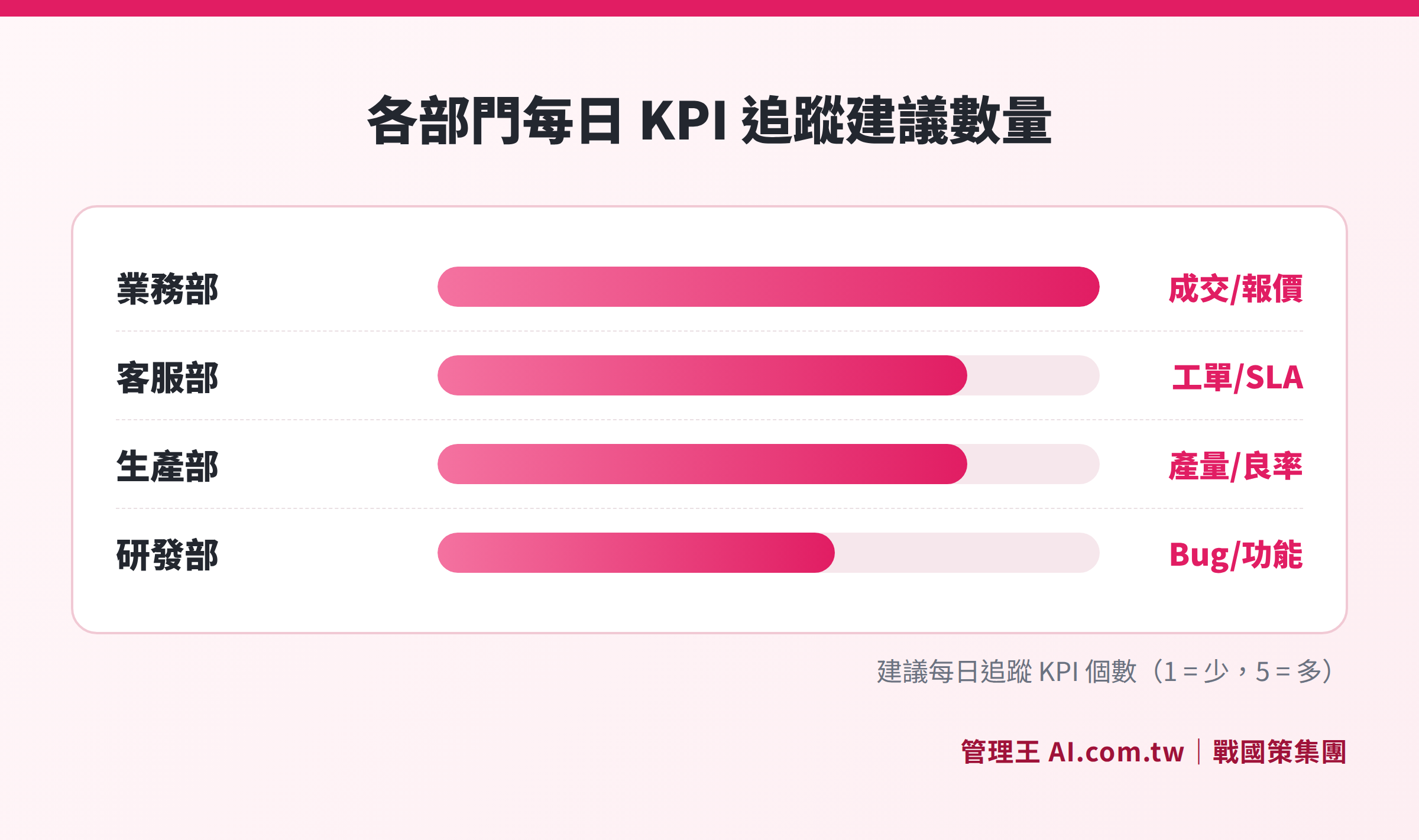
Illustrative of the types of daily KPIs tracked by the sales, customer service, R&D, and production departments
How to Establish a Department Daily Report System from Scratch? 6 Steps
Step One: Define the Purpose and Audience
First, confirm who the primary readers of the daily report are: Is it just the direct supervisor, or does the boss want to see it every day as well? Different readers require different levels of content depth and format. Generally, it is recommended to provide department daily reports to department heads and a consolidated "weekly report" to the general manager or boss to avoid information overload.
Step Two: Select 3 to 5 Core Indicators
Having too many indicators can be overwhelming. It's advisable for each department to track 3 to 5 key numbers daily. Start from the "few questions the boss often asks"; for example, the sales manager usually asks, "How many clients did we visit today?" or the production manager often asks, "How many products were shipped today? How many were defective?"
Step Three: Set Anomaly Alert Thresholds
Having numbers is not enough; you must also define what constitutes an anomaly. For instance, if the number of contacts is below 5 for the sales team, response time exceeds 4 hours for customer service, or production defect rate is below 95%, they should be automatically flagged or highlighted for the supervisor. This way, the supervisor doesn’t need to read line-by-line, just focus on the highlighted parts.
Step Four: Design the Employee Reporting Process
Decide how employees will fill out reports: 30 minutes before the end of the day, using what tools (LINE, web form, app), and how long each question should take to answer. The simpler the reporting design, the higher the acceptance rate among employees. Research shows that if daily reporting takes more than 10 minutes, adherence rates drop significantly.
Step Five: Integrate with Other Systems
A standalone daily report is of limited value. The ideal situation is to have sales CRM data automatically fed into the daily report, customer service ticket data automatically synchronized, and production ERP data automatically compiled; employees only need to add qualitative explanations that the system cannot capture, reducing the burden of duplicate reporting.
Step Six: Establish a Habit of Weekly Report Consolidation
Daily reports track short-term fluctuations, while weekly reports analyze trends and root causes. It is recommended that supervisors spend 15 minutes every Friday before the end of the day reviewing the summary of the five daily reports from that week to identify patterns: Which indicators have been persistently low this week? Is it a people problem or a process issue? A weekly report does not need to be lengthy; three to five sentences addressing the issues and adjustment directions for the next week suffices.

A six-step process from defining the purpose to system integration
Daily Report Template: A Practical Example from the Sales Department
Using the sales department as an example, here’s a practical template for a department daily report:
Sales Department Daily Report (Example)
- Date: YYYY/MM/DD
- Department Head: Director Wang
Daily Numbers
| Indicator | Target Value | Actual Value | Achievement Rate |
|---|---|---|---|
| Number of New Client Contacts | 30 | 28 | 93% |
| Effective Quotes | 8 | 10 | 125% |
| New Transaction Amount | NT$200,000 | NT$185,000 | 93% |
| Opportunities in Follow-up | — | 47 | — |
Highlights of the Day
Chen secured the largest order of the month (NT$120,000) from a manufacturing client, and the reason for closing the deal was competitors raising their prices.
Anomaly Alerts
Lin only made 3 calls today (team average was 9), and I confirmed with him that it was due to整理客户资料. He will make up for it tomorrow.
Focus for Tomorrow
Follow up with 5 customers from last week's quotes who have not responded; prepare presentation for XX company.
The key to this format is "numbers + textual supplement": numbers allow supervisors to quickly understand the quantitative situation, and the textual supplements explain the reasons and actions behind the numbers.
From Excel to System: Three Stages of Daily Report Tools
Many companies' paths in developing daily reports are generally similar: paper → Excel/Google Forms → professional systems. Each stage has its applicable scenarios and limitations:
Stage One: Paper or Word/Email
Suitable for startups with three people or fewer. The advantages are zero cost and quick start; the disadvantages are that it is difficult to compile and compare, hard to search historical data, and easy to lose.
Stage Two: Excel or Google Sheets
The most common choice for small and medium-sized enterprises. You can create tables and use formulas for statistics, but you need to compile them manually every day, cannot automatically alert for anomalies, and it is hard to integrate CRM or attendance data, making it difficult to maintain if multiple departments operate simultaneously. If there are more than 15 employees or cross-departmental comparisons are needed, Excel daily reports typically do not last long.
Stage Three: Integrated System
The system automatically pulls data from sales, customer service, and production, allowing employees to only supplement qualitative explanations, while supervisors directly view the aggregated department overview. The core value of integrated systems lies in "disintermediation"—no need for HR or administration to manually copy and paste daily, as data flows to the right places automatically.
Many companies find the right timing for transition is when they surpass 20 employees or start having management needs across multiple departments.
Common Mistakes in Daily Report Implementation and How to Avoid Them
The failure to implement a daily report system typically stems from issues related to people and processes rather than the system itself:
- Mistake One: Treating Daily Reports as Attendance Tools. If employees feel that daily reports are used to "catch lazy workers," the quality of submissions will drop significantly, leading to negative emotions. The correct approach is to show employees the benefits of daily reports: when problems arise, the system proactively alerts supervisors, eliminating the need to wait until month-end inquiries.
- Mistake Two: Too Many or Too Complex Indicators. Daily reports with more than seven indicators overwhelm supervisors. Streamline it to the three to five most important indicators.
- Mistake Three: Lack of Feedback Mechanism. When daily reports are submitted with no response from supervisors, employees quickly lose motivation. At least once a week, supervisors should provide specific feedback or action plans concerning anomalies mentioned in the daily reports.
- Mistake Four: Using LINE Groups for Compilation. Posting reports in LINE groups is simple, but comparing, searching historical data, and avoiding information overload can be difficult. It is advisable to use at least a spreadsheet, and preferably a dedicated system.
How to Use 管理王: Practical Operation of Department Daily Reports
管理王 AI.com.tw's Department Daily Report System is designed for supervisors as a tool for "reviewing department performance in the last 30 minutes of the workday." It is integrated into the all-in-one management platform of 戰國策 Group, which serves over 30,000 enterprises, with a free plan available for permanent use.
The practical operation process is as follows:
- Set Department KPI Indicators: Supervisors set the indicators to track for sales (number of new client contacts, number of quotes, total transaction amount), customer service (number of tickets, response time), and so on, applying their combinations to each department.
- Employees Fill Out Personal Daily Reports: Employees fill out their daily reports before the end of the day in the LINE Bot or web interface, attaching report documents, quotes, and approval requests. The system synchronizes and integrates data from task management, CRM, and performance management.
- Automatically Aggregate into Department Daily Report: After each of the eight employees fills out their report, the system automatically consolidates them into a department daily report, eliminating the need for supervisors to manually collect forms.
- Proactive Alerts for Anomalies: If a salesperson only made three calls today, far below the average of thirty, the system will highlight this in the daily report's anomaly section, so supervisors do not need to read through everything to find out.
- One-Click AI Reporting to the General Manager: The AI Report Center automatically generates "a summary of the department daily report for the general manager." Supervisors can review it and with one click send it to the boss via LINE, compressing the repetitive work of preparing reports down to a few seconds.
- Cross-Department Horizontal Comparisons: The Team Daily Report feature allows departments at the same level to compare with each other and combines current week analysis against past weeks or the same period last year to judge whether it’s a short-term fluctuation or a structural issue.
管理王's daily report templates offer preset formats for various common departments such as sales, customer service, R&D, and production, allowing all companies to get started within one day. View complete plans and pricing, with no credit card required for the free plan.
Have Consultants Plan Your Department Daily Report System
Free consultations on how to use 管理王 to establish a daily report and weekly report consolidation process suited for your company size, enabling quick implementation within a day.
Free consultation hotline: 0800-003-191
Official LINE account: @119m
Official website: app.AI.com.tw
Free trial: Apply for 管理王 now
Frequently Asked Questions
What is the difference between a department daily report and attendance records?
Attendance records document employees' "punch-in times" and, based on Article 30 of the Labor Standards Act, employers must have attendance records and keep them for five years, which is a legal obligation. The department daily report records "work content and output," which is not legally required, but it significantly aids in management decisions. The two are complementary: attendance records ensure regulatory compliance, while daily reports enhance management efficiency. You can integrate the attendance clock-in system with the department daily report on the same platform for one-stop management.
Does having employees fill out daily reports lead to backlash?
This is a common concern but can be managed. The key lies in “design”: keep the reporting time under 5 minutes, show employees their data progression, and supervisors should provide positive feedback rather than just pointing out issues. 《經理人月刊》 suggests starting with daily reports first and gradually adjusting to every other day or weekly once employees are accustomed, replacing monitoring with trust.
What size companies are daily reports suitable for?
From startups with 3 people to medium enterprises with 500 employees, daily reports can be applied, though system designs will differ. Small teams (10 or fewer individuals) can keep it simple, using a Google form daily. Mid-sized teams (30 to 100 employees) need tools with system integration, anomaly alerts, and historical trend analysis. The focus should be on whether "the boss has enough information daily for decision making" rather than on company size.
Should weekly reports and daily reports be done separately?
It is advisable to separate them. Daily reports track "how today is (short-term fluctuations)," while weekly reports analyze "how this week's trend looks, what the root cause is, and how to adjust for next week." Weekly reports are usually generated by the system automatically consolidating five daily reports on Fridays before work ends, with supervisors adding analytical commentary. Together, they provide both immediacy in management and a long-term perspective.
Can the data from department daily reports be used for performance evaluations?
Yes, and it is very suitable. The accumulated data from daily reports provides an objective basis for performance evaluations, avoiding supervisors solely relying on memory for scoring. Through the performance management system, the daily achievement data from daily reports can be directly integrated into monthly KPI evaluations, 360° peer reviews, and year-end assessments, making performance discussions data-driven and more persuasive for both employees and supervisors.
How much time should a department supervisor spend on daily reports?
A well-designed daily report allows supervisors to spend just 10 to 15 minutes each day: 5 minutes reviewing the department overview dashboard and anomaly alerts, focusing primarily on highlighted items; 5 minutes reading today's highlights and tomorrow's plans; and if there are anomalies, an additional 5 minutes examining individual employee logs in detail. The rest of the time is handled by the system’s automatic aggregation. If daily report reviews take over 30 minutes, it usually indicates that too many or too complex indicators need streamlining.
How to unify daily report management for multiple branches or remote offices?
For businesses with multiple locations or branches, the design of the daily report must include an additional dimension: the location or branch. It is recommended to set expected KPI values for each site (e.g., Taipei Store/Taichung Store/Kaohsiung Store) in the system, as each store’s scale varies and absolute figures should not be compared directly. Use the "achievement rate" for horizontal comparisons across stores. The attendance analytics can automatically aggregate attendance data from various branches, while the human resources system supports employee management across multiple branches and integrates natively with the daily report.
Data Sources
- Article 30 of the Labor Standards Act, National Regulations Database (Attendance record retention obligation)
- Worried about "salary thieves"? Is requiring employees to write work logs an effective management tool? Manager Monthly
- Understanding the core elements of work daily reports, FanRuan Software
- 管理王 AI.com.tw Department Daily Report Feature Page
- 管理王 AI.com.tw Plan Pricing
This article is for general information only and does not constitute legal advice; actual regulations shall follow the latest announcements by the competent authorities.