Recommended Electronic Form Systems: When Google Forms Are Not Enough|EIP System Recommendation

Google Forms is suitable for data collection, but it struggles with needs such as multi-layer approvals, conditional routing, and automatic salary integration. This article outlines five key points for selecting an electronic form system to help small and medium enterprises in Taiwan find a suitable recommendation.
An electronic form system is a tool that digitizes the internal application, review, and archiving processes of a company, allowing employees to fill out forms via web pages or mobile phones, with managers approving in a step-by-step manner according to the configured process, and all records are automatically saved. Google Forms is free and easy to use, suitable for simple surveys and event registrations; however, when faced with scenarios such as "leave requires manager approval," "procurement needs three layers of approval," or "contracts need to retain audit trails," Google Forms clearly falls short. This article compiles the true reasons why Google Forms is not enough, the core functional differences of enterprise electronic form systems, five key evaluation points for selection, and how small and medium enterprises in Taiwan can quickly introduce electronic signatures, ensuring the application to approval process no longer relies on LINE groups and paper tracking.
When Is Google Forms Most Suitable?
Google Forms is a free form tool built into Google Workspace, with the main advantages being no additional costs, no need for fill-out users to have accounts, and quick setup. The following scenarios are where Google Forms is completely adequate:
- External survey and customer satisfaction feedback
- Event registration and headcount statistics
- Internal opinion collection from employees (no approval process required)
- One-time, short-term data collection needs
For small organizations or individuals without IT resources, Google Forms is a suitable starting point. The issue arises when the number of employees increases and processes become complex, leading to many form needs exceeding simple "data collection" and starting to require "process management."
Three Key Limitations of Google Forms
No Approval Process
After submitting a Google Form, the system can only send one email notification at most. Who needs to see it first, who approves, who gets notified after approval, and what the current bottleneck is—there is no system tracking for these, relying completely on manual LINE transmission and verbal confirmation.
Inability to Set Conditional Routing
Real enterprise forms often have needs such as: "Amounts less than five thousand can be approved by department heads, amounts over that require an additional layer of finance review; during business trips, should automatically transfer to the proxy." Google Forms lacks conditional process design and cannot accommodate these rules.
Form Data Is An Island
The filled-out results exist in Google Sheets and are not integrated with HR, payroll, or ERP systems. Even if a leave application is approved, the HR department still needs to manually update attendance records; procurement applications may be approved, but the inventory system won't automatically know. Data is not interconnected, necessitating manual transfer at every step.
In One Sentence
Google Forms is a tool for "data collection"; an enterprise electronic form system is a tool for "process management"—the problems they solve are fundamentally different.
Google Forms vs. Enterprise Electronic Form Systems: Feature Comparison
Table: Comparison of Core Features of Google Forms and Enterprise Electronic Form Systems
| Feature | Google Forms | Enterprise Electronic Form Systems |
|---|---|---|
| Multi-layer Approval Process | None | Supported, customizable levels and conditions |
| Conditional Routing | Limited (only form jumps) | Automatically routes based on amount, department, and job level |
| Proxy Approval | None | Can designate proxies, no interruption during business trips |
| Mobile Device Approval | Only able to fill out forms | Managers can directly approve on LINE or mobile |
| Audit Trail | None | Complete record of each approval time and person |
| Integration with HR and Payroll | Requires additional development | Usually natively integrated, auto-update after approval |
| Customizable Form Fields | Basic field types | Rich fields, including calculated fields and attachments |
| Permission Control | Based on Google accounts | Layered settings based on organizational structure and roles |
| Cost | Free | Charged by plan, some free plans available |
Which Enterprise Forms Require an Electronic Signature System?
Not all forms need to be upgraded to an enterprise-level electronic form system. Here are common judgment criteria:
Types of Forms Suitable for Electronic Signature Systems
- HR: Leave, overtime, compensatory leave, business trip applications—after approval, need to sync attendance records and payroll calculations
- Procurement: Supplies requisition, procurement applications—need manager or financial approval, larger amounts require multiple layers of review
- Expense: Reimbursement, transportation subsidies—requires financial settlement, needs to retain receipts and audit records
- Document: Contract signing, internal document circulation—requires legal validity, needs to keep complete trails
- Administrative: Meeting room reservations (need to confirm no schedule conflicts), equipment borrowing (need to confirm availability)
Scenarios Where Google Forms Remain Applicable
- Customer satisfaction surveys, external market research
- Event registration collection (no approval needed)
- Anonymous employee opinion surveys
- One-time data collection where results do not need to link to other systems
A simple judgment principle: If form submission "requires someone to approve for it to count," or "the results need to be written into another system," that is a suitable scenario for electronic signature systems.
Five Key Points for Selecting an Electronic Form System
When choosing an enterprise electronic form system, the following five aspects are often overlooked but significantly affect the actual experience:
Table: Evaluation Key Points for Electronic Form System Selection and Common Pitfalls
| Evaluation Aspect | Key Questions | Common Pitfalls |
|---|---|---|
| Flexibility of Approval Process | Can multi-layer processes and conditional routing be customized? | Fixed process, can only do linear sequence approvals |
| Level of Mobility | Can managers complete approvals on mobile or LINE? | Can only review by going back to the office to use a computer |
| Integration with Attendance and Payroll | Does approval automatically update attendance records? | Requires HR to re-enter manually |
| Completeness of Audit Trail | Can you check who, when, and where approved? | Only the final result is retained, details of the process are untraceable |
| Data Sovereignty and Security | Does the data storage location comply with local regulations? | Data stored overseas, difficult to cooperate during audits |
Proxy Approval Design is especially worth noting: If a system lacks a proxy mechanism when managers are on business trips or leave, it will halt all applications, causing employees to ask questions, and managers to relay through LINE, creating even more chaos than paper forms.
Timeliness Reminders are also critical: A good system should automatically notify approvers if an application remains unprocessed beyond a certain time, ensuring each application has someone responsible and a deadline for completion.
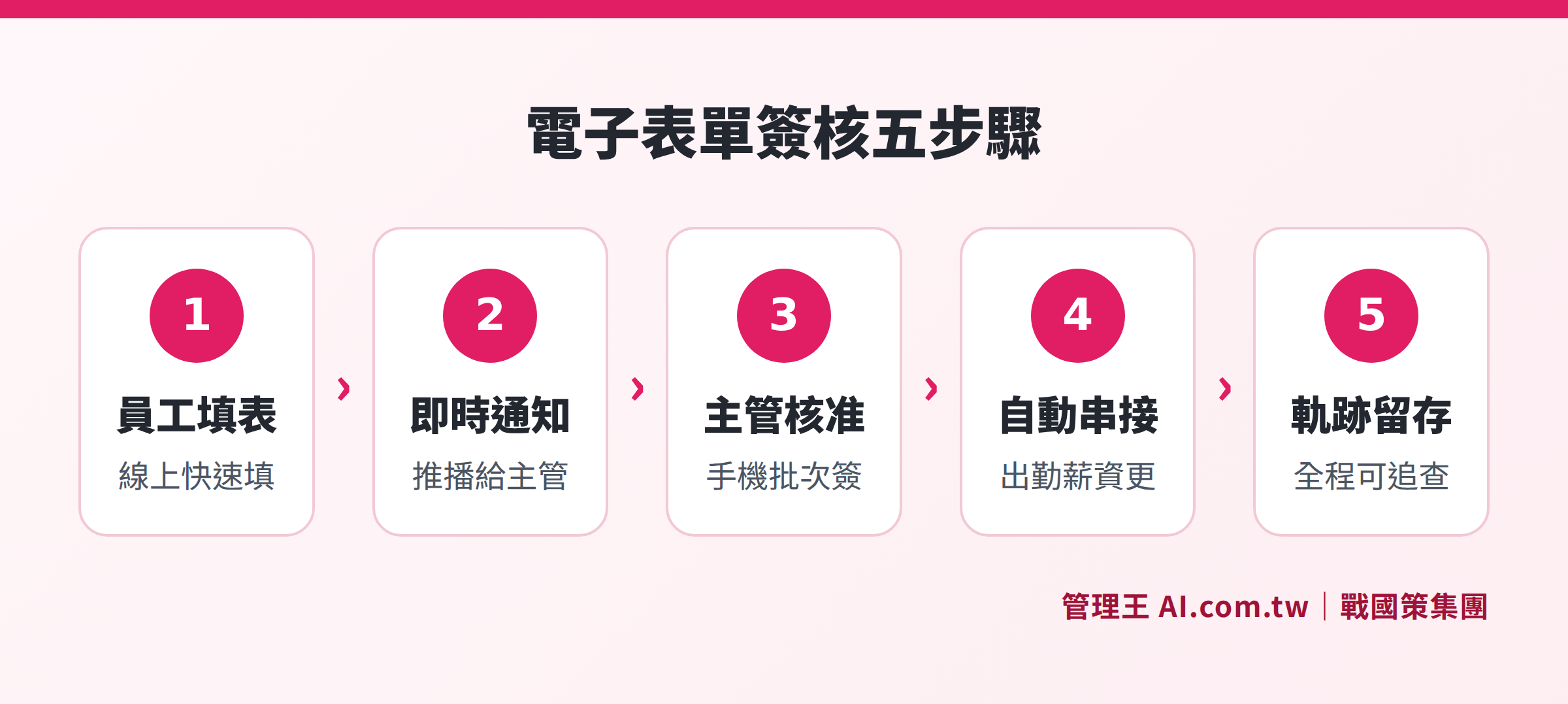
Employees fill out forms and submit, LINE notifies managers, managers approve on-the-go, automatic connection to attendance payroll, complete audit trails are preserved
Off-the-shelf Systems vs. Custom Development?
Some enterprises consider developing their own form systems or outsourcing a full custom solution. The basic differences between the two paths are:
Off-the-shelf SaaS systems: Quick implementation, usually going live with standard processes within one to several days; costs are subscription-based; suppliers handle system maintenance and feature updates; flexibility is platform-dependent.
Full Custom Development: Completely tailored to the enterprise process; longer development time; requires long-term maintenance by IT personnel or vendors; higher initial setup costs.
SaaS with Partial Customization: Based on standard features, allows for custom fields or process logic for specific needs, balancing implementation speed and flexibility, which is a relatively pragmatic choice for most small and medium enterprises. 管理王 offers transparent custom pricing at NT$1,000/hour, with consultants evaluating working hours for free before quoting.
For most Taiwanese small and medium enterprises with 10 to 100 employees, "running off-the-shelf systems first, then making partial adjustments based on actual needs" is usually faster to reach goals and saves resources compared to "building from scratch."
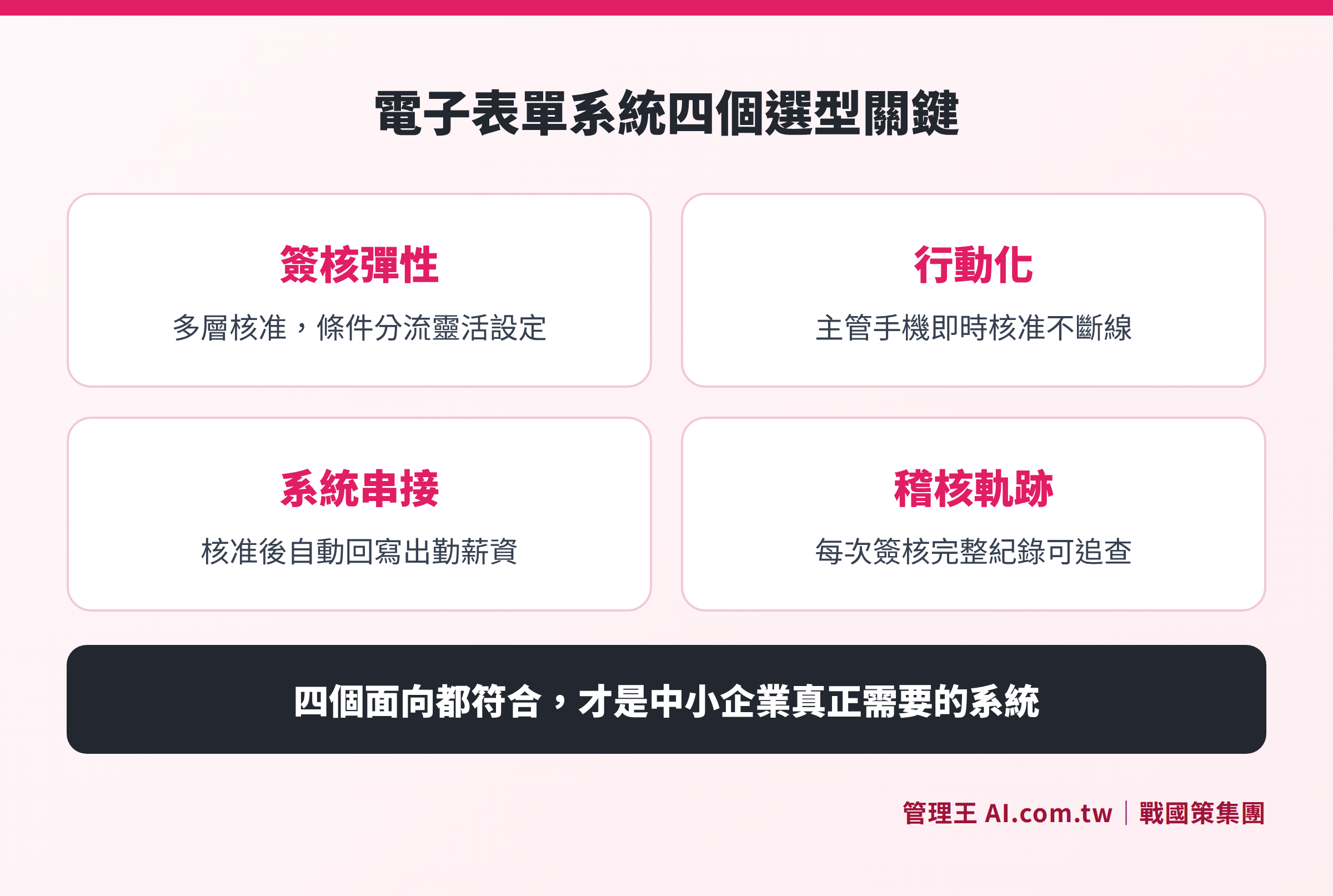
Comparative advantages and disadvantages of off-the-shelf systems versus custom development across four dimensions: approval process, mobility level, system integration depth, and data sovereignty
How to Use 管理王 for Electronic Form Approvals
The EIP Portal of 管理王 AI.com.tw integrates electronic signatures into the daily login portal for employees, with clocking in, checking announcements, filling out forms, and seeing pending approvals all on the same screen. Here is how to operate it:
Step One: Create a Form
In theApproval Center, use the built-in templates (for leave, overtime, business trips, expense reimbursements, procurement, document approvals) or customize fields to create new forms, supporting text, numbers, dates, attachments, and calculated fields; common leave types in Taiwan (annual leave, sick leave, personal leave, maternity leave, family care leave) have corresponding settings.
Step Two: Set the Process
Based on department, job level, and application amount, set the multi-layer approval sequence; conditional routing can be set up (for example, "expenses above a threshold automatically send for finance review"); managers can designate proxies to avoid hindrances during business trips; built-in timeliness SLA automatically reminds approvers of pending approvals after a set time.
Step Three: Employees Submit and Managers Approve
Employees fill out forms via mobile or web and submit them, with the system automatically pushing LINE notifications to the first approver. Managers can directly click to approve from LINE upon receiving the notification, supporting batch processing of multiple applications during commuting breaks, negating the need to return to the office to use a computer.
Step Four: Automatic System Integration
Leave and overtime approvals automatically write back to theclock in attendance system, theHR system updates concurrently, and salary calculations directly read approved records without requiring HR to re-enter manually. If contracts need to be signed externally, theelectronic contracts and digital signatures can be used, complying with Taiwan's electronic signing regulations.
For collecting customer or employee surveys, 管理王 also has asurvey system available for use. For external client communication or internal collaboration, real-time messaging is also integrated into the same portal.
Free plans are permanently available, completely free for teams under 10 people, including basic electronic signature functions, while employee approval via LINE and manager approval via LINE can operate without cost. For more customizable fields or advanced processes, refer to 管理王 pricing plans or consult for customized needs evaluation.
For more comprehensive introductions to EIP systems, please refer to: What is EIP System? An Integration Portal for Announcements, Forms, and Approvals|EIP System Recommendation.
Solve Your Electronic Form Approval Issues
Consultants provide free assessments of the form process, assisting in selection or customization, automating the entire application to approval process, eliminating manual tracking.
Free consultation hotline: 0800-003-191
LINE Official Account: @119m
Official website: app.AI.com.tw
Free trial: Apply for 管理王 Now
Frequently Asked Questions
What is the biggest difference between an electronic form system and Google Forms?
The biggest difference lies in "the presence of an approval process and system integration." After filling out Google Forms, it will at most send one email notification; there is no tracking of who approved, how long it took, or whether it was subsequently written into other systems. An enterprise electronic form system can set multi-layer approval checkpoints, where each level must be approved before moving to the next, completely recording every operation and allowing for automatic integration with attendance and payroll systems, saving redundant manual data entry.
Does a small company of just a dozen people need to implement an electronic form system?
Employee count is not the deciding factor; "the presence of approval processes" is. Even with just a few employees, as long as there is a need for manager approval for leave or procurement requiring the boss's nod, an electronic signature system can save time chasing signatures. 管理王 offers a free plan for under 10 people, allowing for a zero-cost trial.
Do electronic signature records have legal validity?
General electronic signatures (when managers click to approve within the system) leave a complete audit trail, which is sufficient for internal management and labor dispute handling. If external contracts or procurement agreements are involved, it is recommended to pair it with digital signature functionality that complies with the Electronic Signature Act for complete legal effect.
How long does it take for employees to adapt after implementing an electronic form system?
The more the user interface resembles everyday tools (for example, supporting LINE notifications and operations), the higher the acceptance and the shorter the adjustment period for employees. 管理王 is designed primarily around LINE notifications and mobile use, so employees don't need to learn a new app, typically integrating into their daily routine within one to two weeks.
Can form fields and processes be modified later?
Yes. Adding, deleting, or rearranging fields as well as increasing or decreasing approval levels can typically be modified anytime in the backend without needing to reintroduce the system. 管理王's approval process supports real-time adjustments, which take effect immediately and do not affect ongoing applications.
Data Sources
- What is a Custom Form? Grasp the Most Practical Electronic Signature Digital Tools All at Once!—104 Business Master
- How to Choose Between Electronic Forms and Signature Systems? Comparing Three Approaches, Implementation Steps, and Workflow Design—Wasa Team
- 管理王 EIP Enterprise Information Portal Features Page (Query as of November 2026)
- 管理王 Approval Center Features Page (Query as of November 2026)