How to Choose Enterprise Communication Software? Complete Comparison of Internal Communication Tools|Recommended Enterprise Communication Software

Compare LINE WORKS, Teams, Slack, Google Chat, and 管理王, from six core features, pricing plans to suitability in Taiwan, helping SMEs find the most suitable enterprise communication software, addressing the management pain points of private LINE group data leakage and message disappearance.
Enterprise communication software is a professional tool that replaces private LINE groups, keeping internal company communication within a controlled system. Core features include channel-based conversations, private messaging, threads, full-text search, and cross-module integration. The most common pain point for SMEs is that business decisions, customer data, and approval records are all mixed in personal LINE groups, and messages disappear when employees leave, making it challenging for managers to trace the context of events through hundreds of chat records. After implementing enterprise communication software, all discussion records remain in the company account, can be searched in full, and can connect to tasks and approvals, fundamentally solving issues of scattered communication, data leakage, and management disconnection. Common options in the market include LINE WORKS, Microsoft Teams, Slack, Google Chat, and 管理王's team real-time communication module on AI.com.tw. This article provides a complete comparison from four angles: features, costs, integration, and suitability for Taiwan, helping you find the best plan for your company's size and budget.
What is Enterprise Communication Software? Why Not Just Use LINE Groups?
Enterprise communication software (Business Messaging / Team Chat Software) is an instant messaging platform designed for internal collaboration within companies. The main difference from personal social apps is that all accounts belong to the company, message records do not disappear when employees leave, and permission management is detailed down to the department and channel levels.
Using personal LINE groups for work exposes companies to three major risks:
- Loss of data sovereignty: Messages, customer contacts, and contract discussions are all in employees' personal accounts and can be taken when they leave, making it impossible for the company to retrieve them.
- Legal compliance and audit difficulties: If regulatory agencies request specific transaction records, personal LINE cannot comply with formal audits.
- Efficiency bottlenecks: Without channel segmentation, important announcements get drowned out by gossip; without full-text search, decisions from three months ago can only be recalled from memory.
Taiwan's SMEs have long used LINE as their primary work tool, creating a habit that is hard to change. However, with the revision of personal data laws and stricter labor inspections, the need for companies to retain communication records is becoming increasingly urgent. Enterprise communication software has rapidly gained popularity against this backdrop.
Key differences between enterprise communication software and regular communication apps:
| Comparison Aspect | Personal LINE Group | Enterprise Communication Software |
|---|---|---|
| Account Ownership | Personal to employees | Company managed |
| Message Retention | Disappears upon employee departure | Permanently stored in company system |
| Search Scope | Manual scrolling through single group | Full-text search across channels |
| Permission Control | None (anyone can add people) | Three levels: department, channel, individual |
| Task Approval Integration | Not supported | Native integration or API connection |
| Audit Tracking | Not available | Complete audit log |
From the table above, it is clear that the biggest flaw of personal LINE groups is not just functional but the issue of message "ownership"—conversations occur in employee accounts, and the company has no ownership. This often puts companies in a difficult position when labor disputes, customer disputes, or regulatory inspections arise. Choosing enterprise communication software fundamentally establishes the legal sovereignty of the company over internal communication records.
In One Sentence
Enterprise communication software = Company version of LINE group, but messages belong to the company, are searchable, can integrate tasks and approvals, and records do not disappear when employees leave.
Comparison of Mainstream Enterprise Communication Software Features
Major solutions on the market have different positioning: Slack is known for developer integration, Teams relies on Microsoft 365 ecosystem, LINE WORKS leverages LINE's high usage rate to reduce adoption resistance, while 管理王 focuses on native integration with ERP/CRM/human resources modules.
Table: Comparison of Six Major Features of Enterprise Communication Software (Based on information publicly available on official websites, checked in October 2026)
| Feature | LINE WORKS | Microsoft Teams | Slack | 管理王 AI.com.tw |
|---|---|---|---|---|
| Channel-based Conversations | ✓ | ✓ | ✓ | ✓ |
| Private Messaging and Groups | ✓ | ✓ | ✓ | ✓ |
| Threads | Partial | ✓ | ✓ | ✓ |
| Full-text Search | ✓ | ✓ | ✓ (free version only 90 days) | ✓ |
| Video Conference | ✓ | ✓ | ✓ | ✓ |
| Integration with ERP/Human Resources | Requires API | Requires API | Requires API | Native integration |
| Task/Approval Integration | Requires API | Requires API | Requires API | Native integration |
| Traditional Chinese Interface | ✓ | ✓ | ✓ | ✓ |
| Data Stored in Taiwan | Japan Data Center | Asia-Pacific | U.S. Data Center | Taiwan Data Center |
| Free Plan | Available (limited features) | Available (limited features) | $0 (90 days message limitation) | Available (permanent) |
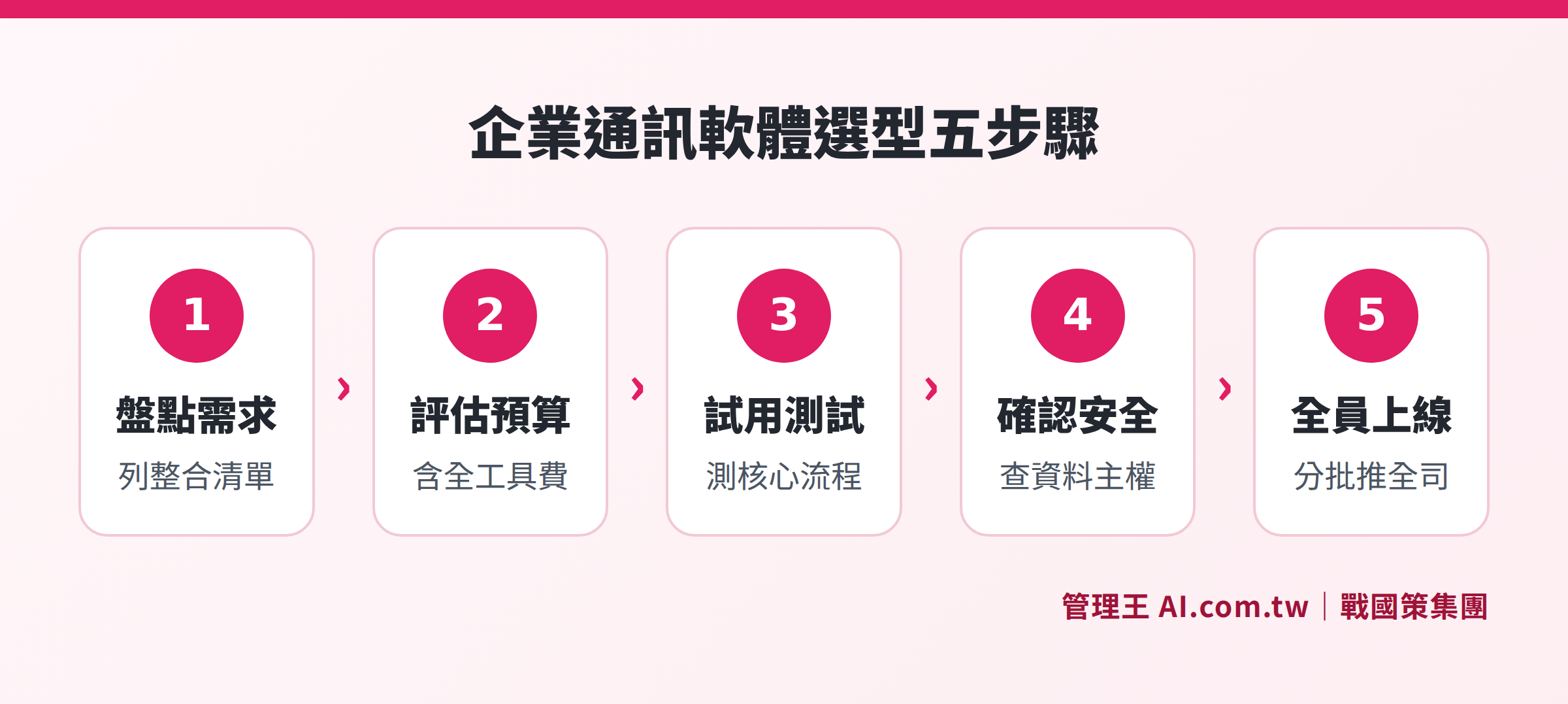
Five Steps in the Purchasing Process from Needs Assessment to System Implementation
Comparison of Enterprise Communication Software Plans and Costs
Cost is a key consideration for SMEs when choosing tools. Below are the official public pricing of each platform, expressed as costs per person per month (annual payment). Some platforms are priced in U.S. dollars.
Table: Cost Comparison of Enterprise Communication Software (Based on publicly available information from each official website, checked in October 2026 according to latest pricing)
| Plan | LINE WORKS | Microsoft Teams Essentials | Slack Pro (annual payment) | Google Workspace Starter (annual payment) | 管理王 AI.com.tw |
|---|---|---|---|---|---|
| Free Version | Available (limited features) | Available (limited features) | $0 (90 days message restriction) | Not available | Permanent free (for up to 10 users) |
| Entry Paid Version | Please consult Taiwanese agents | NT$120 /person/month | $7.25 /person/month (approximately NT$235) | $7 /person/month (approximately NT$225) | NT$5,000 /month (up to 30 users) |
| Advanced Version | Please consult Taiwanese agents | NT$225+ /person/month | $15 /person/month (approximately NT$485) | $14 /person/month (approximately NT$450) | NT$10,000 /month (up to 60 users) |
| Includes ERP/Human Resources | Not included | Not included | Not included | Not included | Includes 100+ modules |
LINE WORKS in Taiwan is serviced by Taiwanese agents like Taiwan Mobile, and the official pricing in TWD has not been publicly announced; please consult official authorized partners for quotes. Microsoft and Google mainly price in US dollars, and TWD costs fluctuate with exchange rates. The 管理王 subscription plan includes nine major systems with over 100 features, not just a single communication module’s cost.
Five Key Considerations for SMEs When Choosing Enterprise Communication Software
The greatest cost of choosing the wrong tool is "abandonment halfway through implementation"; even the employee learning curve and old data migration can lead to a failed implementation. Here are five aspects that Taiwanese SMEs often overlook when selecting a tool:
1. Depth of Integration with Existing Systems
If the company uses ERP, CRM, and human resource systems simultaneously, choosing a communication tool that can "natively integrate" is far more stable and cost-effective than using Zapier or other third-party links afterward. For example, if a procurement approval needs to be initiated in the middle of a discussion, if the communication tool and the approval system are the same, it can transition directly without needing to switch pages or copy and paste.
2. Data Security and Storage Location
Article 19 of the Personal Data Protection Act requires companies to take appropriate security measures to protect personal data. Choosing a plan that stores data in Taiwan ensures more reassurance when facing regulatory audits or customer demands for data sovereignty. Foreign SaaS that store data in U.S. or Singapore data centers carry additional legal considerations when involving cross-border data transfers.
3. Traditional Chinese Interface and Compliance with Taiwanese Laws
The interface language directly influences employee acceptance. All mainstream solutions provide a Traditional Chinese interface, but the level of compliance varies: electronic invoices, Labor Standards Act attendance records, and official document signing formats are unique needs in Taiwan. Choosing a local platform or one with customizations suitable for Taiwan will offer better direct support.
4. Learning Curve and Implementation Costs
Slack and Teams have rich functionalities but require a certain level of IT capability to utilize fully. If an SME does not have a dedicated MIS staff, implementation may hit roadblocks during the early stages. Whether the management interface is intuitive, whether Chinese instructional resources are available, and whether there is local technical support in Taiwan are all questions to clarify during evaluation.
5. Total Cost of Ownership
"NT$120 per person per month" may seem cheap, but if the communication tool does not include project management, electronic approvals, or CRM, and each feature requires separate subscriptions, the accumulated costs may exceed expectations by the end of the month. SMEs should calculate using "the total cost of all the tools required to complete the entire workflow" instead of just the individual tool pricing.
Analysis of Six Core Functions of Enterprise Communication Software
Channel-based Segmented Communication
Independent channels are used to distinguish departments, projects, and topics; public channels can be joined by everyone, while private channels are limited to designated members. New employees joining a channel can fully catch up on past discussions without having to ask colleagues, "What was discussed before?"
Private Messaging and Temporary Groups
One-on-one private messages or temporary group chats are suitable for discussions on personnel issues and sensitive customer information. Records are kept in the company system, and conversations and handover information do not disappear with the personal account when employees leave; this is a critical function to replace personal LINE.
Threaded Conversations to Converge Topics
Specific messages can open threads, keeping exchanges on the same topic centralized on one line, preventing clutter in the main channel. Multi-round discussions on complex projects are clear, allowing for quick pinpointing of decision-making processes later on.
@Mentions for Accurate Notifications
Calling out specific members or entire channels, crucial messages go directly to those responsible, avoiding significant assignments getting buried in the message flow, while reducing the disturbance to unrelated members and lowering notification fatigue.
Full-text Search and Knowledge Accumulation
All channels and private messages support full-text search; key terms can retrieve historical decisions, attachments, and customer information. The free version of Slack retains message history for only 90 days; companies with long-term audit needs should select paid plans without time limits or local solutions.
Task and Approval Integration
Top-tier enterprise communication systems should allow "communication" to directly convert into "action": creating task assignments, initiating cost approvals, and documenting meeting resolutions directly from conversations. If this step requires manually copying to another system, it becomes an efficiency black hole.
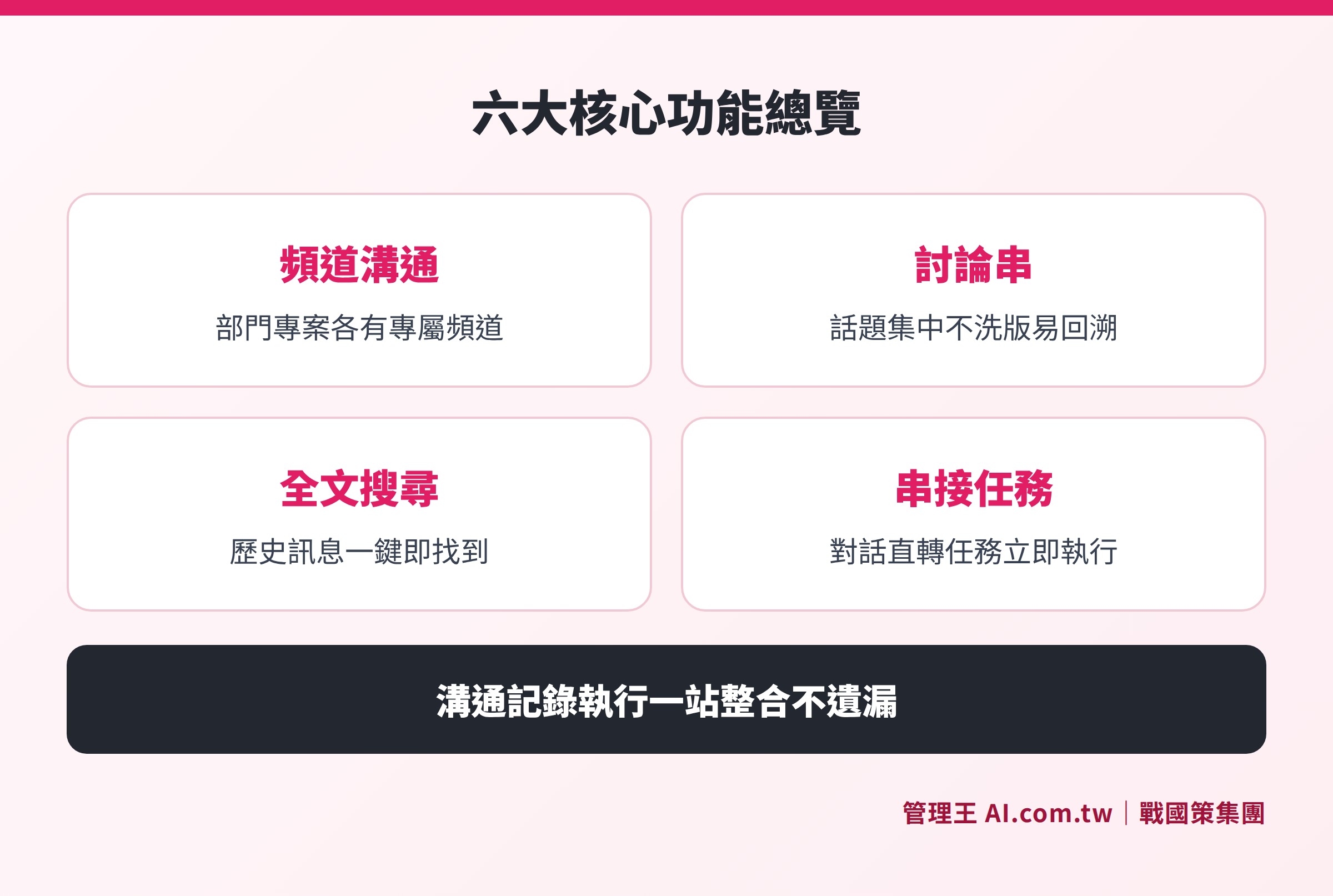
Explanation of six main functions: channels, private messaging, threads, @mentions, full-text search, task integration
Communication Needs Under Remote and Hybrid Working
Post-pandemic, a certain proportion of companies in Taiwan have retained flexible office arrangements, making hybrid work (partly from home and partly at the office) the new norm. This elevates enterprise communication software from a "convenient tool" to a "core infrastructure":
- Asynchronous Communication: Members online at different times can leave messages in channels and threads to fill in the context without waiting for everyone to be online simultaneously.
- Video Integration: Impromptu meetings can be initiated directly within the communication system without needing to switch to another meeting app; after meetings, AI automatically generates summaries and to-dos can be quickly confirmed back in the communication channel.
- Cross-location Collaboration: Remote staff, field sales, and store personnel can communicate through the same system, allowing supervisors to easily see the dynamics of the entire company.
- Cybersecurity Compliance: Remote work brings endpoint risks, and encrypted transmission (TLS 1.3), multi-factor authentication, and detailed permissions in enterprise communication software are the baseline for cybersecurity in hybrid work.
When selecting enterprise communication software, confirm whether mobile apps or PWAs are supported (to ensure field staff can receive @mention notifications anytime) and check if video conferencing requires additional plugins or fees. Also, ensure that notification settings allow for silent periods to avoid disturbances during non-working hours, aligning with labor health protection design considerations.
Common Barriers and Solutions for Implementing Enterprise Communication Software
Barrier 1: Employees are accustomed to LINE and do not want to learn a new tool
Solution: Choose an intuitive interface with a short transition period between new and old systems; initially trial in specific departments or projects before gradually expanding company-wide. LINE WORKS has a similar interface to LINE, resulting in relatively high acceptance; 管理王 provides local consultants to assist with implementation and can integrate LINE notifications to use old habits as a transition bridge.
Barrier 2: Old messages cannot be migrated
Solution: The core value of enterprise communication software lies in retaining records from "now on," not in recovering old LINE messages. Conduct effective transition advocacy, setting principles that "new business discussions occur in the new system"; employees usually adapt naturally after 2 to 4 weeks.
Barrier 3: Insufficient IT resources, fear of complex settings
Solution: Choose options that provide local Chinese support and free implementation training. 管理王 offers customer service via 0800, and business plans and above include remote training; administrative personnel familiar with computers can complete basic settings.
Barrier 4: Concerns about data security and account management
Solution: Confirm that the plan provides multi-tier permission control (organizational → departmental → individual), a complete audit log, and a mechanism to retain company data even after disabling accounts of departing employees. Choosing solutions with ISO 27001 certified data centers can further reduce cybersecurity risks.
How to Use 管理王 AI.com.tw?
The team real-time communication in 管理王 is the core module of the nine systems, designed from day one to integrate natively with CRM, tasks, approvals, daily reports, etc., without additional API integration fees.
Actual Operating Process:
- After registering for a 管理王 account, create the company or department's first channel under "Information System" → "Team Real-time Communication", e.g., "Sales Team - Quote Discussions".
- Invite members to join the channel, set public or private permissions, and appoint channel administrators.
- Daily discussions occur directly in the channel; when actions are required, click "Assign Task" next to the message, assign it to relevant personnel, and set deadlines—messages directly connect to the Task Management module.
- For matters requiring approval from supervisors (costs, contracts, procurement), trigger the Approval Center process directly from conversations, maintaining a complete record.
- Use full-text search to find historical decisions and attachments at any time.
Scenarios Where 管理王 is Particularly Suitable:
- SMEs that require communication, tasks, approvals, CRM, and accounting simultaneously, without wanting to spread subscriptions across multiple SaaS.
- Companies needing data stored in Taiwan and compliant with the Personal Data Protection Act and the Commercial Accounting Act.
- Business owners wanting to see a complete link from "communication→task→execution→closure" in one backend.
The free plan allows permanent use of basic features (for up to 10 users) without requiring a credit card, suitable for trial before deciding whether to upgrade to a paid plan. Detailed plans and pricing are available on the official website.
If you also need to manage meeting notes, consider pairing with the AI Meeting Notes module for automatic transcripts and summaries, reducing the time needed for manual organization. If video communication is required, you can use the Video Conference module, and for file sharing, the Cloud Drive can be used, with all data stored in 戰國策 Group's Taiwan data center.
For businesses needing network environment monitoring, further integration with Network Management Tools can achieve one-stop management of communication and IT infrastructure.
End the Chaos of LINE Groups, Switch to an Enterprise Communication System
Management consultants assist in evaluating the best plan, free trials for over 100 features, and message records belong to the company, no longer disappearing due to employee departures.
Free consultation hotline: 0800-003-191
LINE Official Account: @119m
Official Website: app.AI.com.tw
Free Trial: Apply for 管理王 now
Frequently Asked Questions
What is the difference between Enterprise Communication Software and LINE WORKS?
LINE WORKS is an enterprise communication tool designed based on LINE, excelling in low adoption barriers (employees are familiar with the interface) and connectivity with customers' personal LINE accounts. The difference with integrated platforms like 管理王 lies in the native integration with ERP, CRM, human resources, etc., not requiring additional API integration fees, making it suitable for SMEs that need "communication + management" all in one go.
How long can message records be retained in enterprise communication software?
It depends on the plan: Slack's free version retains messages for only 90 days; Slack Pro and above, Teams, and paid versions of LINE WORKS and 管理王 offer unlimited message retention. Enterprises needing compliance or audit requirements should choose plans that offer indefinite retention and verify if CSV or PDF export functionality is included.
What budget is needed to implement enterprise communication software?
Costs mainly depend on the number of users and the depth of functionalities. Microsoft Teams Essentials starts at NT$120 /person/month (annual payment), Slack Pro is about NT$235 /person/month (converted from U.S. dollars), and Google Workspace Starter is approximately NT$225 /person/month. 管理王 charges per team, the free plan is permanently usable, and the economical plan is NT$5,000/month for up to 30 users with over 100 functionalities, ideal for SME owners who do not want to calculate each person's individual cost.
Will an employee's message records disappear after they leave?
The premise of using enterprise communication software is that messages belong to the company account. Once the account of a departing employee is disabled, all messages, attachments, and task records from their channel remain in the company system, allowing administrators to continue accessing them. This is one of the core advantages of enterprise communication software over personal LINE groups.
Does enterprise communication software support mobile use?
All mainstream solutions support native apps for iOS and Android. 管理王 adopts a responsive web design that works smoothly across desktop, tablet, and mobile browsers, and it provides a PWA version (added to the home screen from the browser) and LINE Bot quick query functions, making it suitable for field personnel or multi-device work scenarios.
Data Sources
- Microsoft Teams Business Comparison (Microsoft Taiwan Official, checked in October 2026)
- Slack Official Pricing Page (Slack Inc. Official, checked in October 2026)
- Google Workspace Official Pricing (Google LLC Official, checked in October 2026)
- LINE WORKS Taiwan Official Page (LINE WORKS Taiwan, checked in October 2026)
- Personal Data Protection Act (National Regulations Database, Ministry of Justice)
- Commercial Accounting Act (National Regulations Database, Ministry of Justice)