What is an ERP System? Understand Inventory to Finance for SMEs at Once | Recommended ERP Systems
An ERP system is a management tool that integrates a company's inventory, finance, production, and payroll on a single platform, with the core principle of entering data only once and automating the entire process. This article fully explains the definition of ERP, functionality of various modules, differences between manufacturing and trading industries, key selection criteria, and the process of implementing cloud ERP, while introducing how 管理王 ERP assists small and medium enterprises in Taiwan to quickly get online.
An ERP system (Enterprise Resource Planning) is a core tool that manages a company's "people, goods, and money" within a single system. Its essence is single source of truth: an order is handled from quotation, shipping, invoicing, to payment, where data is only entered once and all departments see the same numbers, completely eliminating issues of manual data transfer and month-end reconciliation that lasts until dawn. For small and medium enterprises, implementing ERP is not about keeping up with trends, but rather enabling the owner to see real-time revenue, inventory, and cash flow, allowing sales, purchasing, and accounting to collaborate on the same platform, freeing time from "reconciliation" to focus on "doing business." This article will guide you through the definition of ERP, the composition of modules, selection criteria, and how to quickly get started with 管理王 ERP.
What is an ERP System? From Definition to Core Concepts
ERP stands for Enterprise Resource Planning. This term is generally believed to have been introduced by Gartner in 1990 to describe a software that extends from Manufacturing Resource Planning (MRP) into integrating logistics functions like financial accounting. Today, the definition of ERP has expanded to encompass all core processes of a company: sales, procurement, inventory, production, finance, human resources payroll, and electronic invoicing.
The Three Core Spirits of ERP
1. Single Source of Truth
For the same customer order, once created in the system, inventory is automatically deducted, purchasing is automatically triggered, and accounting entries are automatically generated, eliminating the need for three departments to maintain their own Excel files.
2. Process Integration
From quotation → order → shipping → invoicing → payment, each step flows within the system, where the next step can only begin after the previous one is completed, ensuring processes do not break and accounts do not go missing.
3. Real-time Visibility
Inventory levels, accounts receivable, gross margins, and cash flow can all be viewed at any given time without having to wait for monthly reports.
Differences between Traditional ERP and Cloud ERP
Table: Comparison of Traditional ERP and Cloud ERP
| Comparison Item | Traditional ERP (On-premises) | Cloud ERP (SaaS) |
|---|---|---|
| Implementation Method | Purchase license, build own server | Subscription plan, cloud activation |
| Implementation Time | Longer, needs server setup and customization | Shorter, can set up after activation |
| Initial Cost | One-time purchase of license and hardware | Monthly or annual subscription |
| Maintenance and Updates | Company’s responsibility | Service provider’s responsibility |
| Suitable for | Large corporate groups | Small and medium enterprises, startups |
| Data Security | Self-built protection | Service provider offers cybersecurity certification |
Why Do SMEs Need ERP? Four Real Pain Points
Many SME owners say, "We are fine using Excel right now," but when performance grows, customers increase, and employees expand, the issues with Excel will arise one by one:
Pain Point 1: The Same Data is Entered Three Times
The sales team enters quotations, assistants enter orders, and accounting inputs again; each person maintains their own records. If any step is incorrect, everything goes awry at the end of the month. Duplicate data entry not only wastes time but also becomes the root of errors.
Pain Point 2: Inventory Numbers are Never Accurate
Shipping does not deduct the inventory in real-time, and purchases are recorded late, leaving apparent inventory that cannot be found in the warehouse. When sales take on urgent customer orders, they find out there isn’t enough stock at shipping time, damaging customer relationships.
Pain Point 3: Costs Cannot Be Calculated
Raw material costs, labor hours, and outsourcing fees scattered everywhere make quoting rely solely on the owner's intuition. Once an order is taken, they realize the gross margin is less than 5%, or worse, making more results in bigger losses, a common dilemma in Taiwan's manufacturing industry.
Pain Point 4: The Owner Cannot See Real-time Numbers
Every month's revenue, gross margin, and accounts receivable results need to wait for the accounting month-end reconciliation to come out. By the time the owner sees the report, a month of problem-solving has been wasted, missing the golden time for resolution.
Understand in One Sentence
ERP does not make the enterprise "more complicated"; rather, it organizes existing chaos into a logical process, ensuring everyone does their job while data links automatically.
What Modules are in an ERP System? Complete Functionality Breakdown
A complete ERP system typically includes the following core modules. Microsoft describes ERP as covering the integration of finance, supply chain, manufacturing, human resources, procurement, and other core processes. 管理王 breaks these modules into independent functional pages for individual review: Quotation System, Procurement System, Inventory Management System, Production Management System, Accounting System, Payroll Calculation System.
Sales and Quotation Module
- Customer data management, quotations, order management
- Shipping notes, sales returns
- Accounts receivable tracking, customer reconciliation statements
Procurement Module
- Supplier management, requisitioning, price inquiry and comparison
- Purchase orders, receiving inspection
- Accounts payable, vendor payment management
Inventory Management Module
- Multi-warehouse management, safety stock alerts
- Inbound and outbound records, inventory counting operations
- Inventory cost calculation (weighted average, FIFO)
Production Manufacturing Module (Applicable for Manufacturing Industries)
- Item and BOM (Bill of Materials) lists (supports multiple levels)
- Work orders, material issuance operations
- Completion inventory, quality control records
- MRP material requirements planning, recommended purchase quantities
Financial Accounting Module
- Journals, general ledgers, cash ledgers
- Profit and loss statements, balance sheets, cash flow statements
- Multi-currency accounts, exchange difference calculations
- Electronic invoices (incoming and outgoing)
Payroll and HR Module
- Employee data, attendance records
- Overtime pay calculations, labor and health insurance declarations
- Payroll slips production, payroll accounting
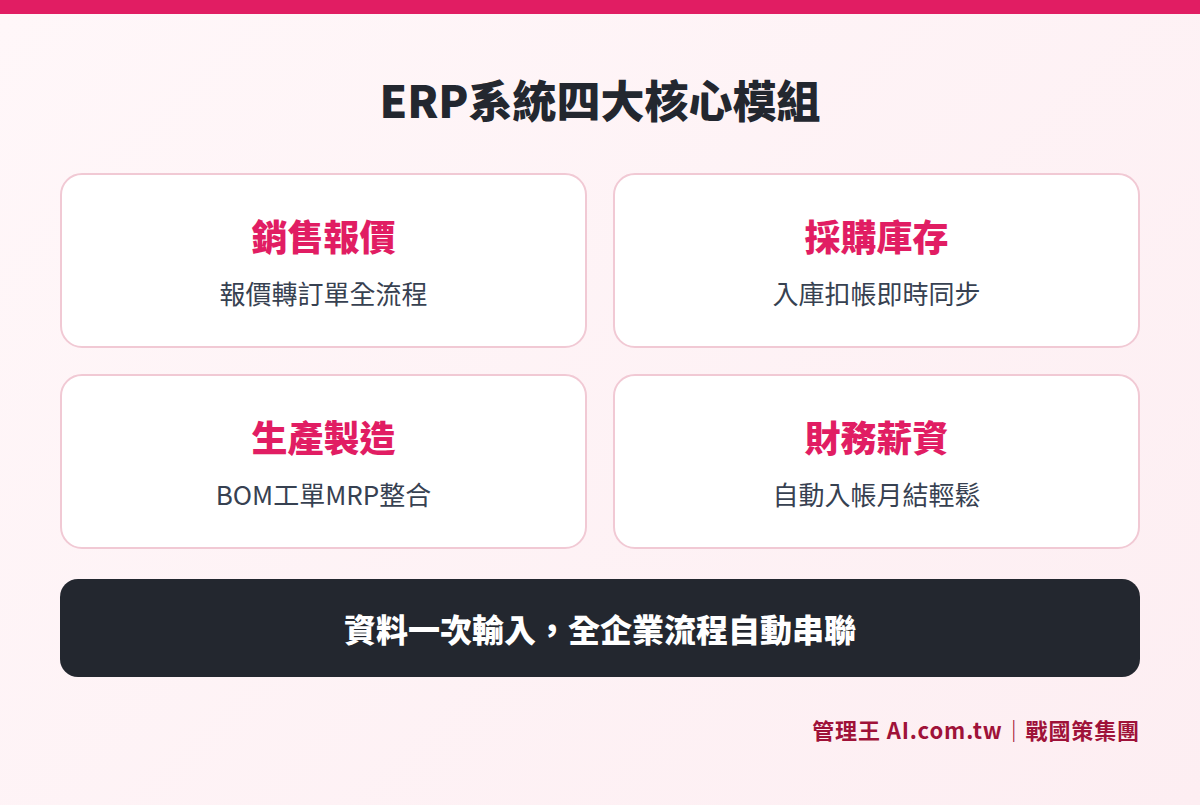
ERP systems cover complete enterprise process modules from sales, procurement, inventory to finance
Manufacturing vs Trading vs Service Industries: Which Modules are Most Important?
Different industries have varying emphases on ERP needs:
Table: Key ERP Modules by Industry Type
| Industry Type | Essential Modules | Advanced Needs |
|---|---|---|
| Manufacturing | BOM, work order, MRP, inventory | Quality control, production scheduling, cost analysis |
| Trading (Import/Export) | Orders, procurement, inventory, multi-currency | Batch tracking, shelf life |
| Retail | POS, inventory, electronic invoicing | Membership systems, promotional management |
| Services | Quotations, contracts, accounts receivable | Project tracking, hour management |
| Corporate Groups | All of the above | Consolidated financial statements for multiple companies |
How to Choose an ERP System Suitable for SMEs? Five Key Evaluation Points
When choosing ERP, don't just look at functionalities; the following five dimensions are crucial:
1. Process Coverage
Can the entire flow from quotation, order, procurement, inventory, production, to finance be completed on the same system? Or do you need to use Excel in between? Every gap is a source of errors.
2. Industry Adaptability
Companies with production need to confirm how many levels BOM supports and whether work order functionality is complete; businesses with overseas operations must verify multi-currency and exchange difference calculations; retail businesses need to check POS and electronic invoicing integration.
3. Implementation Costs and Time
Traditional on-premises ERP usually requires server construction and consultancy for implementation, with higher costs and timelines; cloud ERP can start setup after activation with lower initial investments. Also, consider the "total cost of ownership": license fees, maintenance costs, customization costs, and upgrade fees.
4. Integration with Frontline Business
If ERP is completely different from systems like CRM, electronic signature, and attendance, data will still need to be manually moved around. Selecting a system where a CRM and ERP share the same customer data can save a lot of data synchronization hassle.
5. Local Regulatory Support
Taiwan's electronic invoice format, business tax declaration, labor and health insurance premium calculations, and withholding of income tax are all governed by specific regulations. ERP must natively support these Taiwan-specific regulations; otherwise, additional handling will be required.
Common Selection Pitfalls
- Purchased functionalities are unused: Not performing a process audit before implementation and buying a comprehensive ERP only to utilize 20% of its functionalities, resulting in wasted licensing fees each month.
- System island problems: ERP, CRM, electronic signature, and attendance each operate independently, requiring manual data transfers, not addressing the original issue.
- Customized becomes increasingly expensive: If the system doesn’t meet needs, each update incurs more customization costs, significantly exceeding the initial budget over five years.
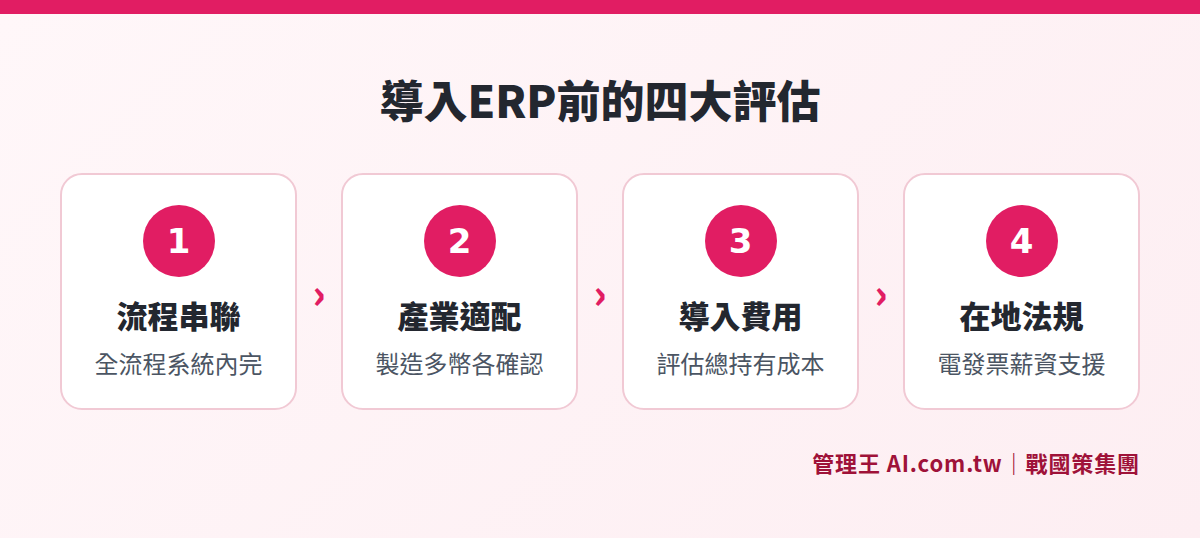
Five key dimensions for evaluating ERP system selection, from process coverage to regulatory support
Benefits After Implementing ERP: What Can SMEs Improve?
The benefits of implementing ERP vary depending on the company's scale and process complexity; here are the improvements most commonly reported by SMEs in Taiwan:
Increased Operational Efficiency
The same order in the ERP system only needs to be entered once, with subsequent inventory deductions, invoice creation, and accounts receivable being automatically generated without manual re-entry. Sales personnel save time on reconciliation and can focus their energy on developing new clients; procurement staff no longer need to inventory using Excel daily, as the system automatically alerts them when supplies are running low.
Many SMEs spend several days reconciling accounts at the end of each month. After implementing ERP, transactions are recorded in real-time, and month-end processes shift from "rush mode" to "confirmation mode."
Improved Inventory and Financial Control
Inventory management is a cash leakage point often overlooked by small and medium enterprises. Over-investing leads to cash immobilization, whereas insufficient materials can halt production lines, leaving customers waiting. ERP's safety stock alerts and MRP recommendations for procurement amounts allow data-driven purchasing decisions rather than relying on intuition.
After introducing BOM and work order management, every work order’s raw material usage, labor hours, and outsourcing costs are recorded, enabling managers to accurately calculate each item's actual costs and compare with quotes to identify which orders are profitable and which need price adjustments.
Increased Financial Transparency
Every transaction is recorded in accounting in real-time, so owners don’t need to wait for month-end to see accounts receivable balances, cash balances, and gross margins. This kind of real-time visibility allows for quicker and more precise financial decision-making, and when applying for bank loans or external financing, complete accounting records can be provided quickly.
Multi-currency support means companies with import/export operations no longer need to manually convert exchange rates; daily exchange rates are automatically updated and unrealized exchange differences calculated, reducing manual operations for finance staff and minimizing the risk of calculation errors.
Cloud ERP Implementation Process: How Many Steps from Decision to Go Live?
The implementation process for cloud ERP is far simpler than traditional ERP, generally divided into the following stages:
- Requirements Assessment: List current pain points and confirm which modules are essential for the first phase
- Data Preparation: Organize customer lists, product codes, initial inventory, and opening balances (can be imported from Excel)
- Account Setup: Create user accounts, set permissions, configure company basic information, and currencies
- Initial Data Import: Import master data for products, customers, vendors, and initial inventory
- Process Testing: Conduct a complete test order, carrying through to pricing and invoicing
- Go Live: Switch to the formal environment and begin actual use
The actual time taken depends on the completeness of data organization and the quantity of items; manufacturing industries typically require more preparation time due to the need to establish BOM lists first compared to trading industries.
Common Challenges in ERP Implementation and How to Overcome Them
While implementing cloud ERP is much easier than traditional software, SMEs still face common issues during actual execution:
Challenge 1: Incomplete or Messy Basic Data
Products lacking unified codes, duplicate customer entries, and vendor data scattered across individuals' mobile phones—these are the most time-consuming preliminary tasks of ERP implementation. It’s recommended to start organizing and unifying product and customer master data 2 to 4 weeks before the official switch. Most cloud ERPs support bulk imports from Excel, which can be cleaned up using existing Excel files before direct upload.
Challenge 2: Employee Resistance to Change
If employees are accustomed to using Excel or verbal notifications, they may be hesitant to create orders within the system initially. The approach is to enforce the use of the most critical one or two processes to start (for example, start with order creation), allowing employees to see the benefits of "not having to ask for inventory" and "clearly settled accounts," thus increasing acceptance naturally.
Challenge 3: Migration of Old Data
If there is an existing system, initial inventory, uncollected receivables, and unprocessed payables need to be correctly transferred to the new system; otherwise, the accounts will not match from day one. It’s advisable to select the beginning of a month (e.g., the beginning of a quarter) as the switching point, carrying over initial numbers once, then conducting all subsequent transactions entirely on the new system.
Challenge 4: Rushing to Implement Without Standardizing Processes
Before implementing ERP, it’s advisable to spend one to two weeks mapping out existing processes: Where do orders come from? Who reviews? Who ships? Who invoices? If the flow is unclear, system setup will go wrong, and once implemented, the system may not align with the actual workflow, requiring significant adjustments.
What 管理王 Does: Complete Process Demonstration from Order Creation to Accounting
管理王 ERP System integrates modules for quotations, orders, procurement, inventory, production, finance, payroll, and electronic invoicing, all sharing the same customer, product, and accounting data without needing to switch between different systems.
Daily Sales Process
After a deal is made in the CRM, the quotation can be instantly converted to an order; when the order is shipped, the system automatically deducts inventory and generates an electronic invoice; once the customer pays, payment reconciliation synchronously offsets accounts receivable and records the accounting journal. The entire sales cycle requires no manual transfers or data duplication.
Procurement and Inventory Management
After establishing a purchase order, when suppliers deliver goods, acceptance can be confirmed directly in the system, increasing inventory in real-time while simultaneously generating accounts payable; safety stock alerts automatically notify when inventory falls below the set level to prevent stockouts.
Manufacturing Process
Once the BOM for items is established, the work order automatically calculates required materials; issuing materials deducts raw material inventory; completing production increases finished goods inventory; MRP automatically computes a shortage list every day, transforming it with one click into a procurement suggestion, which procurement personnel can then confirm and submit as a purchase order.
Finance and Payroll
Every business transaction is instantly recorded in accounting; when an incoming invoice is uploaded via photo, AI recognizes it, and upon approval by accounting, it is automatically imported. The payroll module reads attendance and overtime data, performs calculations automatically, producing pay slips and recording payroll expenses.
管理王 offers a free plan for permanent use (up to 10 people), suitable for small businesses starting to test core processes, confirming the system meets requirements before upgrading to paid plans. For detailed plans and pricing, please check the official website.
Considering ERP Systems? Get Free Consultation First
Tell us about your industry, number of employees, and current situation using Excel or old systems, and our consultants will assist in evaluating processes and necessary modules. 管理王 also provides a free plan for permanent use.
Free consultation hotline: 0800-003-191
Official LINE ID: @119m
Official website: app.AI.com.tw
Free trial: Apply for 管理王 now
Frequently Asked Questions
Which companies should implement ERP systems?
There is no fixed threshold. Small companies with three to five employees that have inventory management needs or spend considerable time reconciling accounts each month should consider implementing cloud ERP. In fact, the fewer employees there are, the more waste there is from redundant data entry, and the more apparent the efficiency gains from ERP. Practically, Taiwanese SMEs with five or more employees that have inventory or production needs are the most common starting point for ERP implementation.
Is cloud ERP data secure?
Leading cloud ERP providers in Taiwan generally offer data encryption transmission (HTTPS/TLS), regular backups, and cybersecurity certifications (like ISO 27001). When selecting, confirm whether data is stored in local Taiwanese data centers or overseas and whether it complies with personal data protection laws. 管理王's data is stored in the 戰國策 group’s Taiwan data center, equipped with dual machine room redundancy and compliant with ISO 27001 standards.
Is it necessary to hire consultants for ERP implementation?
Cloud ERP usually provides online training, documentation, and customer support; small businesses can implement it themselves. However, if the processes are complex (like multi-warehouse, multi-company, or manufacturing BOM), it’s advisable to seek assistance from vendor consultants. Both 管理王's business and flagship plans include remote training hours and also provide customized services at NT$1,000/hour, with transparent costs.
Can ERP integrate with existing systems?
Yes. Most cloud ERPs offer API interfaces for integration with external systems like e-commerce platforms, POS systems, and EDI. 管理王 ERP natively integrates CRM, electronic signatures, attendance, and electronic invoicing within the same system without needing additional API connection fees; if external system integration is needed, it can be completed through customized development.
What are the typical costs for ERP systems?
Cloud ERP subscription fees vary significantly depending on the provider and plan; common plans for small and medium enterprises in Taiwan range from several thousand to tens of thousands of NT dollars per month. 管理王 offers a free plan (up to 10 users permanently free), an economical plan at NT$5,000/month (30 users), a business plan at NT$10,000/month (60 users), and a flagship plan at NT$19,900/month (unlimited users), with a two-month discount for annual payments. The latest plan pricing is based on official announcements on the website.
Sources
- Microsoft Dynamics 365: What is ERP? Enterprise Resource Planning Systems and Software (Microsoft, accessed October 2026)
- NetSuite: The History of ERP (Oracle NetSuite, accessed October 2026)
- 管理王 ERP Enterprise Resource Planning System Function Page (管理王 AI.com.tw, accessed October 2026)
- 管理王 Plans and Pricing (管理王 AI.com.tw, accessed October 2026)
- 管理王 Product Description Document (管理王 AI.com.tw, accessed October 2026)