Is a Free Inventory Management System Worth It? Differences Between Functional Limitations and Paid Versions|Recommended Inventory Management Systems

Free inventory management systems are suitable for beginner businesses to establish basic accounting, but advanced features like multi-warehouse management, expiration date tracking, and multi-user collaboration are mostly found in paid versions. This article outlines five key limitations, five indicators for upgrading, and a comparison of features between different options from 管理王 to help you select the inventory management solution that best meets your scale needs.
Is a free inventory management system worth using? The answer is: it is worthwhile in the startup phase, but there are clear functional boundaries. Free plans typically offer product registration, inbound and outbound records, and basic inventory queries, allowing businesses without systems to manage accounts clearly; once the business volume increases, there are multiple warehouses, needs for collaborative use, or integration with POS and e-commerce platforms, the limitations of the free version can lead to actual losses—manual data entry, over-selling complaints, relying on guesswork for stocking. This article compiles typical functional limitations of free inventory management systems in the market, comparing key differences added in paid versions to help you determine whether the current free solution is sufficient and when it’s the right time to upgrade.
What Can a Free Inventory Management System Do?
Most free inventory management systems offer the following core features to help businesses that have never used a system to set up their basic accounting:
- Product Registration: Unified management of product names, specifications, barcodes, costs, and prices
- Inbound and Outbound Records: Manually record purchases and sales, replacing Excel spreadsheets
- Real-Time Inventory Queries: Inventory quantities of various items at a specific time
- Basic Report Export: Export inbound and outbound records to Excel or CSV
- Low-Stock Alerts: Notifications when inventory falls below a set threshold
These features are adequate for a one-person shop or a newly started e-commerce business. The core purpose is to consolidate inventory, which was originally managed through memory, sticky notes, and scattered spreadsheets, into a traceable location, minimizing stockouts and account discrepancies caused by forgetfulness or errors in data entry.
In a nutshell
A free inventory system can help you "see your inventory"; only the paid version can help you "forecast inventory, synchronize across warehouses, and automate cross-channel replenishment."
5 Major Functional Limitations of the Free Version
The limitations of free inventory management systems are usually not explicitly stated in the feature lists but are hidden in the details of daily use. According to the publicly available plan information from major vendors, the five most common bottlenecks in free versions are as follows:
Table: Comparison of Inventory Management Functionality Differences Between Free and Paid Versions
| Feature | Free Version | Paid Version |
|---|---|---|
| --- | --- | --- |
| Number of Users | Usually 1 to 10 | Expanded according to the plan, some unlimited |
| Number of Warehouses/Stores | Usually only 1 | Real-time synchronization across multiple warehouses |
| Monthly Order/Transaction Limit | Has a limit (some only 50 transactions/month) | Increased based on the plan or unlimited |
| Automatic Replenishment Purchase Requests for Safety Stock | Not supported | Automatically generates purchase orders for approval |
| Expiration Date Tracking / FIFO Management | Usually not supported | Supported, with traceable recalls |
| Multi-Channel (POS + E-Commerce) Synchronization | Not supported | Real-time synchronization |
| Purchase Order and Supplier Management | Limited or unsupported | Complete procurement process |
| Advanced Reports like Inventory Turnover Rate | Basic lists reports | Complete analytical dashboard |
| AI-Assisted Forecasting/Suggestions | One-time quota | Fixed points monthly |
| Technical Support | Community or email | Phone / Real-time customer service |
1. Limit on Number of Users and Transactions
The free version often limits the number of accounts (e.g., up to 10) and the monthly transaction count. Once the limit is reached, no additional employees can be added, and warehousing and sales staff must share the same account, leading to chaotic operation records and no accountability when problems arise. Some systems have a monthly order limit of just a few dozen transactions, which can be hit quickly as business volume grows.
2. Single Warehouse, No Cross-Channel Synchronization
As business expands to a second location or sells simultaneously on e-commerce platforms and physical stores, the free version cannot manage inventory transfers across warehouses, and inventory synchronization can only be updated manually. If online displays show stock available but the physical store is out of stock, the hidden costs of over-selling refunds and customer complaints far exceed the monthly fee of a paid version.
3. No Automatic Trigger for Replenishment Requests
The free version typically only "alerts" about low inventory and requires manual intervention to issue purchase requests. The paid version can automatically generate purchase orders when stock drops below the safety level, allowing supervisors to approve them online and send them to suppliers with a single click, saving time on repetitive confirmations.
4. Lack of Expiration Date and Batch Tracking
Businesses in food, pharmaceuticals, and cosmetics require first-in, first-out (FIFO) and batch management. When a supplier notifies a recall of defective items, it’s crucial to identify quickly which batches were sold to whom. Free versions usually do not support this function, and in the event of a recall, it requires going through records one by one, which is inefficient and carries regulatory risks.
5. System Isolation, Inability to Integrate with Quotation and Accounting
The free version typically lacks APIs or deep integration; the inventory system operates independently from quotations, procurement, and accounting. Employees must cross-copy data between systems, increasing error rates and wasting time, negating the cost advantage of being free.
What Key Features Does the Paid Version Add?
Upgrading from free to paid versions leads to noticeable functional differences focused on four areas:
Real-Time Multi-Warehouse Synchronization: Inbound, outbound, and transfers occurring in any warehouse will immediately update the inventory records across all warehouses, ensuring that headquarters and stores see the same data without needing to call to confirm stock availability.
Automatic Replenishment Requests: Set safety stock levels and reorder points for each item; when stock drops below these levels, the system automatically generates purchase orders for approval by a supervisor, eliminating the need for phone confirmations and back-and-forth emails, changing the process from "noticing we’re low just in time" to "ordering before running out".
Expiration Date Tracking and FIFO Management: Manage items by expiration dates in food and cosmetics, ensuring that the earliest expirations are shipped first. In case of a recall, the system allows for instant tracing, significantly reducing compliance risks and recall losses.
Sales Analysis and ABC Categorization: The system automatically produces monthly reports on what was purchased, sold, inventory turnover rates, and gross margins for each product and supplier. ABC analysis helps identify the 20% of star products that contribute to 80% of revenue, ensuring procurement budgets focus where they will be most effective and reducing stock backlog of slow-moving items.
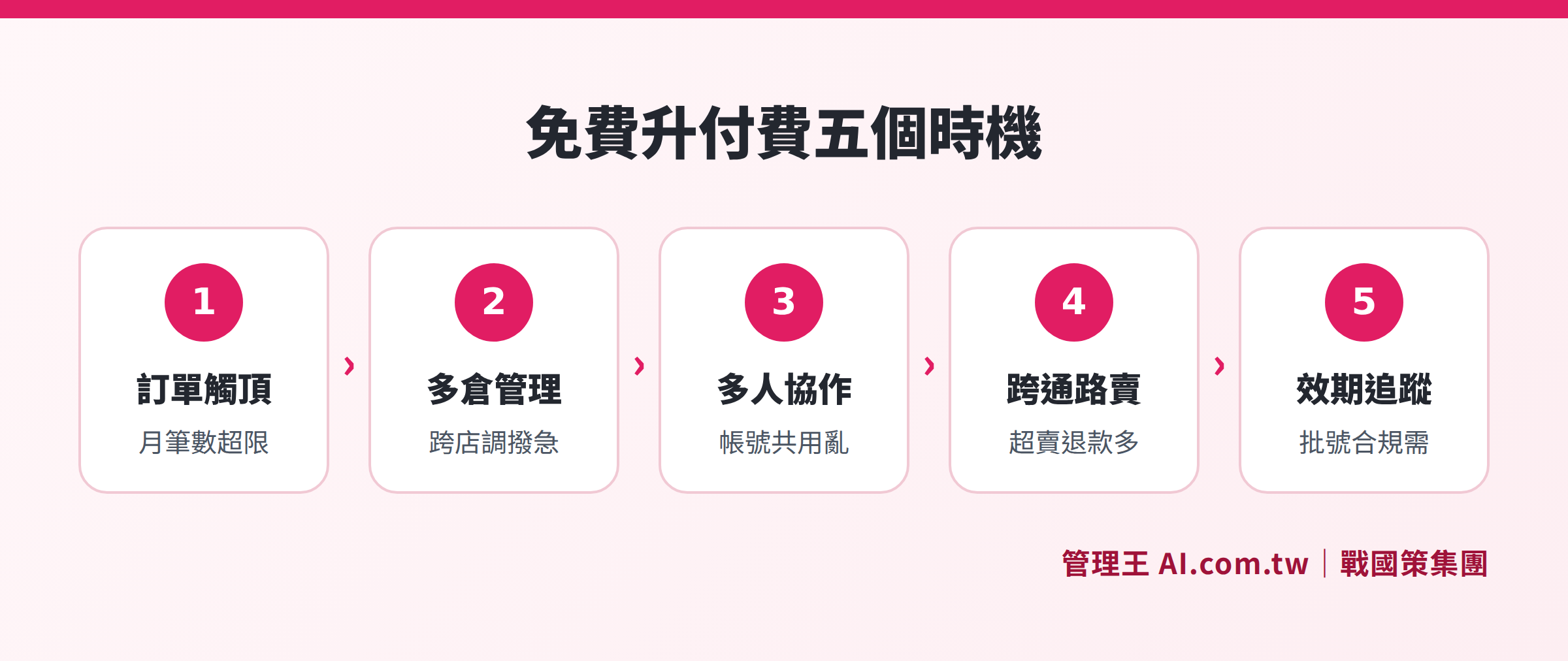
Five key indicators for upgrading: orders exceeding free limits, need for multi-warehouse management, accountability for multiple collaborations, real-time cross-channel synchronization, and compliance needs for expiration date tracking
When Should You Upgrade to a Paid Version? 5 Indicators to Consider
The core issue with the free version is not its functionality, but that when business scales exceed its boundaries, the "hidden costs" of continuing with the free version (manual fixes, over-selling refunds, lost orders) may far exceed the cost of the paid monthly fee. Here are five indicators to help you determine when to upgrade:
- Rapid Growth in Order Volume: Monthly transactions approaching or exceeding the free version's limits, leading to system slowdowns or requiring manual batch processing.
- More Than One Warehouse or Store: Branches keeping separate records, with headquarters unable to see the whole picture in real-time, and inventory transfers relying on phone confirmations, often resulting in repeated transfers or missed cargo.
- More than 3 Users Require the Inventory System: Restrictions on free version accounts force multiple users to share a single login, making it impossible to trace who performed which operations, greatly increasing management blind spots.
- Simultaneous Online and Offline Sales: Selling the same batch of inventory on e-commerce platforms and in physical stores causes over-selling due to lack of real-time synchronization in the free version, making the costs of refunds and complaints hard to estimate.
- Needs for Expiration Dates, Batch or Serial Number Management: Industries like food, pharmaceuticals, or 3C accessories require batch tracking as a basic compliance and after-sales necessity; non-paid features cannot accommodate these needs.
Comparison of Free and Paid Plans from 管理王
管理王 AI.com.tw Inventory Management operates on a subscription basis, offering a permanent free plan with no time limits; some advanced features are available for 30 days before requiring an upgrade, while AI points are a one-time quota. 戰國策 Group serves over 30,000 companies, with all features designed for Taiwanese SMEs.
Table: Key Differences in Inventory Management Between 管理王 Plans
| Plan | Monthly Fee (NT$) | Member Limit | AI Points/Month | Multi-Warehouse Management | Expiration Date Tracking | Technical Support |
|---|---|---|---|---|---|---|
| --- | --- | --- | --- | --- | --- | --- |
| Free Plan | 0 | 10 | One-time quota | 30-day trial | 30-day trial | |
| Economy Plan | 5,000 | 30 | 1,000 points | ✓ | ✓ | Phone / LINE |
| Business Plan | 10,000 | 60 | 3,000 points | ✓ | ✓ | Phone + 8h onboarding |
| Flagship Plan | 19,900 | Unlimited | 10,000 points | ✓ | ✓ | Phone + 16h onboarding |
For details and the latest pricing, please see 管理王 Service Plans. Annual payments can enjoy the equivalent of 14 months of discounts, and a single feature plan is also available for NT$1,000/month.
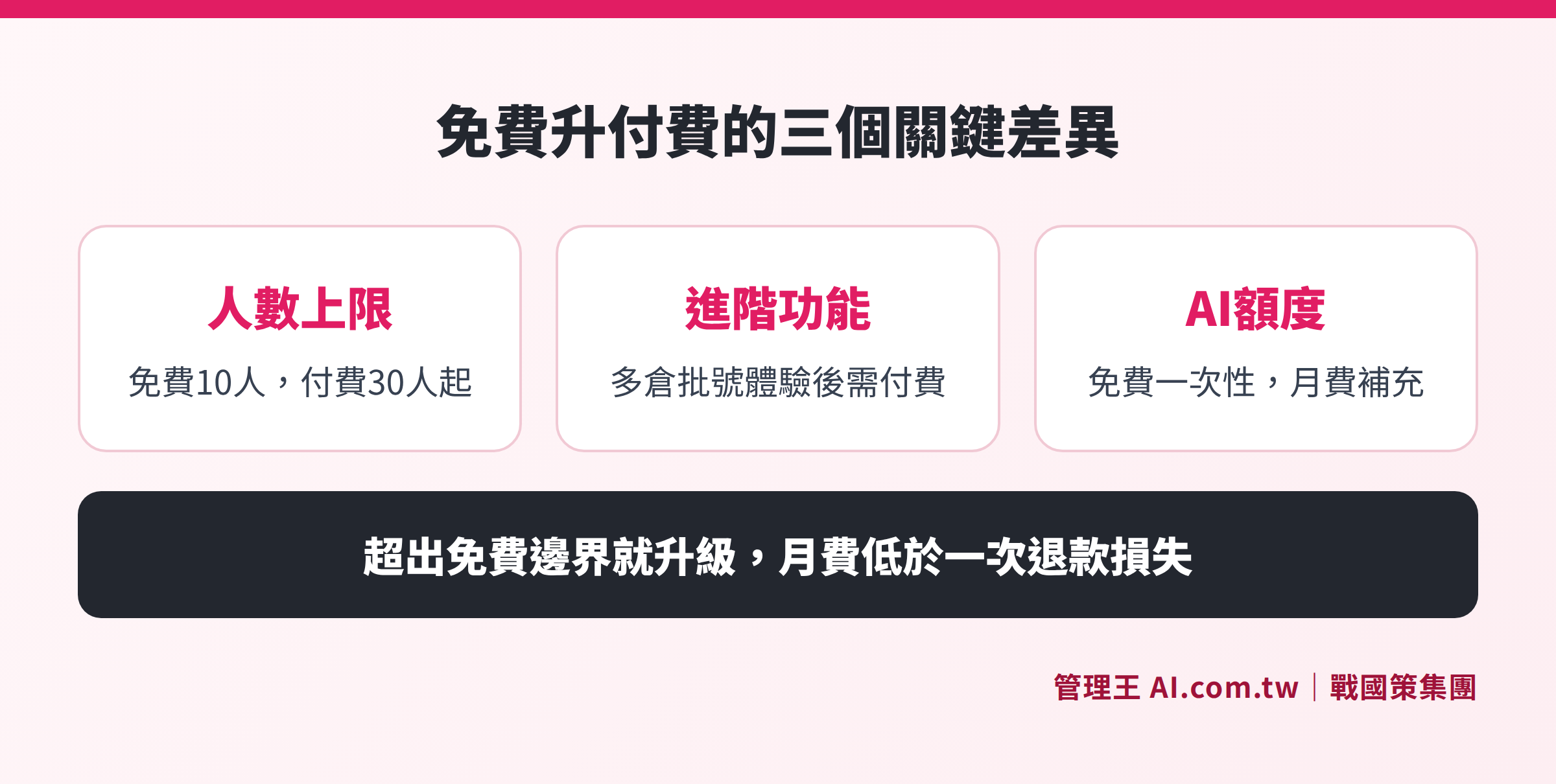
Comparison of member limits, AI points, multi-warehouse management, and expiration date tracking across 管理王's four plans
How to Use 管理王: Start Free, Upgrade as Needed
If you are considering a free inventory management system, it is recommended to start with the free plan from 管理王: registration takes 30 seconds, no credit card is required, and teams of up to 10 people can permanently use core inventory features without worrying about trial periods expiring and forcing upgrades.
The operational logic for starting with 管理王's free plan is as follows:
- Create Product Master Records: Enter product names, specifications, barcodes, costs, prices, and suppliers all at once, supporting bulk imports from Excel, making new product listings, price changes, and supplier updates all manageable on one page.
- Set Safety Stock Levels: Establish minimum stock levels for each item, with automatic alerts from the system when those levels are below the threshold, so stocking is no longer left to guesswork.
- Integrate with Other Modules: The same account can be combined with the Quoting System, Accounting Module, and POS System, automatically reducing inventory once orders are established, without the need to copy data between systems.
- Inbound and Outbound Inventory Reports: The system automatically generates reports on monthly inbound and outbound volumes, eliminating the need for manual account reconciliation.
As order volumes grow, the need for multi-warehouse management arises, or when the 30-day trial for expiration date and batch tracking expires, you can upgrade to the Economy Plan (NT$5,000/month) based on actual needs. 管理王's Procurement Module and Supplier Management are also within the same system, triggering purchase requests when stock is low, converting requests into purchase orders, and automatically receiving and storing items after delivery without switching systems.
For a deeper understanding of the complete selection logic for inventory management systems, you can refer to: What is an Inventory Management System? A Complete Guide for SMEs Upgrading from Excel.
Three Recommendations for SMEs Choosing Inventory Management Systems
Start with the Free Version to Build Usage Habits: The biggest risk in choosing an inventory management system is not insufficient functionality but rather employee disengagement. Begin with the free version to help your team habitually input data systematically, and confirm that workflows operate before evaluating upgrading, so you don't end up paying for a monthly fee that no one will utilize.
Calculate Hidden Costs Before Deciding: Multiply the hours spent on manual fixes by hourly wages, the frequency of over-selling refunds by customer complaint costs, and the loss of orders due to stock-outs; if the total exceeds the paid monthly fee, upgrading would be a worthwhile investment.
Choose Systems with High Integration Levels: An inventory system that operates in isolation, unable to link with quotations, purchases, accounting, only resolves part of the problem. When selecting an ERP system, prioritize plans that natively integrate inventory with procurement and accounting to avoid future connection costs and data inconsistencies.
Evaluate Your Inventory Management Needs
Free consultations with advisors can assist you in determining whether the current free solution is sufficient and which inventory solution best fits your business scale.
Free consultation hotline: 0800-003-191
Official LINE account: @119m
Official Website: app.AI.com.tw
Free trial: Apply for 管理王 now
Frequently Asked Questions
Can I use the inventory features of 管理王's free plan permanently?
Yes, the 管理王 free plan can be used permanently, with a member limit of 10. Product registration, inbound and outbound records, basic inventory queries, and stock alerts can be used for free over a long term; advanced features like multi-warehouse management, automatic safety stock replenishment, and expiration date tracking are available for 30 days and require an upgrade to the paid plan to continue using after the trial ends. AI features in the free plan are one-time quota only.
What size of business is a free inventory management system suitable for?
Small businesses or individual sellers with fewer than 10 employees, a single warehouse or store, and lower monthly inbound and outbound transaction numbers generally only need the free version. As your business grows to require collaboration among more than 3 people, inventory across more than 2 warehouses, or channels requiring expiration date tracking, the limitations of the free version may cause operational friction; it's advisable to consider upgrading to a paid plan.
Can free inventory management systems connect with POS?
Most free inventory management systems do not support POS integration, or integration features are limited to paid versions. 管理王's POS System operates under the same account as the inventory module for real-time online and offline stock synchronization; the integration range available under the free plan can be confirmed during the trial period; if full-channel synchronization is needed, it's recommended to upgrade to a paid plan.
Will data from the free period be retained after upgrading to a paid version?
Upon upgrading to the paid plan of 管理王, all product master records and inbound and outbound records created during the free version will be fully retained without the need for re-entry. Data is stored in a Taiwan data center (dual-machine room backup, ISO 27001 compliant) supporting exports in CSV, Excel, and PDF formats.
What is the approximate monthly fee for inventory management systems?
There is substantial variation in the fees for inventory management systems, ranging from free (limited functionality) to thousands of dollars per month (single-function SaaS), to over ten thousand per month (full-function ERP). 管理王 operates on a subscription basis, with the Economy Plan at NT$5,000/month covering 100+ features, accommodating 30 members, including inventory, procurement, and reporting modules, suitable for companies with 5 to 30 employees; for those needing only single inventory functions, there is an option for NT$1,000/month. For complete pricing details, see 管理王 Service Plans.
Data Sources
- 管理王 Inventory Management Functions Page (管理王 AI.com.tw, queried November 2026)
- 管理王 Service Plans Pricing (管理王 AI.com.tw, queried November 2026)
- Free vs Paid Inventory Software for Small Retailers (2026) (iTechGuides, queried November 2026)
- Best Free Inventory Management Software 2026 (FitSmallBusiness, queried November 2026)