Is a Free Scheduling System Enough? Function Limitations and Timing for Upgrading to Paid Plans|Scheduling System Recommendations
作者:戰國策集團

A free scheduling system is sufficient for businesses with fewer than 10 employees, but the short data retention period, lack of automatic compliance checks with labor standards, and salary integration features are three common limitations. This article analyzes the four key timing signals for upgrading to a paid plan and important points to consider.
Free scheduling systems are indeed sufficient for small businesses with up to 10 employees and simple shift patterns; however, when the number of employees exceeds the limit of the free plan, or there is a need for automatic compliance checks with labor standards and integration with payroll calculations, the limitations of the free version will become apparent. This article comprehensively analyzes what free scheduling software can do, in what scenarios it falls short, and how to determine the best timing for a paid upgrade, helping small and medium-sized business owners in Taiwan make cost-effective decisions.
What Can a Free Scheduling System Do?
The core positioning of free scheduling software is to upgrade small-scale businesses from "paper-based handwritten schedules" to "cloud-based digital schedules", allowing them to experience the basic benefits of scheduling digitalization without any costs.
Most free scheduling systems offer the following features:
- Schedule Arrangement Interface: Monthly or weekly calendar view, allowing supervisors to enter employee scheduling data
- Employee List Management: Create basic employee data and set available scheduling time slots
- Shift Settings: Customize different shifts such as morning, afternoon, evening, etc.
- Basic Conflict Detection: Generate alerts when the same person is scheduled for overlapping shifts
- Schedule Sharing: Notify employees of their schedules via link or export
- Basic Attendance Records: Record employee clock-in and clock-out times, with options for Excel or CSV export
These basic functions can effectively address the core pain points for a small business of 5 to 10 people: no more handwritten monthly schedules, employees can check their shifts at any time, and supervisors have basic attendance records readily available.
In short
Free scheduling systems are suitable for small businesses with fewer than 10 employees, simple shifts, and no need for automatic compliance checks with labor standards; once this scope is exceeded, the functional gaps will quickly escalate management costs.
Five Common Limitations of Free Scheduling Systems
Understanding the boundaries of the free version allows for timely upgrades before issues arise, rather than being forced to remedy situations during labor inspections or employee disputes.
Limitation One: Employee Count Has a Limit
Most free scheduling systems have a member count limit, usually between 10 and 30 people. Once the total number of employees exceeds this limit, the system will require an upgrade to a paid plan to add members. This is the first threshold commonly faced by rapidly growing businesses.
Limitation Two: Short Data Retention Period
Free versions typically only retain schedules and attendance data for the past 3 to 6 months. According to Article 30, Paragraph 5 of the Labor Standards Act, employers must maintain attendance records for 5 years, and employees can request to review these records at any time; employers cannot deny this. Using a free system that automatically deletes data will prevent the submission of complete attendance records in the event of labor disputes or inspections, possibly resulting in fines ranging from NT$20,000 to NT$1,000,000.
Limitation Three: No Automatic Compliance Checks with Labor Standards
Free scheduling systems usually lack the functionality for automatic checks of compliance with labor standards. The following compliance requirements need to be calculated by supervisors:
- Normal working hours do not exceed 40 hours per week (Article 30 of the Labor Standards Act)
- There should be 2 days off within every 7 days (1 holiday + 1 rest day, Article 36)
- Overtime should not exceed 46 hours per month (Article 32)
- Shift changes must be separated by at least 11 hours (Article 34, effective from March 2018)
Manually verifying these regulations is not only time-consuming but also prone to errors—especially when employees exceed 20; even just checking overtime hours each month requires substantial time investment.
Limitation Four: Cannot Automatically Calculate Overtime Pay
Free scheduling systems only record schedules and do not automatically connect to payroll calculations. Supervisors still need to export attendance data to Excel at the end of the month and manually apply overtime pay multipliers according to Article 24 of the Labor Standards Act (for weekdays, the first 2 hours of overtime are at 1.34 times, the next 2 hours at 1.67 times; for rest days, the 3rd to 8th hours of overtime are at 1.67 times and the 9th to 12th hours are at 2.67 times). This process usually takes 2 to 3 working days and has a high error rate.
Limitation Five: Does Not Support Multi-Branch and Cross-Location Management
Free versions are often designed for single locations, and cannot track clock-in locations for employees across stores or automatically attribute overtime pay to the correct store. Businesses opening a second or third branch will find schedule management increasingly chaotic.
What Signals Indicate That a Free Scheduling Version Is No Longer Sufficient?
Here are four clear indicators for assessing when to upgrade, which you can compare to your circumstances:
Table: Free Version Upgrade Timing Assessment
| Situation | Still Usable with Free Version | Consider Upgrading to Paid Plan |
|---|---|---|
| Number of Employees | Fewer than 10 | Exceeds free plan limit or is about to exceed it |
| Shift Complexity | Only fixed shifts or 2 types of shifts | 3 or more types of shifts, requires rotation or flexible hours |
| Multi-location Management | Single location | 2 or more branches or have field employees |
| Payroll Calculation Method | Fixed monthly salary, little overtime | Hourly wage, piece rate, frequent overtime calculations |
| Labor Inspection Risk | Low (startups, individual studios) | 30 or more employees, or has previously been inspected |
If you meet more than 2 conditions in the "Consider Upgrading to Paid Plan" column, the hidden costs of continuing to use the free version (additional HR operating hours, potential penalties for labor standard violations) may already exceed the monthly fee of a paid plan.
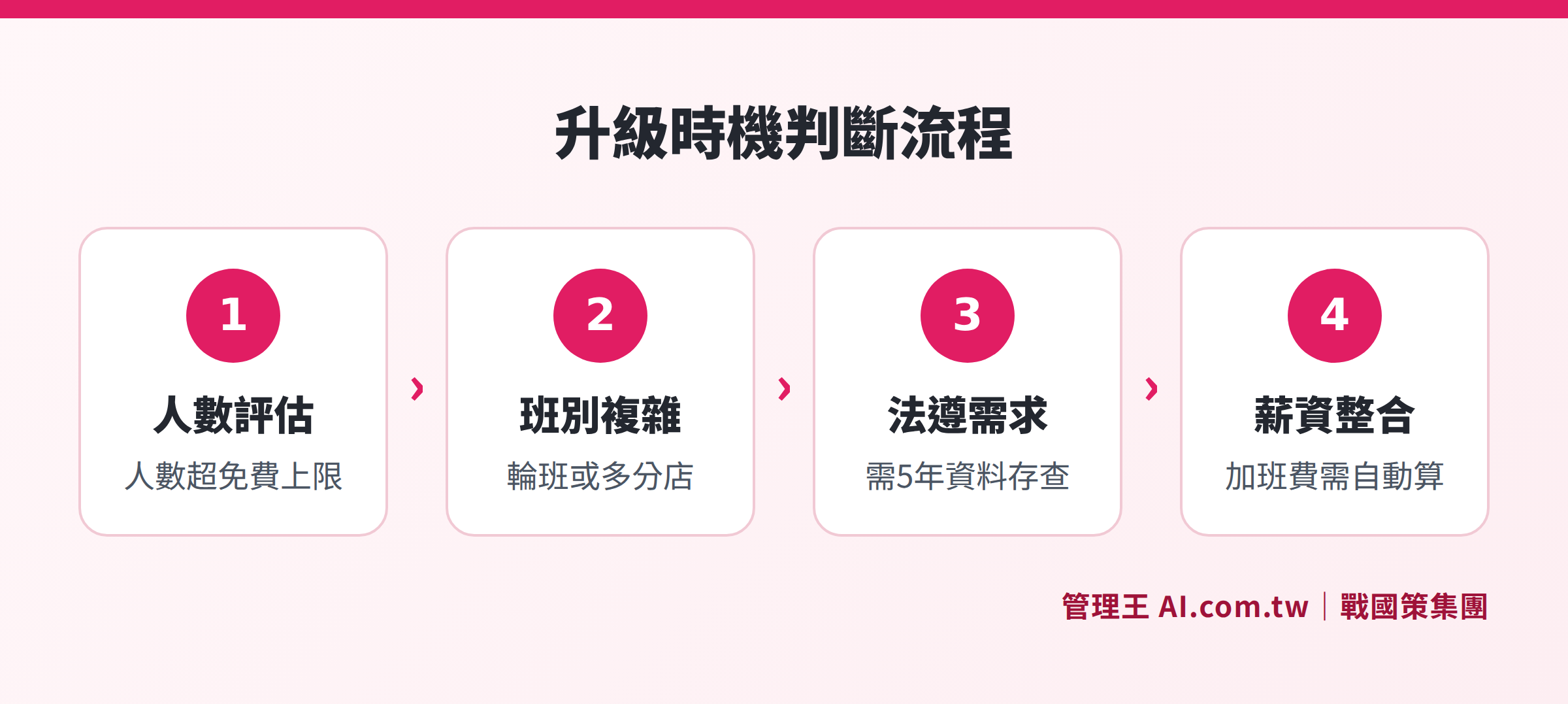
Step-by-step evaluation of whether to upgrade to a paid scheduling system based on the number of employees, shift complexity, multi-location management, and overtime pay calculation needs
What Key Upgrades Can a Paid Scheduling System Bring?
The difference between paid plans and free versions lies not only in the number of employees but also in whether the entire management loop is complete.
Table: Comparison of Features between Free Scheduling Systems vs. Paid Scheduling Systems
| Feature Item | Free Version | Paid Version |
|---|---|---|
| Employee Count Limit | 10–30 People | Depending on the plan, unlimited |
| Data Retention Period | 3 to 6 Months | 5 Years (in accordance with labor standards) |
| Automatic Compliance Checks with Labor Standards | No | Yes, automatic warnings before scheduling |
| Automatic Calculation of Overtime Pay | No | Yes, integrated with payroll systems |
| AI Automatic Scheduling | No | Yes, automatically generates fair schedules based on preferences |
| Multi-Branch Management | No | Yes, unified management of cross-location employees |
| Online Shift Change Application Process | No | Yes, requires agreement from both parties + supervisor approval |
| Clock-In System Integration | Usually No | Yes, with multiple verification methods like GPS, IP, WiFi |
| Payroll System Integration | No | Yes, attendance directly tied to payroll calculations |
The core value of a paid scheduling system is to eliminate the manual reconciliation hours for HR at the end of the month and reduce the risk of penalties for violating labor standards. For a business of 20 employees working shifts, HR typically needs 2 to 3 working days at the end of the month to compile attendance and calculate overtime pay; if upgraded to a paid integrated system, this time can be shortened to just the approval process, and the labor cost saved is often enough to cover the monthly fee.
The Relationship between Free Scheduling Systems and Compliance with Labor Standards
Enterprises using free scheduling systems often overlook legal compliance risks from three directions:
Data Retention Obligation: Article 30, Paragraph 5 of the Labor Standards Act requires attendance records to be kept for 5 years, with violators facing fines of NT$20,000 to NT$1,000,000. If a free system is used and the data retention period is insufficient, once subjected to inspection or employee complaints, there will be no evidence.
Interval Between Shift Changes: Many free systems do not automatically alert users to whether the 11-hour minimum interval between shifts is being met, making it easy for supervisors to accidentally set incorrect schedules. Violators face fines of up to NT$1,000,000 under Article 34 of the Labor Standards Act (effective from March 1, 2018).
Overtime Pay Calculation Responsibility: The Labor Standards Act clearly defines the standards for calculating overtime pay. Regardless of the software used, companies have an obligation to calculate overtime according to the law. The lack of automatic calculations in free systems does not absolve companies of legal responsibilities—when employees file unpaid wage claims, the burden of proof is on the employer.
According to the Ministry of Labor's official explanation, one common violation during labor inspections in 2023 was incomplete records of attendance documentation (source: Ministry of Labor official website). Establishing complete attendance and schedule data that can be retained for 5 years is a basic duty for all businesses using scheduling systems.
How to Evaluate the Long-Term Total Cost of Free Scheduling Software?
When choosing a scheduling system, consider not just the monthly fee but also the Total Cost of Ownership (TCO):
Direct Costs (Easy to Identify)
- Monthly fee for the paid plan (if applicable)
Hidden Costs (Easily Overlooked)
- HR Operation Time Costs: Number of hours required for manual calculation of overtime and exporting attendance reports × salary
- Error Remediation Costs: Time required to address disputes arising from scheduling errors or incorrect overtime calculations
- Compliance Risk Costs: Penalties for violating labor standards, with single fines reaching up to NT$1,000,000
- Shift Change Communication Costs: Employees relying on verbal or LINE group communications for shift swaps, needing repeated confirmations from supervisors
When the number of employees exceeds 15 and overtime is frequent, hidden costs typically exceed the monthly fee of paid scheduling solutions. This is a core reason many small and medium-sized business owners decide to upgrade after conducting their calculations.
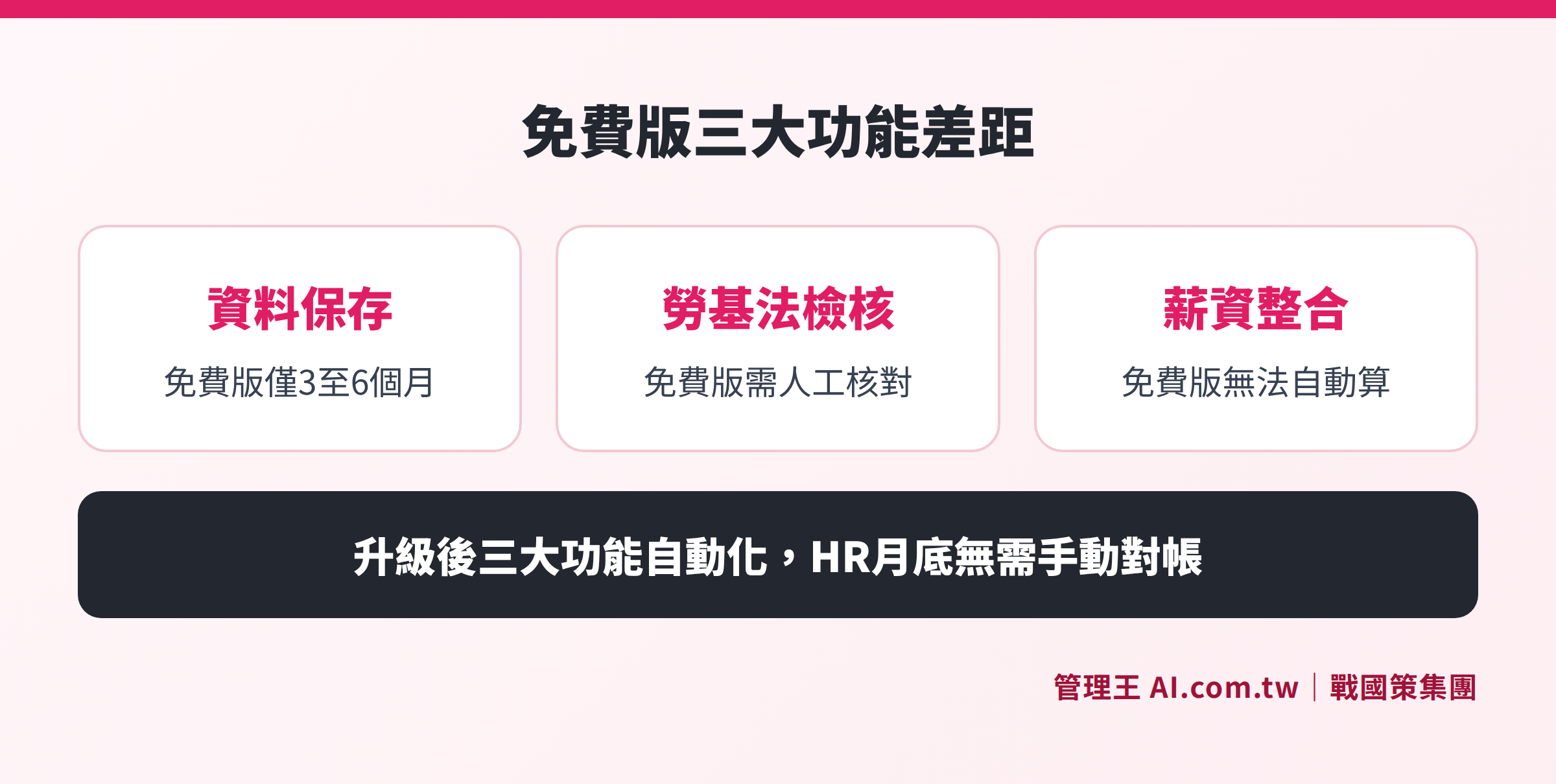
Comparison of differences between free and paid scheduling systems in terms of data retention, compliance with labor standards, payroll integration, and AI scheduling
How to Use the Management King Scheduling System
Management King AI.com.tw scheduling system offers a free plan that can be used permanently, with companies of fewer than 10 employees not needing to incur any costs while gaining access to more complete features than most free scheduling software, including shift settings, AI detection of scheduling conflicts, LINE notifications to employees, and basic reminders of labor standard hours.
The onboarding process only requires three steps:
- Set Shift and Staffing Requirements: According to the store or department, set the required minimum number of staff for morning, afternoon, evening, and night shifts, and the system will automatically alert when staff is insufficient.
- Input Employee Preferences and Schedule: Register each employee’s available scheduling times and fixed days off, allowing the supervisor to complete scheduling on a monthly calendar with drag-and-drop functionality, while AI automatically detects scheduling conflicts.
- One-Click Notification to Employees: Once the schedule is complete, the system will notify each employee of their monthly shifts via LINE, allowing them to apply for shift changes directly on their smartphones, and once agreed upon by both parties and approved by the supervisor, the schedule will update automatically.
For advanced needs (automatic compliance checks for shifts, automatic calculation of overtime pay, multi-branch cross-location management), you can upgrade to the Economic Plan (NT$5,000/month, for under 30 people) or the Business Plan (NT$10,000/month, for under 60 people). For more details, see Pricing Plans.
The scheduling system can integrate with schedule management, clock-in system, attendance analytics, and payroll calculations, forming a complete loop from scheduling to payroll, significantly shortening HR reconciliation time at month-end.
For a comprehensive guide on selecting a scheduling system, refer to How to Choose a Scheduling System? A Complete Guide for SMEs from Manual Scheduling to Automated Scheduling.
Management King provides unified management of employee data through the HR System, allowing for seamless communication of scheduling, attendance, payroll, and performance data within the same account, without the need for additional software installations or integrations.
Free Trial of Management King's Scheduling System
Consultants assist in evaluating whether the free version meets your needs, guiding you on upgrade timing and plan differences. Register for a free trial in 30 seconds to start experiencing it immediately.
Free consultation hotline: 0800-003-191
LINE official account: @119m
Official website: app.AI.com.tw
Free trial: Apply for Management King now
Frequently Asked Questions
Does the free scheduling system meet labor standards requirements?
It meets some requirements, but with conditions. As long as the free system can record daily start and end work times and retain records for 5 years, it complies with the attendance record obligation under Article 30, Paragraph 5 of the Labor Standards Act. The issue is that most free versions only retain data for 3 to 6 months, far below the statutory requirement of 5 years. Before choosing a free scheduling system, ensure you verify that system's data retention policies.
What is the biggest difference between free scheduling software and the paid version?
The most critical differences are automatic compliance checks with labor standards and integration with payroll systems. Free versions typically only handle "schedule entry" and will not automatically detect whether working hours exceed 40 hours or whether the shift change intervals are less than 11 hours; they also do not automatically calculate overtime pay, which requires HR to manually reconcile at month-end. The absence of these two functions represents the highest hidden costs in the free version.
Will there be issues using a free scheduling system for fewer than 10 employees?
For enterprises with fewer than 10 employees and simple shifts (such as fixed shifts only), using a free scheduling system is typically sufficient. It’s advisable to choose a free plan that commits to retaining data for 5 years and supports CSV exports to ensure compliance with the labor standards attendance record obligation. If future growth is planned, selecting a system that allows seamless upgrades from the free to paid plan (like Management King) can prevent data migration costs in the future when switching systems.
When should I upgrade from a free scheduling plan to a paid plan?
Any of the following circumstances indicate it’s time to upgrade: the number of employees exceeds the free plan limit; there are rotating shifts that require automatic verification of an 11-hour interval; incorrect overtime pay calculations have led to employee complaints; opening more than one branch; or having been inspected by labor authorities without comprehensive records. The monthly fee of a paid scheduling system is often offset by the operating hours saved for HR.
What limitations does Management King's free scheduling system have?
Management King's free plan is permanently available, with a maximum member count of 10, and AI functionality provided as one-time points (it needs to be replenished with an upgraded plan once used up). Advanced features like complete AI automatic scheduling, unlimited historical data retention, and multi-branch management require upgrading to the Economic Plan (NT$5,000/month) or above. For a detailed feature comparison, please visit the Pricing Plans page.
Sources
- Ministry of Labor Global Information Network - Work Hours System and Flexible Measures
- Explanation of Attendance Record Obligations under Article 30 of the Labor Standards Act
- Regulations on Shift Change Intervals under Article 34 of the Labor Standards Act
- National Regulations Database - Labor Standards Act (N0030001)
- Management King AI.com.tw Scheduling System Features
This article is for informational purposes only and does not constitute legal advice; please refer to the latest announcements from the Ministry of Labor for actual guidance.