Free Survey Tools: When Do You Start Paying? | Survey Tool Recommendations

Four mainstream free survey tools' payment thresholds summarized: Google Forms allows unlimited responses, but analysis is limited for over 10,000 entries; SurveyCake has unlimited responses but charges NT$750/month for skip logic and anti-spam; Typeform caps at 100 responses per month; SurveyMonkey allows only 10 questions per survey. 管理王's free plan is permanently available for up to 10 users, including skip logic and anti-spam features.
The answer to "when do free survey tools start charging?" depends on three dimensions: the monthly or per survey response limit, the number of questions that can be set, and whether advanced features (skip logic, anti-spam, cross-analysis) are included in the free version. Google Forms is the most lenient in these three dimensions; SurveyCake's free version also has unlimited responses, but advanced analysis features require payment to unlock; Typeform reaches its limit with 100 responses per month; SurveyMonkey's free version allows a maximum of 10 questions per survey. This article explains each platform's payment thresholds based on publicly available information (checked November 2026), assisting small and medium enterprises in Taiwan in making informed choices before subscribing.
In Summary
The differences between "fully free" survey tools vary greatly: Google Forms has the most flexible response limits, SurveyCake has the clearest feature wall, Typeform hits its limit at 100 responses per month, and SurveyMonkey has the most stringent restriction with only 10 questions.
Why Do Free Survey Tools Have Usage Limits?
Survey tools are a typical Software as a Service (SaaS) product. Response data needs storage space, AI summary, anti-spam mechanisms, cross-analysis features require computing resources, and customer service and customization also incur costs. Free plans usually serve as a "trial gateway," allowing users to develop habits before upgrading organically as business grows and needs become complex.
Understanding when each platform's free version stops being free is essentially understanding the platform's business logic and target audience. Platforms that trigger payment thresholds quickly tend to serve larger companies with budgets, while a truly friendly free version for small and medium enterprises often allows users to get basic processes started before upgrading as growth needs arise.
Below, we dissect the true limitations of the free versions of four commonly used survey tools in Taiwan.
Google Forms: Most Liberal Response Counts, But Analysis Tools Have Hidden Limits
Google Forms is the most widely used free survey tool in Taiwan. A personal Gmail account can be used for free, supporting unlimited forms, unlimited survey responses, 12 basic question types, and seamless integration with Google Sheets, without ads or forced branding.
However, "unlimited responses" does not mean "no restrictions at all." According to Google's official documentation, after a certain response volume is exceeded, the "by question" and "individual response" viewing modes become unavailable; if a survey exceeds 50,000 responses, summary charts may not display correctly. In other words, the free version of Google Forms is suitable for "data collection" but not for in-depth analysis of a large number of responses.
What features require payment?
The following features require a subscription to Google Workspace (starting plan around $7 to $14 USD/person/month):
- AI Text Summary: Google Forms free version does not have AI summary functionality; even with Workspace upgrade, AI summary analysis has limitations (according to Google's official documentation).
- Prevent Duplicate Responses: The free version cannot set a "one submission per person" mechanism, making data authenticity unguaranteed.
- Enterprise Management Backend: Cannot centrally manage survey accounts of members within the organization or set data access permissions.
When is Google Forms "good enough"?
Personal surveys, event registrations, and small internal surveys (like department quarterly satisfaction surveys, with collections less than a few hundred) typically do not require payment. Once there is a need for anti-spam features or cross-departmental data comparison, one reaches the capability limits of Google Forms.
SurveyMonkey: A Maximum of 10 Questions Per Survey
SurveyMonkey is one of the most recognized survey platforms in the Western market, with a large global user base. However, its free version (Basic) has the strictest limitations among the four tools.
According to SurveyMonkey's official pricing page (checked November 2026), each survey can design a maximum of 10 questions, and the response quantity per survey is also limited. If exceeded and not upgraded, the extra responses cannot be viewed.
For surveys like "customer satisfaction surveys" or "employee engagement surveys" that require understanding multiple facets, the 10-question limitation makes it almost unusable: just the basic background variables (department, seniority) combined with a few NPS question sets can easily exceed the 10-question limit.
SurveyMonkey's Payment Starting Point
According to publicly available information (checked November 2026), the Team Advantage plan is NT$750/person/month, with a minimum subscription of 3 people (i.e., a minimum of NT$2,250/month), billed annually, including unlimited survey questions and 50,000 responses per year. A personal plan also offers monthly payment options, but at a higher cost.
SurveyMonkey’s advantage lies in its rich survey templates and widespread use in the international academic and market research community, suitable for enterprises or research institutions with professional research needs, but for budget-constrained small and medium enterprises in Taiwan, the free version with 10 questions can hardly solve practical issues.
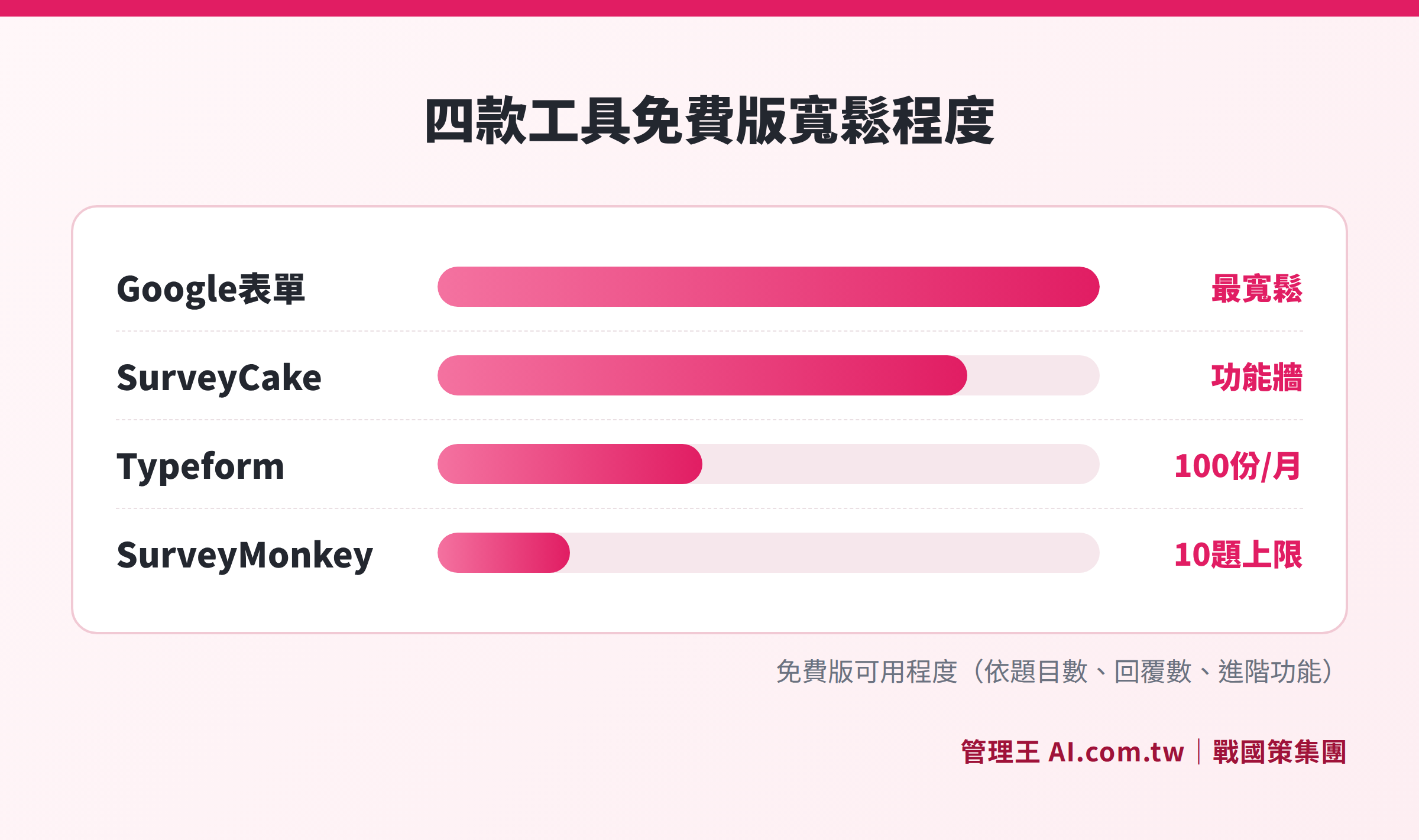
Key limitations of the free versions of four mainstream survey tools: Google Forms allows unlimited responses but is limited in analysis, SurveyCake allows unlimited responses but requires payment for advanced features, Typeform allows up to 100 responses per month, and SurveyMonkey limits to 10 questions per survey.
Typeform: Reaches Limit at 100 Responses Per Month
Typeform is known for its conversational survey experience, with each question displayed in full screen for a smooth response process, offering higher design quality. It has stable users among personal brands, market research, UX research, and other groups.
According to an article comparing online survey platforms published on the difference between free and paid versions (data check time: November 2026), Typeform's free version collects a maximum of 100 survey responses per month, with no limit on the number of questions and advanced features like skip logic also unlimited—but once the monthly response count exceeds 100, the system stops accepting new responses until the next month resets.
For general small events or personal use, 100 responses might be sufficient. However, for client satisfaction surveys or employee quarterly surveys, where hundreds of responses are often needed from the same survey, the 100-response cap quickly becomes worthless.
Upgrade Costs
Typeform's Basic plan costs around $25 USD/month (billed annually), canceling the monthly response limit and adding brand removal and advanced analysis. If collaboration or a higher response volume is needed, higher plans must be considered.
Typeform's support for a Chinese interface is limited, making traditional Chinese experience and localized service additional considerations for small and medium enterprises primarily targeting the Taiwanese market.
SurveyCake: Unlimited Responses but Advanced Features Have a Clear "Feature Wall"
SurveyCake is a locally developed survey tool in Taiwan, with a traditional Chinese interface that complies with Taiwanese business practices, making it one of the more popular survey platforms among small and medium enterprises in Taiwan.
According to SurveyCake's official site (checked November 2026), the BASIC plan is completely free and permanently available, including unlimited surveys, unlimited responses, and unlimited questions. This makes SurveyCake almost without usage barriers in pure "data collection" terms.
However, SurveyCake’s business model does not rely on response number limits for upgrades, but rather on the "feature wall": all advanced features are centralized in the PRO plan. Users only encounter a payment threshold when they reach the desire for “smarter surveys.”
Features requiring an upgrade to PRO to use (according to official site information):
- Skip Logic and Conditional Branching: Show different subsequent questions based on the respondent’s answers to enhance relevance.
- Prevention of Duplicate Submissions (Anti-Spam): Prevent the same browser or account from submitting multiple times.
- Cross-Analysis: Compare response results based on background variables (gender, department, age group).
- Embedding Marketing Tracking Codes: Include GA4, Facebook Pixel, GTM tracking codes.
- Public Sharing of Results: Directly publicize the survey statistics page.
SurveyCake PRO Costs (according to official site, November 2026)
| Plan | Monthly Payment | Annual Payment (Average Monthly) |
|---|---|---|
| PRO | NT$1,099 | NT$750 |
| TEAM (3 people, including collaboration function) | NT$3,399 | NT$2,150 |
The TEAM plan includes multi-account collaboration, survey group management, and member permission settings, suitable for marketing or research teams managing multiple surveys together.
Overview of Payment Thresholds for Four Free Survey Tools
Table: Comparison of Payment Thresholds for Mainstream Free Survey Tools (based on publicly available information from each platform, checked November 2026)
| Tool | Response Limit in Free Version | Question Limit in Free Version | Anti-Spam | Skip Logic | Payment Starting Point |
|---|---|---|---|---|---|
| Google Forms | Unlimited (analysis limited for over 10,000) | Unlimited | No | Yes (Basic) | No forced (Workspace-based upgrades) |
| SurveyCake | Unlimited | Unlimited | Requires PRO | Requires PRO | NT$750/month (annual payment) |
| Typeform | 100 responses/month | Unlimited | Requires payment | Included in free version | Approximately $25 USD/month (annual payment) |
| SurveyMonkey | Limited | 10 questions/survey | Requires payment | Requires payment | NT$750/person/month (annual payment, minimum 3 people) |
Based on publicly available information, checked November 2026; actual costs subject to the latest announcements on each platform.
When Should You Definitely Upgrade to Paid Plans?
Understanding free limitations leads to the following five scenarios indicating that "the free version does not meet the needs":
1. Monthly Response Volume Exceeds Free Limit
The limitation of 100 responses/month in Typeform quickly reaches capacity for any survey needing "all members" to respond (employee satisfaction surveys, all-client NPS). SurveyMonkey's 10-question limit makes designing complex surveys impossible.
2. Need to Ensure Data Authenticity
Employee engagement surveys, candidate evaluations, vendor scoring forms—any survey whose results will influence decisions requires an anti-spam mechanism. Without it, multiple submissions from the same individual may seriously distort results, leading to flawed decision-making.
3. Need Skip Logic
As survey questions exceed 8, requiring each respondent to answer all questions lengthens response time and lowers completion rates. Setting logic such as "if selecting A, skip to question 5" can significantly improve completion rates, but this requires PRO for SurveyCake or a paid version for SurveyMonkey.
4. Need Cross-Analysis to Identify Differences
Questions like "Is there a difference in employee satisfaction across departments?" and "Do northern and southern clients score services differently?" cannot be directly answered in the free versions of Google Forms, SurveyMonkey, or SurveyCake.
5. Need Survey Results to Integrate with Backend Systems
Survey responses need to be entered into a CRM system, trigger customer service tickets, or send LINE notifications via backend integration, relying solely on the free version with Zapier is high maintenance.
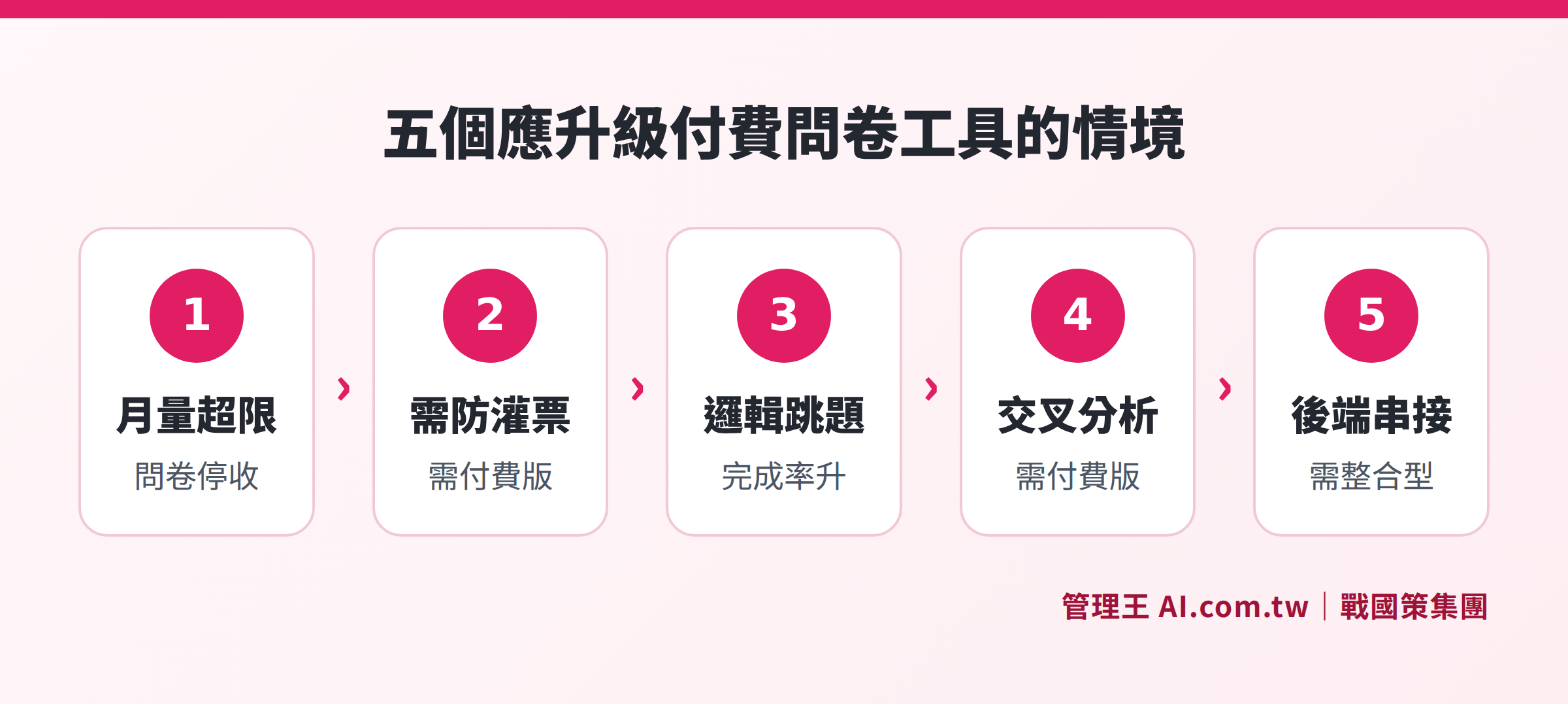
Five scenarios for upgrading: monthly responses exceed limits, need for anti-spam, need for skip logic, need for cross-analysis, and need to connect with backend systems.
How to Use 管理王's Survey Tool
管理王 AI.com.tw Survey Tool is a module within an integrated management platform, designed to solve the independent survey tool issues of "functional independence and difficulty integrating with backends."
The free plan can be used permanently, without charge for up to 10 members, including:
- Multi-type question creation (multiple choice, checkbox, open ended, NPS, 1-10 scoring, matrix questions)
- Skip logic settings
- Multi-channel distribution (LINE, Email, QR Code)
- Automated sending schedules and reminder notifications
- Analysis dashboard (average scores, standard deviation, AI open text summaries)
- Anti-duplicate submission mechanism
More importantly, survey results can be directly entered into the same system's CRM customer data without requiring additional Zapier setups, triggering updates for customer satisfaction dashboards, or automatically pushing follow-up messages via marketing automation rules.
How to Operate
After entering the survey tool, select "Create Survey", design questions one by one based on question types, and upon completion, select sending lists in the "Sending Settings" (can specify segments of members, like customers who made purchases last month), set scheduling time and reminder days. After collection, view the dashboard in the "Analysis" page, and for open-ended questions, click "AI Summary" to obtain major themes organization within seconds.
戰國策 Group serves over 30,000 enterprises, with all data from 管理王's survey tool stored in Taiwan's data center, complying with localization requirements of personal data regulations. For an overall function guide and design methods for survey tools, refer to How to Design Surveys That People Will Fill Out? Processes from Design to Distribution to Analysis.
To learn about complete functional plans and costs, please refer to 管理王 Service Plans.
Try 管理王 Survey Tool Now, Permanently Free for Up to 10 People
管理王 survey consultants can assist you in evaluating if the free version meets your needs, designing skip logic surveys, and integrating CRM systems, ensuring that collected data flows directly into business processes.
Free consultation hotline: 0800-003-191
LINE official account: @119m
Official website: app.AI.com.tw
Free trial: Apply for 管理王 now
Frequently Asked Questions
Is Google Forms really completely free? Are there any paid scenarios?
Google Forms is free in itself and can be used with a personal Gmail account. Payment thresholds mainly occur in two scenarios: one is the need for AI open text summary features, requiring a subscription to Google Workspace; the other is the need for enterprise management backend functionality (centrally managing organizational member accounts, setting data access permissions), which also requires a Workspace subscription. If just collecting personal or small surveys, there is absolutely no need to pay.
Does SurveyCake's free version have ads or watermarks?
According to SurveyCake's official site (checked November 2026), the BASIC free plan indeed has no response limit, but the survey page may display a SurveyCake watermark or brand identification. If you need to "completely remove brand logos," you must upgrade to the PRO plan. The PRO feature list on SurveyCake’s official site also mentions "Ad-Free Responses," indicating that the free version's response pages may contain advertising content.
I just want to create an employee satisfaction survey, do I need to pay?
It depends on the number of respondents and whether you need anti-spam features. If the number of employees is small (e.g., less than 20), and you trust employees won't fill out multiple times, SurveyCake BASIC or Google Forms free version typically suffices. If there are over 100 employees, requiring anonymous submissions and preventing duplicates, or needing cross-analysis (e.g., comparing scores from different departments), consider evaluating SurveyCake PRO (NT$750/month annual payment) or an integrated platform. 管理王 survey tool's free plan supports up to 10 members, while those exceeding 10 may consider paid plans.
What happens if Typeform exceeds 100 submissions?
According to data from the published online survey comparison article, Typeform's free version stops accepting new responses once the maximum of 100 responses per month is reached, until the quota resets the next month. Respondents exceeding the limit will see a submission failure notice, and responses will not be queued. If there’s a timeliness requirement (e.g., needing responses collected by the registration deadline), the 100-response limit may cause data loss.
Is it necessary to pay for CRM integration with survey tools?
In most standalone survey platforms (SurveyCake, Typeform, SurveyMonkey), CRM integration requires using third-party automation tools like Zapier or Make, and Zapier’s free version also has task quantity limits. An integrated platform like 管理王 AI.com.tw aligns the survey module with the CRM system, allowing response data to flow directly into the CRM without needing additional setups. The free plan also includes this capability.
Data Sources
- SurveyCake Official Pricing Page (checked November 2026)
- SurveyMonkey Pricing Page (checked November 2026)
- SurveyMonkey Complete Plan Comparison (checked November 2026)
- 管理王 AI.com.tw Survey Tool Function Page (checked November 2026)
- Online Survey Platform Comparison: What's Different Between Free and Paid Versions (checked November 2026)