The Cost of Free Video Editing Software: Watermarks and Export Limitations Explained|Video Editing Software Recommendations

An overview of the watermark conditions, resolution limits, and commercial licensing specifications for 7 mainstream free video editing software options, explaining which tools truly have no hidden costs, helping Taiwan's small and medium enterprises find suitable video editing tools.
Is free video editing software really 'free'? Most tools automatically add a watermark upon export, limit the maximum quality to 1080p, or unexpectedly change to paid services after exhausting your monthly AI quota. This article compiles the actual limitations of mainstream free video editing software available in the market, detailing watermark trigger conditions, maximum export resolutions, commercial licensing specifications, and options with no hidden costs, so you can clearly understand the rules before downloading and choose the tools that fit your needs.
Why Do Free Video Editing Software Add Watermarks?
Watermarks are a common strategy used by software vendors to encourage users to upgrade to paid plans. When you render a video with the free version and see "Powered by CapCut" or a brand logo, each playback serves as advertising for the vendor—simultaneously reminding you, "Upgrade to remove it."
There are three common scenarios that trigger watermarks:
- Automatically Added: Regardless of the materials used, brand markings are always included upon export (this is the case for some older tools).
- Triggered by Using Paid Materials: Applying any effect, music, or template marked with the "Pro" label immediately triggers a watermark upon export.
- Free but with Quotas: Initially does not add a watermark, but after reaching the monthly AI functionality limit, some features require payment to continue using them.
Understanding the trigger conditions can help you make the right choice when your budget is limited.
Actual Restrictions of Mainstream Free Video Editing Software
The following is a comparison of the limitations of the mainstream tools' free versions as of 2025 (sources are listed at the end of the article) for quick reference.
Table: Overview of Mainstream Free Video Editing Software Limitations (2025)
| Software | Watermark Conditions | Export Limit | Commercial Use | Notes |
|---|---|---|---|---|
| CapCut Free Version | Triggered by using Pro materials | 1080p | Allowed | Limited after free AI quota usage |
| Canva Free Version | Triggered by using Premium materials | 1080p | Allowed | Storage limit of 5 GB |
| DaVinci Resolve Free Version | None | 4K UHD 60fps | Allowed | Studio version requires a one-time payment |
| iMovie | None | 4K UHD 30fps | Allowed | Limited to Apple devices |
| Clipchamp Free Version | Triggered by using Premium features | 1080p | Allowed | 4K requires Microsoft 365 |
| OpenShot | None | Unlimited | Allowed | Completely open-source and free |
| Kdenlive | None | Unlimited | Allowed | Completely open-source and free |
In a Nutshell
The watermarks on free video editing software are mostly "condition-triggered", not universally added; options truly with no restrictions are DaVinci Resolve, iMovie (Apple devices), OpenShot, and Kdenlive.
CapCut Free Version: Most Popular, Most Limitations
CapCut has a large user base in Taiwan and globally, primarily due to its smooth mobile operation, a wealth of templates, and useful automatic subtitle features. However, several limitations are often discovered by users afterward:
Watermark Trigger Conditions
As long as you apply any effect, filter, sticker, or music labeled as Pro in the project, a CapCut brand ending will automatically be added when exporting the video. If only materials marked "Free" are used throughout the process, there will be no watermark upon export.
AI Functionality Monthly Usage Limit
- Automatic subtitles: maximum of 10 minutes per video
- AI auto-editing: 5 times per month
- Background removal: 5 times per month
Maximum Resolution Limit
The free version supports a maximum of 1080p; to export in 4K, you need to upgrade to Pro (according to the official page, the monthly fee is about $9.99 USD, or $89.99 USD annually, depending on exchange rates and regions, so check the official site for the latest announcements).
Commercial License
The official policy allows users of the free version to use videos for commercial purposes, but videos produced with Pro materials and containing watermarks may raise licensing concerns when used in commercial contexts—it's recommended to verify that all materials used are labeled Free before use.

Comparison of watermark trigger conditions for the free versions of CapCut, Canva, and Clipchamp: left side uses free materials (no watermark), right side uses Pro materials (triggers watermark)
Canva Free Video Editing: A Designer's Favorite, But Many Material Traps
Canva is popular for its drag-and-drop design interface, integrating video features within one platform, making it convenient for marketers who need to create both static graphics and dynamic videos simultaneously.
Actual Limitations of Free Version Videos
| Item | Free Version | Pro Version |
|---|---|---|
| Maximum Video Length | 30 minutes | Unlimited |
| Storage Space | 5 GB | 1 TB |
| Export Resolution | 1080p | 4K (in some formats) |
| Watermark | Triggered by using Premium materials | None |
| Brand Templates | 1 set | Unlimited sets |
The biggest trap of Canva's free version is that the most enticing stock video clips and music on the platform mostly belong to the Premium category. If you accidentally add a Premium material during the design process, a watermark will appear upon downloading the entire video, and you'll need to either remove that material or upgrade your account to cancel it.
DaVinci Resolve Free Version: The Strongest Truly Free Professional Option
Blackmagic Design's DaVinci Resolve free version is one of the few truly "not limited in features" professional editing tools on the market. The free version includes:
- Support for exporting up to 4K UHD (3840×2160) 60fps with absolutely no watermarks
- Professional color correction and grading tools (Fairlight audio, Fusion visual effects)
- Multiplayer collaboration features
- No usage counts or monthly quota restrictions
Situations where you need to upgrade to the Studio version (one-time purchase of about $295 USD, based on the latest pricing on the official site) include: needing 32K resolution, hardware-accelerated H.264/H.265 encoding (which significantly reduces rendering time), and advanced AI tools like Magic Mask for object masking, face recognition, and voice isolation.
If you're only editing commercial videos from 1080p to 4K, the free version is completely sufficient. The only obstacle is the learning curve—the interface of DaVinci Resolve is more complex than CapCut, so it's recommended to use official free tutorial videos to get started.
iMovie and Clipchamp: Platform-Bound but Completely Free
iMovie (Apple)
iMovie is pre-installed for free on macOS and iOS, with no subscription fee, no watermarks, and supports a maximum export of 4K UHD 30fps. The main limitations are:
- Limited to Apple devices (Mac, iPhone, iPad)
- A maximum of two video tracks on the timeline
- Resolution is determined by the first material added and cannot be set manually
- No motion tracking and no multi-point color correction
It is suitable for Apple ecosystem users to produce simple to moderately complex marketing videos.
Clipchamp (Microsoft)
Clipchamp is integrated within the Microsoft 365 ecosystem, with a free version built into Windows 11. The free version will not have a watermark when using purely free materials, with an export limit of 1080p; if you require 4K or more Premium resources, you need to obtain them through a Microsoft 365 subscription. Commercial licensing: allowed.
Open Source Free Options: OpenShot and Kdenlive
OpenShot and Kdenlive are two completely open-source free video editing software options with the following features:
- No fees, no watermarks, no quota restrictions
- Support multi-track timeline, keyframe animation, and 3D titles
- Unlimited export formats and resolutions
- Commercial use is completely allowed (GPL v3 licensing)
The downside is that the UI updates more slowly and there are fewer official template resources, requiring users to import their own materials. These options are suitable for users familiar with open-source tools who don't mind navigating on their own.
Four levels from basic to professional: Entry-level (iMovie, Clipchamp), Mainstream (CapCut, Canva), Professional Free (DaVinci Resolve), Completely Open Source (OpenShot, Kdenlive)
Four Key Questions When Choosing Free Video Editing Software
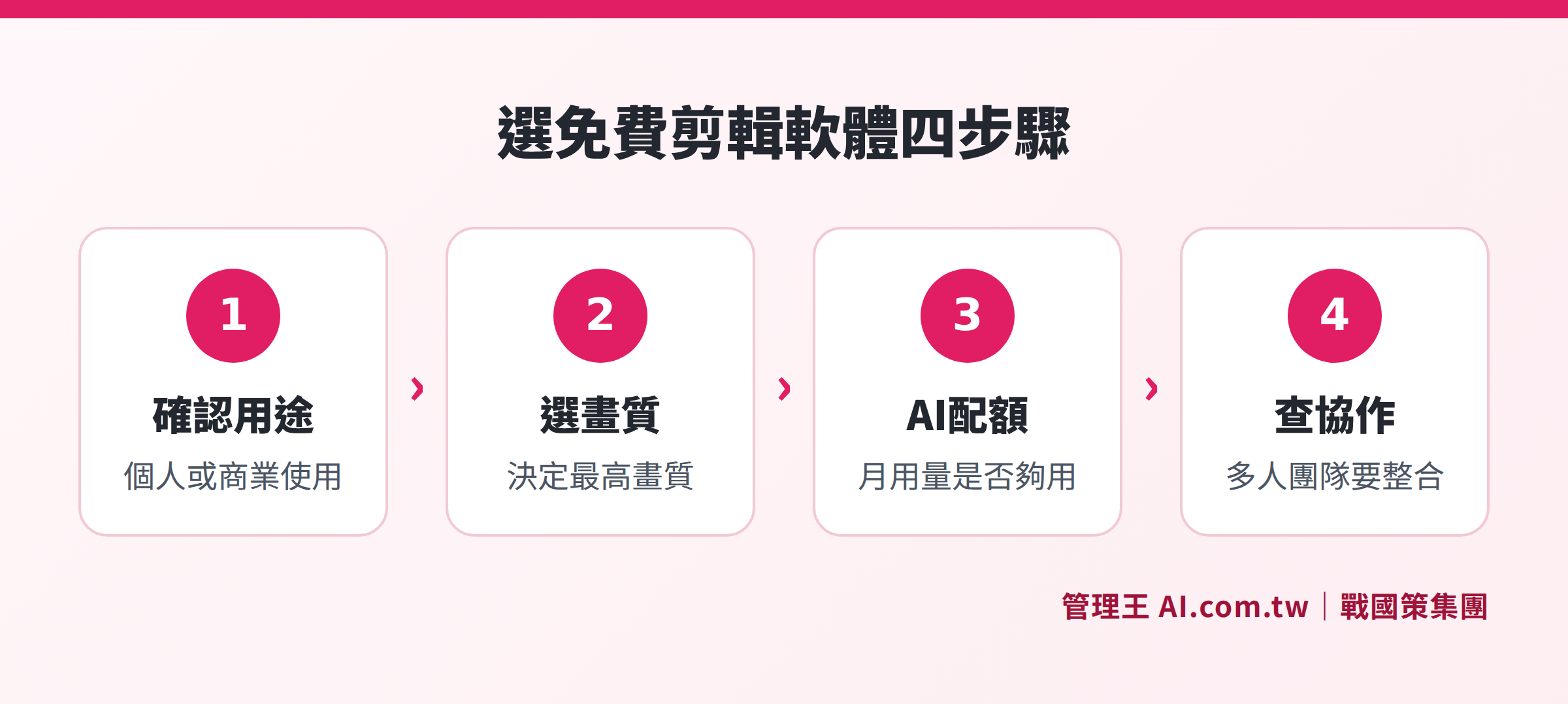
Before downloading, it is recommended to answer the following four questions to help narrow down your choices:
1. Is the final use of the video personal or commercial?
If it's for commercial use, confirm the tool's commercial licensing policies; using videos that trigger watermarks from Pro materials for advertising or client presentations could lead to copyright issues.
2. What is the required maximum resolution?
Most free versions have a maximum of 1080p; if you need 4K output (for example, for YouTube channels or exhibitions), DaVinci Resolve free version is the best choice.
3. Are AI features a core need or used occasionally?
CapCut's AI automatic subtitles are very convenient, but once you exceed the monthly quota, you need to pay; if AI functionality is used daily, the monthly subscription cost needs to be accounted for.
4. Is it for team collaboration or personal use?
DaVinci Resolve free version supports multi-user collaboration; CapCut and Canva's collaboration features largely belong to Pro functionalities.
The Hidden Costs of Free Versions: Time Costs Can’t Just Be Measured in Money
Beyond watermarks and resolution, there are several often-overlooked costs when using free versions:
- Advertisement Time: Some free tools insert ads into the interface, requiring you to close ads every time you open the tool to continue.
- Export Wait Time: Free versions usually use CPU rendering, making export speed significantly slower than paid versions with GPU acceleration; rendering a 10-minute 1080p video may take 20 to 40 minutes or longer (actual time varies based on computer specifications).
- Cloud Storage Limitations: When free version cloud storage is insufficient, you will need to manage materials manually, increasing operational time.
- Version Update Discrepancies: Some tools only provide the latest functionality in paid versions, with free versions continuing to reduce features.
For small and medium enterprises, the time marketers spend each month overcoming tool limitations often exceeds the cost of directly subscribing to a paid version. Especially considering export wait times, if there are 10 to 20 videos needing processing in a month, rendering alone may consume half a workday, making this hidden cost easy to overlook during budget assessments. It's recommended to conduct real export speed tests with the same materials before making a formal decision on the tools, and compare that alongside subscription costs in your total cost comparison.
How to Use the Video Professional Editor from 管理王
The Video Professional Editor from 管理王 AI.com.tw is an online video editing tool integrated into 管理王, designed specifically for small and medium enterprises in Taiwan that do not wish to install desktop software and need to complete the entire process from editing to uploading within a browser.
Actual操作流程:
- Log into your 管理王 account and go to "Marketing System > Video Professional Editor"
- Upload your materials, arrange clips on the timeline by dragging, and add text cards and brand templates
- One-click switch between 16:9 / 9:16 / 1:1 ratios, adapting the same material for YouTube, IG Reels, TikTok
- Apply your company's logo and color scheme to ensure visual consistency in each video
- Once complete, directly schedule for publication to multiple platforms via Social Scheduling Management
Native integration with other marketing modules: The edited videos can be directly used in Landing Pages or paired with AI Short Video Studio to automatically generate various formatted versions. The Material Library and Music Material Library are also within the same system, avoiding any platform swapping.
The free plan can be used indefinitely, core editing features have no time limitations, and AI functionality is based on point calculations (the free plan includes one-time points). If you need higher AI usage or more collaborative team members, you can upgrade to plans starting from NT$5,000/month according to your needs. For detailed plan comparisons, see the 管理王 pricing page.
A Complete Learning Guide for Video Editing from Scratch serves as an overview of the theme series, recommended for reading to understand the overall video marketing workflow; An Eight-Software Comparison of Video Editing Software Features provides a thorough comparison of paid version functionalities.
Free Trial of 管理王 Video Editor
Consultants assist in evaluating video marketing needs, explaining how to start with the free plan, and gradually upgrading to a complete solution for commercial use.
Free consultation hotline: 0800-003-191
LINE Official Account: @119m
Official website: app.AI.com.tw
Free trial: Apply for 管理王 now
Frequently Asked Questions
Can the watermarks added by free video editing software be removed in post-production?
Technically it can be removed through post-edit cropping or overlaying masks, but most tools' terms of use explicitly prohibit this, and violating the terms could lead to account suspension. The simplest solution is to choose tools that do not add watermarks from the start, such as the free version of DaVinci Resolve or iMovie.
Can CapCut's free version be used for commercial advertising videos?
CapCut permits commercial use of the free version, provided that the video does not contain any Pro materials triggering watermarks. If the video contains a watermark, it means there are Pro materials involved, and licensing for using these materials commercially should be confirmed. It's advisable to read CapCut's terms of use thoroughly before deciding.
Does DaVinci Resolve's free version really have no functional limitations?
DaVinci Resolve's free version indeed has no watermarks, no usage count restrictions, and completely free exports below 4K. Upgrading to the Studio version is necessary mainly when needing more than 32K ultra-high resolution, requiring faster GPU-accelerated rendering (significant H.264/H.265 encoding), and needing advanced AI tools like Magic Mask. For general commercial video production, the free version is usually sufficient.
Can free video editing software be used on both Mac and Windows?
CapCut, Canva, and DaVinci Resolve's free versions support both Mac and Windows; iMovie is limited to Apple devices; Clipchamp is primarily integrated into Windows 11, with access on Mac through browsers; OpenShot and Kdenlive support Mac (Intel), Windows, and Linux.
Which free video editing software is most suitable for small and medium enterprise teams?
For small and medium enterprises that require multi-user collaboration and have fixed brand identity needs, it's recommended to consider integrated platforms (such as the 管理王 Video Professional Editor) to avoid inconsistent brand visuals caused by each employee using different tools. If manpower is limited and mainly one person handles editing, the professional features of DaVinci Resolve's free version combined with its zero watermark policy are the strongest free option for personal use.