How to Prevent Buddy Punching with Location-Based Punch Apps? Comparing GPS, Wi-Fi, and Photo Verification|Punch System Recommendations

Location-based punch apps verify employee attendance using three technologies: GPS geofencing, Wi-Fi binding, and photo evidence. The combination of these methods can significantly increase the difficulty of buddy punching. This article compares the technical principles, strength of anti-buddy punching measures, and applicable scenarios to help businesses choose the right verification combination.
Location-based punch apps are attendance systems that verify if employees are physically present at a designated location using technologies such as mobile GPS coordinates, Wi-Fi base station IDs, or IP addresses before allowing them to punch in. Compared to traditional magnetic cards or fingerprint machines, the core value of location verification lies in the principle of "only those who are present can punch in," which significantly increases the difficulty and cost of buddy punching. There is no single technology that can completely prevent buddy punching, but the simultaneous use of GPS, Wi-Fi, and photo verification mechanisms can leave a traceable audit trail of buddy punching activities, making the costs of buddy punching outweigh the benefits. In this article, we compare mainstream verification methods across three dimensions: technical principles, strength of anti-buddy punching measures, and applicable scenarios, aiding the owners of small and medium-sized enterprises in Taiwan to choose the right tools.
What is Buddy Punching? What Are the Legal Consequences?
Buddy punching refers to employees asking others to punch in or out on their behalf, or asking colleagues to operate their phones to create false records of "being present."
According to Article 30, Sections 5 and 6 of the Labor Standards Act, employers must maintain attendance records and retain them for five years, with records to be noted to the minute each day. If attendance records are inaccurate (for example, the employee arrives at 09:30 but punches in at 09:00), it may trigger the following legal risks:
- For Employers: If discrepancies between records and reality are found during labor inspections, fines ranging from NT$20,000 to NT$1,000,000 may be imposed in accordance with Article 79 of the Labor Standards Act.
- For Employees: Court cases show that deliberately falsifying attendance records to obtain undeserved wages could constitute fraud (Article 339 of the Criminal Code), which has led to prosecutions; employers have grounds to terminate employment without severance pay under Article 12, Item 1, Clause 2 of the Labor Standards Act (serious violation of work rules).
In Summary
Buddy punching is not just a "minor offense"; employees may face criminal fraud charges, while employers may receive penalties during labor inspections.
GPS Location Punching: Principles, Accuracy, and Limitations
How GPS Works
Mobile GPS calculates the user's latitude and longitude coordinates by receiving satellite signals. The location punch system sets a geographical geofence with the target location as the center and a specific radius (usually 50 to 200 meters); employees can only successfully punch in within the geofence range.
Applicable Scenarios for GPS
- Field Sales, Security, Mystery Shoppers: Employees are dispersed across different locations, making GPS the only way to verify across sites.
- Construction Sites, Factory Areas: Geographically defined areas allow a 100-meter geofence to accurately cover work zones.
Limitations of GPS
GPS accuracy declines in indoor, basement, or densely built-up areas, with errors potentially exceeding 50 to 100 meters. Malicious individuals can also spoof coordinates using "GPS simulation apps," making it crucial not to rely solely on GPS. Therefore, GPS is typically used in combination with other verification methods.
Wi-Fi Verification for Punching: Making Specific Locations "Electronic Access Control"
How Wi-Fi Prevents Buddy Punching
Businesses set the Wi-Fi SSID (wireless network name) and MAC address for their offices or branches, requiring employees' phones to connect to designated Wi-Fi networks to punch in. Given that Wi-Fi signals typically range from 30 to 50 meters, this method can restrict punching ranges accurately within an office or store.
Applicable Scenarios for Wi-Fi
- Multi-Branch Chain Stores: Each store’s Wi-Fi is linked, making it clear where employees punch in.
- Fixed Office Buildings: Employees can only connect to Wi-Fi when in the office, making external buddy punching impossible.
Considerations for Wi-Fi
Wi-Fi SSIDs can be copied or faked; it is recommended to employ a MAC address whitelist or dual verification with IP range. Additionally, if employees turn off their phone's Wi-Fi, verification fails, so the system should set a mandatory rule that "punching in fails if not connected to Wi-Fi."
Photo Evidence Punching: The Strongest Visual Verification for Field Workers
How Photo Verification Works
When field employees punch in at client locations, the system requires them to take a real-time photo of the site (not uploaded from the gallery), automatically adding GPS coordinates and timestamps before uploading it to the cloud. Supervisors can see where employees are, what time they arrived, and what the site looks like in the backend.
Why Photos Are Hard to Fake
- The photo must be "taken in real-time"; the system checks whether the photo-taking time matches the punch-in time.
- GPS coordinates are embedded in the photo’s metadata (EXIF), verifying whether the photo location matches the punch-in location.
- If multiple days of "field photos" have the same background, AI anomaly detection can automatically flag and alert supervisors.
Applicable Scenarios for Photo Verification
This is suitable for field visits, medical equipment engineers' services, and logistics delivery confirmations, essentially any fieldwork requiring documentation of "where they went and what they did."
Comparison Table of Four Verification Methods
Table: Comparison of Anti-Buddy Punching Strengths of GPS, Wi-Fi, IP Range, and Photo Verification
| Verification Method | Anti-Buddy Punching Strength | Applicable Scenarios | Main Limitations |
|---|---|---|---|
| GPS Location | Medium | Field, construction sites, factory areas | Poor accuracy indoors, can be simulated |
| Wi-Fi SSID | High | Multi-branch stores, fixed offices | SSID can be faked, requires Wi-Fi to be on |
| IP Range | High | Fixed offices | Employees can punch in from the same building |
| Photo Evidence | High | Field visits, location confirmations | Requires employee cooperation for photos |
Facial Recognition: The Highest Level of Anti-Buddy Punching Option
Facial Recognition (Face Liveness Detection) is currently the single verification method with the highest anti-buddy punching strength, requiring employees to verify their facial features in real-time to confirm it is indeed them and not a photo or video. This is suitable for high-security requirement scenarios (security control, access to confidential areas).
According to the implementation regulations of the Labor Standards Act, biometric recognition systems are considered legal attendance recording methods, but the collection of biometric data must comply with personal data protection regulations, requiring employees to be informed and consent to it.
Table: Recommendations for Five Punch Verification Method Combinations
| Business Type | Recommended Verification Combination | Reasons |
|---|---|---|
| Single Office (Fixed Positions) | IP Range + Wi-Fi | Low cost, easy management |
| Multi-Store Chain | Wi-Fi + GPS | Independent signals for each store, capable of punching in remotely |
| Field Sales Teams | GPS + Photo | Field verification with traceable images |
| Manufacturing Factories | NFC/QR Code + GPS | On-site scanning without needing mobile internet |
| High-Security Environments | Facial Recognition + IP | Highest security level |
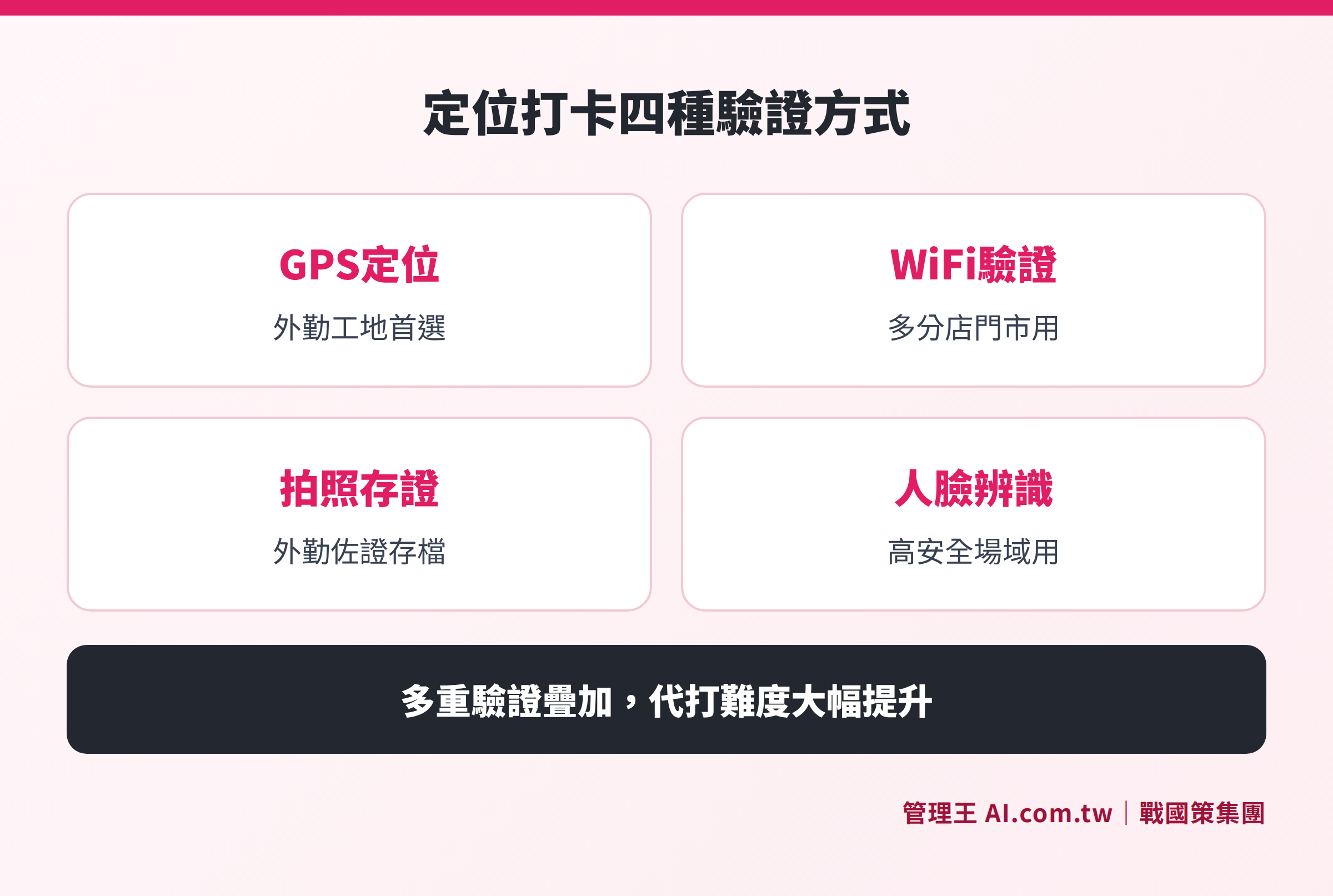
Comparison of applicable scenarios and anti-buddy punching strengths for five punch verification methods (GPS, Wi-Fi, IP, Photo, Facial Recognition)
Multi-Factor Verification: Making Buddy Punching More Costly than Beneficial
Each individual verification method has its vulnerabilities; it is only by layering multiple verifications that you can effectively prevent buddy punching.
Example of Triple Verification: GPS + Wi-Fi + Facial Recognition
- Employees must connect their phones to the store's Wi-Fi (confirming they are inside the store).
- GPS coordinates must fall within the geographical geofence (confirming correct location).
- Facial recognition must confirm it is the employee (confirming it is not someone else punching in).
All three conditions must be met for a successful punch in. To bypass triple verification, one would need to replicate Wi-Fi, spoof GPS location, and bypass facial recognition, significantly increasing the difficulty of buddy punching.
AI Anomaly Detection as a Fourth Layer of Protection
Even if an employee successfully circumvents the verification, AI can still detect behavioral anomalies:
- Consistently punching in to the second at for 30 consecutive days (normal punch times fluctuate by 1 to 3 minutes).
- The same device appearing at two locations that are too far apart within a short timeframe.
- Repeated backgrounds in the photos used as evidence.
Such anomalies can trigger alerts to supervisors, turning "post-audit" into "real-time warning."
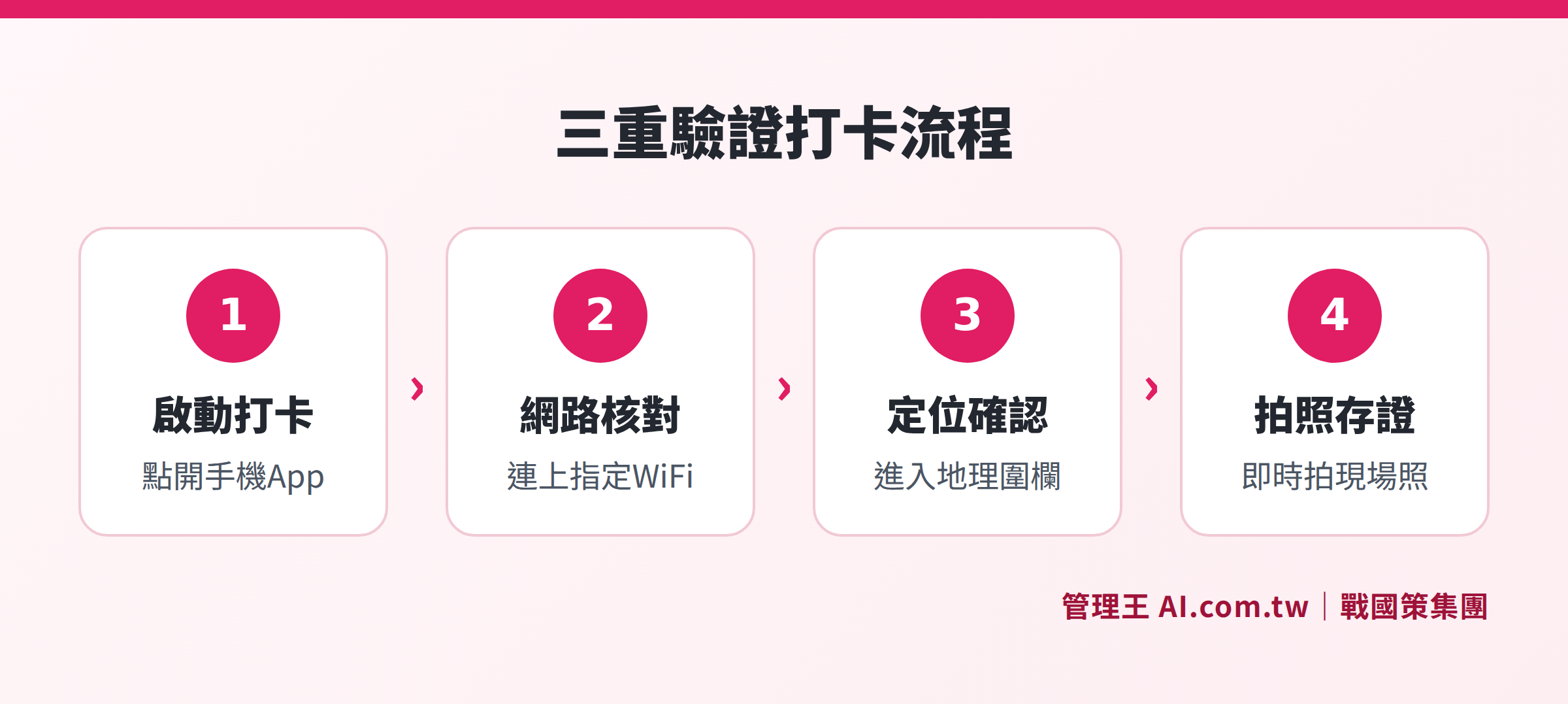
Illustration of the punch in process steps using triple verification of GPS + Wi-Fi + Facial Recognition
Formal Processes for Forgotten Punch-ins
While multi-factor verification increases the difficulty of buddy punching, it may also leave employees who genuinely forget to punch in without a remedy. Establishing a standard punch correction process is equally important:
- Employees submit a "punch correction request" in the app, explaining the reason for the missed punch (e.g., lack of signal while traveling).
- Attach supporting materials (emails, itinerary screenshots, client signatures).
- Supervisors approve the correction in the system, making the correction effective.
- All correction actions are logged in a complete Audit Log, including the applicant, supervisor, application time, and before-and-after values.
The correction limit can be set at a maximum of N corrections per month; exceeding this will automatically notify HR for further attention, preventing the loophole of mass corrections at month's end.
How to Use 管理王
管理王 AI.com.tw punch system supports five verification methods: GPS, Wi-Fi, IP range, NFC/QR Code, and facial recognition, which can be used individually or combined for multi-factor verification.
Operational Steps:
- Set Up Geofences: Enter the addresses of your office or branches in the backend, and the system calculates coordinates and sets the fence radius automatically (default 100 meters, adjustable).
- Bind Wi-Fi: Scan the office Wi-Fi SSID and add it to the allowed list, directly rejecting any punches outside the specified network.
- Enable Photo Verification: For field employees, the system requires real-time photo capture when punching in, automatically uploading the photo along with GPS and timestamp.
- Set AI Anomaly Detection Rules: Establish thresholds for consecutive tardiness or abnormal punching time differences to trigger LINE notifications to supervisors.
- Integrate Scheduling and Payroll: Attendance records automatically flow into the scheduling system and payroll system, eliminating the need for manual number transference at month-end.
Field visit management functionality allows salespersons’ GPS visit records to sync instantly with CRM, enabling supervisors to track all field employees' current locations on a map, completely replacing paper business reports.
The attendance analysis ranking module offers multi-dimensional attendance reports (tardiness counts, attendance rates, overtime ranking), allowing managers to quickly identify hot spots of attendance issues rather than discovering them at month-end.
The free plan can be used permanently; small teams under 10 can immediately try all features without binding a credit card.
Reference previously published articles:
- Complete Guide to Punch Systems
- Punch App Recommendations: GPS, Anti-Buddy Punching, and Payroll Integration
- Is the Free Punch System Sufficient? Common Limitations of Free Versions and When to Pay
Consult Now for Anti-Buddy Punching Solutions
Consultants offer free evaluations of your attendance management needs and assist in setting up GPS + Wi-Fi + photo triple verification to make buddy punching impossible.
Free consultation hotline: 0800-003-191
LINE Official Account: @119m
Official Website: app.AI.com.tw
Free trial: Apply for 管理王 Now
Frequently Asked Questions
Can GPS Location Punching Completely Prevent Buddy Punching?
GPS cannot completely prevent buddy punching, as there are GPS simulation apps available on the market that can spoof coordinates. Effective prevention requires a combination of "multi-factor verification": GPS confirming location, Wi-Fi ensuring connection to the designated network, and photo verifying that the employee is present—the simultaneous meeting of all three conditions results in a successful punch-in, significantly raising the difficulty and cost of buddy punching.
Can a Company Directly Fire an Employee for Buddy Punching?
According to Article 12 of the Labor Standards Act, employers can legally terminate labor contracts without prior notice (i.e., without paying severance) if it meets conditions such as "serious violations of work rules." If a company’s work rules state that buddy punching is a serious violation and there is solid evidence (such as system logs and surveillance corroborations), then there is justification for termination under this provision. It is recommended to first consult labor authorities or legal advisors before taking action to avoid being deemed unlawful dismissal.
What Are the Differences Between Wi-Fi Punching and GPS Punching, and Which Is Better for Chain Stores?
Wi-Fi punching requires employees' phones to connect to specified Wi-Fi SSIDs, with signal ranges of about 30 to 50 meters, making it very suitable for stores with fixed Wi-Fi access points. After linking each store to its own Wi-Fi, it becomes clear where employees punch in. GPS is more suited for field scenarios without fixed indoor Wi-Fi, but its accuracy is impacted by the environment. For chain stores, a combination with Wi-Fi as the primary method and GPS as supplementary is recommended.
Does the Location Punch App Comply with Taiwan's Labor Standards Act?
Yes. The implementation regulations of the Labor Standards Act do not impose restrictions on the tools for recording attendance, explicitly stating that "other verifiable record-keeping tools" are permissible, which encompasses electronic methods such as GPS, Wi-Fi sensing, and biometric recognition (fingerprints, facial recognition), as long as they accurately record employee attendance to the minute, they are considered legal. The collection of facial and other biometric features must comply with personal data laws, and employees must be informed and consent to the collection.
How to Manage Location Punching for Field Employees Not in the Office?
For field employees, it is advisable to use a combination of GPS + photo verification: when employees arrive at client locations, the system requires them to take real-time photos of the site, automatically uploading the GPS coordinates and punch-in time together. Managers can view real-time locations, playback visit trajectories, and verify the documentation, ensuring field records are completely auditable, replacing phone tracking.
Data Sources
- Article 30 of the Labor Standards Act — National Legal Database (attendance records must be retained for five years, noted to the minute each day)
- Taichung City Government Labor Bureau e-newsletter: Is it mandatory to maintain attendance records? (summary of lawful attendance recording methods)
- 104 Workplace Power: What to Do If You Forget to Punch In, Is Buddy Punching Illegal? (explanation of legal risks of buddy punching)