How to Choose an Inventory Management System? Starting from Inventory Discrepancies|ERP System Recommendations
An inventory management system integrates procurement, sales, and inventory processes, allowing data to be entered once with synchronized accounts, goods, and cash flow. This article starts with the fundamental reason behind inventory discrepancies, provides five key indicators for selection, a feature comparison table, and recommendations for different scales of enterprises to help Taiwanese SMEs find the most suitable inventory management solution.
An inventory management system is a software tool that integrates the three main processes of procurement (incoming goods), sales (outgoing goods), and inventory management, helping businesses grasp the quantity of goods, costs, and cash flow in real-time. When financial reconciliation occurs at the end of the month, and sales personnel find that "there's stock on the books, but none in the warehouse," or cannot calculate the cost of goods purchased, it is usually an issue with inventory management. Choosing a good inventory management system is core to ensuring that data is input only once from receiving goods to sales to payment, allowing numbers to automatically flow to each department—keeping accounts, goods, and money synchronized so that owners can truly see the operational status. This article starts with common pain points of "inventory discrepancies" and explains the key factors for selecting an inventory management system, feature comparisons, and implementation recommendations suitable for Taiwanese SMEs evaluating a system change or adopting a system for the first time.
Why are Inventory Discrepancies Always Occurring? Three Common Fundamental Reasons
Many business owners know that there are problems with inventory management but cannot pinpoint where things went wrong. The following three fundamental reasons cover almost all scenarios of "discrepant accounts":
Reason 1: Multiple Data Entry Points Resulting in Conflicts
Sales update pricing in Excel while warehouse management logs it in another sheet, and accounting manually copies the numbers from both into the ledger. The same order is entered three times, in three versions, and if one person makes a mistake or forgets to update, discrepancies during account reconciliation at the end of the month become impossible to identify. This isn't because employees are careless; it's a structural issue in the system that naturally invites errors.
Reason 2: No Real-Time Deduction of Incoming and Outgoing Goods
When a store sells a box of goods, the inventory system waits for the next day's data import to deduct sales; if goods have come in but the warehouse management has not logged them, the on-the-books numbers remain outdated. When a salesperson receives a large order and checks to find "50 items on the books," they may discover only 10 items in the warehouse—this is where the "out-of-stock order-taking" problem originates.
Reason 3: Complete Disconnection Between Inventory Management and Accounting
Inventory software only records the movement of goods, while accounting uses a separate tool, each operating independently. At the end of each month, accounting needs to manually export data from the inventory system, organize it, and then import it into their accounting software; this is not only time-consuming but also prone to missing entries. Finally, when the profit and loss statement comes out, the owner may say, "This differs greatly from the gross profit reported by sales," and upon investigation, they find that returns were not offset, and discounts were not recorded.
In a Nutshell
The core issue solved by an inventory management system is "multiple entries of one piece of data": it automates the connections between procurement, shipping, inventory, and invoices within the same system, reducing end-of-month reconciliation from three days to one.
What is an Inventory Management System? How Does it Differ from Simple Inventory Software?
The three characters of "Inventory Management" represent three processes:
- Procurement: Ordering, requesting, receiving goods, inspection, and corresponding accounts payable
- Sales: Quoting, orders, shipping, invoicing, and corresponding accounts receivable
- Inventory: Inventory levels, safety stock warnings, stocktaking, transfers, and item master data
Simple "inventory software" only manages the "storage" aspect, recording the quantity of goods entering and leaving but does not connect the procurement payment process or link to accounts receivable from sales. An "inventory management system" connects the three processes into a single line, automating the generation of accounts payable and updating inventory from a purchase order from request → approval → receiving → payment, and automatically deducting inventory and generating accounts receivable from an order from quoting → contracting → shipping → invoicing.
A more complete "Inventory Management ERP" further connects accounting, payroll, and production (BOM/MRP), ensuring all company data flows in the same system for accounts, goods, personnel, and money.
To understand the complete definition of an ERP system, refer to: What is an ERP System? SMEs Understanding Procurement to Finance All at Once.
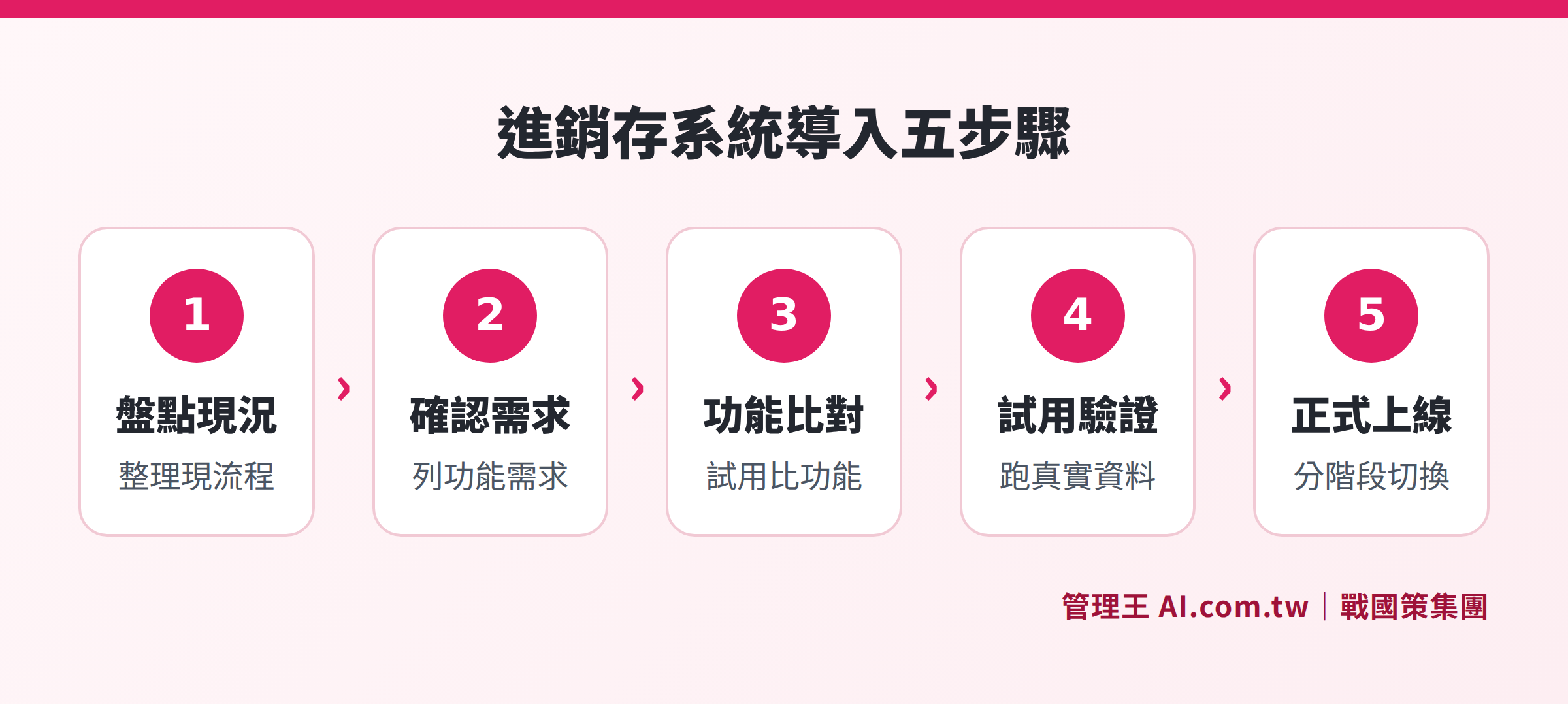
From assessing the current state to going live, detailing the complete process of implementing an inventory management system
Five Key Indicators for Purchasing an Inventory Management System
In the Taiwanese market, there is a wide variety of options for inventory management systems—from basic inventory tools that rent for a few hundred dollars a month to integrated platforms that combine ERP, accounting, and invoicing, with functionality and costs differing by dozens of times. Before selecting, use these five indicators to assess your needs:
Table: Five Key Indicators for Purchasing an Inventory Management System
| Indicators | Description | Common Pitfalls |
|---|---|---|
| Process Coverage | Are procurement, sales, and storage fully linked without relying on Excel to fill gaps? | Only has inventory functionality, procurement payment is in another system |
| Compliance with Taiwanese Regulations | Electronic invoicing (B2B/B2C), business tax reporting, commercial accounting formats | Foreign tools that require extensive customization for Taiwanese invoice formats |
| Depth of Integration | Is it natively integrated with accounting, CRM, procurement, payroll, or does it rely on APIs? | Integration costs are high and ongoing maintenance is expensive |
| Implementation Difficulty and Time | Is it cloud-based and ready to use, or does it require consultants for several months? | Usually takes three to six months to implement large ERP systems in general trading companies |
| Cost Transparency | Are subscription costs, module fees, customization fees, and maintenance fees clear? | Post-implementation customization fees are continually added, leading to uncontrolled total ownership costs |
According to Article 15 of Taiwan’s Commercial Accounting Law, businesses must establish commercial accounting credentials, and Articles 36 to 38 regulate the types and preservation of accounting books; the Ministry of Finance’s electronic invoicing regulations require qualified businesses to issue electronic invoices. When choosing an inventory management system, these two compliance requirements are the most basic bottom line. It is advisable to directly ask vendors whether they natively support Taiwanese electronic invoice formats.
Selection Recommendations for Different Scales and Industries in Inventory Management
There is no one-size-fits-all answer for inventory management systems; priorities differ based on scale and industry:
Small businesses with fewer than 10 employees
Typically need to manage "how much stock I have now, who I sell it to, and how much it costs," with core requirements being simple records for incoming and outgoing goods and invoice generation. The focus should be on having an interface simple enough for employees to learn in a day, without needing complex BOM or multi-currency features. Choose a cloud subscription plan that allows monthly payments, offering flexibility without initial costs.
Medium-sized wholesale or retail businesses with 10 to 50 employees
Need multi-warehouse management, synchronization of inventory across multiple stores, automatic safety stock alerts for reordering, and basic inventory reports. If also engaging in e-commerce, having synchronized online and offline inventory is essential to avoid overselling. It is recommended to choose solutions that can integrate POS and e-commerce platforms.
Companies with Manufacturing Needs
Need BOM (Bill of Materials), production work orders, and MRP (Material Requirements Planning) to calculate material quantities before starting production to avoid material shortages. This demand falls under the scope of inventory management ERP, and it is advisable to choose a system with a comprehensive manufacturing module.
Businesses with Overseas Operations or Group Structures
Need multi-currency accounts, handling of exchange rates, and consolidated reports for multiple companies, so pure inventory tools are usually insufficient; choose platforms with complete ERP financial functions.
Comparison Table of Inventory Management System Features: Basic vs. Complete Version
Table: Comparison of Basic Features versus Advanced Features in Inventory Management Systems
| Feature | Basic Inventory Management | Inventory Management ERP |
|---|---|---|
| Management of Item Master Data | ✓ | ✓ (including multi-level BOM) |
| Multi-Warehouse Management | Partially supported | ✓ |
| Safety Stock Alerts | ✓ | ✓ (automatically generates purchase orders) |
| Procurement Processes (Request → Approval → Payment) | ✗ | ✓ |
| Electronic Invoice Generation | Partially supported | ✓ (native support) |
| Automatic Generation of Accounting Vouchers | ✗ | ✓ |
| BOM / MRP Production Management | ✗ | ✓ |
| Multi-Currency / Multi-Company | ✗ | ✓ |
| AI Inventory Anomaly Detection | ✗ | Some systems support |
Selection recommendation: If there are plans for significant growth within the next two to three years, it is advisable to directly select an inventory management ERP to avoid the data conversion costs that come with system migration.
Why are BOM and MRP Indispensable for the Manufacturing Industry?
For the manufacturing industry, the core issue in inventory management is not "how many finished products do I have" but "how much material do I need to prepare before starting work." This requires the functionalities of BOM (Bill of Materials) and MRP (Material Requirements Planning):
- BOM: Establishes the raw material composition of each finished product, such as how many parts are required for a machine.
- MRP: Automatically calculates material shortages based on unfinished production work orders and generates suggested procurement quantities.
Without these two functions, factory procurement relies on engineers' instincts for estimating materials, only to discover material shortages during production, leading to delays and customer complaints. When comparing inventory management systems, confirming whether BOM supports multi-level (sub-component nesting) and whether MRP calculates in real-time should be prioritized.
Learn more: 管理王 Inventory Management Features, 管理王 Procurement System.
How to Fully Integrate Inventory Management with Accounting and Procurement?
There are three common breakpoints in integrating inventory management:
- Shipping → Invoicing: Goods have shipped but invoices are not issued; or invoices are issued but inventory isn't deducted.
- Procurement → Payment: Purchase orders are received but accounts payable aren't created; payment is made but no vouchers are generated.
- Stocktaking → Account Adjustment: There are discrepancies in stocktaking; the inventory system is adjusted, but accounting hasn’t made corresponding adjustments, leading to distorted financial statements.
The correct approach to integrating inventory management with accounting is to automatically generate corresponding accounting vouchers for every incoming and outgoing action directly within the same system, eliminating the need for manual data transfer. When selecting a system, ask vendors whether "shipping automatically generates receivables and sales entries" and whether "procurement entries automatically generate payables"—only those who can provide clear answers can be considered truly integrated.
Related functionality pages: 管理王 Accounting System, 管理王 Vendor Management.
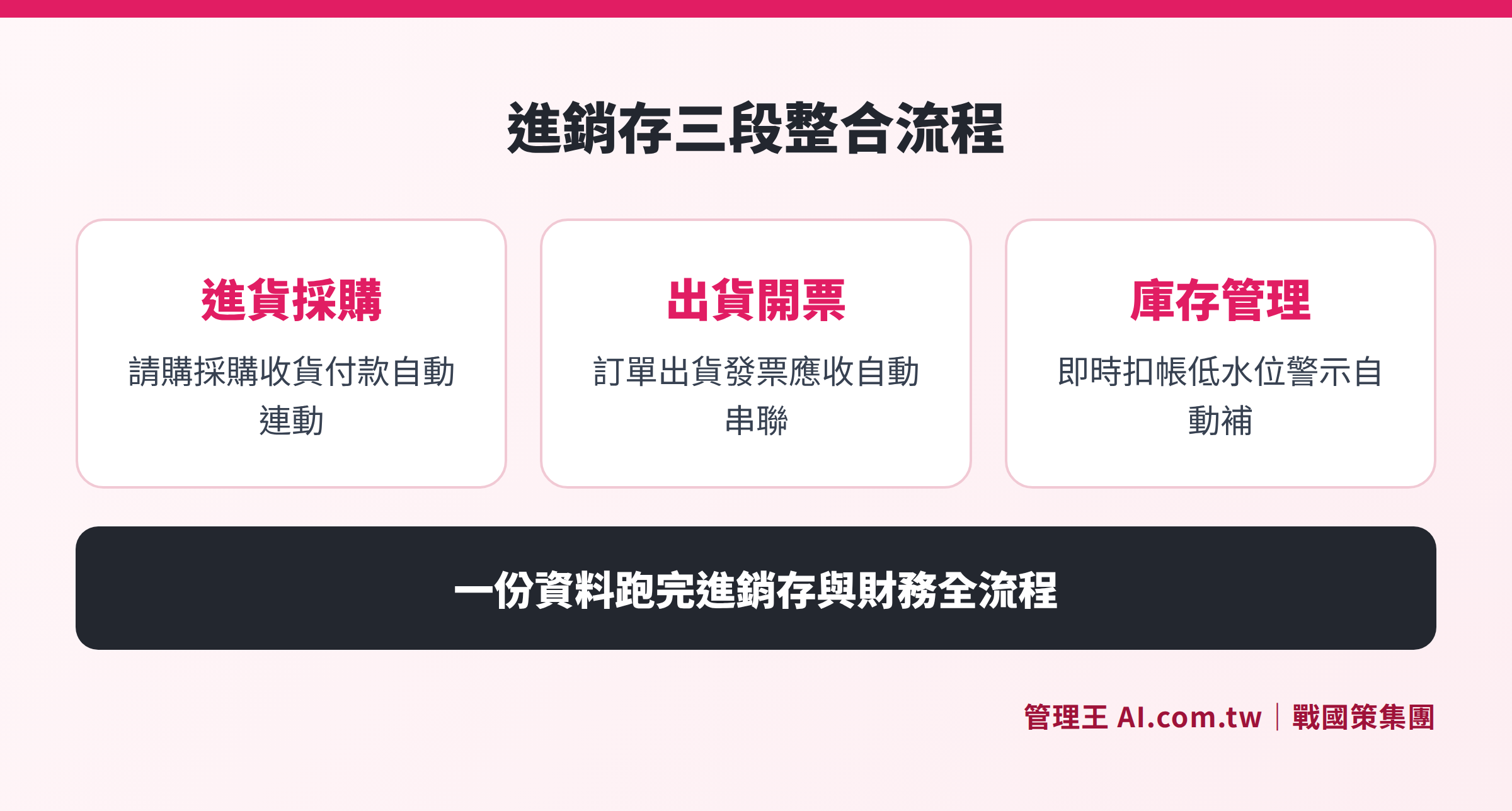
Explaining how procurement, sales, inventory, and accounting can automatically interconnect within the same system
How to Manage Inventory with 管理王 AI.com.tw
管理王 AI.com.tw is an AI-integrated management system that serves over 30,000 companies under the 戰國策 Group, where the inventory management feature is directly integrated into one account without needing separate installations or connections.
The actual operational process is as follows:
- Set Up Item Master Data: Input product name, specifications, barcode, cost, selling price, and suppliers in 管理王, supporting barcode scanning without needing to refer to Excel spreadsheets.
- Set Safety Stock Levels: For each item, set safety stock levels and reorder points; the system automatically alerts and generates purchase orders when levels fall below thresholds.
- Procurement and Receiving Automatically Linked: Once the purchase order is received, inventory instantly increases, and accounts payable are automatically created, eliminating manual entries.
- Immediate Inventory Deductions on Shipping: When orders are shipped, inventory is automatically deducted, electronic invoices are automatically generated, and accounts receivable are automatically created.
- One-Click End-of-Month Reconciliation: Directly view profit and loss statements, inventory turnover rates, and margin rates for each supplier without waiting for accounting to consolidate.
管理王 offers a free plan that can be used indefinitely, including basic inventory management functions, suitable for emerging SMEs to try before evaluating for upgrades. For industries with production needs, 管理王 also includes BOM item lists, production work orders, and MRP functionalities, fully covering inventory management requirements in manufacturing.
For more information on 管理王 ERP features: ERP Enterprise Resource Planning System Page, Quotation System. Also, refer to articles on the same topic: Is 鼎新 ERP Suitable for Small Companies? Functions, Implementation Barriers and Alternatives.
Free Trial of Inventory Management System, Manage Accounts, Goods, and Money Well
管理王 consultants will help you assess inventory needs, set safety stock levels, and procurement processes; the free plan is permanently available and only takes 30 seconds to register.
Free consultation hotline: 0800-003-191
Official LINE account: @119m
Official website: app.AI.com.tw
Free trial: Apply for 管理王 Now
Frequently Asked Questions
What is the difference between an Inventory Management System and an ERP System?
An inventory management system focuses on the integration of procurement, sales, and inventory processes; it is one of the core modules of an ERP system. ERP (Enterprise Resource Planning) has a broader scope, including inventory management, accounting, payroll, production, CRM, etc., allowing data of the entire company to circulate on the same platform. If budget constraints exist, start with inventory management functions and choose a platform that can expand to full ERP in the future.
Does an inventory management system need to integrate electronic invoicing?
In Taiwan, according to the Ministry of Finance's electronic invoicing regulations, qualified businesses (including most B2B transactions using a unified number) must issue electronic invoices. If an inventory management system does not support electronic invoicing, a separate invoicing system must be opened after shipping, leading to complications and potential errors in inventory deductions or invoices not being issued (or issued but inventory not deducted). When selecting a system, it is advisable to directly request vendors to demonstrate the complete process of electronic invoicing.
How long does it take to implement an inventory management system?
The implementation time for cloud-based inventory management systems varies significantly. Generally, once main item data and initial inventory are imported, online businesses typically can go live within one to two weeks; companies with production needs might need to establish BOM and, depending on the number of items, implementation can take three to eight weeks. When selecting a system, ask vendors whether they provide data import assistance and if they have dedicated personnel to assist with go-live, as these factors determine the actual implementation time.
Can the inventory management system support multi-warehouse management?
Yes, but it is necessary to confirm whether the multi-warehouse functionality of the system is truly synchronized in real-time. A good inventory management system should allow integrated management of main warehouses, branch stores, and online warehouses, while enabling inventory totals across all locations to be viewed on the same screen, updating numbers in real-time during shipping or transfers. If synchronization between online and offline is needed, it should also be verified whether the POS system and e-commerce platforms share the same data.
Can historical data from the old system be migrated?
Most cloud-based inventory management systems support importing customers, products, and initial inventory quantities from Excel. Some systems also support importing historical orders and accounts in standard formats (such as CSV) exported from old ERPs. Practically, it is advisable to first import initial inventory levels and item master data to let the system start official accounting from a certain point in time, while historical order data can be selectively imported as needed, without the necessity to migrate everything.
Data Sources
- Ministry of Finance Electronic Invoice Integration Service Platform (Electronic Invoice Regulations): https://www.mof.gov.tw/
- National Development Council Business Service Portal (GCIS, Business Registration Information): https://gcis.nat.gov.tw/
- Ministry of Finance Financial Information Center (Electronic Invoice Policies and Digitization Direction): https://www.fia.gov.tw/
- 管理王 AI.com.tw ERP System Feature Description: https://app.ai.com.tw/features/erp-system
- 管理王 AI.com.tw Inventory Management Feature Description: https://app.ai.com.tw/features/inventory