Is NotebookLM Viable for Meeting Minutes? Advantages and Limitations | Meeting Minutes Software Recommendations
NotebookLM (Gemini Notebook) is free to use and can convert audio files into summaries and action items, making it suitable for light personal use. Businesses that require real-time recognition, true speaker identification, automatic task integration, and compliance with Taiwan's data sovereignty should consider evaluating more integrated AI meeting minute tools.
NotebookLM is an AI note-taking and research tool launched by Google, many people use it to organize meeting recordings, generate summaries, and action items. It has a low entry threshold (available for free), and its intuitive interface can indeed convert an audio file into structured meeting highlights. However, for small and medium enterprises, there is still a gap between "usable" and "suitable for daily business use." This article organizes the core functions of NotebookLM (now renamed Gemini Notebook), the process for operating meeting minutes, and its real limitations in a business context based on publicly available information (as of November 2026), allowing you to make an informed decision when choosing an AI meeting minute tool.
What is NotebookLM? Current Status in 2026
In July 2026, Google officially renamed NotebookLM to Gemini Notebook, integrating it into the Google One AI subscription plan. Its core positioning is as "an AI research partner based on the data you upload," rather than a general-purpose Q&A bot. The system only answers based on the source documents you upload and does not pull data from the internet automatically, with answers accompanied by source citations, which is a significant advantage.
Currently supported source types:
- Google Docs, Google Slides
- PDF, text files, Markdown
- Audio files (MP3, WAV, etc., maximum 200 MB)
- YouTube videos (via subtitles)
- URLs
In the application of meeting minutes, users primarily operate through the process of "uploading audio files → providing prompt → generating summary," which is explained in detail in the third section of this article.
Gemini Notebook Plans and Pricing (Based on Official Information)
Gemini Notebook is currently not sold separately but is tied to Google AI subscription plans.
Table: Comparison of Gemini Notebook (NotebookLM) Plans (According to official information as of November 2026)
| Plan | Monthly Fee (USD) | Number of Notebooks | Source Limit per Notebook | Daily AI Usage |
|---|---|---|---|---|
| Free | $0 | 100 | 50 sources | Standard quota (about 50 queries, 3 audio/video generations) |
| Google AI Plus | $4.99 | 200 | 100 sources | Standard ×2 |
| Google AI Pro | $19.99 | 500 | 300 sources | Standard ×4 |
| Google AI Ultra | From $99.99 | 500 | 500–600 sources | Standard ×5–20 |
Each source document has no page limit, but the text limit is 500,000 words or 200 MB (the same for all plans). The enterprise version (NotebookLM Plus) is accessed through Google Agentspace, Google Workspace, and Google Cloud, and is not included in personal plans.
In a Nutshell
The free version of Gemini Notebook allows about 50 queries per day, which might quickly reach the limit for companies that hold frequent meetings.
Three-Step Process for Using NotebookLM for Meeting Minutes
The following is a common operation method seen in community and tutorial articles, for reference only; actual steps should be based on the official Gemini Notebook interface.
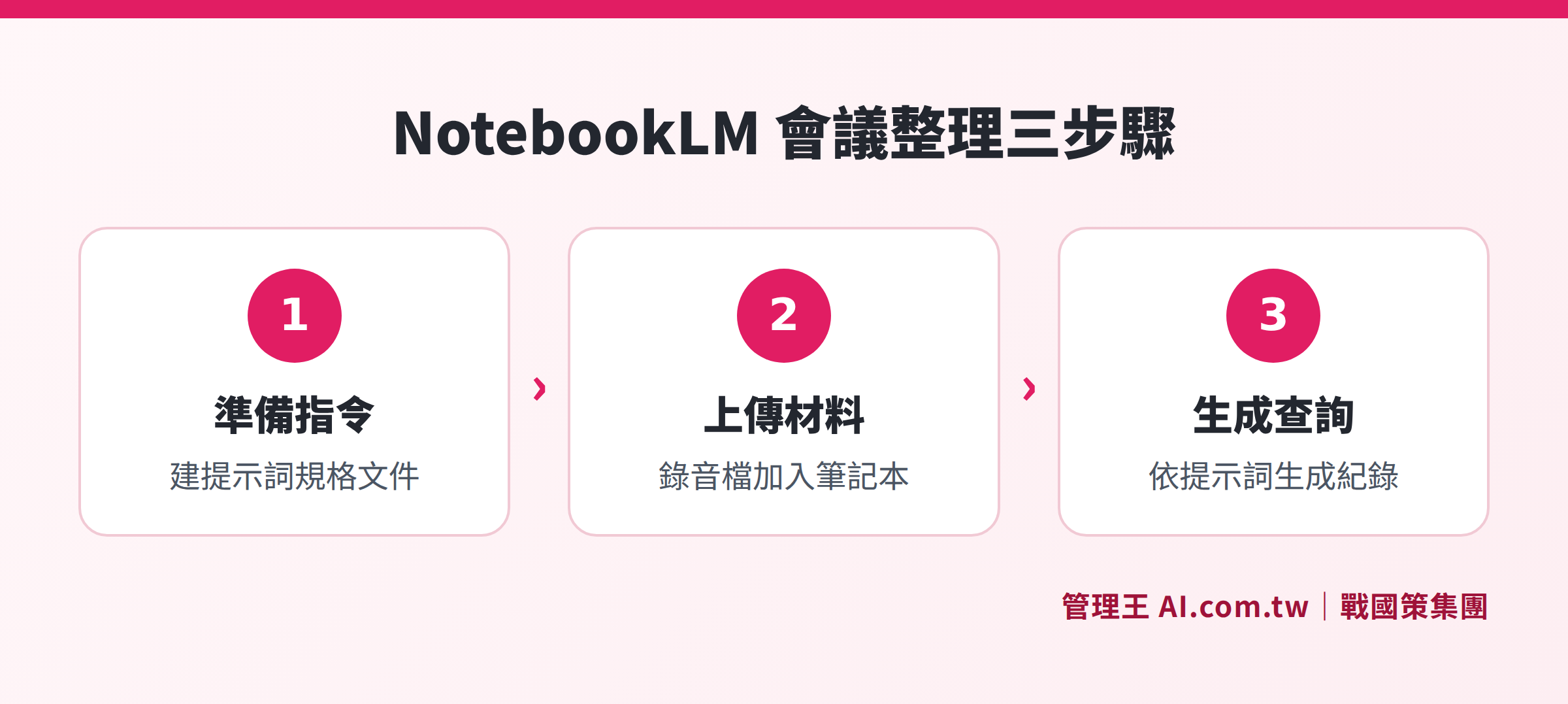
The complete three steps from preparing the prompt document, uploading the audio file, to querying and generating the summary
Step One: Prepare the Prompt Document
Pre-write the formatted commands in Google Docs or a plain text file, for example: "Please organize the meeting highlights according to the following format: 1. Meeting purpose; 2. Main discussion topics; 3. Resolutions; 4. Action items (responsible person, deadline); 5. Items to be confirmed. Please use traditional Chinese Taiwan terms."
Step Two: Upload Materials
Enter Gemini Notebook, create a new notebook, and add the "prompt document" and "meeting audio file" as sources. The system will analyze the audio content and convert it into queryable material.
Step Three: Query Generation
In the chat box, select the relevant sources, and ask the AI to organize the meeting minutes according to the prompt commands. You can further request to generate a draft summary notification email to the participants.
Prerequisites for this method:
- You must have the audio file in advance (Gemini Notebook does not actively record audio)
- The audio quality must be clear enough
- Post-generation, manual proofreading is required, especially for names, proper nouns, and numbers
Four Major Advantages of NotebookLM in Meeting Minutes
1. Low Barrier to Entry
For individuals or small teams with a general volume of meetings, the free plan is sufficient to get started without requiring a credit card and can register in 30 seconds.
2. Integration and Analysis of Multiple Sources
The same notebook can accommodate multiple meeting recordings, relevant contracts, and reference documents, allowing the AI to synthesize cross-document analysis, suitable for scenarios where multiple data points need to be collected for analysis.
3. Traceable Sources
All responses are marked with the paragraph from which the source document they came from, allowing for verification, which reduces the risk of AI hallucination.
4. Various Output Formats
In addition to text summaries, outputs can include mind maps, audio overviews (Audio Overview, a podcast-style dialogue between two AI hosts), slide outlines, and data tables, suitable for converting meeting highlights into educational materials or reporting materials.
Five Limitations of NotebookLM in Enterprise Meeting Scenarios
The following limitations are compiled based on official functionality descriptions and public user evaluations; it is recommended to test and confirm during the evaluation.
1. No Support for Real-Time Recording
Gemini Notebook cannot record audio in real-time during a meeting; it requires a separate recording to be completed and uploaded afterward. This additional manual step is not smooth for companies accustomed to "receiving records immediately after a meeting."
2. Manual Speaker Identification Required
While the system can annotate "Speaker A, B" through prompt commands, it cannot automatically associate them with participants' real names. Companies need either to have a speaker voiceprint database or manually specify in the prompt; otherwise, the record will only show "Speaker 1 says..."
3. No CRM/Task System Integration
After generating action items, there is no direct transfer to task management systems or customer relationship management (CRM) systems. Moving from Gemini Notebook to formal tracking still requires manual copy-pasting, increasing the risk of oversight during handover.
4. Data Stored on Google Servers
Gemini Notebook's computation and storage occur on Google’s cloud infrastructure (mainly located in the United States). If enterprises have data sovereignty requirements (such as finance, healthcare, or governmental concerns) or worries about international data transfer under Taiwan's personal data laws, compliance must be evaluated in advance.
5. Limited Daily Usage in Free Version
The free plan allows approximately 50 queries per day, with around 3 audio/video generations. For companies that have multiple meetings a day with several employees using it simultaneously, limits will be reached quickly. The enterprise version (Google AI Pro or Ultra) has its monthly fee calculated in USD, with fluctuations based on exchange rates.
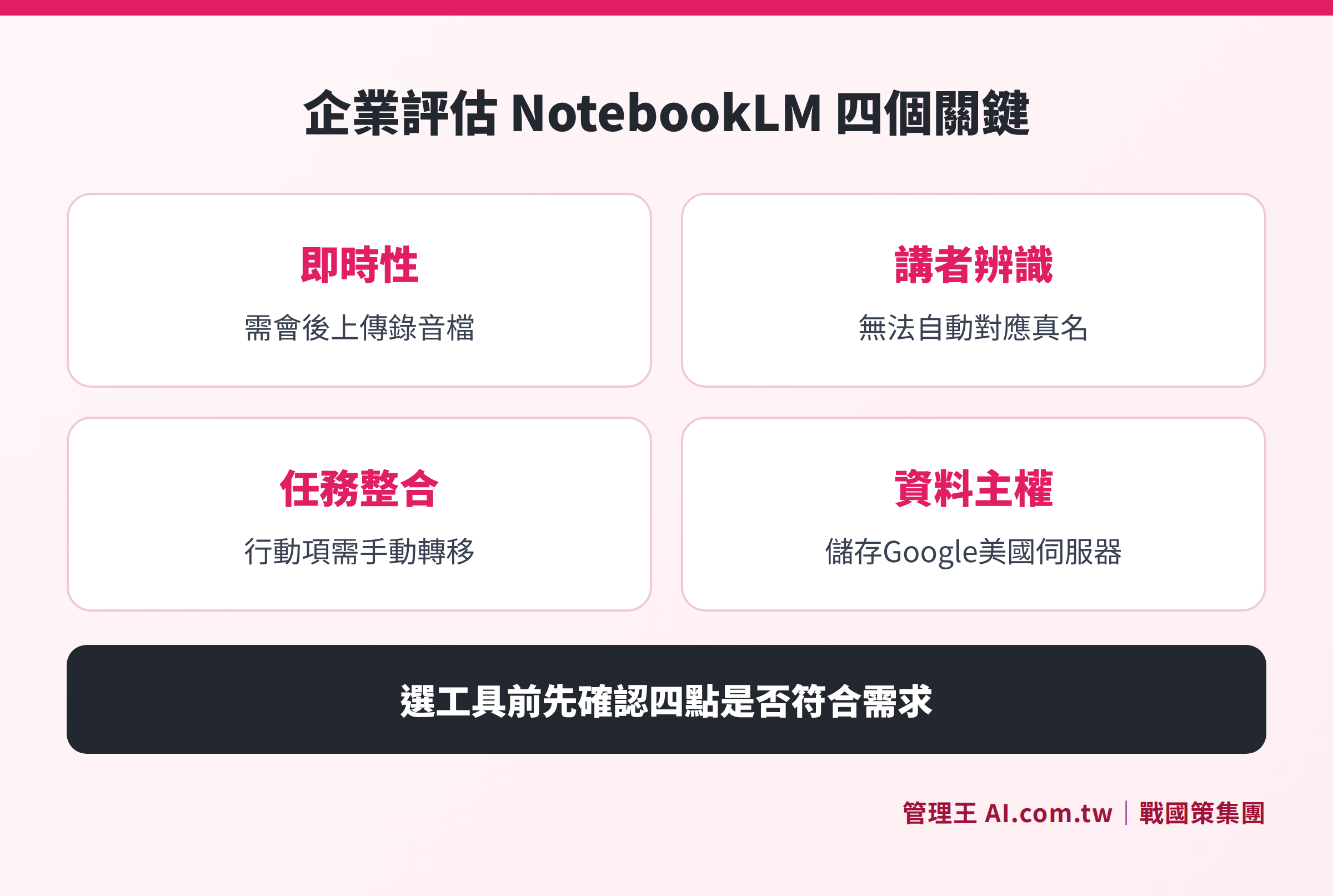
Comparison of Gemini Notebook and enterprise-specific AI meeting minute tools across four dimensions: real-time recording, speaker identification, task integration, and data sovereignty.
Table: Feature Comparison of NotebookLM (Gemini Notebook) and Enterprise AI Meeting Minute Tools (Based on official information, November 2026)
| Feature | Gemini Notebook (Free) | Enterprise AI Meeting Minute Tool (e.g., 管理王) |
|---|---|---|
| Real-Time Recording | No, must upload recording after the meeting | Yes, real-time recognition during the meeting |
| True Name Speaker Identification | No, must be manually specified | Yes, speaker identification automatically matched |
| Multi-Language Real-Time Recognition | Via post-processing upload, not real-time | Mandarin/Japanese/English real-time |
| Action Item Integration | No, must manually copy | Yes, automatically integrates task management systems |
| Automatic Sending to Participants | No, must manually write and send | Yes, one-click automatic sending |
| CRM Association | No | Yes, client meeting auto-archiving |
| Data Sovereignty | Google servers (mainly in the USA) | Taiwan data center, ISO 27001 |
| Permanent Use of Free Plan | Yes, but with daily usage limits | Yes, free permanent for under 10 users |
| Monthly Fee (Paid Version) | Starts at $4.99 (USD, bundled with Google AI plan) | Starts at NT$5,000 (integrating over 100 features) |
What Usage Scenarios is NotebookLM Suitable For?
Based on its functional design, Gemini Notebook performs better in the following scenarios:
- Personal Research and Study: Graduate students or knowledge workers analyzing multiple papers or reports within the same notebook for cross-comparison
- Occasional Meeting Summaries: 1-2 meetings per week, users who do not require real-time recording and can accept manual operations
- Preparation of Content Creation Material: Converting meeting recordings or interviews into podcast scripts, slide outlines, and other diverse formats
- Cross-Document Compilation: Project work requiring the comparison of contracts, meeting records, and market research together
Relatively Unsuitable Scenarios:
Enterprises conducting multiple meetings daily, requiring true name correspondence for speakers, needing automatic assignment and tracking of action items to CRM or task systems, or having data sovereignty compliance needs may find it difficult to meet the current functionality design of Gemini Notebook, still requiring supplemental tools to fill process gaps.
How to Use 管理王 AI Meeting Minutes?
If your need is "to have a formal record ready to send immediately after a meeting, with action items automatically going into the task system, and customer meetings directly entering CRM," consider the approach of 管理王 AI Meeting Minutes:
- Real-Time Identification During Meetings: Supports uploading of MP3, WAV, M4A, and can be directly imported during Zoom or Google Meet, eliminating the need to wait until after the meeting to organize.
- Voice Recognition Matching True Names: Automatically identifies speakers based on audio features and matches them with participant lists with one click, saving the manual tagging step.
- Direct Integration of Action Items into Tasks: AI extracts "who is responsible, what to do, due date" and automatically pushes it to the task management system, allowing the responsible person to see it on their next login without manual reminders.
- Associating Customer Meetings with CRM: External client meetings are automatically associated with the CRM customer profile, eliminating the need for manual archiving by sales personnel, making it easy to find what was discussed three months later.
- One-Click Sending to Participants: After completing the meeting minutes, applicable AI automation rules automatically send the minutes to all participants, including summaries to absent colleagues.
The free plan for 管理王 is permanently usable (for under 10 users) and includes one-time points for AI features, suitable for trial use to confirm if the process meets company needs. For a complete plan comparison, see 管理王 Pricing Page.
Data is stored in 戰國策 group's Taiwan data center, complying with ISO 27001 standards, suitable for enterprises with local data sovereignty needs. If there are more complex system integration requirements, you can also refer to AI Knowledge Base feature page to understand how to turn meeting records into a fully searchable corporate knowledge base.
For more key points on selecting AI meeting recording tools, you can refer to related articles:
- How to Choose AI Meeting Recording? Accuracy, Privacy, and Chinese Recognition Key Points
- Is the Free Version of Meeting Records AI Enough? Differences Between Free Quota and Paid
- Is 雅婷 Transcription Useful? Functionality, Pricing, and Alternative Options Review
- How to Write Useful Meeting Records? Formats, Templates to AI Automated Organization
Consultation for AI Meeting Record Implementation
Consultants assist in evaluating the most suitable AI meeting record tools for small and medium enterprises in Taiwan, handling everything from recording to summarizing to task integration all at once, with a free plan available for permanent use.
Free consultation hotline: 0800-003-191
LINE Official Account: @119m
Official Website: app.AI.com.tw
Free Trial: Apply for 管理王 Now
Frequently Asked Questions
Has NotebookLM been renamed? What is its current name?
Yes. Google renamed NotebookLM to Gemini Notebook in 2026 and integrated it into the Google One AI subscription plan. The functionality has extended, but the core logic remains unchanged—still based on the uploaded source documents for Q&A and summaries, with no independent web searching. The old NotebookLM link (notebooklm.google.com) has automatically redirected to notebook.google.com.
Can NotebookLM directly record audio in real-time during meetings?
No, currently. Gemini Notebook does not have real-time recording functions; it requires recordings (in MP3, WAV, etc. format, with a single file cap of 200 MB) to be uploaded to the notebook after the meeting, and then summaries generated through prompt commands. If real-time transcripts are needed, you need to use other recording or transcription tools (like 雅婷逐字稿, Otter.ai, etc.) together with it.
Is the accuracy of meeting record organization using NotebookLM sufficient?
For clear recordings and standard Mandarin content, the summary accuracy usually falls within a usable range. However, in common scenarios in Taiwan's enterprises—bilingual mixing, Taiwanese vocabulary, company-specific terms, and names—recognition rates will decrease, and the AI cannot autonomously judge decision-makers. It is recommended to treat the results generated by Gemini Notebook as a "draft," and to manually proofread key numbers, responsibilities, and names before sending out.
Is data security guaranteed when enterprises use NotebookLM?
Gemini Notebook's data is processed on Google’s cloud infrastructure, mainly located in the USA. Google states that data from Workspace business users is not used to train models, but the privacy policy for personal plans is different and must be reviewed for the latest service terms provided by Google. If a company has Taiwan data sovereignty requirements (such as international transfer regulations under personal data laws) or industry compliance requirements, it is recommended to choose enterprise AI tools that store data in Taiwan and are ISO 27001 certified.
What are the limitations of the NotebookLM free version?
The free plan allows for up to 100 notebooks to be created, each with 50 sources, approximately 50 queries per day, and audio/video generation (Audio/Video Overview) about 3 times daily. It is completely sufficient for occasional personal use; however, if an enterprise has multiple meetings daily and several employees share the account, the quota will be quickly reached. Paid plans (Google AI Plus at $4.99/month, Pro at $19.99/month) can increase usage, but fees are calculated in USD, and do not include enterprise management features such as CRM, tasks, or HR.
Sources
- Official Website of Google Gemini Notebook (formerly NotebookLM, queried November 2026)
- NotebookLM – Wikipedia (English version, evolution of functionality, queried November 2026)
- NotebookLM Pricing 2026 – felloai.com (pricing summary based on official information, queried November 2026)
- Is organizing meeting minutes painful? Learn how to use "NotebookLM + a set of prompts" — Digital Age (operational process reference, queried November 2026)