Complete Guide to Online Registration Systems: From Event and Course Registration to Payment Collection | Recommended Registration Systems

An online registration system integrates registration pages, capacity management, online payments, e-tickets, and automatic notifications, allowing organizers of events and courses to eliminate manual reconciliation. This article covers core functions, the differences between event and course registrations, compliance points for electronic invoices in Taiwan, five major selection criteria, and the practical workflow of the integrated registration solution from 管理王.
An online registration system is an integrated tool that allows organizers to collect participant information, manage capacity, process payments, issue tickets, and automatically send notifications through web forms. Unlike simple Google Forms, the registration system has built-in capacity limits, waiting lists, payment processing, e-tickets, and refund rules that can automatically complete all administrative tasks from "filling out forms" to "entry on the day of the event," allowing organizers to focus on the content itself. Whether hosting a corporate seminar, seasonal course, professional training, or annual expo, a suitable online registration system can significantly shorten check-in waiting times, reduce reconciliation errors, and provide a complete list of participant data for post-event marketing reuse.
What Problems Can Online Registration Systems Solve?
The most common pain points in hosting events are often not the content itself, but the administrative tasks of registration:
- Collecting participant lists through LINE groups, ending up unsure who has paid and who hasn’t responded.
- Google Forms lacks capacity control; if oversubscribed, notifications must be sent one by one to process refunds.
- Payments spread across various platforms (bank transfer, LINE Pay, cash collected on-site), consuming half a day for reconciliation.
- Manual roll call on the day of the event, causing traffic jams at the entry point.
- Once the event is over, no participant list is available for follow-up marketing.
These issues essentially stem from a "lack of process automation." The online registration system integrates the five aspects mentioned above onto a single platform, allowing organizers to set everything up once, after which the system takes over automatically.
Considering the common usage scenarios among small and medium-sized enterprises in Taiwan, training organizations may hold 4 to 8 courses per month. If they still rely on manual list collection and reconciliation, administrative staff will spend a substantial amount of time verifying payments, manually sending confirmation emails, and managing waiting lists; after adopting a registration system, the same workforce can manage more course sessions simultaneously, and the administrative error rate will also significantly decrease. For chambers of commerce, associations, or corporate training departments, complete attendance records and participant information are also necessary bases for issuing completion certificates, applying for subsidies, or reporting to regulatory authorities.
What Are the Differences Between Event Registration Systems and Course Registration Systems?
The "registration system" actually covers two common usage scenarios, with slightly different functional requirements:
Table: Comparison of Event Registration vs. Course Registration Functional Requirements
| Comparison Aspect | Event Registration (Single Session Focus) | Course Registration (Multiple Sessions) |
|---|---|---|
| Capacity Management | Set limits for a single event; close registration when full | Manage capacity for multiple individual sessions |
| Payment Timing | Full payment upon registration | Can split payments or charge per session |
| Ticket Types | Early bird, VIP, group tickets | Participant accounts, course serial numbers, attendance cards |
| Entry Verification | Scan QR Code for entry on the day | Check-in for each class |
| Materials and Certificates | Less frequently needed | Often requires participants to download materials and certificates |
| Instructor Payment Calculation | Usually fixed compensation | Calculated based on the number of attending participants |
| Post-Event Survey | Single satisfaction survey | Segmented ratings after each class or course completion |
If the organizer only hosts an annual forum, a lightweight event registration system will suffice; however, if managing training courses or subscription-based workshops, complete course registration features supporting multiple sessions, attendance management, and instructor commission calculations are necessary.
Essential Core Features of an Online Registration System
Regardless of whether it’s for events or courses, a mature online registration system should possess the following features:
1. Public Registration Page
Customizable main visuals, instructor introductions, schedules, and registration form fields, allowing participants to understand and register on the same page without switching to other platforms.
2. Multiple Ticket Types and Early Bird Pricing
Supports various pricing types such as early bird, standard, student, and group tickets, with settings for opening and closing times, allowing for automatic switching of ticket types without manual changes.
3. Online Payment and Financial Integration
Connects with credit cards, ATM transfers, LINE Pay, and other commonly used payment methods in Taiwan, automatically confirming payment status once registration is completed, eliminating the need for manual verification of transfer details.
4. Electronic Tickets and QR Code Check-In
After successful payment, the system automatically issues electronic tickets containing unique QR Codes, which can be scanned for check-in on the event day, ensuring smooth entry; the system prevents the same ticket from being reused.
5. Capacity Management and Waiting List Mechanism
Real-time display of remaining slots, automatically closing registration when full, with waiting list participants notified in order when someone cancels, without needing manual supervision.
6. Automated Notification Emails
Confirmation emails, payment completion notifications, reminders (configurable for N days in advance), post-event thank you emails, all sent automatically by the system according to schedule.
7. Refund and Name Change Processes
Automatically process refund requests based on rules set by the organizer (e.g., full refund 7 days prior, 50% refund 3 days prior) to avoid disputes and manual calculation errors.
8. Attendance Statistics and Reporting
Export participant lists (CSV/Excel), payment records, attendance rates, ticket type sales analysis after the event, providing a data foundation for subsequent marketing.
9. Mobile and Responsive Support
Staff at the event need to check in attendees using mobile phones or tablets, thus smooth mobile operation is crucial for practical implementation. A good registration system should provide a responsive interface or a dedicated scanning app to allow even non-formal staff to learn operations within 5 minutes, ensuring no slow entry due to equipment limitations.
From creating the registration page to exporting the participant list after the event, a six-step process
How to Ensure Compliance with Taiwan Regulations for Registration and Payment?
When organizing an event and collecting fees, be aware of the following compliance points:
Electronic Invoice Obligation
According to the Ministry of Finance's Electronic Invoice Integration Service Platform, organizers with a business presence in Taiwan must upload electronic invoices for ticket sales to consumers (non-business entities) within 2 working days. Failing to transmit within the specified timeframe can result in fines ranging from NT$1,500 to NT$15,000. If using a registration system that integrates electronic invoicing (like 管理王), the invoicing and transmission can be automatically handled after payment is confirmed, saving manual operations.
Standardized Contracts for Performing Arts Tickets
The Ministry of Culture has issued guidelines for "standard contracts for performing arts tickets regarding what should and should not be included," applicable to events like concerts, stage plays, and music concerts. Key regulations include:
- Consumers must be allowed to request ticket changes or refunds at least N days before the performance (the number of days is determined by the organizer according to the program's nature, and cannot be zero).
- Transaction fees for refunds cannot exceed 10% of the ticket price.
- If the main performer or main content of the program changes, the organizer must announce and allow consumers to apply for a full refund.
- Tickets must specify essential information such as ticket price, seating area, and performance session.
For typical corporate seminars or training courses, although the cultural ministry's performing arts ticket regulations do not directly apply, the spirit of fair trade under consumer protection laws still applies, so it is recommended to clearly indicate refund policies on registration pages.
In a Nutshell
An online registration system = registration page + online payments + electronic tickets + automatic notifications + refund management, a five-in-one solution that replaces the outdated method of using Google Forms combined with manual reconciliation.
How to Choose the Right Registration System? Five Evaluation Criteria
The registration tools available in Taiwan range from free Google Forms to professional ticketing platforms; it is advisable to evaluate based on the following five aspects before making a choice:
Table: Evaluation Criteria for Choosing a Registration System
| Evaluation Criteria | Description | Applicable Scenarios |
|---|---|---|
| System Cost Structure | Monthly subscription vs. per-ticket commission (usually 5-6%) | Frequent event organizers should choose subscription for cost efficiency |
| Completeness of Financial Integration | Does it support credit cards, ATM, mobile payments, and electronic invoices? | Essential for paid events |
| Integration with Existing Systems | Can it connect with CRM, accounting, and marketing automation? | Priority consideration for corporate internal users |
| Participant Backend Features | Does it offer material downloads, certificate issuance, and post-event surveys? | Essential for training organizations |
| Data Sovereignty and Compliance | Where is the data stored, compliance with data privacy laws, invoicing integration? | Must ask for corporate or government procurement |
When are free tools suitable?
Ticketing platforms like Accupass or KKTIX are suitable for purely external ticket sales for cultural events, typically charging 5-6% per ticket sold; however, for internal corporate training, member-exclusive courses, or marketing events requiring integration with CRM, an integrated management system (like 管理王) usually offers a better advantage in terms of cost and functional completeness.
What are some often-overlooked but important features?
- Multi-Session Batch Management: Multiple sessions of the same course can be offered simultaneously, with separate capacity control for each session.
- Automatic Post-Event Survey Sending: Satisfaction surveys can be automatically sent after the event ends.
- Customizable Registration Forms: Beyond basic fields, whether special fields can be added based on event requirements.
- Mobile Operation Support: Organizers need to check in attendees on-site using mobile devices.
- Automatic Instructor Payment Calculation: Multiple instructors sharing revenue based on participant attendance can be prone to manual calculation errors.
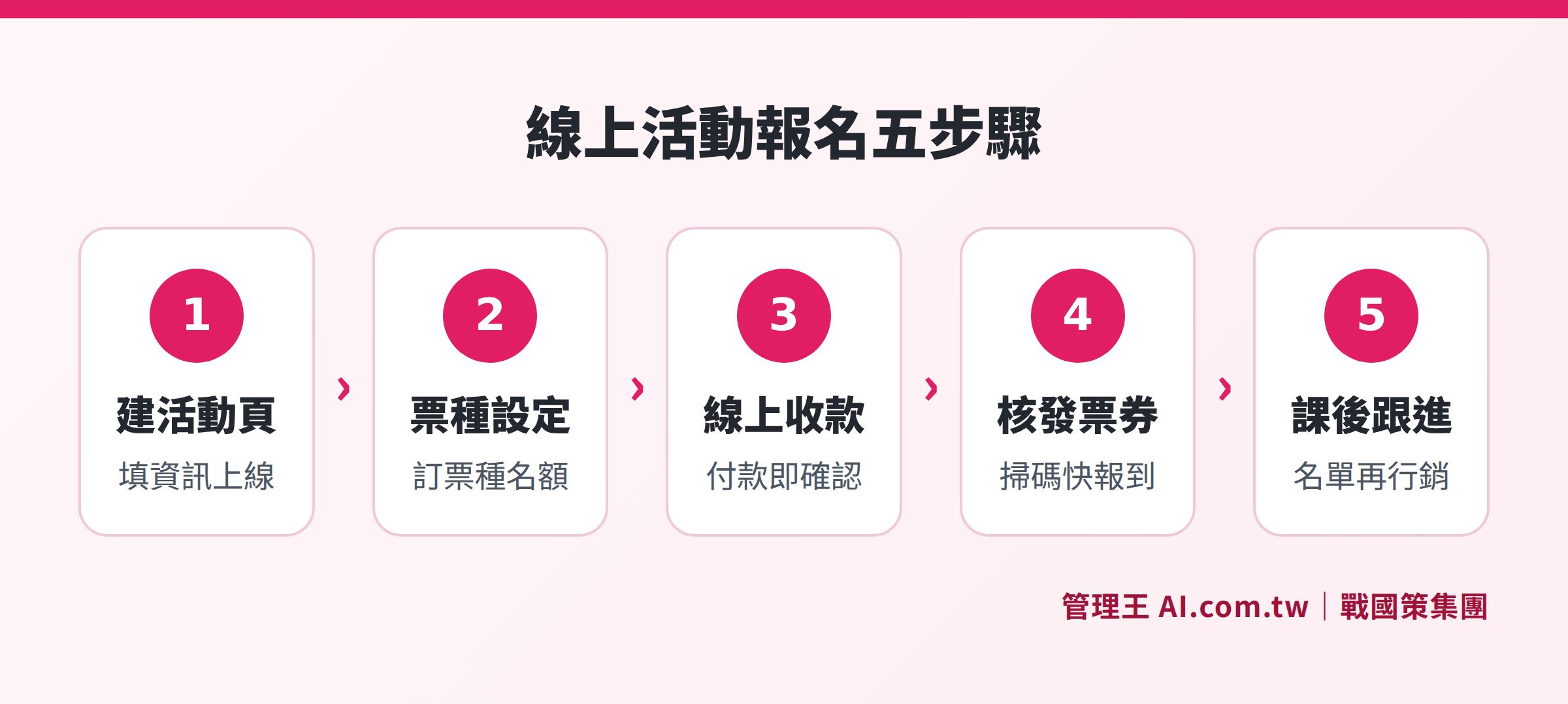
How to Use 管理王 for Event Registration?
管理王 AI.com.tw's event/course registration feature is specifically designed for small and medium enterprises and training institutions in Taiwan, providing a seamless workflow from creating event pages to managing participants post-event:
Step 1: Create an Event Page
Add an event in the backend, upload main visuals, fill in instructor introductions and agendas, set multiple ticket types (early bird, standard, VIP, student, group tickets) along with their sales times and quantity limits. Once completed, the system automatically generates a public registration link, which can be directly shared on the official website, LINE official account, or via email.
Step 2: Integrate Online Payment
The system has built-in integration with Gomaji, Newebpay, supporting popular payment methods in Taiwan such as credit cards and ATM transfers. After payment is completed, electronic invoices are automatically issued, QR Code electronic tickets generated, and confirmation emails sent, all without manual intervention.
Step 3: Automatic Management of Capacity and Waiting Lists
After setting the capacity limit, the system will automatically close registration when the number reaches the limit; for those on the waiting list, the system will notify them in order when someone cancels, giving them a 24-hour confirmation window, after which the next person is notified automatically.
Step 4: Check-In using QR Code on Event Day
Staff use mobile phones or tablets to scan the QR Code tickets of participants, with real-time status marked in the system; onsite managers can see current attendance numbers in the management backend and compare them against the registration list for absentees.
Step 5: Post-Event Participant Management
After the event concludes, registration data is automatically synced to the CRM system, allowing sales or marketing staff to follow up later; marketing automation can be configured to send out thank you emails, satisfaction surveys, offers for the next course, and allow participants to accumulate points through membership rewards to enhance repurchase rates.
The 管理王 free plan allows unlimited use of basic event registration features, suitable for small to medium-sized enterprises that hold 1-2 events per season to try out the complete process. For complete plans and pricing, please visit the official website.

Comparison of the features of three tools in capacity management, financial integration, and automatic notifications.
Common Integration Scenarios for Registration Systems
Here are several common usage scenarios, illustrating how to maximize the value of the registration system by integrating with other features:
Corporate External Seminars
Event page → Online registration and payment collection → CRM automatically builds leads → Marketing automation for post-event follow-up → Quoting system provides service quotes. Suitable for B2B companies using events to develop leads.
Professional Training Institutions
Course registration → Students download materials from their backend → Check-in for each class → Post-event survey → Automatic issuance of completion certificates → Automated sending of offers for the next course. Suitable for vocational training centers, corporate training departments, and language tutoring centers.
Annual Meetings of Chambers/Associations
Public event page → Multiple ticket types (member/ticket non-member) → Electronic tickets → Scanning for entry on the day → Export lists as data for updating member databases. Chambers often face issues with different pricing for members and non-members as well as potential errors during onsite check-in; the registration system can automatically display the correct prices based on identity verification and check membership eligibility during entry, ensuring accurate pricing and that no one is overlooked.
Restaurant Wine Tasting/ Cooking Classes
Limited registration → Online prepaid deposits → Confirmation emails including important notes → Automatic reminders one day prior → Check-in on the event day → Introduce related products through the online ordering system.
Differences from Appointment Systems
Appointment systems are suited for one-on-one or small group services (such as hair styling, fitness training, clinics), mainly managing employee resources and time slots; registration systems are suitable for regular group events or courses, focusing on capacity control and ticket management. Both offer applicable scenarios, and 管理王 provides both functional modules simultaneously.
Free Trial of the Event Registration System
Consultants assist you in building a complete event registration page, integrating online payment and electronic tickets within one day. The free plan is available for unlimited use, and registration takes only 30 seconds.
Free consultation hotline: 0800-003-191
LINE Official Account: @119m
Official Website: app.AI.com.tw
Free Trial: Apply for 管理王 now
Frequently Asked Questions
What is the difference between online registration systems and Google Forms?
Google Forms is a basic data collection tool, lacking capacity limit controls, cannot integrate payments, and does not automatically issue tickets. Online registration systems combine capacity management, online payments, electronic tickets, automatic notifications, and refund processes, suitable for events that require charging fees or strict attendance control. The biggest difference lies in that Google Forms requires manual reconciliation and subsequent handling, while the registration system allows for complete automation.
Is it mandatory to issue invoices when collecting fees for events?
Yes, organizers with a business presence in Taiwan that sell tickets to consumers are deemed taxable sales and must legally issue unified invoices (or electronic invoices). According to the Ministry of Finance's regulations, electronic invoices must be uploaded to the Ministry of Finance's integration service platform within 2 working days. If using a registration system with electronic invoicing integration, invoices can be automatically issued after payment is completed, eliminating the need for additional operations.
How are refund rules set up in registration systems?
Most registration systems (including 管理王) allow organizers to customize refund rules, such as “full refunds 7 days prior to the event, 50% refunds 3-6 days prior, no refunds within 3 days.” Once the rules are set, the system automatically executes refund calculations without manual accounting. Tickets for performing arts events must also comply with the minimum consumer protection provisions of the Ministry of Culture's standardized contracts, which cap refund handling fees at 10% of the ticket price.
Can an online registration system simultaneously manage multiple events?
Yes. Corporate or business plans usually support the simultaneous creation of multiple events or courses, each with independent registration pages, capacity settings, ticket types, and payment settings. The backend allows the review of registration statuses, collected amounts, and attendance statistics for all events at once without the need to manage each event through separate accounts.
How can we prevent duplicate registrations or overselling?
A mature registration system generates a unique QR Code for each registration, and the system immediately marks attendance upon scanning; if the same QR Code is scanned again, the system warns staff. During the registration phase, settings can be configured to allow "one submission per email," and verification of identity documents can be required if necessary to prevent scalping or proxy registration issues.
Sources
- Ministry of Finance's Electronic Invoice Integration Service Platform: Regulations and inquiries regarding electronic invoices, Ministry of Finance (Last accessed October 2026)
- Regulations on electronic invoice transmission deadlines effective January 1, 114, Ministry of Finance: Explanation of transmission deadlines and penalties
- Consumer protection regulations regarding standardized contracts for performing arts tickets by the Ministry of Culture: Regulations on consumer refund and exchange protection (Last accessed October 2026)
- 管理王 AI.com.tw event/course registration features page: Product functionality description (Last accessed October 2026)
This article serves as general information and should not be construed as legal or tax advice; actual regulations from the relevant authorities shall prevail.