How to Edit a Podcast? Beginner's Guide from Recording to Publishing | Recommended Podcast Editing Software

Podcast editing involves noise reduction, removing filler words, and format conversion. This complete post-production process covers equipment selection, comparison of mainstream editing software (Audacity, Descript, AI tools), and the publication steps on four major platforms: Apple Podcasts, Spotify, KKBOX, and SoundOn, assisting Taiwanese creators and brands in quickly launching their programs.
Podcast editing refers to the process of converting original recordings into professional programs that can be published on platforms like Apple Podcasts, Spotify, and KKBOX. This is done through steps such as noise reduction, removing filler words and silence, adjusting dynamic volume, and adding music and subtitles. The complete podcast production process includes six major stages: pre-planning, recording, post-production editing, format conversion, cover and show note production, and platform publishing. For beginners, post-production editing often takes the most time, with a 30-minute episode often requiring 3 to 6 hours to complete. The emergence of AI automatic editing tools significantly shortens this time, allowing creators to focus on content strategy rather than cumbersome technical operations. This article provides a comprehensive explanation of each step from recording to publishing, along with a comparison of mainstream editing tools and AI tools, to help Taiwanese creators and businesses find the most suitable podcast production methods.
What is Podcast Editing? Understand the Post-Production Process at a Glance
The core goals of podcast post-production editing are threefold: remove disruptive elements (background noise, filler words, long pauses), enhance the listening experience (volume balancing, EQ adjustments, compression), and increase discoverability (transcripts, chapter timestamps, SEO keywords show notes).
A complete post-production process can generally be divided into the following levels:
Level One: Content Editing
- Delete obvious errors, NG segments, and long pauses (it is recommended to cut out any silence longer than 3 seconds)
- Rearrange the program structure (if the discussion order during interviews is chaotic)
- Cut out the mixing of the opening and closing sounds
- Remove filler words such as “um,” “ah,” and “then”
Level Two: Audio Technical Processing
- Noise reduction (removing environmental background noise, computer fan noise, air conditioning noise)
- Volume normalization to ensure consistent volume across all segments
- EQ adjustments (emphasizing the 2kHz to 5kHz range of the human voice, reducing low-frequency rumble)
- Dynamic compression to narrow the gap between maximum and minimum volume
Level Three: Program Packaging
- Add intro and outro music
- Add advertisement bridging sounds
- Add chapter timestamps
- Output transcripts and proofread
Understand in One Sentence
Podcast Editing = Removing the Bad + Enhancing the Good + Packaging for the Audience, with AI tools now handling 80% of the steps automatically.
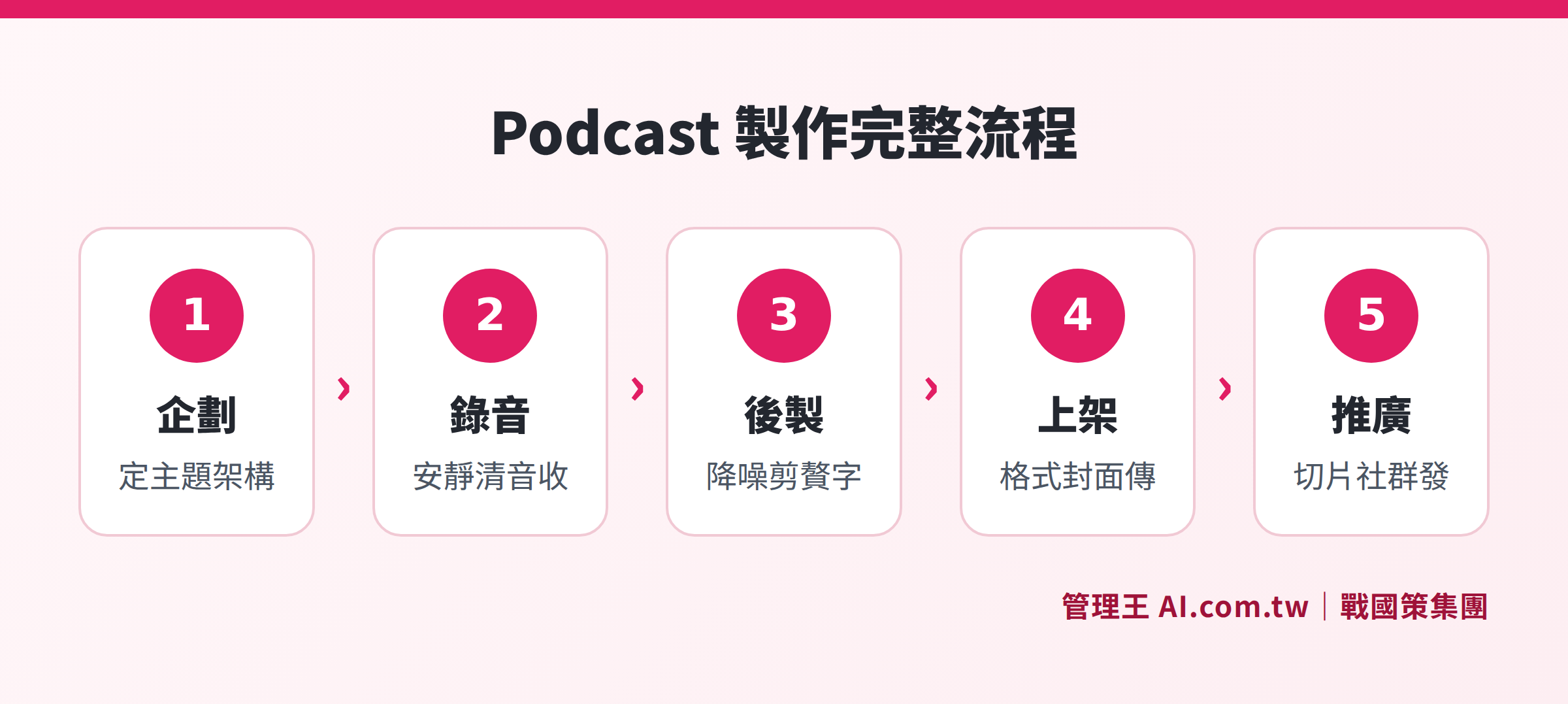
The complete production process from planning, recording, post-editing, platform publishing to community promotion
Podcast Planning: Three Key Decisions Before Recording
Before starting to record, clarify the following three questions to save a lot of time on editing later:
1. Program Positioning: Who are you talking to?
A clear target audience (e.g., "small and medium-sized business owners aged 35 to 50 in Taiwan") makes it easier to build a loyal listener base compared to a vague "for anyone". The more focused the program topic, the easier it is to rank for specific search terms.
2. Program Format: Interview, Monologue, Roundtable Discussion?
- Interview Format: Invite one or more guests per episode, content can be diverse, but scheduling and remote audio collection need coordination
- Monologue Format: The host speaks alone, requiring more preparation time but the easiest to produce, suitable for building a personal brand
- Roundtable Discussion: Involves more than two fixed hosts discussing; it fosters an intimacy with listeners but requires multi-track audio recording and more editing
3. Update Frequency: Weekly or Biweekly?
Data in Taiwan show that programs that update weekly have higher subscription retention rates than those that update irregularly. It is recommended for beginners to start with one episode every two weeks to prioritize quality over frequency, avoiding sacrificing content depth. When going live, it is advisable to prepare 3 to 5 episodes in advance to avoid interruptions at the initial launch stage.
How to Choose Recording Equipment for Beginner Podcasters?
Good recording is the foundation for efficient post-production. While equipment is important, the acoustic environment is the primary factor determining sound quality. It is advisable to choose spaces with soft materials for sound absorption (like shelves full of books, closets, or rooms with thick curtains), avoiding echoey places like tiled bathrooms or empty living rooms. If recording in an office, you can temporarily use blankets or thick rugs to surround the recording area, which can produce surprisingly good results.
Here are the equipment recommendations categorized by budget:
Table: Podcast Recording Equipment Budget Levels
| Budget Level | Recommended Microphone | Recording Interface | Recording Software | Sound Quality Level |
|---|---|---|---|---|
| Entry Level (Below NT$3000) | Audio-Technica ATR2100x-USB | Direct USB Connection | Audacity (Free)/ GarageBand (Free for Mac) | 60 Points |
| Advanced (NT$10,000-30,000) | Rode PodMic | Focusrite Scarlett Solo | Adobe Audition / Reaper | 80 Points |
| Professional (Above NT$30,000) | Shure SM7dB | Universal Audio Volt 1 | Logic Pro / Pro Tools | 95 Points |
Common Mistakes for Beginners:
- Recording in echoey rooms (tiled bathrooms are the worst; a closet packed with clothes is the best)
- Keeping the mouth over 20 cm away from the microphone (recommended distance is 10 to 15 cm)
- Not wearing headphones for monitoring, discovering noise only after recording
- Forgetting to mute the phone and shut down computer notifications
Considerations for Remote Interview Recording:
When recording remotely with guests, it is advisable to ask each guest to record their audio on their end (known as the Double-Ender recording method), which is then merged in post-production, rather than just recording the system audio from a platform like Zoom. This greatly improves the audio quality of each speaker and avoids the impact of unstable internet connections. Tools like Riverside and Zencastr can automatically assist in recording separate audio tracks for each participant, which can be processed individually in post-production.
Comparison of Mainstream Podcast Editing Software
Podcast editing tools on the market can be divided into three main categories: Traditional DAWs (Digital Audio Workstations), Text-based Editors, and AI Automation Tools.
Table: Comparison of Podcast Editing Software Functions and Costs (2025 Data)
| Software | Type | Cost | Suitable for | Main Advantages | Main Limitations |
|---|---|---|---|---|---|
| Audacity | Traditional DAW | Free | Budget-conscious beginners | Complete functions, no cost | Steep learning curve, no AI features |
| GarageBand | Traditional DAW | Free for Mac/iOS | Apple user beginners | Intuitive interface, pre-installed | Limited to Apple devices |
| Adobe Audition | Traditional DAW | Approx. NT$700/month | Intermediate users with budget | Top-notch noise reduction | Learning cost required |
| Descript | Text-based editor | Free to NT$500/month | Efficiency-focused creators | Text editing saves 70% time, AI transcription | Requires payment for full features |
| Alitu | AI Automation | Approx. NT$900/month | Beginners with no technical knowledge | Fully automated post-production, one-click output | Low level of customization |
| 管理王 Podcast AI | AI Integration | Free plan available | Taiwanese enterprises and brand creators | Integrates CRM and marketing, Traditional Chinese interface | Requires a 管理王 account |
The Core Questions for Choosing Tools:
- How much time do you have for post-production each week? (Less than 2 hours → Prioritize AI automation)
- What is your technical background? (Zero-base → Avoid professional DAWs like Pro Tools)
- Is this for personal creation or a corporate brand program? (Corporate → Integrating CRM and marketing is more important)
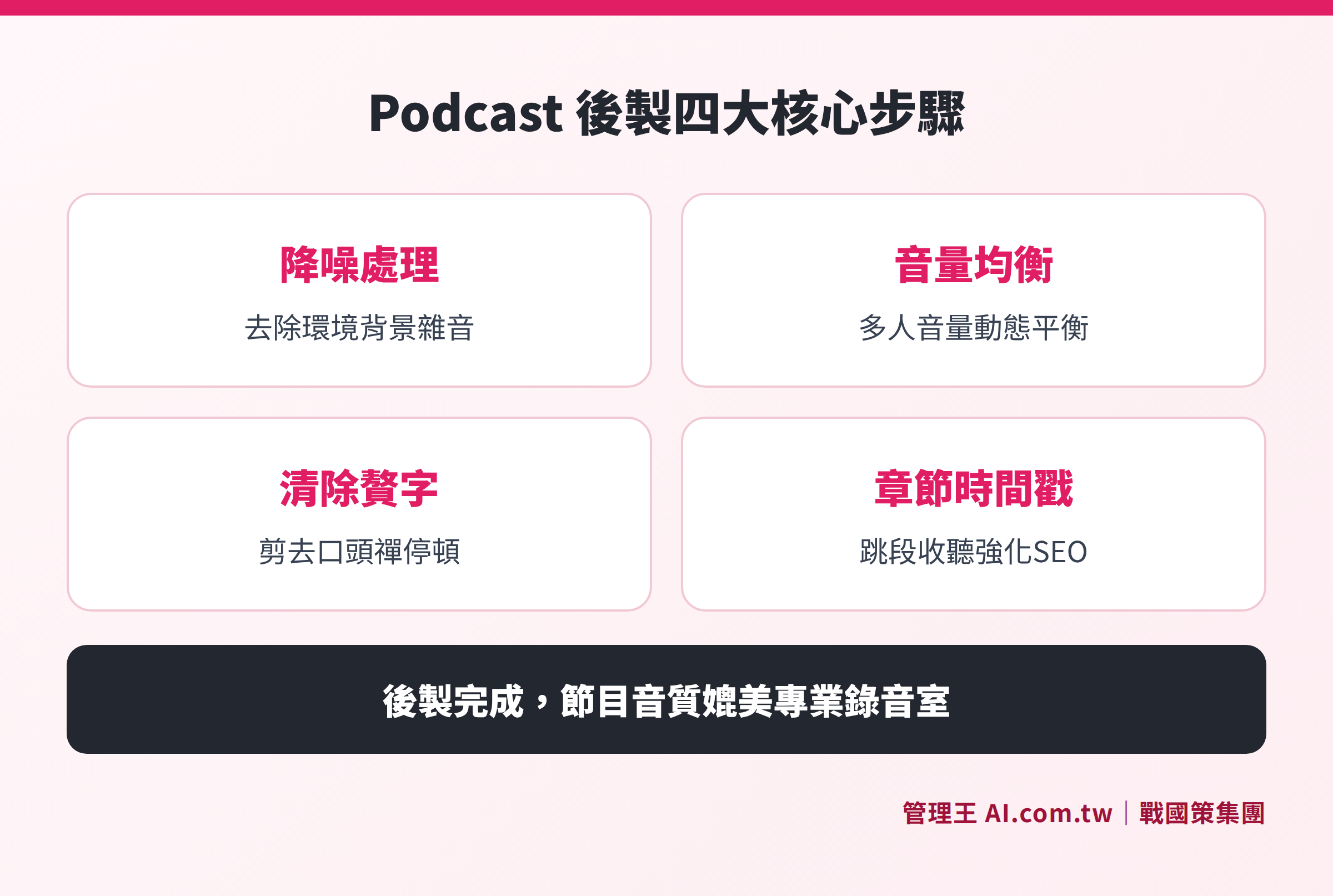
Description of the four core post-production indicators: noise reduction, volume normalization, filler word removal, and chapter timestamps
Podcast Audio Formats and Quality Standards
Before publishing, the audio file must be exported in a format compliant with platform specifications. Choosing the wrong format or too low a bitrate can affect sound quality and may cause platforms to reject the file.
Common Output Standards:
- Format: MP3 (widely compatible) or M4A (AAC, suitable for Apple ecosystem)
- Bitrate: 128 kbps mono (the golden standard for voice programs)
- Sample Rate: 44.1 kHz
- Channels: If it's an interview program, convert to mono to reduce file size by 50% without affecting sound quality
- Master Save Format: WAV 48kHz/24-bit, as material for future clips or creating Reels
Technical Specifications for Various Platforms:
| Platform | Accepted Formats | Suggested Bitrate | Max Size per Episode | Cover Image Size |
|---|---|---|---|---|
| Apple Podcasts | MP3, M4A, MP4 | Above 128 kbps | Unlimited | 3000×3000px JPG/PNG |
| Spotify | MP3, M4A, WAV | 128kbps (minimum 96kbps) | 200MB/episode | Delivered via RSS |
| KKBOX | Delivered via RSS | Suggestion: 128kbps | Based on RSS specifications | Delivered via RSS |
| SoundOn (Taiwan) | MP3, WAV | Above 128kbps | 500MB/episode | 1400×1400px or above |
Key Points for Cover Design: The cover image is the first impression audiences see on search pages. It is recommended to use high-resolution images of 3000×3000 pixels, focusing on the program name and main visuals, ensuring clarity even at a thumbnail size (around 1 cm). Avoid using too much text or detail to prevent it from being unrecognizable when shrunk. Tools like Canva can be used for production, or design professionals can create a consistent visual system for branding.
Complete Steps for Publishing on Four Major Podcast Platforms
To publish a podcast, you need to choose a hosting platform to store audio files and generate an RSS feed, then submit the RSS feed to various listening platforms. SoundOn and Firstory are the most common hosting platforms in Taiwan and offer free plans for use.
Publishing on Apple Podcasts
Apple Podcasts is the second largest podcast platform globally, with a high usage rate among Taiwanese audiences, especially with iPhone users who usually have it pre-installed.
- Prepare your program RSS feed (can be automatically generated through hosting platforms like SoundOn or Firstory)
- Log in to Apple Podcasters Connect (requires an Apple ID)
- Paste the RSS feed URL and submit for approval
- Approval time: About 3 to 10 working days
- Once approved, new episodes will automatically sync every 24 hours
Note: The RSS feed must be a publicly accessible HTTPS URL; the cover image must meet the 3000×3000 pixels, JPG or PNG format requirements; each episode must have a unique GUID identifier (the hosting platform will handle this automatically).
Publishing on Spotify
Spotify is the largest podcast platform globally, with a high usage rate among young audiences in Taiwan, and the Spotify for Podcasters backend provides detailed audience analytics (age, gender, region, retention rates), which is very helpful for optimizing programs.
- Go to Spotify for Podcasters to create an account
- Select "Existing podcast" and enter the RSS feed URL, or upload the audio file directly
- Verify ownership of the RSS feed (the system will require inserting a verification code into the feed)
- Usually takes effect within 24 hours after submission
- You can view play data and audience analytics through the Spotify for Podcasters backend
Publishing on KKBOX
KKBOX has a stable user base in Taiwan, Hong Kong, Singapore, Malaysia, and Japan, making it a good choice for entering the Southeast Asian market.
- Go to KKBOX Podcast Platform and click on "Become a Podcaster"
- Submit the program RSS feed URL
- Approval usually takes about 24 hours
- Once published, new episodes are automatically updated every hour
- KKBOX does not accept pure music DJ mixes, only spoken content
SoundOn (Local Taiwanese Platform)
SoundOn is the largest local podcast hosting and distribution platform in Taiwan. Once you upload your program to SoundOn, the system helps synchronize distribution to Apple Podcasts, Spotify, Google Podcasts, etc., saving you the hassle of submitting each platform individually. Another local option is Firstory, which also provides multi-platform publishing services and Taiwanese local advertisement matching services.
Podcast SEO and Show Note Writing Tips
Podcast SEO differs from website SEO; the program's "discoverability" relies on both platform algorithm recommendations and search engine indexing. The following elements are key to making your program appear in searches:
Key SEO Elements:
- Program Title: Includes main keywords, no more than 60 characters
- Episode Title: Clearly describes the content of this episode and includes searchable keywords
- Show Note: At least 500 words, containing a summary of the episode highlights, guest introductions, mentioned books and links, plus keywords appearing naturally
- Transcripts: Google and Spotify can index the text in the transcript, greatly increasing keyword coverage
- Chapter Timestamps: Allow listeners to jump to segments while providing additional SEO anchor points
- Cover Image Alt Text: Fill this out on the publishing platform to help visually impaired persons and search engines understand image content
Suggested Structure for Show Notes:
- Episode Highlights (2 to 3 sentences explaining the most interesting content of this episode)
- Guest Introduction (if there is a guest, explaining their background and expertise)
- Key Points Summary (3 to 5 points, each with corresponding timestamps)
- Relevant Resource Links (books, tools, websites mentioned)
- Listening and Subscription CTA
How to Get Your Podcast Cited in AI Search Engines (ChatGPT, Perplexity): Organize the key points of the transcript into a well-structured blog article that addresses specific questions (e.g., "How long does podcast editing take?" "What microphone should I use for podcasts?") to increase the chances of being referenced in AI-generated answers. You can also use AI SEO tools to optimize the structured data and semantic markup of the blog version.
Podcast Content Marketing Strategy: Turning One Episode into Multiple Outputs
Creating one episode is just the starting point; effectively using content repurposing can maximize the return on investment for each production. Marketing content that can be derived from each podcast includes:
- Social Clips: Extract 30 seconds to 1 minute of highlight segments and make short videos with subtitles (IG Reels, TikTok, Threads)
- Blog Articles: Rewrite the transcripts into 1,000 to 2,000 words SEO articles to increase organic search traffic
- Email Newsletter Summaries: Turn the key points from the Show Note into weekly newsletter content
- Social Posts: Capture memorable quotes from the program to create text-image posts, combined with the social scheduling feature for planned releases
- Quote Cards: Create images with quotes branded with visuals, generating sharing incentives
- E-books: Compile transcripts from multiple episodes on the same theme into one themed e-book, serving as a magnet for potential customers
If all the above-derived content relies on manual processes, it could take an additional 10 to 15 hours of production time for just one episode. With AI automatic editing and transcription features, most of the above-derived content can be generated automatically. If businesses integrate their weekly podcasts with their marketing systems, the return on investment (ROI) for the production of each episode will be several times higher than just releasing audio files.
How to Use 管理王 for Podcast AI Automatic Editing
The 管理王 AI.com.tw platform has a built-in Podcast AI Automatic Editing Tool, designed for corporate creators who lack time for traditional post-production. The main process is as follows:
Upload and Automatically Process: Supports MP3, WAV, M4A files and recording sources from Zoom, Riverside, etc. After uploading, the AI automatically removes background noise, wind noise, and computer fan sounds, separating the hosts and guests into individual audio tracks during interviews.
Automatic Removal of Filler Words and Silence: The AI automatically trims filler words like “uh,” “and,” “okay,” and long pauses, instantly tightening the program's pacing, saving the labor of dragging the timeline segment by segment.
Chinese Transcripts and Chapters: Chinese transcripts automatically align with the timeline, automatically marking chapter timestamps every five to ten minutes, allowing listeners to jump segments freely while enhancing SEO indexing effects.
Automatic Show Note and Summary: The AI automatically generates a 200-word highlight introduction based on the transcript, organizing guest information, mentioned books, and links into the Show Note, eliminating the need for late-night manual writing before publishing.
One-click Social Clips: Automatically cut the program's highlights into short clips for IG Reels, TikTok, Threads, combined with AI Short Video Studio and social scheduling feature to solve content distribution in one go.
Integration with Marketing Systems: Show Notes can be directly imported into the Marketing Automation module for Email and LINE pushing, or optimized using the AI SEO tool for the blog version, allowing one episode to generate various marketing materials while integrating the Video Editing Tool to create social short videos with subtitles.
Free Plan for Permanent Use: The 管理王 free plan includes a one-time AI point suitable for initial evaluations. For further integration with marketing and CRM functions, check the service plans and pricing.
Free Trial of Podcast AI Automatic Editing Tool
管理王 consultants will assist you in evaluating the Podcast AI automatic post-production process, saving you the time of frame-by-frame editing and allowing creators to focus on content.
Free consultation hotline: 0800-003-191
LINE Official Account: @119m
Official Website: app.AI.com.tw
Free Trial: Apply for 管理王 Now
Frequently Asked Questions
Is it Necessary to Use a Computer for Podcast Editing?
Not necessarily. Entry-level creators can use GarageBand (iPhone/iPad) or Ferrite Recording Studio (iOS) to complete basic editing directly on their phones. However, for detailed noise reduction, multi-track editing, or AI automation needs, a desktop or laptop remains a better choice. 管理王 Podcast AI tools support responsive web access and can be used in mobile browsers.
Will the Sound Quality Be Poor Without Professional Equipment?
Equipment is not the decisive factor; the acoustic environment is far more important. In a quiet environment with sound-absorbing materials (shelves, clothes, curtains), even a NT$1,500 USB microphone can produce acceptable sound quality. In contrast, even expensive microphones will perform poorly if recorded in large echoey rooms. First, improve your recording environment before considering upgrading equipment.
Do You Need to Edit Each Podcast Episode?
It depends on the style of the program. Interview or discussion-type programs usually require post-production to remove filler words; whereas a solo monologue program may only need basic noise reduction and volume adjustments if the host speaks smoothly. The advent of AI tools has significantly reduced the time cost even for full post-production, compressing traditional 6-hour workloads to just 30 minutes.
Should Background Music Be Added? Where to Find Royalty-Free Music?
Intro and outro music can enhance brand recognition, but copyright issues must be considered. It is recommended to use royalty-free music libraries such as the YouTube Audio Library (free, CC licensed), Pixabay Music (free), or Artlist (paid with more high-quality options). When adding background music to the program, keep the volume below 10% to 20% of the voice volume; otherwise, it may distract listeners.
How Long Does it Take to Be Found on Apple Podcasts After Launching?
The initial approval process takes about 3 to 10 working days. After approval, the program usually takes another 1 to 3 days to appear in the search fields, as it is indexed by Apple. Subsequently, each additional episode is expected to sync with the platform within 24 hours, and its appearance in recommended slots will depend on the program's category and interaction rates. It is suggested to publish simultaneously on platforms like Spotify and KKBOX to expand coverage.
Sources
- Apple Podcasters - Podcast Requirements (Official Apple, 2025 Inquiry)
- Spotify for Podcasters - Technical Specifications and Submission Guidelines (Official Spotify, 2025 Inquiry)
- KKBOX for Podcasters (Official KKBOX, 2025 Inquiry)
- SoundOn Taiwan Podcast Hosting Platform (Official SoundOn, 2025 Inquiry)