How to Choose a POS System? The Key to Integrating Cashier, Inventory, and Membership|POS System Recommendations

A comprehensive guide to understanding POS systems: from compliant electronic invoicing, real-time inventory deductions, member point accumulation, to multi-store management. This article provides seven key evaluation criteria and practical suggestions for retail, dining, and service industries when selecting a POS system.
A POS system (Point of Sale) is a core tool for physical stores, restaurants, and service industries that synchronously processes payment, issues electronic invoices, deducts inventory, and accumulates membership points at the moment of checkout. A complete integrated POS system allows business owners not to constantly monitor the cash register, inventory sheets, and invoice printers, as data flows automatically between the front and back end; while an inadequate POS can turn month-end reconciliation into a nightmare and may even lead to fines from authorities for failing to transmit electronic invoices. This article provides the most comprehensive guide to choosing a POS system, covering functional architecture, regulatory requirements in Taiwan, seven purchasing indicators, and industry differences to help small and medium business owners find the truly suitable cash register solution.
What is a POS System? Understand the Core Concept
POS stands for "Point of Sale," referring to the moment and location where a customer completes a purchase. Early POS systems were simply electronic cash registers responsible for calculating amounts and issuing receipts. Modern cloud POS systems are integrated platforms that encompass the entire process from checkout, inventory, membership, to financial reporting.
The biggest difference between traditional POS and cloud POS lies in where data is stored: traditional POS stores data locally, meaning power outages or crashes can lead to data loss; cloud POS synchronizes data in real-time to cloud servers, allowing owners to check real-time sales status from any device, with unified management across multiple stores.
Understand in One Sentence
A POS system is not just a cash register, but an operational engine that automates the connection between "payment → invoice → inventory → membership → reports."
Modern small and medium enterprises adopt cloud POS for three main reasons: 1. No need to purchase expensive dedicated hardware; any tablet or computer plus a printer can go online; 2. Multi-device synchronization; you can also check today’s performance in real-time on a mobile phone; 3. Automatically complies with Taiwan's electronic invoice regulations, eliminating manual entry and reconciliation.
Six Essential Functions of a POS System
A POS system suitable for small and medium enterprises in Taiwan should at least feature the following six core functions:
1. Versatile Checkout and Mixed Payments
Supports barcode scanning and quick touch-based product selection, and can split payments into cash, mobile payments (LINE Pay, Jkopay), and credit card within the same transaction, handling various change and splitting scenarios.
2. Automatic Linking of Electronic Invoices
According to the "Implementation Guidelines for Electronic Invoices," electronic invoices must be uploaded to the Ministry of Finance's electronic invoice integration service platform within 48 hours of issuance; failure to comply may result in fines ranging from NT$1,500 to NT$15,000. A quality POS system should automatically complete the number application, issuance, and upload through a Ministry of Finance approved electronic invoice value-added center (currently over 130 approved centers) without manual operation required from merchants.
3. Real-time Inventory Deduction
Every sale deducts inventory in real-time, and returns and refunds are synchronized to replenish stock, allowing owners to check real-time inventory even when they are not on-site, avoiding shortages of popular items or excess stock of slow-selling products.
4. Integration with EDC Card Readers
Integrates with Taiwan's mainstream EDC card readers (AllPay, Fubon, E.SUN) and supports contactless payments like EasyCard and iCash, all payment needs can be handled at the checkout station.
5. Shift Reports and Hierarchical Permissions
Supports shift closing settlements, clearly records each employee's payment and refund details, reducing cash discrepancies and internal fraud risks, with shift reports directly importable for payroll calculations.
6. Multi-Store Headquarters Consolidation
Transaction data from each branch is compiled in real-time, and after the headquarters sets product and pricing, this is automatically synchronized across all stores, avoiding the need for each chain brand to maintain stores individually, with pricing policies established at once.
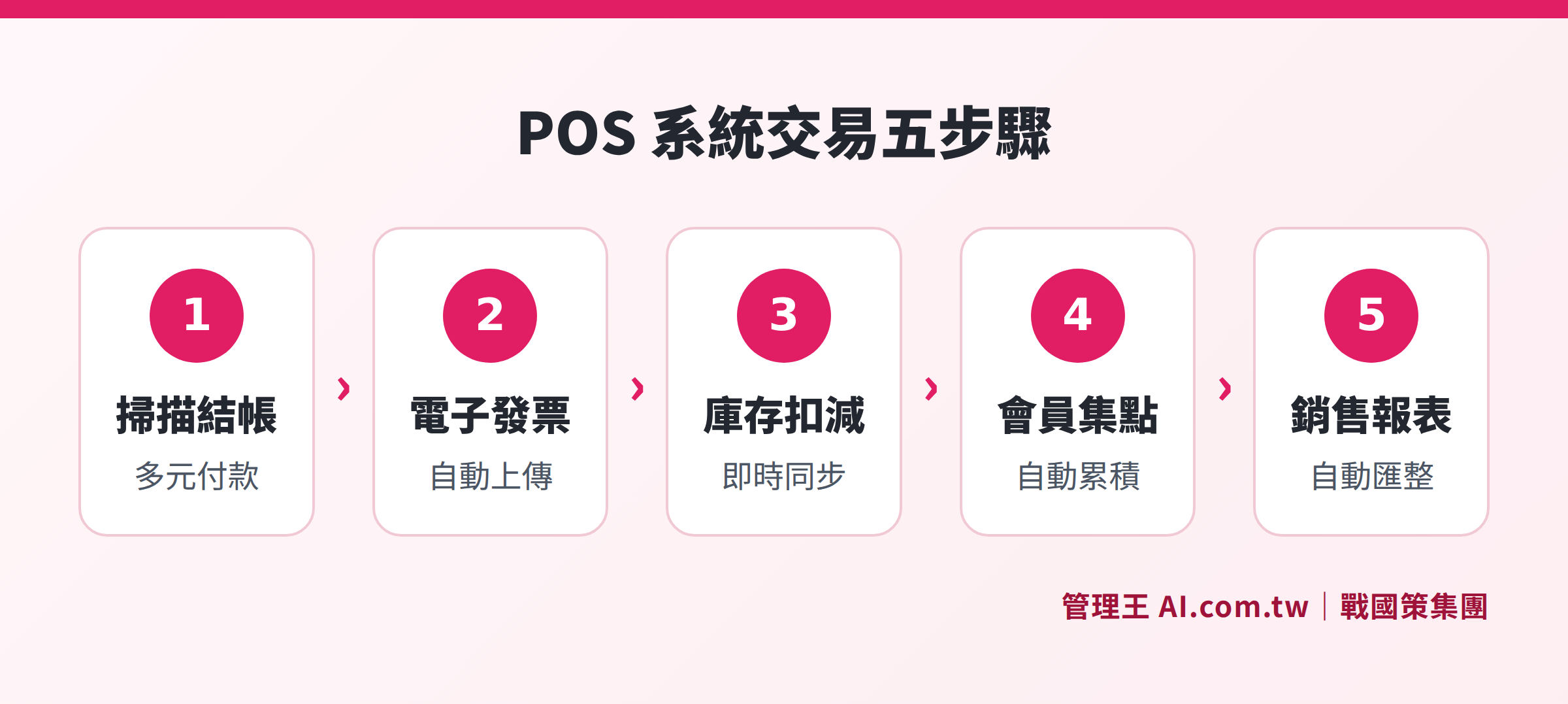
From checkout to inventory, invoices, membership points, and reports, the POS system links five key steps of the transaction process
How to Integrate Cashier, Inventory, and Membership?
Many stores use three systems simultaneously: one for POS cash register, one for inventory management, and one for membership CRM, manually merging all three data sets at the end of each month—this is a classic case of the POS “island problem.” The issues caused by data islands include discrepancies in inventory numbers, membership points not matching transaction records, and significantly longer reconciliation times.
The solution of an integrated POS is to let all three systems use the same data:
- Checkout → Inventory: The inventory in the back end is automatically deducted the very second the checkout is completed via barcode scanning, and replenishment alerts are immediately triggered.
- Checkout → Membership: After binding the member's phone number or membership card, each transaction automatically accumulates points, redeeming points is instantaneous without needing to open another system for query.
- Checkout → Electronic Invoice: By choosing the carrier (mobile barcode, personal identification certificate, love code), the POS directly sends electronic invoices to the value-added center without requiring staff to manually enter the uniform invoice number.
For consumers, integrated POS also brings a smoother shopping experience: checkout completes point accumulation, electronic invoice issuance, and sending a LINE thank-you message in one go, without requiring customers to switch between multiple apps or systems. Below is a major comparison of the differences between integrated POS and separate systems:
Table: Feature Differences Between Integrated POS and Separate Systems
| Item | Integrated Cloud POS | Separate Multi-Systems |
|---|---|---|
| Real-time Inventory | Second-level sync after checkout | Requires daily or manual imports |
| Membership Point Redemption | Completed during checkout | Requires separate system query |
| Electronic Invoice | Automatic issuance and upload | Manual entry or additional module required |
| Multi-Store Management | Unified headquarters backend | Maintained separately by each store |
| Month-End Reconciliation | Reports generated automatically | Manual merging in Excel |
| Hardware Costs | Can use a regular tablet | Requires purchasing dedicated equipment for each system |
Electronic Invoice Integration: An Indispensable Compliance Feature for Taiwan's POS Systems
The Ministry of Finance has promoted electronic invoices for many years; the current basis is the Ministry of Finance’s "Implementation Guidelines for Electronic Invoices," which mandates that stores above a certain scale (and voluntary adopters) upload transaction data through a value-added center for electronic invoices.
When selecting a POS system, verify the following three points regarding electronic invoice functionality:
1. Is it connected to an approved value-added center by the Ministry of Finance?
The value-added center must pass the Ministry of Finance's review and ISO 27001 information security certification to legally issue and upload electronic invoices on behalf of businesses. Fines for invoices issued independently without using an approved value-added center carry regulatory compliance risks.
2. Does it support various carriers?
Current electronic invoice carriers include: mobile barcode, personal identification certificate (IC card), membership carrier (system-stored), and printed uniform numbers (for businesses). The POS system should allow customers to choose during checkout.
3. The process of voiding invoices and handling returns
When handling returns, the original electronic invoice must be correctly voided, and a credit note issued. If this process is not automated, manual operations are prone to errors, leading to tax back payment or fines during inspections.
The 管理王 POS system connects through the ezPay (AllPay) electronic invoice value-added center to automatically complete issuance, uploading, and carrier affiliation at checkout, complying with Taiwan's tax regulations.
What Hardware Do You Need for a POS System?
Before implementing a POS system, understand the required hardware list to accurately estimate initial investment costs. Traditional POS systems require purchasing dedicated terminals, which typically cost tens of thousands; cloud POS significantly lowers hardware thresholds, allowing the use of standard business equipment:
- Main Unit: iPad, Android tablet, or Windows laptop; it is recommended to select a screen size of 10 inches or larger for easy touch operation.
- Receipt Printer: Thermal printers that can print receipts and kitchen order slips (needed for the food service industry) typically cost between NT$2,000 and NT$5,000.
- Cash Drawer: Automatically pops open via the printer signal, costing about NT$1,000 to NT$2,000.
- Barcode Scanner: Essential for retail, can be wired or Bluetooth wireless, costing around NT$1,000 to NT$3,000.
- Card Reader / EDC Card Machine: Requires application through banks or third-party payment service providers (AllPay, Fubon) and is usually billed on a rental basis.
In comparison to traditional POS systems where a single main unit can start from NT$30,000 to NT$80,000, the total hardware cost for a cloud POS plus a standard tablet can usually be kept under NT$10,000, and software upgrades don’t require hardware replacements, leading to lower long-term maintenance costs.
Seven Evaluation Criteria for Selecting a POS System
With many POS systems available on the market, it is recommended to evaluate each one based on the following seven aspects:
1. Hardware Requirements
Is there a need to purchase dedicated POS terminals? Cloud POS typically can work with regular iPads or Windows tablets combined with a receipt printer and cash drawer for setup, resulting in a lower hardware threshold.
2. Electronic Invoice Compliance
Verify whether it connects to the Ministry of Finance-approved electronic invoice value-added center, supporting mainstream carriers like mobile barcodes and personal identification certificates.
3. Inventory Integration Depth
Is inventory deduction real-time? Does it support multiple warehouses and raw material tracking (for the food service industry)? Are there alerts for restocking and unsold products?
4. Membership and CRM Integration
Can it accumulate points in real-time during checkout, redeem points, and send coupons? Can membership data be exported and integrated with other marketing tools?
5. Multi-Store Management
Can product settings and price changes be pushed from headquarters to all branches? Can each branch's performance be summarized in real-time at headquarters?
6. Reports and Data Analysis
Can it provide daily sales, best-selling products, employee performance, time-slot analysis reports? Can these be exported to accounting systems?
7. Cost Structure
What are the monthly fees, hardware costs, transaction fees, and value-added service charges? Is the free plan indefinitely usable? Is the custom billing method transparent?
Comparison of POS Functionality Needs Across Different Industries
Different industries have distinct core needs for POS systems, so it is crucial to compare against your industry characteristics before making a purchase:
Table: Comparison of POS Functionality Needs for Retail, Dining, and Service Industries
| Function Requirement | Physical Retail | Restaurants / Beverages | Service Industry (Beauty, Medical Aesthetics, etc.) |
|---|---|---|---|
| Quick Checkout | Necessary | Necessary | General |
| Table Order Integration | Not required | Necessary | Not required |
| Ingredient Inventory Tracking | Product Inventory | Raw Material Tracking | Consumable Management |
| Reservation Scheduling | General | General | Necessary |
| Membership Point Accumulation | Necessary | Important | Necessary |
| Delivery Platform Integration | General | Important | Not required |
| Electronic Invoice | Necessary | Necessary | Necessary |
| Multi-Store Management | Only needed for chains | Only needed for chains | Only needed for chains |
Physical Retail places the highest value on accuracy in product inventory and quick checkout, usually handling a large number of SKUs (Stock Keeping Units), requiring barcode scanning and batch import of product data as basic thresholds.
Dining Industry requires table number management, a system to send orders to the kitchen (KDS), ingredient inventory tracking, and integration with delivery platforms (like UberEats, Foodpanda).
Service Industry (beauty, medical aesthetics, fitness, tutoring, etc.) needs a reservation system integrated with POS so that customer reservations are directly reflected at checkout, while synchronously calculating employee performance and membership points.
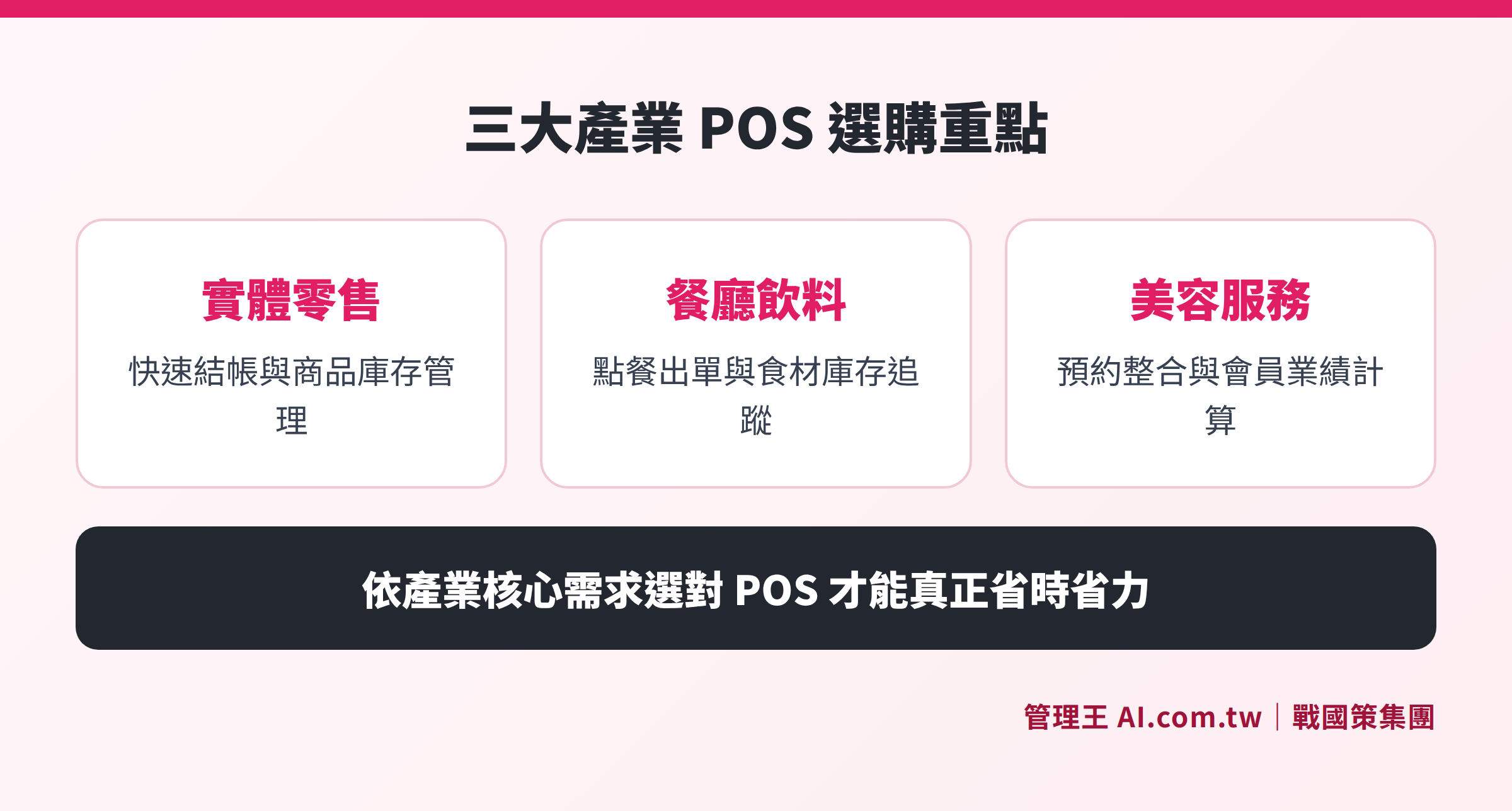
Retail, dining, and service industries have different priorities for POS functionalities; evaluating according to industry characteristics ensures the correct system is chosen.
How to Use 管理王 POS System?
管理王 AI.com.tw POS cash register system is a cloud POS solution designed specifically for physical retail, dining, and service industries in Taiwan, requiring no purchase of dedicated hardware; a tablet or computer plus a printer and cash drawer is sufficient for setup, usually completed within a day.
The actual operational process is as follows:
- Creating Product Data: Batch import product names, barcodes, prices, and stock quantities, supporting CSV import to save time on individual entries.
- Setting Up Electronic Invoices: Choose to connect through the ezPay/AllPay electronic invoice value-added center; once set up, it automatically issues and uploads at checkout.
- Checkout Process: Scan barcodes or touch to select products, choose payment methods (cash, card, mobile payment); mixed payments can be done in one go.
- Membership Point Accumulation: Enter the member's phone number or scan the member QR Code during checkout for immediate points accumulation or redemption; collected customer data automatically enters the CRM system.
- Inventory Tracking: Automatically deducts stock after sales, alerts are triggered if below safe stock levels, and the inventory management module allows viewing of stock and purchase records.
- Shift Closing Settlement: Generate the daily payment report at the end of the shift, reconcile cash, and close the shift. Data uploads automatically, allowing headquarters to view daily performance the next day.
- Financial Reports: Daily sales automatically integrate into the accounting system, generating month-end profit and loss statements and cash flow statements automatically, eliminating the need for manual organization.
The free plan is permanently usable, suitable for newly opened or trial stores to first establish product and member data; if AI value-added features, unlimited member entries, and multi-store functions are needed, upgrades to the monthly payment plan are available, see management plans and pricing for details.
The 管理王 POS system is not a standalone module, but inherently integrated with membership point accumulation, online ordering, CRM, inventory, accounting, and 70+ modules; there is no need for additional API integrations or payment integration fees, making it particularly friendly for small business owners with limited staff. Consultant's advice: If you are still reconciling accounts with Excel every day, just the automatic electronic invoice and inventory synchronization alone is enough to benefit you.
Owners of chain brands or multiple stores will feel the difference of integration even more: performance, refunds, and inventory status of all branches for the day are summarized in real-time in the headquarters backend, without needing to call each store for verification; if a product is out of stock at Store A but available at Store B, the system can prompt immediate transfer, preventing sales losses from popular items. Overall, the design logic of the 管理王 POS system is to "ensure that every data point at the checkout automatically flows to the correct module," helping owners transition from analyzing past data to making decisions with real-time dashboards.
Try the Cloud POS Cash Register System Now
Consultants help evaluate POS solutions, planning an integrated process for checkout, inventory, and membership. The free plan is permanently usable, and registration can be completed in 30 seconds.
Free consultation hotline: 0800-003-191
LINE official account: @119m
Official website: app.AI.com.tw
Free trial: Apply for 管理王 Now
Frequently Asked Questions
Must a POS system connect to electronic invoices?
According to the Ministry of Finance's "Implementation Guidelines for Electronic Invoices," electronic invoices must be uploaded to the Ministry of Finance's electronic invoice integration service platform within 48 hours of issuance, and failure to comply may result in fines ranging from NT$1,500 to NT$15,000. Cloud POS connects automatically through an approved electronic invoice value-added center, completing issuance and uploading immediately after checkout, which is currently the most convenient compliance method. It is recommended to prioritize confirming whether this feature is built-in when purchasing a POS system.
What are the differences between cloud POS and traditional POS?
Traditional POS data is stored locally, which could be lost in a device failure or power outage, and cannot be viewed remotely; cloud POS backs up data in real-time to the cloud, allowing owners to view daily performance via their mobile phones and manage multiple stores uniformly. If hardware fails, simply log in on a new device to continue using the system.
Do small stores or newly opened businesses need a POS system?
Even a one-person shop can gain three immediate benefits from a POS system: automatic issuing of electronic invoices (no manual entry), automated inventory deductions (no handwritten accounting), and automatic aggregation of sales reports (no manual Excel organization at month-end). Many cloud POS systems now offer permanently usable free plans, so the entry threshold for small shops is nearly zero. It is advisable for newly opened businesses to first use the free plan to establish product catalogs and membership data, and upgrade to paid plans when business stabilizes and multi-store or advanced analytical functions are necessary, avoiding high software costs before verifying their business model.
Can POS systems integrate with delivery platforms?
Some cloud POS systems support integration with delivery platforms such as UberEats and Foodpanda, allowing delivery orders to enter the POS directly and synchronously deducting inventory. Inquiring whether the vendor offers this integration and whether there are additional integration fees is recommended before purchase.
What are the typical costs of a POS system?
Costs vary significantly based on plans and features. The 管理王 POS system is included within the overall subscription plan: a free plan is permanently usable, the economy plan is NT$5,000/month (up to 30 members), the business plan is NT$10,000/month (including 8 hours of remote implementation training), and the flagship plan is NT$19,900/month (unlimited members). For detailed pricing, please refer to the official pricing page, with additional discounts for annual subscriptions.
Data Sources
- Ministry of Finance's Shared Regulatory System — Implementation Guidelines for Electronic Invoices (Ministry of Finance, amended 2024)
- Ministry of Finance's Shared Regulatory System — Electronic Invoice API Usage Guidelines (Ministry of Finance)
- 管理王 AI.com.tw POS Cash Register System Feature Page (管理王, 2026 check)
- 管理王 AI.com.tw Plans and Pricing (管理王, 2026 check)
This article provides general information and does not constitute legal or tax advice; actual electronic invoicing regulations and penalties should be based on the latest announcements from the Ministry of Finance.