Quotation Generator Comparison: What's the Difference Between Free Tools and Quotation Systems|Recommended Quotation Systems

A quotation generator refers to tools that can quickly produce quotation documents, including Word templates, Google Sheets, and online free generators. Free tools are suitable for individual freelancers or small shops with low monthly quotation volumes, but they have obvious limitations in tracking customer views, version management, automatic follow-ups, and backend integration. For teams with 2 or more sales members or those issuing over 20 quotations a month, it is advisable to upgrade to a complete quotation system to manage the entire quotation process.
A quotation generator refers to tools that can quickly produce quotation documents, from Word templates, Excel spreadsheets, Google Forms, to online free PDF generators. The advantages of these free tools are zero cost and quick adaptation, making them suitable for individual freelancers or small shops with low monthly quotation volumes. However, when business demand increases, requires collaboration among multiple people, or wants to track customer activities post-quotation, free tools exhibit management blind spots: versions scattered across each salesperson’s computer, no way to know if customers have viewed the quotations, and the need to re-enter the information after a sale. This article systematically compares various free quotation generators with complete quotation systems to help Taiwanese SMEs find the most suitable quotation tools for their scale.
What is a Quotation Generator? Common Types at a Glance
A quotation generator is a tool that assists users in inputting items, quantities, and unit prices, automatically calculating subtotals, taxes, and total amounts, and outputting standard format documents. Based on functionality depth, they can be categorized into the following types:
1. Local Office Software
Microsoft Word and Excel are the most common options. Word provides layout design flexibility, while Excel can set up automatic summation formulas. There are a large number of free quotation templates available online for download, suitable for users who have never been exposed to digital tools.
2. Cloud Spreadsheets
Google Sheets and Microsoft 365 Excel Online allow multiple users to edit simultaneously, solving the problem of files being scattered across different computers, but still cannot automatically track the sending status or customer reading behavior.
3. Online PDF Quotation Generators
Local tools like CaseFlow and Qlite allow you to fill in items and export PDFs without logging in, and some incorporate automatic calculations for 5% sales tax and unified number inquiries. The advantages are quick operation and tidy formatting, while the drawbacks include limited free issuance numbers per month and no automatic connection to backend business processes.
4. Complete Quotation Systems
For example, the quotation module by 管理王 AI.com.tw not only generates PDFs but also integrates CRM opportunity tracking, automatic sending and reading tracking, online e-signing, and one-click conversion to contracts, specifically designed for SMEs with sales teams.
In a Nutshell
Free tools solve the problem of "creating a quotation," while quotation systems solve the issue of "managing the entire quotation process."
4 Major Limitations of Free Quotation Tools
Free tools are not inherently bad, but they have their boundaries of applicability. When business volume or management needs exceed this limit, continued use of free tools can create more troubles.
Limitation 1: Unable to Know if Customers Have Viewed
After attaching the PDF quotation in an email, the sales team has no idea if the customer has opened it. If the customer forgets to look, there is no prompt, and it often sinks into oblivion. A complete quotation system’s "sending tracking" function can record when the customer opened the quotation and how long they stayed, allowing sales to follow up at the right time.
Limitation 2: Confusing Version Management
If the sales team quoted three different amounts for the same customer, they save each modification as new files, but the copies are scattered across personal computers, email inboxes, and cloud drives. The supervisor wishing to confirm the latest quotation amount often has to search through three different locations. Quotation systems come with built-in version control, making all modification records of a single quotation clear at a glance.
Limitation 3: Disruption When Staff Leaves
Quotation files made in Word or Excel are usually stored on personal computers, and when a salesperson leaves, customer contact records often leave with them. The new person taking over has no historical context and can only start from scratch to build relationships with the customer. In a quotation system, all data belongs to the company account, avoiding any gaps during turnover.
Limitation 4: Inability to Link to Backend Processes
After using free tools to create a quotation, the customer’s signed agreement still has to be manually entered into contracts, followed by manually creating payment requests, and finally matching invoices. Each step involves repeated input, and there is always a chance of errors. Quotation systems with one-click conversion to contracts and payment requests minimize repeated inputs.
Comparison Table of Free Tools vs. Quotation System Functions
Table: Comparison of Functions Between Free Tools and Complete Quotation Systems
| Function Item | Word / Excel | Online Free Generator | Complete Quotation System |
|---|---|---|---|
| Generate Quotation PDF | ✓ | ✓ | ✓ |
| Automatic Tax Calculation | Manual formula setup required | Partially supported | ✓ Automatic |
| Electronic Signature | ✗ | Partially supported | ✓ Built-in |
| Sending Tracking After Delivery | ✗ | ✗ | ✓ |
| Automatic Follow-Up Reminders | ✗ | ✗ | ✓ |
| Version Management | Manual saving required | Manual saving required | ✓ Automatic |
| One-Click Contract Conversion | ✗ | ✗ | ✓ |
| Collaboration Among Multiple Users | Requires cloud saving | Partially supported | ✓ Native |
| CRM Integration | ✗ | ✗ | ✓ |
| Customer Data Protection | Stored on personal computer | Stored in cloud but isolated | ✓ Company account |
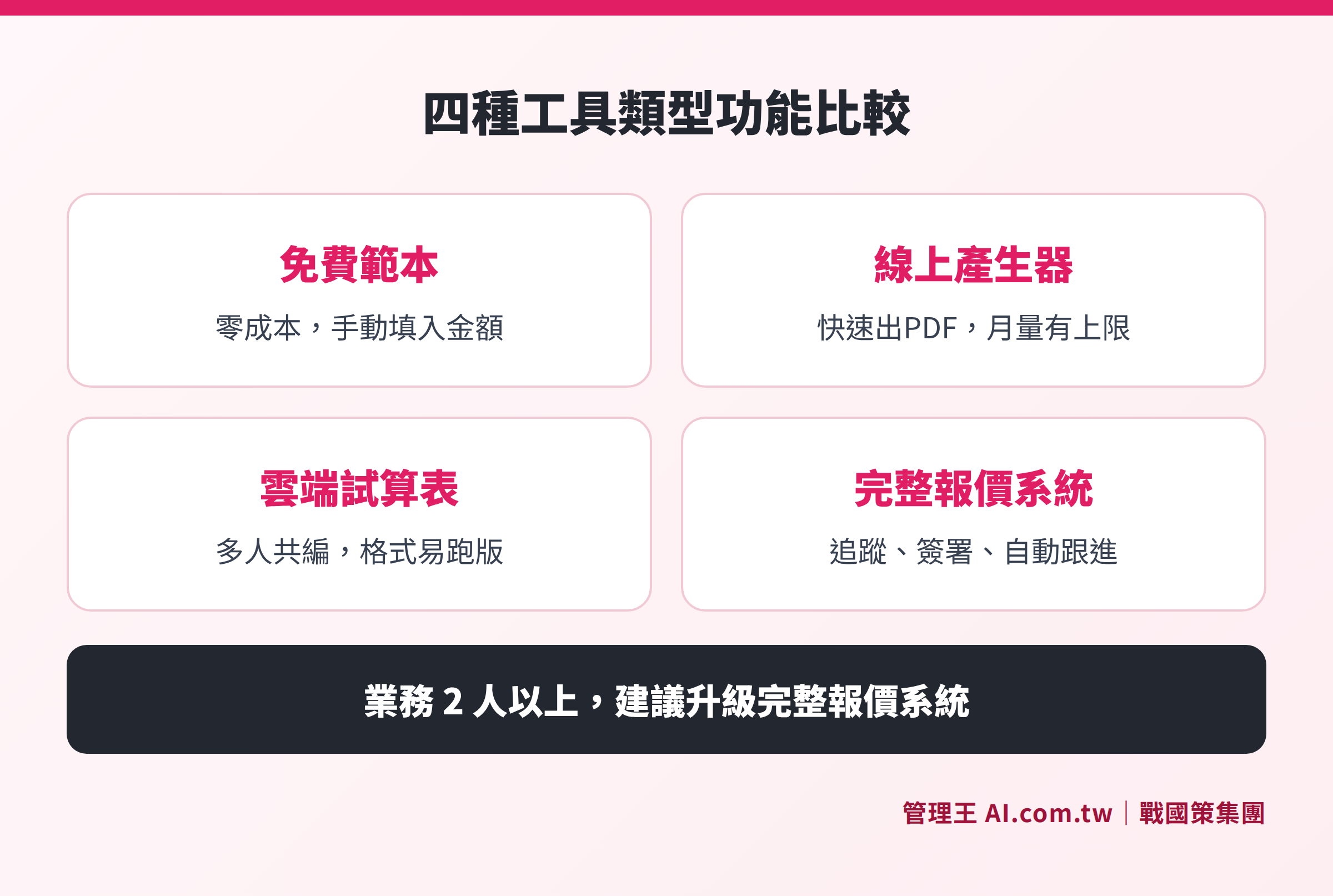
Core function comparison of four types of tools (Word/Excel, cloud spreadsheets, online generators, complete quotation systems)
When Should You Upgrade to a Quotation System?
Based on the monthly quotation volume and the number of sales personnel, the following judgments can be made:
Table: Tool Selection Based on Usage Scenario
| Usage Scenario | Recommended Tool |
|---|---|
| Individual projects, 1–5 per month | Free Excel template or online generator |
| Small team of 2–5, 6–20 per month | Cloud spreadsheets + free online generator |
| Sales team of 5 or more, over 20 per month | Complete quotation system |
| Need for quotation tracking and contract management | Complete quotation system |
| High turnover rate among sales personnel | Complete quotation system |
The following scenarios indicate that you are likely exceeding the capacity of free tools:
- Sales ask a supervisor, "What was the last quotation for this customer?" and the supervisor cannot answer immediately.
- A customer asks, "Is the quotation you gave me last week still valid?" and the sales representative has to search their email for the attachment.
- At the end of each month, reconciling requires a significant amount of time to verify figures from both email and Excel.
- After a salesperson leaves, the successor knows nothing about the customers they are taking over.
In other words, free tools are suitable for "operational" quotation needs, while complete quotation systems are suited for "management" quotation needs. The former treats the quotation as a document to produce, while the latter manages the quotation process as a business opportunity. The essential goals of both are different. When a company’s pain point shifts from "how to create a beautiful quotation" to "how to manage all subsequent quotations well," it’s time to change tools.
How to Choose an Online Quotation Generator? Five Key Questions
When choosing among various free online quotation generators, Taiwanese companies can ask themselves the following five questions:
Q1: Does it support Taiwan's tax system?
Taiwan's 5% business tax and supplementary health insurance premiums for specific transactions (2.11%) are common oversights in foreign tools. Choosing locally developed tools can avoid manual recalculations.
Q2: What is the monthly order volume?
Most free plans limit to 5 to 10 quotations per month, beyond which requires a paid upgrade. Assess your actual needs before deciding on a free or paid version.
Q3: Is electronic signature needed?
If you want the customer to confirm quotations on the spot without printing, choose a tool that supports electronic signature functionality; simple PDF generators may not suffice.
Q4: Is team sharing needed?
Individual freelancers can use free tools without issues, but as soon as there are more than two salespeople collaborating, a system with backend management functionalities becomes necessary rather than a single-use generator.
Q5: Can data connect to the backend?
Quotation data in free tools are usually isolated; if you want the quotation to feed automatically into CRM, accounting, or contract systems, you need to select a platform with integration capabilities.
If your answers to the above five questions are mostly "yes," it indicates you have exceeded the service limits of free online quotation generators and should consider evaluating a paid complete quotation system. If it's only basic order demands, locally available free tools like CaseFlow or Qlite are good starting options, as both support Taiwan’s tax system and require no login for usage.
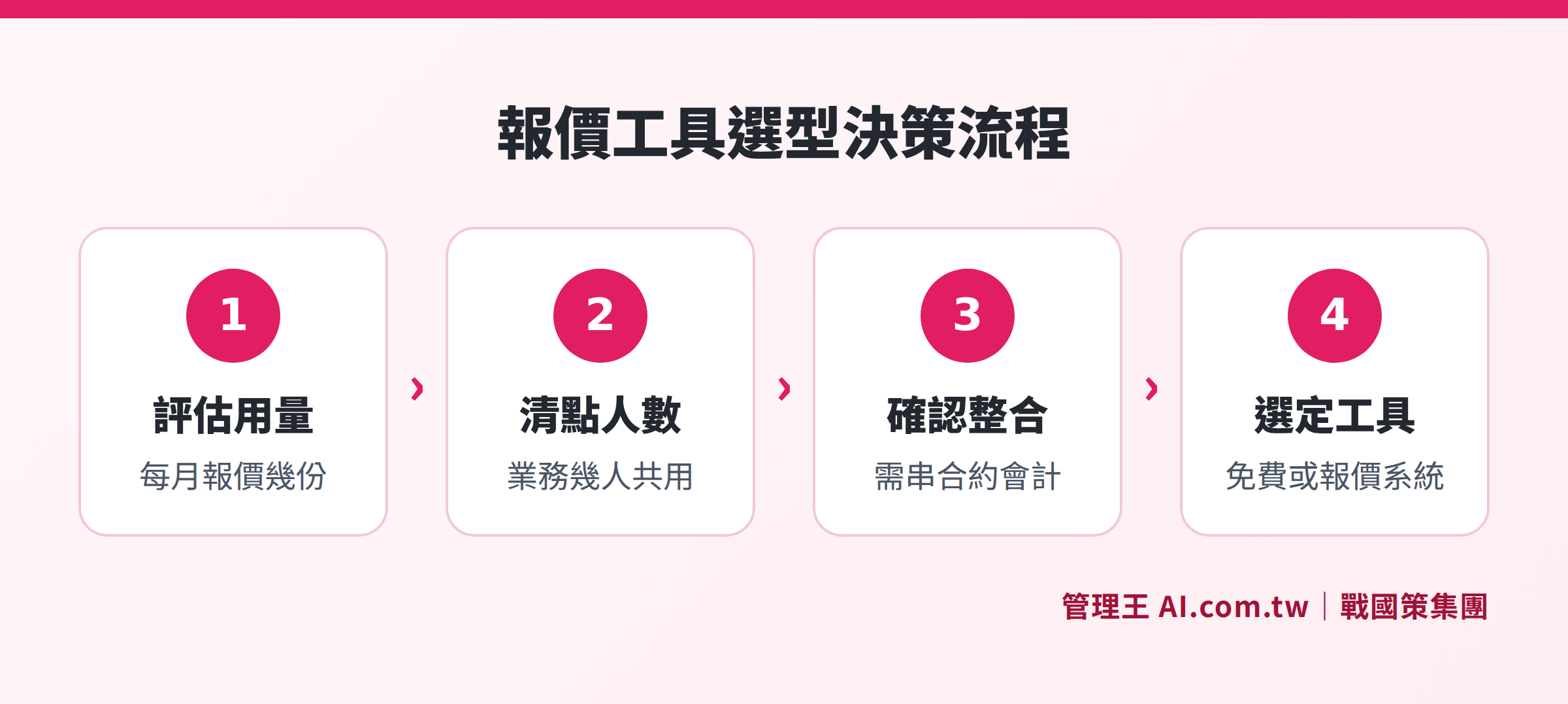
Decision-making steps for choosing suitable tools based on monthly order volume, number of sales personnel, and backend integration needs
How to Use 管理王: From Quotation to Closing the Deal in One Go
The quotation system by 管理王 AI.com.tw integrates into the sales system, with a free plan available for permanent use. The entire quotation process, from production to tracking, is managed within the same system, allowing sales to switch tools seamlessly while supervisors can keep track of the status of each quotation, follow-up progress, and overall closing rates in real time. Here is the actual operating process:
Step 1: Establish Product Catalog
First, pre-build standard items and unit prices in the system, so sales can simply select them during quotations, eliminating the need to retype each time and preventing manual errors in item names and unit prices.
Step 2: One-Click Generate PDF Quotation
The system automatically inputs the company logo, terms, and quotation number, automatically calculates discounts, taxes, and shipping costs, and you only need to confirm the numbers before exporting a professional PDF with a signature field with one click.
Step 3: Online Sending and Tracking
The quotation email is sent by the system, and upon customer click, the system records the opening time, duration, and visit count. Sales can call at optimal timing instead of blindly following up the next day.
Step 4: Automatic Follow-Up, Saving Time on Chasing
If the customer does not reply after sending the quotation, the system automatically sends emails, LINE messages, or SMS in the sales tone based on the set intervals. Each round alternates phrasing, and once the customer closes the deal or clearly declines, the follow-up stops automatically, preventing disturbance.
Step 5: One-Click Convert to Contract After Signing
After the customer clicks the link to sign online, the quotation status updates automatically, allowing sales to convert to contract management with one click and record it in the CRM opportunity pipeline, ensuring all closing records are retained in the company system.
If your business processes still require integration with e-signatures, accounting, or sales daily reports, 管理王’s nine systems are natively integrated, without needing additional API connections.
For more information on complete features and pricing plans, refer to 管理王 Quotation System Overview: Complete Features and Selection Guide.
Want to Replace Excel Quotations?
管理王 consultants assist you in evaluating the best quotation tools, planning to introduce everything from free tools to complete systems.
Free consultation hotline: 0800-003-191
LINE official account: @119m
Official website: app.AI.com.tw
Free trial: Apply for 管理王 now
Frequently Asked Questions
Who are Free Quotation Generators Suitable For?
Users with a monthly quotation volume of 5 or less, primarily engaged in individual projects, will find that free online quotation generators are quite sufficient, enabling quick generation of well-formatted PDFs with automatic tax calculations. If the number of sales personnel increases to 2 or more, or the monthly issuance exceeds 20, it is advisable to upgrade to a complete quotation system with backend management functions.
What is the Essential Difference Between Using Excel for Quotations and Using a Quotation System?
Excel is a static document tool that can help you "create" a quotation, but cannot track progress after the quotation is sent. A quotation system is a dynamic process tool that manages the entire business workflow from sending the quotation, customer openings, automatic follow-ups, e-signatures to contract conversion, all within the system. The data also belong to the company account, ensuring that former employees do not take it with them.
What Functions are Included in 管理王's Free Quotation System Plan?
The 管理王 free plan is permanently usable and has a member limit of 10 people, including basic quotation creation, PDF export, and sending functions. Advanced AI quotation suggestions, batch quotations, and unlimited issuance require an upgrade to a paid plan (starting at NT$5,000/month). For detailed functional differences, please refer to the official pricing page.
Is the Data from Online Quotation Generators Secure?
Locally developed tools in Taiwan typically store data on Taiwanese servers, complying with personal data protection regulations. 管理王 stores data in 戰國策 Group's Taiwan data center (dual machine room backup, ISO 27001 standards), encrypting data transmission throughout with HTTPS/TLS, and maintains complete operation records for audits.
How Can a Quotation System Help Sales Teams Improve Closing Rates?
A complete quotation system enhances closing rates through two key mechanisms: opening tracking after sending, which enables sales to call when customers are most interested; and automatic follow-up reminders, where the system periodically contacts hesitant customers to prevent quotations from going cold. Together, these strategies allow sales to focus their time on worthy discussions.
Data Sources
- CaseFlow: Quotation Tool Showdown 2026! Evaluating the Pros and Cons of Word, Excel, and Online PDF Quotation Generators (Inquiry from 2026)
- 恒遠數位科技: Are Free Quotation Generators Useful? Free Tools Stronger Than Excel (Inquiry from 2026)
- 管理王 AI.com.tw Quotation System Function Page
- 管理王 AI.com.tw Quotation System Overview