How to Choose a Scheduling System? A Comprehensive Guide for Small and Medium Enterprises from Manual to Automated Scheduling

Scheduling systems allow businesses to upgrade employee scheduling from paper and Excel to cloud-based automated management. This article outlines six major features (shift settings, AI automated scheduling, online shift swaps, labor law hourly alerts), compiles five key purchasing indicators, and analyzes scheduling challenges and countermeasures within industries such as catering, retail, and manufacturing. The 管理王 scheduling system is natively integrated with clock-in, payroll, and approval modules, with a free plan available indefinitely.
A scheduling system is a core tool for enterprises to upgrade employee attendance scheduling from paper, Excel or fingerprint machines to cloud-based management. For small and medium enterprises, a good scheduling system can automatically generate fair schedules, notify employees in real-time, track overtime hours, and seamlessly integrate with clock-in and payroll modules. This article begins with the core regulations of labor law hours, fully explaining the six core functions of scheduling systems, the pain points of scheduling across various industries, and five crucial assessment indicators to help Taiwanese SME owners find the most suitable scheduling software as quickly as possible, freeing them from the repeated nightmare of scheduling every month.
What Losses Have Small and Medium Enterprises Suffered from Manual Scheduling?
Many small and medium enterprise owners still prefer to use Excel sheets or whiteboards for scheduling, which might be barely sufficient for shops with fewer than five employees, but once the number of employees exceeds ten or if there are more than two stores, manual scheduling quickly turns into a management minefield that recurs every month.
The time cost far exceeds expectations: To schedule shifts for 20 employees for a month, a supervisor typically spends half a day to a full day communicating, adjusting, and confirming, plus each time a swap request or overtime confirmation is required, the administrative time spent on scheduling and attendance changes often exceeds two working days each month.
Schedule conflicts are unavoidable: The same employee might be assigned two shifts in one day, continuous working days may exceed the statutory limit without anyone noticing, and there's a shortage of critical shift personnel leading to last-minute overtime requests—these issues are common problems of manual scheduling, as the human brain cannot track multiple constraints simultaneously.
Perception of fairness among employees directly affects retention rates: Are night shifts and holiday shifts evenly distributed? Are there employees with similar tenure who always get assigned less favorable shifts? Such concerns about "unfairness" are hard to prove with Excel sheets, yet they often ignite employee departures or labor disputes.
Proxy punching and attendance fraud: Without a proxy punching prevention mechanism, disputes over overtime pay and full attendance bonuses are bound to arise, and at the end of the month, reconciliation consumes significant time verifying paper attendance sheets.
Labor Law Hour Regulations: Regulatory Red Lines to Understand Before Scheduling
Before selecting a scheduling system, it’s critical to understand Taiwan's Labor Standards Act core regulations regarding working hours and scheduling to ensure that the schedules produced are legal and avoid penalties from labor inspections.
Standard working hours limit (Article 30): The normal working hours for laborers are limited to 8 hours per day and 40 hours per week. Employers may adopt flexible working hours for two weeks (a maximum of 48 hours per week) or for eight weeks (a maximum of 48 hours per week, 8 hours per day), but must comply with procedures established by labor meetings or labor-management meetings.
Overtime hours limit (Article 32): The monthly limit for overtime is 46 hours, but if approved by labor unions or labor-management meetings, it may reach up to 54 hours in a single month, with a three-month total not exceeding 138 hours. Overtime must be with employer approval; unauthorized overtime still requires legal payment.
Overtime pay rates (Article 24): The calculation method is as follows:
Table: Overview of Overtime Pay Rates under Article 24 of the Labor Standards Act
| Type of Overtime | Time Period | Rate |
|---|---|---|
| Weekday Overtime | First 2 hours | Monthly salary × 1.34 |
| Weekday Overtime | Last 2 hours | Monthly salary × 1.67 |
| Rest Day Overtime | First 2 hours | Monthly salary × 1.34 |
| Rest Day Overtime | 3rd to 8th hour | Monthly salary × 1.67 |
| Rest Day Overtime | 9th to 12th hour | Monthly salary × 2.67 |
| Public Holiday Overtime | All hours | Monthly salary × 2 |
Shift change intervals (Article 34): When changing shifts, employers should provide employees with at least 11 consecutive hours of rest. Specific industries approved by the central competent authority may reduce the rest period to a minimum of 8 hours, but this requires worker consent. For enterprises with a rotating schedule (such as catering, manufacturing, and security), neglecting shift change intervals can easily violate this regulation.
In a nutshell
The greatest compliance value of a scheduling system is to embed the limits of labor law working hours, overtime pay rates, and shift change intervals as default system rules, which can provide supervisors with real-time alerts during scheduling instead of learning about violations only after a labor inspection.
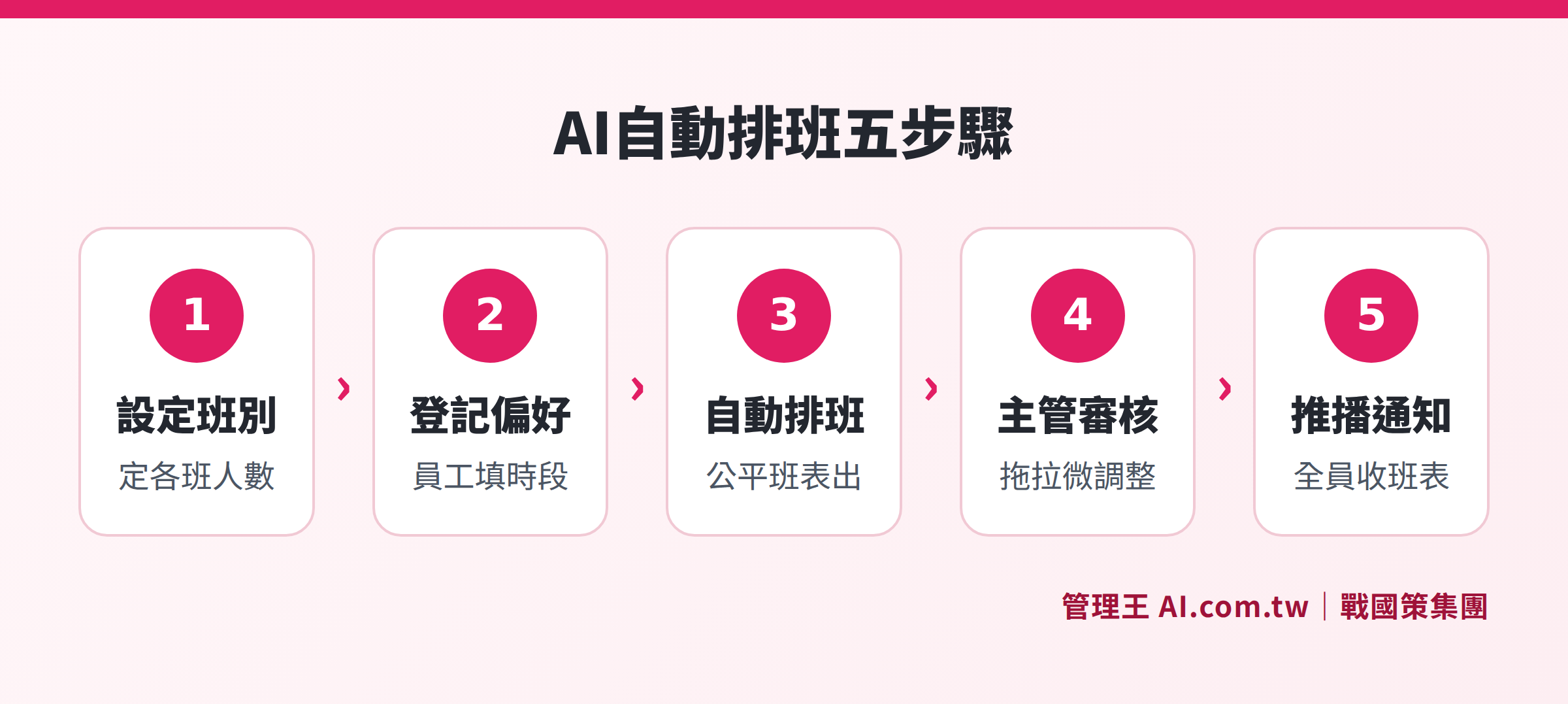
A complete process from setting shift requirements to AI generating fair schedules and notifying employees via LINE
Six Core Functions of a Scheduling System
1. Shift and Staffing Requirement Settings
The foundation of a scheduling system allows supervisors to freely define shifts such as morning, afternoon, evening, and night shifts and set the required number of personnel and working hour ranges for each shift. Advanced features can even set staffing requirements based on store locations, departments, allowing each chain catering outlet and manufacturing production line to deploy personnel according to their respective business rhythms.
2. Employee Preference Registration and Conflict Detection
Employees can register their "available work hours," "fixed days off needs," or "unallowed shift combinations" within the system, and the system automatically detects conflicts during scheduling—for example, if the same employee is assigned to two shifts on the same day, or shifts do not meet the 11-hour minimum rest period. This functionality moves the point of discovering scheduling errors from "only realizing there's a lack of staff when starting work" to "automatically warning during the scheduling phase."
3. Visual Drag-and-Drop Interface
Through a monthly calendar view differentiated by color for different shifts, supervisors can complete scheduling by directly dragging and dropping, without needing to reference complex Excel columns. Whenever there are any adjustments to the schedule, the system immediately notifies involved employees through LINE or App, ensuring information is delivered promptly, eliminating disputes over "I didn’t receive the notice."
4. AI Automatic Fair Scheduling
By inputting the number of days in the month, the staffing requirements for each shift, and all employees' scheduling restrictions, AI automatically generates fair schedules that balance fairness: average distribution of night and holiday shifts, continuous working days not exceeding statutory limits, and individual monthly working hours meeting standards. For supervisors, AI scheduling completely removes the pressure of personal sentiment over who is responsible for scheduling and who may be perceived as favored.
5. Online Shift Swap Requests and Approvals
Employees can initiate shift swap requests within the system, which must be confirmed by the colleague being swapped with before being approved online by the supervisor. Once approved, the schedule updates automatically, and both parties receive LINE notifications, with an electronic record of the entire process. This mechanism is compliant and saves supervisors from manually updating schedules after the fact, unlike past verbal agreements followed by paper signatures.
6. Labor Law Overtime Limit Alerts
The system accumulates each employee's overtime hours and consecutive working days in real-time, proactively alerting supervisors when approaching labor law limits. Evening shift swaps or additional shifts that would lead to less than 11 hours of rest between shifts are also intercepted and reminded in real-time. Comprehensive historical records of schedule changes can be audited, making labor inspections routine rather than unexpected.
Scheduling Challenges and System Solutions Across Industries
Scheduling needs vary significantly across industries, below are the five most common rotating industries in Taiwan and their corresponding scheduling pain points:
Table: Scheduling Challenges and System Solutions Across Industries
| Industry | Main Scheduling Challenges | System Solutions |
|---|---|---|
| Chain Restaurants | Employee support across stores, drastic increase in staffing needs on holidays | Inter-store schedule integration, AI auto-filling for holidays |
| Retail Stores | Many part-time employees, fragmented available work shifts | Employees fill in their available hours, and the system matches automatically |
| Manufacturing | Fixed three-shift rotations, strict shift change intervals | Article 34 interval alerts, automatic detection of three-shift rotation |
| Medical Clinics | Specialized roles must not be mixed, complex on-call fee calculations | Role-label shift segregation, individual setting for on-call rates |
| Security Services | Long working hours, frequent rotation, cross-location management | GPS punch-in verification, unified management of cross-location schedules |
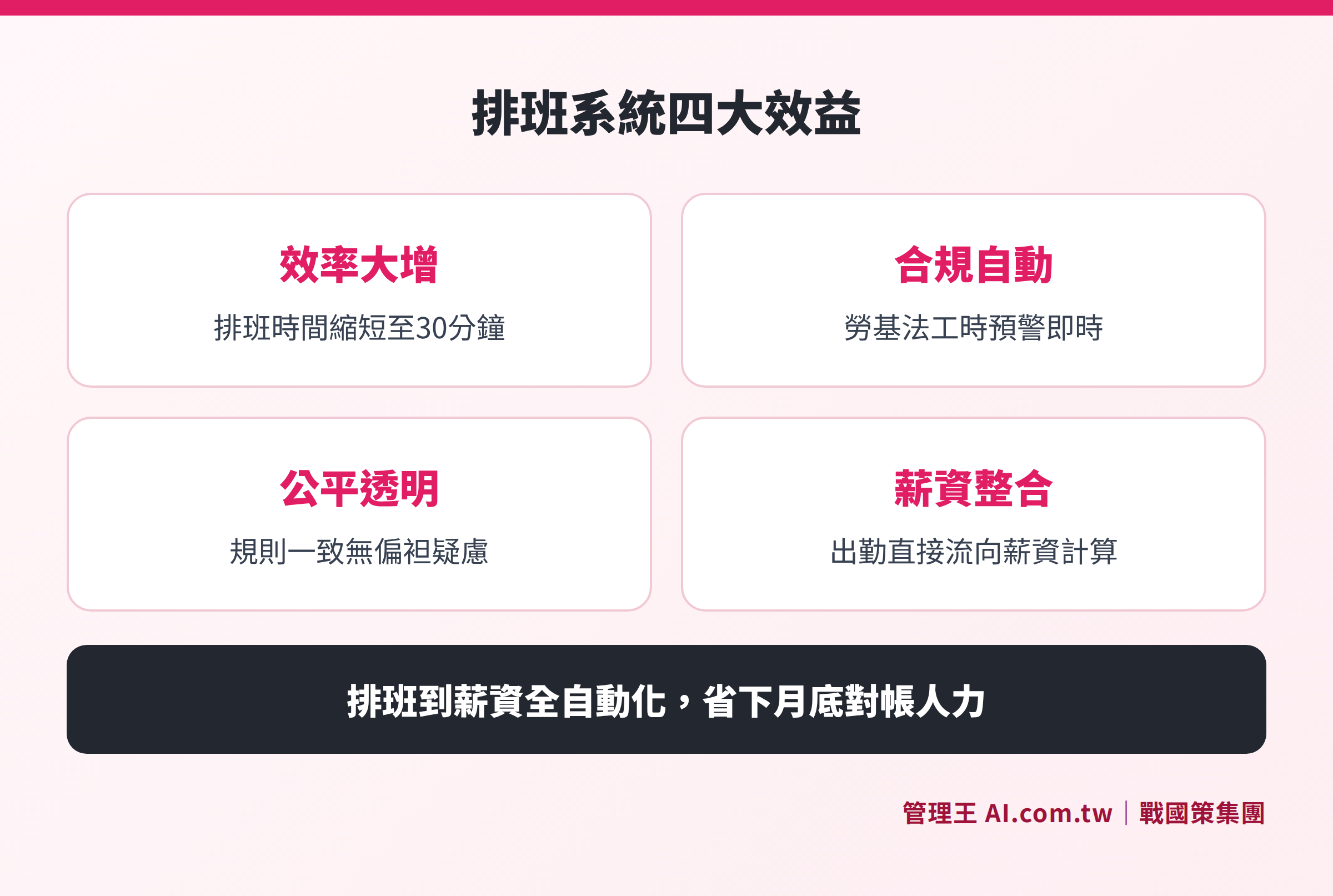
A comparison of the differences in time, accuracy, employee satisfaction, and compliance between manual scheduling and automated scheduling
Manual Scheduling vs Automated Scheduling Systems: Benefit Comparison
Before deciding to implement a scheduling system, many employers commonly ask, "Is it really worth it?" Below is a comparison across four dimensions:
Table: Comparison of Benefits between Manual Scheduling and Scheduling Systems
| Comparison Dimension | Manual Scheduling (Excel/Whiteboard) | Scheduling System (Automated) |
|---|---|---|
| Monthly Scheduling Time Cost | Supervisors take half a day to over a day | Under 30 minutes (AI-assisted) |
| Schedule Conflict Rate | Depends on human memory, conflicts are inevitable | System automatically detects and warns before conflicts |
| Overtime Pay Calculation | Manually cross-referencing rates easily leads to errors | Automatically calculated per labor law rates |
| Shift Swap Request Process | Verbal negotiations, paper records | Online requests, approvals, auto-updates |
| Labor Inspection Preparedness | Manually organizing paper records, time-consuming | One-click export of complete attendance records |
| Employee Notification Methods | Verbal, group messages, easily missed | LINE/App automatic notifications with read confirmations |
Five Key Evaluation Indicators for Selecting a Scheduling System
From clock-in apps to integrated corporate systems, there are various scheduling tools available on the market. The following five indicators will help you quickly filter out options that are truly suitable for small and medium enterprises during the purchase process.
Indicator 1: Is there a multi-verification mechanism against proxy punching?
Simple clock-in apps often struggle to prevent proxy punching. An effective scheduling system should integrate multiple mechanisms, such as GPS positioning, Wi-Fi verification, IP restrictions, or facial recognition, making the cost of proxy punching outweigh its benefits, along with AI abnormality detection (for example, consistently clocking in at the same exact second) to proactively alert management.
Indicator 2: Is compliance with the Labor Standards Act fully built-in?
The overtime pay rates, shift change intervals, and monthly working hour limits are the core regulatory requirements for scheduling systems. When purchasing, you should confirm whether these rules are built as defaults in the system rather than being user-configurable; otherwise, there will be no automatic updates if regulations change.
Indicator 3: Depth of integration with payroll systems
If the scheduling data cannot automatically flow to payroll calculations, HR still needs to manually consolidate attendance records, resulting in both error rates and working hours remaining high. Ideal integration should achieve a complete link of "attendance data → automatic application of overtime pay rates → automatic payroll generation," thereby genuinely reducing reconciliation time from "several days" to "a few hours" at the end of the month.
Indicator 4: Support for multi-site and field staff
If enterprises have more than two locations, or if they have business, security, or inspection personnel working on-site, the scheduling system must support: unified management of cross-location schedules, GPS clock-ins for field work, automatic calculation of inter-store overtime, and separate presentation of attendance analysis for different stores.
Indicator 5: Employee self-service interface
Can employees use their mobile phones to view their schedules, submit shift swap requests, request to re-punch, and query attendance records? A self-service interface directly reduces the hours HR spends answering inquiries, while also increasing employees' trust in their attendance data and reducing the probability of labor disputes.
Additional bonus: Implementation difficulty and customer support
With limited IT resources in small and medium enterprises, if a scheduling system requires professional engineers for setup, the implementation costs will often be high, and the usage rates will be low. Before purchasing, evaluate if the system can complete basic setup within one day and allow employees to start using it? Does the vendor provide a traditional Chinese operating interface, live customer support, and telephone consultation? If there is a consultant available to accompany the process during the initial implementation, it ensures that the scheduling digitalization can be successfully executed rather than just purchasing software that no one uses.
How to Use the 管理王 Scheduling System
管理王 AI.com.tw Scheduling System is the attendance management module within Taiwan's one-stop AI management platform specifically for small and medium-sized enterprises, natively integrated with the clock-in system, payroll, approval center, and attendance analysis, requiring no API connections or integration fees.
The onboarding process is as follows:
- Set Shifts: Define morning shifts (08:00-17:00), afternoon shifts (14:00-23:00), and night shifts (22:00-07:00) in the 管理王 backend and set the necessary personnel for each shift.
- Import Employee Data: Import employee names, departments, and available shifts into the system, with data syncing directly from existing HR systems without requiring duplicate input.
- Execute AI Automatic Scheduling: After clicking "Automatic Scheduling," the system produces a fair schedule based on shift needs, employee preferences, and labor law limits; supervisors only need to make minor adjustments by dragging.
- One-click Send Schedule Notifications: Once the schedule is finalized, all employees receive the monthly schedule through LINE or the App, confirming completion of the scheduling process.
- Automatic Month-end Settlement: Attendance records flow automatically into the payroll calculation system, applying overtime pay rates according to labor law automatically, eliminating the need for HR to manually consolidate.
- Prepared for Labor Inspections Anytime: Schedule management and attendance records can be exported to PDF with one click, fully complying with employer attendance obligations under Article 30 of the labor law.
The free plan can be used indefinitely for basic scheduling functions, suitable for startups; if AI automatic scheduling, cross-store management, advanced analytics, and other features are needed, you can refer to service plan pricing. 戰國策 group serves over 30,000 enterprises, with every function of 管理王 designed based on the actual needs of Taiwanese small and medium enterprises, handling everything from scheduling to payroll, clocking to approvals—all through one system.
Try 管理王 Scheduling System Now
Consultants will evaluate your scheduling needs for free, assist in setting shifts, and implement AI automatic scheduling, helping you say goodbye to the monthly scheduling nightmare and allowing easy month-end payroll processing.
Free consultation hotline: 0800-003-191
LINE Official Account: @119m
Official website: app.AI.com.tw
Free trial: Apply for 管理王 Now
Frequently Asked Questions
Does the scheduling system have to integrate with the clock-in system?
Integration is highly recommended. The scheduling system defines "when employees should be present at which location," while the clock-in system records "when employees actually clock in," allowing for automatic determination of tardiness, early leave, or absences and forming the basis for automatic calculation of overtime pay. If these two systems are separate, HR will still need to manually compare every month, completely losing the benefits of automation.
What process should shift swap requests follow to be legal?
Although the labor law does not specify a written format for swap requests, a swap fundamentally changes labor conditions, so written records are recommended. The online shift swap process of the scheduling system—employee requests, confirmation from the other employee, supervisor review—provides electronic records for all parties, serving as objective evidence in case of disputes, and providing more legal effectiveness than verbal agreements or paper signatures.
What special needs arise in scheduling part-time or hourly workers?
Scheduling for hourly workers is often more complex: fragmented available work hours, calculations based on hourly wage rather than monthly salary, and thresholds for labor/health insurance (minimum 84 hours worked monthly) that need to be tracked. A scheduling system should support hourly wage setups, flexible shifts, and cumulative monthly hour tracking to avoid insurance assignment issues from under or over-threshold part-time employees.
How is fairness guaranteed in AI automated scheduling?
The fairness of AI scheduling stems from "transparent rules": the system calculates the optimal solution based on the same rules for all employees (frequency of night shift assignments, frequency of holiday assignments, restrictions on consecutive working days), leaving no room for "favoritism" from supervisors. The important premise is the completeness of employee preference registration—the system can only schedule within the input limits; if an employee does not fill in preferences, AI will be processed based on default rules.
How does the scheduling system help handle labor inspections?
During labor inspections, inspectors typically request to review attendance records (Article 30, Item 5 of the labor standards act), including employee clock-in times, overtime requests and approval records, shift swap request records, etc. Using a scheduling system allows for exporting a complete attendance report for specific periods in seconds, and any modifications to records have a complete audit log, making compliance verification efficiency much higher than flipping through paper attendance sheets.
Data Sources
- Full Text of Labor Standards Act — National Legislative Database (Ministry of Justice): Article 24 overtime pay rates, Article 30 standard working hours, Article 32 overtime limits, Article 34 shift change intervals
- Ministry of Labor Official Website — Explanation of Working Hours and Overtime Regulations: Explanation of standard working hours, flexible working hour systems, overtime pay calculations
- 管理王 AI.com.tw Scheduling System Feature Page: Introduction to product features, plan details (check in 2025)
This article is for informational purposes only and does not constitute legal or labor advice; please refer to the latest announcements from competent authorities for actual guidance.