How to Manage Tasks? A Guide to Team Division of Labor, Tracking, and Improving Completion Rates|Recommended Task Management Systems

Task management encompasses three major methodologies: GTD five steps, Kanban, and Gantt charts. This article explains how to build an efficient team division of labor, choose suitable views, leverage AI to improve completion rates, and recommends an integrated task management system that integrates LINE, CRM, and reports.
Task Management is the core capability for businesses to structurally track all "things to do," encompassing four major components: task assignment, prioritization, progress tracking, and completion acceptance. An effective task management method enables bosses to clearly know "who is doing what, when it will be completed, and where we are now," thoroughly ending the vicious cycle of chaotic messages in LINE groups, employee omissions, and tasks dropping into a black hole after being assigned. According to Wikipedia's definition of task management, the complete task lifecycle includes planning, assignment, tracking, and reporting four stages. Whether for personal time management or cross-departmental team collaboration, a reliable external system is needed to carry tasks, freeing up mental capacity, allowing each person's attention to focus on the work that truly requires judgment.
What is Task Management? Definition and Core Elements
Task management is the full-process monitoring of a job from start to completion. IBM’s finite state model indicates that tasks go through several states during their lifecycle: "pending execution → assigned → in progress → completed → accepted," with each state transition needing system records and personnel confirmation.
A qualified task management system should be able to answer at least six questions:
- Who will do it? Clearly assign responsibilities to avoid the issue of everyone being responsible yet no one truly being accountable.
- When should it be completed? Set deadlines and priorities.
- What is the current status? Provide real-time progress updates without supervisors having to chase.
- What resources are needed? Attach files, links, and descriptions directly to the task card.
- Are there dependencies? Prevent task B from being stalled due to task A not being completed.
- Is it done? Acceptance mechanisms ensure quality, it's not just about saying it's finished.
In a nutshell
Task Management = Who does it × When is it completed × Transparency of progress × Acceptance of completion, all four elements are essential.
Three Major Mainstream Task Management Methodologies
GTD (Getting Things Done)
GTD was proposed by American consultant David Allen in 2001 and revised in 2015, becoming the most widely used personal task management framework for knowledge workers globally. Its core idea is to "move all to-dos out of your head and into a trusted external system."
The five steps of GTD are:
- Capture — Write down all tasks, thoughts, and commitments as they come to mind.
- Clarify — Determine whether each task is actionable and what the next steps are.
- Organize — Store tasks categorized by context, priority, and projects.
- Reflect — Review the list comprehensively every week to ensure nothing is missed.
- Engage — Choose the appropriate task to work on based on the current context, time, and energy.
Allen emphasizes the state where "mind like water": the brain is no longer burdened by remembering tasks but is tasked only with thinking and judgment, naturally reducing stress.
Kanban
Kanban originates from the Toyota Production System, with its core concept being "visualizing workflows, limiting work in progress (WIP Limit), and continuously improving flow efficiency." In task management, Kanban presents tasks in three columns: "To Do / In Progress / Done," with each card representing a task.
The biggest advantage of Kanban is its ability to quickly reveal bottlenecks in the team: if the "In Progress" column is congested, it's a signal of either insufficient resources or unclear task definitions.
Scrum Sprint
Scrum is suitable for software development or project-based teams with fixed iteration cycles. Before each Sprint (usually two weeks), a planning meeting is held to break tasks down into actionable units that can be completed within two weeks, with results presented and reviewed at the end of the Sprint.
Table: Comparison of Three Major Task Management Methodologies
| Methodology | Suitable Scenarios | Core Tools | Main Advantages | Main Limitations |
|---|---|---|---|---|
| GTD | Individuals, Knowledge Workers | Inbox + List | Reduces mental load | Requires high self-discipline |
| Kanban | Service Industry, Marketing, Sales | Visual Boards | Real-time progress tracking | Not good at schedule planning |
| Scrum | Software Development, Project Teams | Burndown Charts, Sprint Planning | Fixed rhythm, continuous improvement | Requires a Scrum Master |
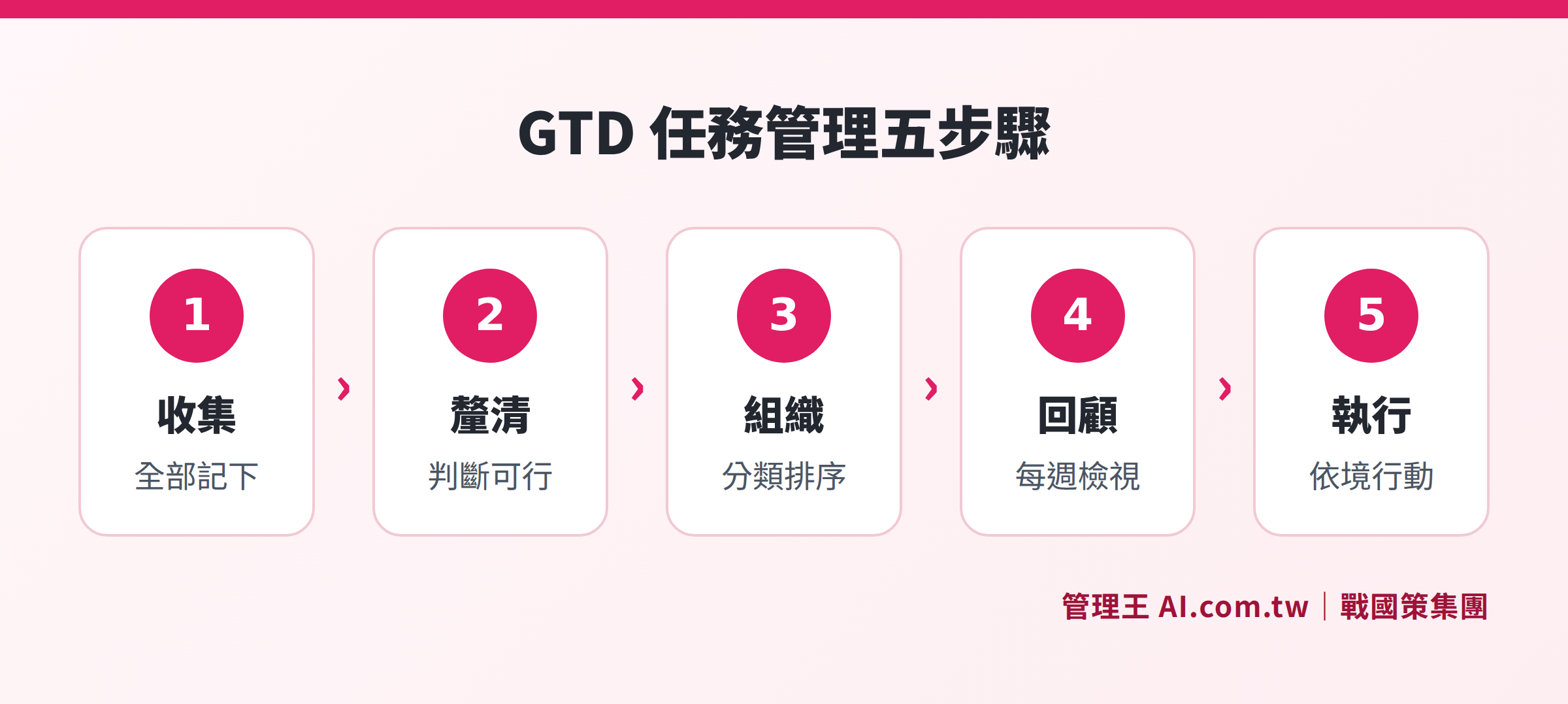
GTD Five Steps: From Capture to Execute, moving tasks from the mind into the system
How to Establish Efficient Team Task Division?
1. Break Down Tasks into Executable Units
If a task is vague to the point of "not knowing where to start," it will inevitably lead to procrastination. WBS (Work Breakdown Structure) is a core tool emphasized in the PMBOK 8th Edition by PMI (Project Management Institute): breaking large goals down into executable subtasks, each with a clear responsible person and completion standards.
Practical tips:
- Begin task names with verbs (write, design, confirm, send) rather than nouns (marketing project, report).
- Tasks estimated to take more than 4 hours should be broken down further.
- Each task should have only one responsible person, but can have collaborators.
2. Set Priorities
Common priority frameworks include:
- Eisenhower Matrix: Divided into four quadrants based on "Important × Urgent"; tasks in quadrant one (important and urgent) are to be done immediately, while those in quadrant four (neither important nor urgent) should be eliminated.
- MoSCoW Method: Must Have / Should Have / Could Have / Won't Have, helping teams make trade-offs with limited resources.
- Priority Score: Scoring based on impact × urgency × difficulty; higher numbers should be executed first.
3. Assign Clearly, Avoid “You All Discuss”
The five elements of task assignment are: responsible person + deadline + completion standards + required resources + reporting methods. Missing any of these can lead to misunderstandings or avoidance.
4. Establish Regular Review Mechanisms
It is recommended to hold a regular "Task Review Meeting" (within 30 minutes) once a week:
- Tasks completed last week? Any overdue? What were the reasons?
- What are the three most important tasks for this week?
- Are there tasks that need priority adjustment or re-assignment?
Which View to Choose: Kanban, Gantt Chart, List, Calendar?
Different roles focus on different aspects of tasks, hence the need for different views to present the same task data:
Table: Four Task Views Usage Scenarios
| View | Best For Whom | Core Purpose | Main Advantage |
|---|---|---|---|
| Kanban | Sales, Marketing, Customer Service | Track task status flow | Bottlenecks are immediately visible |
| Gantt Chart | Project Managers, Engineers | Timeline and dependencies | Understand overall scheduling |
| List | Executors, Individuals | Check off tasks one by one | Most intuitive operation |
| Calendar | Bosses, Supervisors | Cross-personnel and cross-department schedules | Immediate visibility of time conflicts |
The four views point to the same batch of task data, and switching views does not lose any information. Bosses can view the overall picture with calendars, PMs use Gantt charts to schedule, executors check items off in lists, and customer service supervisors track status with Kanban, allowing each to get what they need without interference.
Five Common Reasons for Low Task Completion Rates
Even after implementing a task management system, some businesses report no increase in completion rates. Typically the reason is one of the following five:
- Task definitions are too vague — "Handle customer complaints" is not a task, while "Respond to the client and update CRM notes by Friday" is.
- Too many tasks — Over 15 tasks per person per week dilute attention, resulting in doing nothing.
- Deadlines are unrealistic — Labeling all tasks as "urgent" means there is no priority.
- Lack of progress reporting habits — Employees don't get used to updating statuses, which makes supervisors chase and both parties weary.
- Tasks are disconnected from goals — Employees don't understand the significance of tasks in relation to the overall company goals, leading to low motivation.
Solution: Before implementation, spend a week doing a "task inventory" to document all existing implicit work; after implementation, spend 10 minutes each morning for task confirmations during the first two weeks to develop habits.
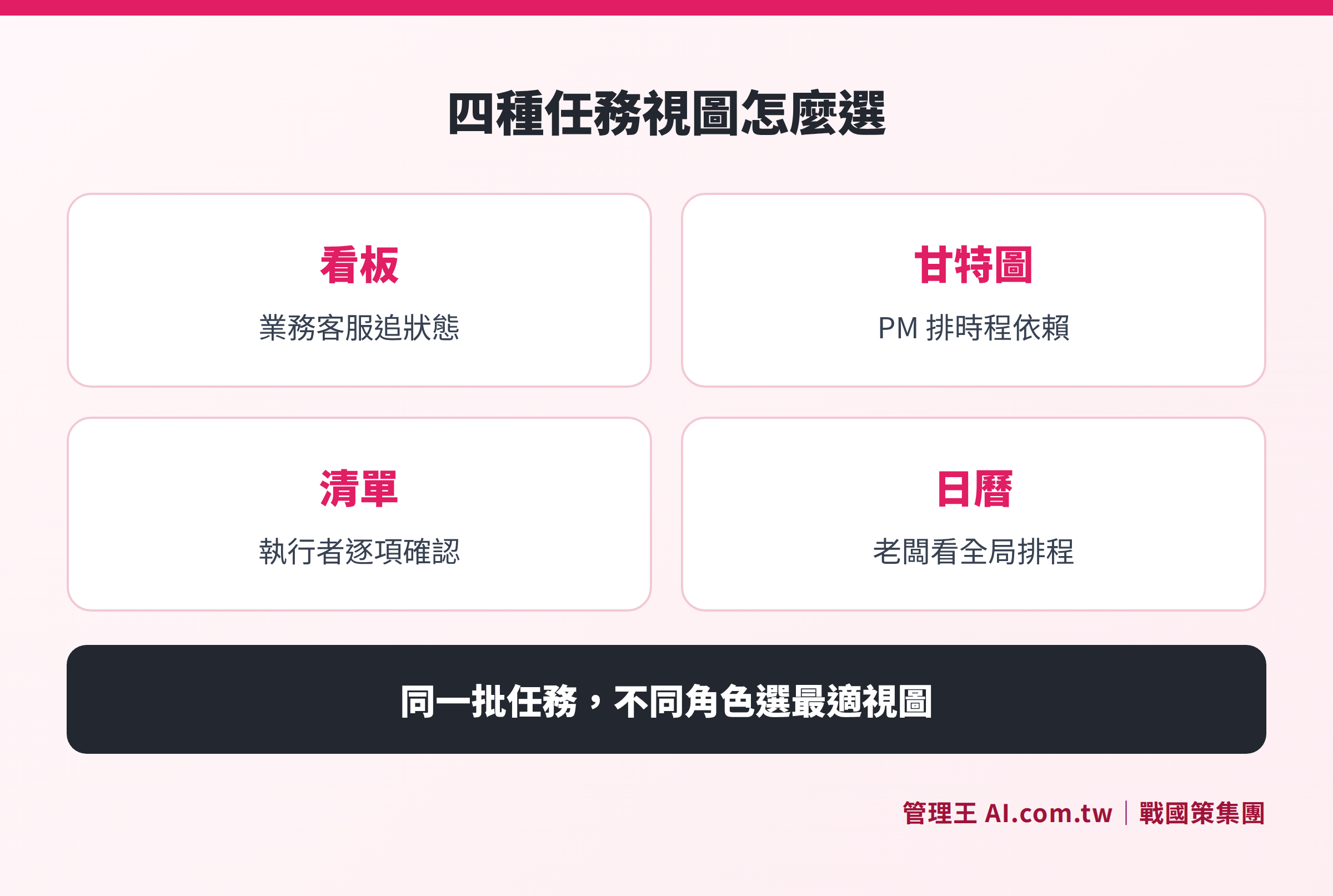
Each of the four task views has suitable user roles and scenarios, the same batch of task data is viewed from different suitable perspectives based on the role.
AI Empowerment in Task Management: New Solutions for SMEs in 2026
The biggest pain point of traditional task management tools is that "tasks need to be created manually": employees must actively log into the system and fill out fields. For small and medium enterprises in Taiwan, this assumption is fundamentally flawed—80% of bosses assign tasks daily in LINE groups, and employees are drowned in messages when they open their phones in the morning, having no time to open another app to create tasks.
AI-driven task management resolves this fundamental contradiction:
- Natural language input: When a boss says, "Send the proposal to Mr. Lee by next Wednesday," AI automatically interprets it as: task name, responsible person, and deadline, and creates a task record.
- Automatic task breakdown: Complex large goals (e.g., "Organizing the Year-End Party") can be automatically broken down by AI into 10 to 20 subtasks, with recommendations for responsible persons based on employees' skills and workloads.
- Smart alerts: Predict which tasks may be overdue based on historical completion rates and task complexity, proactively reminding supervisors to intervene.
- Critical Path Method (CPM): Automatically calculates the critical path within the project to identify which delayed tasks will cause the whole project to be delayed.
- LINE Bot integration: Employees report progress directly in LINE, with the system automatically updating task statuses without the need to learn new tools.
How to Use 管理王: From LINE Assignment to Gantt Chart Tracking
管理王 AI.com.tw's task management feature is an end-to-end solution designed specifically for small and medium enterprises in Taiwan, with the core logic being "the system comes to the person, instead of the person going to the system."
Three ways to create tasks, with bosses using the most natural input methods:
Bosses can speak a sentence, send a LINE message, or forward an email, with the system automatically identifying and structuring the task, pushing it to the corresponding responsible person. No need for employees or bosses to learn any new interfaces.
AI automatically breaks down and assigns:
When complex tasks are submitted, AI automatically breaks them down into 5 to 10 subtasks, recommending the most appropriate responsible persons based on historical completion rates, current workloads, and skill tags. Supervisors can either adopt the suggestions directly or manually adjust them.
One-click view switching among four views:
The same batch of tasks can be freely switched among Kanban, Gantt chart, list, and calendar views. Bosses view the whole picture with the calendar, PMs use Gantt charts to schedule dependencies, executors check off items one by one using lists, and different roles get what they need.
Seamlessly integrate with other modules at no cost:
Tasks can be directly linked to opportunities in the CRM system, quotes, and contracts. After salespeople send quotes, the system automatically generates tasks to track client responses; linking to procurement management triggers order tasks automatically after confirming procurement needs; along with the CEO War Room, bosses can see the completion status of all company tasks and KPI achievement rates on one page.
Upgrading tasks to milestone management with project management features:
When tasks become complex enough to require collaboration among multiple people and Gantt chart schedule control, they can be upgraded to projects with a single click, activating advanced features like burndown charts, milestones, and hours logs without needing to switch platforms.
Free plan available for permanent use:
管理王 offers a free plan supporting teams of under 10 people to use core task management functions permanently (including one-time AI points). Small and medium enterprises can first try for free and confirm suitability before upgrading to paid plans. View full pricing.
When paired with the report analysis module, it can periodically output digitized reports on task completion rates, overdue rates, departmental performance, and more, providing data-supported management decisions. Tasks requiring approvals (e.g., procurement requests, expense reimbursements) can be directly connected to the Approval Center, completing a process without the need for back-and-forth emails.
Task Management Tool Purchase Guide: Five Evaluation Dimensions
The market for task management tools ranges from free options like Trello and Notion to paid ones like Asana, ClickUp, and Monday.com, along with integrated platforms, offering numerous choices. The cost of choosing the wrong tool is not just in monthly fees but also in employee retraining time and the pain of data migration. Here are the five most important evaluation dimensions when purchasing a task management system:
Dimension 1: Low Input Friction
"Employees are unwilling to type" is the most common reason for failure in implementing task management in small and medium enterprises in Taiwan. The ideal system should enable employees to create tasks using tools they already use (LINE, voice, email) rather than requiring them to log into a new interface. The lower the input friction, the higher the rate of self-reported progress, making the system's data credible.
Dimension 2: Comprehensiveness of Views
Different positions have vastly different task needs: bosses require an overall calendar, PMs need Gantt charts for dependencies, executors want lists to check off tasks, and customer service supervisors need Kanban for flow tracking. If the system only offers one view (e.g., just Kanban like Trello), it won’t be long before someone says, "This tool is insufficient."
Dimension 3: AI Value-Addition
By 2026, what AI can accomplish in task management is no longer an add-on but a basic requirement: automatically breaking down large tasks, smartly assigning based on employee workloads, and proactively alerting to potential overdue risks. A task management system without AI requires more manpower to maintain and scales less efficiently.
Dimension 4: Depth of System Integration
Tasks are not isolated; they stem from client needs (CRM), follow business contracts (contract management), and require closure to issue invoices (accounting). If the task system cannot connect with other business systems, employees must manually copy data between multiple systems, which is error-prone and time-consuming.
Dimension 5: Localization and Compliance
The unique needs of Taiwanese enterprises include: Traditional Chinese interface, Taiwanese customer support hours, data storage within Taiwan (personal data protection law, data sovereignty), compliance with labor standards for attendance regulations, and electronic signatures in accordance with the Electronic Signatures Law. These often require additional handling in international SaaS tools.
Table: Comparison of Major Task Management Tools Features
| Tool | LINE Integration | Gantt Chart | AI Breakdown | CRM Integration | Traditional Chinese Support | Taiwanese Customer Support |
|---|---|---|---|---|---|---|
| 管理王 AI.com.tw | ✓ | ✓ | ✓ | ✓ | ✓ | ✓ |
| Asana | ✗ | ✓ (Paid) | Partial | Requires Integration | Partial | ✗ |
| Trello | ✗ | Plugin Required | ✗ | Requires Integration | ✓ | ✗ |
| ClickUp | ✗ | ✓ | Partial | Requires Integration | Partial | ✗ |
| Notion | ✗ | ✗ | ✗ | Requires Integration | ✓ | ✗ |
(The above comparison is based on publicly available information from each official website as of October 2026; features may be updated anytime, please refer to the latest announcements on each official site.)
Try out the task management system for free, and end task omissions today!
Consultants will help you assess the suitable task management solutions, accompanying you from GTD implementation to AI auto-assignment, with free consultations available immediately.
Free consultation hotline: 0800-003-191
LINE Official Account: @119m
Official Website: app.AI.com.tw
Free Trial: Apply for 管理王 now
Frequently Asked Questions
What is the difference between task management and project management?
Task management focuses on the lifecycle of a single work item (creation, assignment, tracking, completion), serving as the foundation for daily operations. Project management, on the other hand, deals with complex multi-task collaborations with clear start and end points, requiring Gantt charts, milestones, work hour budgets, and risk control. In simple terms: task management oversees "daily work," while project management oversees "time-bound major goals"; the two are complementary, ideally allowing a task management system to seamlessly upgrade to project management.
How to ensure employees really use the task management system?
The most common reason for failure in implementation is "the system is too cumbersome, and employees are unwilling to use it." Three practical countermeasures include: first, reducing input friction—supporting tools employees already use (LINE, voice, email) for task creation; second, showing employees personal benefits—using the task system can serve as work hour records, providing credible performance evaluations; third, supervisors leading by example—bosses should use the system for assignments instead of continuing with chaotic LINE messages.
Are free task management tools (Trello, Notion) sufficient?
The free versions of Trello and Notion are generally sufficient for small teams under 10 people, but often encounter several common bottlenecks: lack of LINE integration (since Taiwanese employees primarily use LINE), no AI automatic breakdown functionality, and inability to link with CRM or financial systems. As companies begin to require cross-department collaboration and performance tracking, they often need to switch to integrated platforms that integrate well with business systems.
How much does a task management system cost?
There is a wide disparity in pricing for task management tools: Asana's Business plan is about NT$750 per user per month, requiring over NT$7,500 per month for a 10 person team; ClickUp Business is around NT$450 per user per month. 管理王 offers a free plan that is permanently usable; paid plans start from NT$5,000 per month, including more than 100 functions including task management, bringing the cost per user per month for teams of 10 or more to less than NT$500, and eliminating the need to purchase separate tools for CRM, reporting, personnel, etc., thus usually saving overall IT subscription costs by 70-80% (based on actual customer comparisons).
How to evaluate if a task management system is suitable?
It is recommended to assess based on five dimensions: (1) Input Friction—can employees create tasks using their usual tools (LINE, voice)? (2) View Richness—does it support Kanban, Gantt charts, lists, calendars? (3) AI Additions—can it automatically break down tasks and predict overdue tasks? (4) Integration Depth—can it integrate with CRM, quotes, and accounting systems? (5) Localization Support—does it have a traditional Chinese interface, Taiwanese customer support, and complies with Taiwanese regulations? Free trials provide the most direct verification method.
Sources
- Task Management – Wikipedia
- Getting Things Done – Wikipedia (David Allen, published in 2001, revised in 2015)
- PMBOK Guide – Project Management Institute (8th Edition, updated in 2025/2026)
- 管理王 AI.com.tw Task Management Feature Page
- 管理王 AI.com.tw Service Plans and Pricing