What is a Ticketing System? The Customer Service Process from Reception to Closure | Recommended Ticketing Systems
A ticketing system unifies customer service requests from various channels into trackable tickets, covering five main steps: reception, classification and dispatch, processing and tracking, closure confirmation, and satisfaction surveys, along with SLA management to ensure timely service. This article explains the definition, core functions, workflow, and selection criteria of ticketing systems in detail.
A ticketing system is a customer service management tool that consolidates service requests from customer calls, emails, forms, and instant messages into trackable "tickets" and follows them through to closure. Each ticket includes customer information, problem description, assigned personnel, status, and solution, allowing managers to grasp team progress at a glance. According to Article 43 of Taiwan's Consumer Protection Act, businesses must appropriately handle consumer complaints within 15 days, and the ticketing system serves as the core tool for measuring, tracking, and managing this deadline.
What is a Ticketing System? Complete Analysis of Core Concepts
The English term for a ticketing system is either Ticketing System or Help Desk System, which falls under the core component of the Service Desk in the ITIL (Information Technology Infrastructure Library) framework. Its basic logic is to "ticketize" each customer request, tracking the lifecycle of the entire issue from the perspective of a single ticket.
A typical ticket usually contains the following information:
- Ticket Number: A unique identifier for easy tracking and reference.
- Source Channel: Phone, Email, LINE, website form, Facebook, etc.
- Customer Information: Name, contact methods, history records.
- Problem Description: Details and attachments provided by the customer.
- Priority Level: Urgent, High, Medium, Low, judged based on impact and urgency.
- Assigned Personnel: The customer service or technical personnel assigned to the ticket.
- SLA Deadline: The time within which a response and resolution should be provided.
- Action History: Descriptions of each update made.
- Closure Status: Solutions and closing time.
In a Nutshell
A ticketing system is like a "receipt book" for customer service, with traceable records of every issue from entry to resolution, ensuring no ticket is overlooked.
The fundamental difference between a ticketing system and a regular email inbox is that the inbox is a "communication tool," while the ticketing system is a "workflow management tool." An inbox can receive and reply to messages, but it cannot automatically assign tasks to the right people, cannot remind you about overdue tickets, and cannot calculate average response times for the week.
The ticketing system also differs from traditional "complaint records" or Excel tracking sheets. Excel requires manual updates, cannot provide real-time notifications, and is prone to conflicts when multiple people edit simultaneously. Once the customer service team exceeds three members, it starts to become unmanageable. The core advantage of the ticketing system is "workflow automation": from receiving tickets, classifying, dispatching to reminders, all driven by the system, allowing customer service staff to "do the work" instead of "managing the process."
Complete Ticketing System Workflow: Five Steps from Reception to Closure
A standard ticket processing workflow can be broken down into five stages, each with distinct roles and outputs.
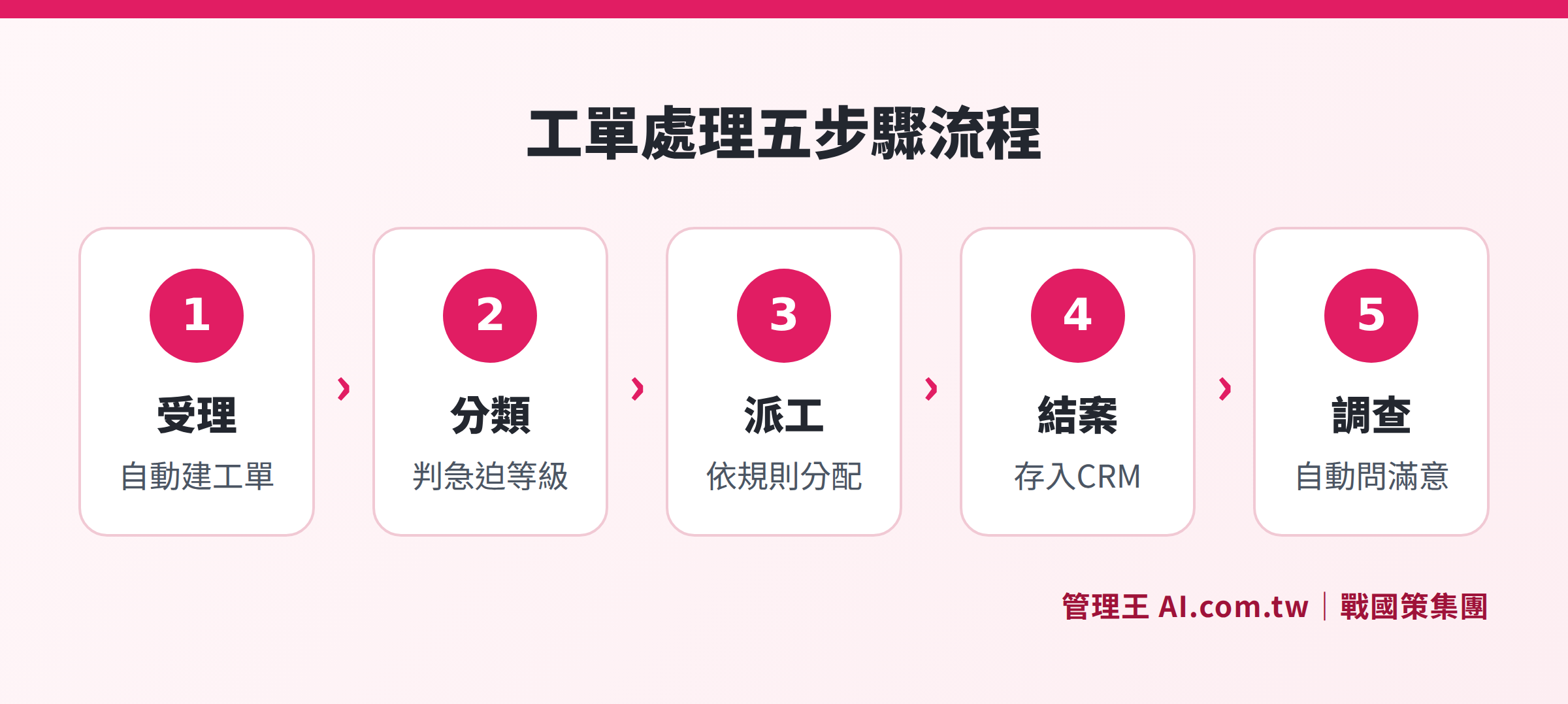
Illustrating the complete five-step workflow of ticketing from reception, classification and dispatch, processing, closure confirmation, to satisfaction survey.
Step One: Reception (Intake)
Customers submit requests through any channel (EMAIL, LINE, phone, web forms), and the system automatically converts the information into a ticket, logging timestamps, customer data, and problem summaries. Modern ticketing systems feature AI auto-summary functions that can even recognize emotional tones and gauge urgency.
Step Two: Classification and Dispatch (Classification & Dispatch)
The system automatically assigns tickets to the most suitable personnel or department based on keywords, sentiment, customer tier, or historical data. For instance, returning issues from VIP customers could automatically be assigned to senior customer service agents and marked as "high priority."
Step Three: Processing and Tracking (Resolution & Tracking)
Customer service staff update the internal processing status within the ticket, while the system concurrently displays the SLA countdown timer. If approaching the deadline, the system automatically escalates alerts to supervisors. Customers can also receive automatic status update notifications (e.g., "Your ticket #12345 is being processed").
Step Four: Closure Confirmation (Closure)
Once the issue is resolved, the customer service staff marks the ticket as "closed," and the system automatically generates a closure summary that explains the cause of the issue and the resolution method, which is also simultaneously recorded in the CRM customer history.
Step Five: Satisfaction Survey (CSAT/NPS)
After closure, the system automatically sends a satisfaction survey to collect CSAT (Customer Satisfaction) and NPS (Net Promoter Score) data, aggregating information for managers to analyze for improvement. CSAT is measured on a scale of 1 to 5 for single service satisfaction, while NPS asks customers about their willingness to recommend (0 to 10), and using both can simultaneously gauge short-term service quality and long-term customer loyalty trends. Negative feedback tickets automatically trigger alerts, allowing managers to intervene before issues escalate.
What is SLA? How Ticketing Systems Track Service Timeliness
SLA (Service Level Agreement) is an agreement between a business and its customers regarding service quality, defining specific goals for "how quickly to respond" and "how quickly to resolve."
Table: Common Customer Service SLA Settings
| Priority Level | Trigger Conditions | Initial Response Time Limit | Resolution Time Limit |
|---|---|---|---|
| Urgent (P1) | System-wide outage | Within 30 minutes | Within 4 hours |
| High (P2) | Core function malfunction | Within 1 hour | Within 8 hours |
| Medium (P3) | Non-core function issues | Within 4 hours | Within 24 hours |
| Low (P4) | General inquiries, suggestions | Within 1 business day | Within 3 business days |
The SLA management functionality of ticketing systems specifically includes:
- Countdown Timer: Displays remaining time until the SLA deadline for each ticket.
- Auto-escalation: Notifies supervisors or automatically transfers when close to the deadline.
- Achievement Rate Reports: SLA achievement percentages weekly and monthly.
- Violation Records: Quantity and analysis of overdue tickets.
According to Article 43, Paragraph 2 of Taiwan's Consumer Protection Act, businesses must appropriately handle consumer complaints within 15 days of the complaint's submission. SLA settings can convert this statutory obligation into automatically tracked metrics, mitigating the risk of legal violations due to human error. If a business fails to comply, consumers may further apply for mediation from the Consumer Protection Committee, which can significantly impact brand image. Therefore, adopting a ticketing system and properly setting SLAs can also serve as a regulatory management tool for businesses.
Overview of Core Functions of a Ticketing System
Table: Features and Descriptions of Ticketing System Modules
| Function Module | Function Description | Pain Points Solved |
|---|---|---|
| Unified Inbox | Aggregates LINE, FB, Email, phone, forms | No need to switch between multiple apps |
| AI Auto Classification | Judges type and urgency based on semantics | Reduces manual tagging work |
| Smart Dispatch | Allocates based on skills, load, customer level | Prevents senior staff from handling low-value tickets |
| SLA Tracking | Countdown timer, overdue escalation, achievement rate reports | Ensures legal compliance |
| Knowledge Base Auto Responses | AI searches knowledge base, auto-drafts or replies directly | Reduces handling of repetitive issues |
| Closure Summary into CRM | Automatically records resolution methods into the customer file | No need to ask again during future service |
| CSAT/NPS Surveys | Automatically sends satisfaction surveys after closure | Quantifies service quality |
| Report Dashboard | Response time, resolution rates, customer service performance | Data-driven ongoing improvement |
Which Businesses Should Use a Ticketing System?
Any business that needs to regularly handle customer issues can benefit from a ticketing system. The following types of businesses particularly stand out:
E-commerce and D2C Brands: Processing a large number of returns, exchanges, and logistics inquiries daily, with repetitive issues accounting for over seventy percent. AI knowledge base auto-replies can significantly reduce manual input.
SaaS and Technology Services: Customer issues involve varying technical depths and require skill-based dispatch, precisely tracking each ticket's resolution time and SLA achievement rates.
B2B Service Industry: Different service levels for different clients, with VIP clients requiring prioritized handling, a feature designed for such purposes in ticketing systems' customer tier dispatch functions.
Appliance and Equipment Repairs: Tickets can include repair locations, equipment serial numbers, warranty status, dispatching to local repair personnel, and tracking repair progress. A detailed repair management system can also connect with inventory modules, allowing on-site technicians to confirm part stock levels.
Online Education and Course Platforms: High duplication of student inquiries (e.g., how to log in, how to download, refund policies), where knowledge base auto-replies can cover most common issues.
Physical Service Industries (Clinics, Maintenance Shops, Beauty Salons): Issues reported after appointments (changing times, service explanations, cost confirmations) can be unified through the ticketing system, allowing customer service to avoid sifting through communication logs, enabling staff to immediately hand over any pending tickets.
Wholesale and Manufacturing Businesses: Issues with orders, delivery confirmations, quality complaints often involve collaboration across multiple departments. A ticketing system allows setting up an "internal collaboration" field, enabling customer service, sales, and warehouse staff to leave processing records on the same ticket, ensuring no information is lost in phone calls and LINE groups.
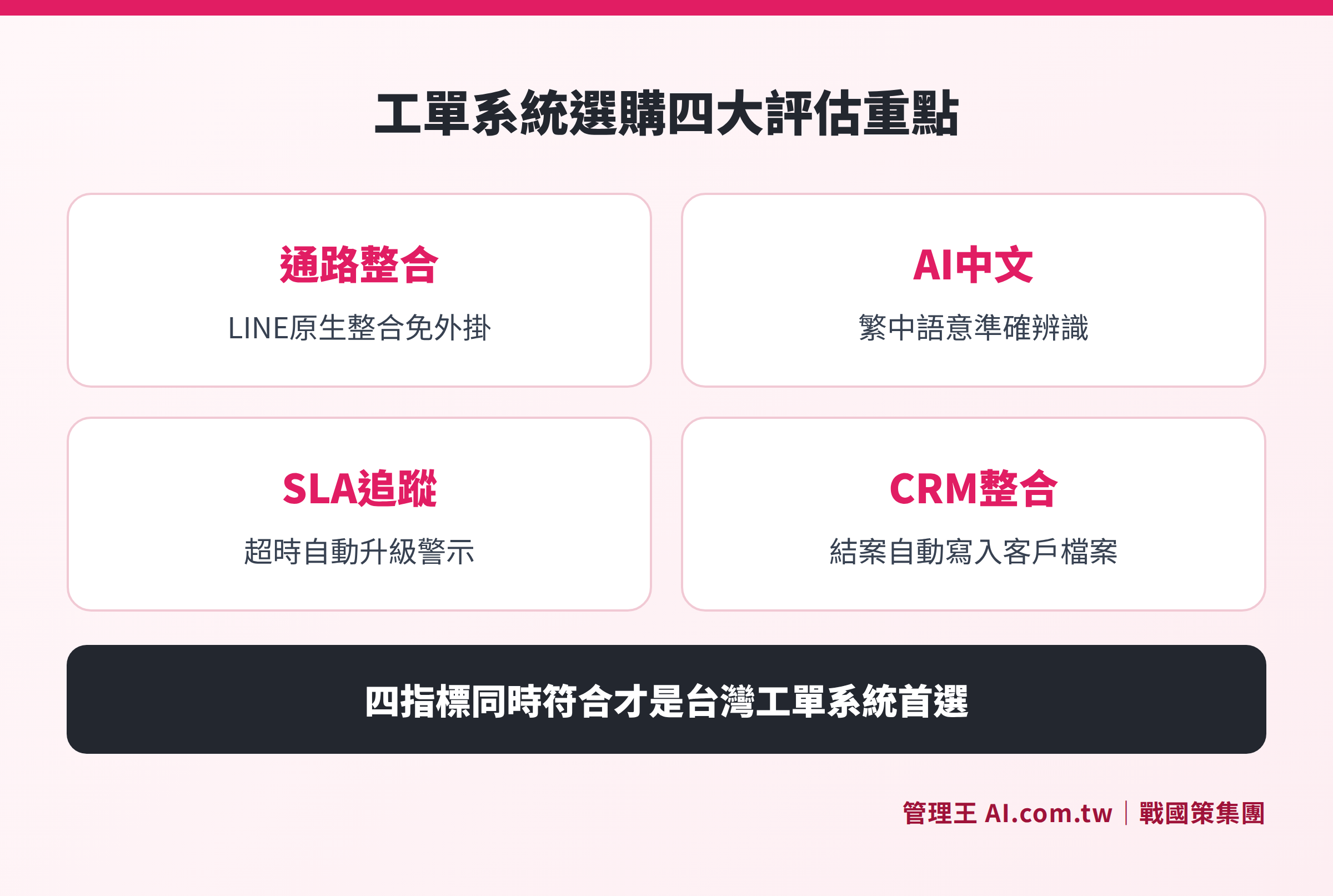
Illustrating the four key evaluation aspects when selecting a ticketing system: Channel Integration, AI Capabilities, SLA Management, and CRM Integration.
Ticketing System vs Regular Email: What’s the Difference?
Many small and medium-sized business owners may ask, "Isn't using Gmail + group inbox sufficient?" Here is a direct comparison:
Table: Ticketing System vs Group Email Functionality Comparison
| Comparison Aspect | Group Email | Ticketing System |
|---|---|---|
| Multi-channel Integration | Email only | Integrates LINE, FB, phone, forms |
| Dispatch Management | Manual forwarding | Automatically dispatches per rules |
| SLA Tracking | None | System auto-timing and alerts |
| Repetitive Issues | Requires manual replies each time | AI knowledge base replies automatically |
| Customer History | Must manually dig through emails | Displays CRM history directly |
| Management Reporting | None | Real-time response times, resolution rates, CSAT |
| Customer Service Performance | Cannot quantify | Tickets handled and achievement rates for each agent |
The conclusion is clear: email solves "receive and reply," while the ticketing system solves "customer service management." When the daily ticket volume exceeds 30 or multiple customer service representatives handle inquiries simultaneously, the benefits of a ticketing system begin to far outweigh its costs. This is especially true when multiple channels operate concurrently (LINE, email, and phone submissions), without a ticketing system there's almost an inevitable risk of missed issues.
Key Considerations for Evaluating Ticketing Systems: Must-Read Before Purchase
When selecting a ticketing system, the following six aspects are worth careful evaluation:
- Channel Coverage: Does it support LINE official accounts? This is the most commonly used communication channel among customers in Taiwan; many foreign tools require additional purchases for integration. Some systems only support Email and web forms, which is insufficient for Taiwanese businesses.
- Chinese AI Capabilities: Can the knowledge base Q&A and auto-classification correctly understand Traditional Chinese and Taiwanese colloquialisms (e.g., "踩雷", "揪團", "貨到付款")? Some foreign AI tools may offer a Chinese version but lag significantly in semantic recognition accuracy.
- SLA Flexibility: Can different SLAs be set based on customer tier and issue type? Can the rules for overdue escalation be customized? An ideal ticketing system should support multiple parallel SLA sets, for instance, one for VIP customers and another for the general clientele.
- Depth of CRM Integration: When customer service replies, can they view customer orders, past tickets, and payment records simultaneously? After ticket closure, is there an automatic record in the CRM? Lacking CRM integration renders the ticketing system ineffective by providing customer service without background information.
- Reporting and Analysis: Are trends in CSAT, individual agent achievement rates, and overdue rate analyses readily available? Some ticketing systems require additional purchases for analysis modules, so confirming before purchase is essential.
- Total Ownership Cost: Apart from the monthly fee, are there additional costs for integrations, AI add-ons, and per-agent accounts? Foreign SaaS tools (e.g., Zendesk starting around NT$1,700 per agent) bill per seat, and costs escalate quickly with team expansions; thus, evaluating the Total Cost of Ownership (TCO) is recommended.
How to Improve Customer Service Efficiency with 管理王 Ticketing System
管理王 AI.com.tw customer service ticketing system is a native Traditional Chinese ticketing solution designed for small to medium enterprises in Taiwan, integrating the following processes:
Unified Source Integration: Messages from LINE official accounts, Facebook Messenger, Email, and website forms are all aggregated into a single inbox, allowing customer service staff to avoid switching between five different windows.
AI Auto Classification and Dispatch: After a ticket arrives, AI automatically determines the type of issue (returns, technical, billing) and urgency of the customer, dispatching it according to established rules to the most suitable customer service personnel. VIP customer tickets can be set to automatically mark as high priority, ensuring someone takes over within 15 minutes.
Knowledge Base Auto Response: Upload frequently asked questions (FAQs) to the AI knowledge base, allowing AI to automatically respond to up to seventy percent of repetitive questions, with customer service handling only cases requiring human judgement. Training 30 to 50 articles can achieve high accuracy.
SLA Tracking and Escalation: Each ticket displays an SLA countdown timer, and as the deadline approaches, it automatically sends LINE notifications to supervisors. A monthly report provides a clear view of SLA achievement rates and distribution of overdue tickets.
Closure Summary into CRM: After ticket closure, the system automatically records the resolution summary in the CRM customer system, enabling customer service to see the full interaction history instantly when the same customer contacts again, eliminating the need for them to repeat themselves.
CSAT Auto Survey: After closure, send out satisfaction questionnaires automatically, allowing managers to track trends in CSAT and NPS via the customer satisfaction dashboard. Negative feedback tickets automatically notify managers, making it possible to salvage the situation within 10 minutes.
Flexible Plans Starting from Free: 管理王free plan can be used indefinitely, allowing up to 10 members to access basic ticketing functionalities. For more comprehensive features such as AI auto classification, massive training of the knowledge base, and multiple SLA settings, you can upgrade to the economical plan (NT$5,000/month for 30 users) or the business plan (NT$10,000/month for 60 users, including 8 hours of remote training). Compared to equivalent foreign tools, overall subscription costs can save over 70%.
管理王 integrates more than 100 features across nine major systems, and the ticketing system is just one part; with the same account, you can also use modules for CRM, quoting, inventory, marketing, human resources, and more, without needing to integrate multiple SaaS software. For a complete understanding of the AI customer service flow, refer to the AI customer service center and AI phone customer service system pages; if you have equipment repair needs, the repair management system can further track equipment serial numbers and repair progress.
Related reading: How to Choose a Customer Service System? A Guide for Small and Medium Enterprises on Customer Service Processes and Purchases, What is AI Phone Customer Service? Workflow and Applications of Voice AI Assistants.
Avoid Missing Tickets, Start with the Free Plan
Management consultants assist you in setting up the ticketing system within 1 day, integrating LINE, Email, forms, SLA auto tracking, and real-time CSAT data monitoring.
Free consultation hotline: 0800-003-191
LINE Official Account: @119m
Official Website: app.AI.com.tw
Free Trial: Apply for Management King Now
Frequently Asked Questions
What is the difference between a ticketing system and CRM?
CRM (Customer Relationship Management system) primarily manages customer basic information, sales opportunities, and contract histories; the ticketing system mainly manages the process of handling after-sales service issues. The best scenario combines both: the ticketing system receives and addresses issues, and closure records are automatically written back into CRM, allowing sales and customer service to share complete customer histories.
How many people need to be involved for it to be worthwhile to implement a ticketing system?
As long as over 10 to 20 customer service issues need to be addressed daily, or if more than 2 customer service representatives need to collaborate, it's worth considering. The core value of a ticketing system is not only "organizing issues" but also enabling managers to use data to manage service quality. Even with a small customer service team, SLA tracking and satisfaction data can assist in continually improving service.
Can small businesses use a free ticketing system?
Yes. 管理王 AI.com.tw offers a free plan that is permanently available, suitable for businesses with lower customer service volumes or just starting out. Advanced features such as multi-channel integration, extensive auto-responses from the AI knowledge base, and complete SLA reporting may require an upgrade to a paid plan (starting at NT$5,000/month).
How long does it take to implement a ticketing system?
The ticketing system is a lightweight SaaS tool that does not require the months necessary for ERP systems to implement. Basic setup (creating an account, importing FAQs, setting dispatch rules, integrating LINE) usually takes 1 to 3 working days. 管理王 provides consultants who offer free interviews and setup assistance, along with a 0800 customer service line and LINE official account for instant support.
Can LINE messages be integrated into the ticketing system?
Yes. 管理王 customer service ticketing system natively supports integration with LINE official accounts, and every message sent by customers via LINE will automatically be converted into tickets in a unified inbox. When customer service replies within the ticketing system, messages will be simultaneously sent to the customer's LINE. Unlike foreign tools (like Zendesk) that require additional purchases of third-party plugins for LINE integration, 管理王 natively supports this without extra setup or payment.
Data Sources
- Article 43 of the Consumer Protection Act, National Regulations Database, Executive Yuan Consumer Protection Committee (Query on November 2026)
- Overview of Service Level Agreements (SLA), Microsoft Dynamics 365 Official Documentation (Query on November 2026)
- Executive Yuan Consumer Protection Committee: Handling Consumer Disputes, Executive Yuan Consumer Protection Committee (Query on November 2026)
- ITIL Service Desk Best Practices, ITIL.org (Query on November 2026)