Complete Guide to Online Video Conferencing: Software, Equipment, and Meeting Process|Video Conferencing Software Recommendations

This article thoroughly introduces the core functions of online video conferencing, compares mainstream software, provides equipment purchasing suggestions by scale, outlines the pre-during-post meeting process, and explains how to utilize 管理王 AI.com.tw's built-in AI meeting recording and cloud recording to enhance remote meeting efficiency.
Online video conferencing allows real-time audio and video transmission over the internet, enabling participants at different locations to communicate face-to-face as if they were in the same space. In simple terms, as long as there is internet access and a camera, meetings can be convened across cities or even internationally within seconds, saving travel costs and waiting time. For SMEs in Taiwan, choosing the right video conferencing software hinges on three key factors: whether the features are comprehensive (screen sharing, cloud recording, AI meeting notes), whether it integrates with existing management tools, and whether the free plan can be used long-term without sudden price increases. This guide covers the core functionalities of online video conferencing, compares mainstream software, offers equipment purchasing advice, and outlines the meeting processes and etiquette to help bosses and managers quickly comprehend and make decisions to find the most suitable solution for their scale.
What is Online Video Conferencing? Definition and Common Application Scenarios
Online video conferencing (Online Video Conferencing) uses the internet as a transmission medium to enable real-time audio-visual communication through cameras, microphones, and screens. Compared to phone conferences, video adds facial expressions and body language; compared to purely text messages, video provides real-time interaction and emotional perception, making it the highest information density form of remote communication.
Common online video application scenarios in Taiwanese companies include:
- Cross-location daily stand-up meetings: Quick 15-minute progress synchronization to confirm task status
- Client proposals and product demos: Replacing on-site visits, saving business travel costs
- Supplier negotiation: Both parties share screens to confirm terms in real-time
- Remote recruitment interviews: HR can invite department heads to connect simultaneously for multiple rounds of interviews
- Cross-national training: Instructors can record or live stream, allowing participants to review anytime without time zone restrictions
- External consultant consultations: Lawyers, accountants, and consultants can provide services without being physically present
The most direct benefit for SMEs in Taiwan is reducing travel expenses and waiting time: three cross-city client video conferences can be arranged in a single morning, significantly enhancing business efficiency. For companies operating in remote or hybrid modes, video conferencing becomes a critical backbone of daily collaboration.
What are the Core Functions of Online Video Conferencing?
Before purchasing video conferencing software, check if the following functions are complete, then prioritize based on your needs.
Basic Call Functions
- Multi-person video: Supports multiple participants simultaneously, allowing everyone to see each other's video
- Audio noise reduction: Automatically filters out keyboard sounds, air conditioning noise, and background noises for clearer conversations
- Virtual background: Covers the actual background of home or office to maintain a professional image
- Beauty mode: Softens the video, suitable for makeup-free or impromptu early meetings
Collaboration Features
- Screen sharing: Share your computer screen with all participants, suitable for presentations and system demos
- Online whiteboard: Enables real-time drawing and marking, replacing physical whiteboards for creative discussions or brainstorming sessions
- Breakout Rooms: Split participants into smaller groups for discussions in large meetings before reporting back to the main room
Recording and Management Functions
- Cloud recording: Records the entire meeting and stores it in the cloud, allowing absent participants to catch up later, and provides video evidence for important decisions
- AI meeting notes: Generates real-time transcripts and automatic summaries, saving time on manual organization
- Waiting room and visitor approval: Controls external personnel entering, allowing the host to verify participants’ identities before granting access
- Attendance management: Automatically records who enters and exits the meeting room and makes it easy to check later
Understand in One Sentence
The core value of video conferencing is not just "being able to meet," but "having records after the meeting, decisions backed by evidence, and tasks tracked."
What are the Mainstream Video Conferencing Tools? Comparison of Features and Plans
Table: Comparison of Core Features of Mainstream Video Conferencing Software in 2025
| Feature | Google Meet | Microsoft Teams | Zoom (Free Version) | 管理王 AI.com.tw |
|---|---|---|---|---|
| Time Limit for Free Plan | 60 minutes/per session | 60 minutes/per session | 40 minutes/per session | Forever free, no time limit |
| Limit on Number of Users in Free Version | 100 users | 100 users | 100 users | Yes |
| AI Meeting Notes | Paid Plan (Business Standard and above) | Requires purchasing Copilot | Requires paid upgrade | Built-in, available in free plan |
| Cloud Recording | Paid Plan | Paid Plan | Requires paid upgrade | Available |
| Screen Sharing | Yes | Yes | Yes | Yes |
| Virtual Background | Yes | Yes | Yes | Yes |
| CRM/Task Integration | Requires additional integration | Requires additional integration | Requires additional integration | Native integration |
| Traditional Chinese Interface | Partial Traditional Chinese | Partial Traditional Chinese | Partial Traditional Chinese | 100% Traditional Chinese |
| Data Storage Location | USA | USA | USA | Taiwan |
Data above is based on publicly available information on various official websites, checked in October 2025.
Google Meet: Deeply integrated with Google Workspace, easiest for businesses using Gmail or Google Calendar. AI transcripts and meeting summaries require upgrading to Google Workspace Business Standard or above; see Google Workspace official pricing page for details.
Microsoft Teams: The top choice for Microsoft 365 users, deeply integrated with Word, Excel, and SharePoint, suitable for companies equipped with M365 licenses. AI text records (Microsoft 365 Copilot) require additional purchase; details on Microsoft Teams official page.
Zoom: High global market share, stable quality, and mature features. The free version limits each meeting to 40 minutes; AI meeting summaries (Zoom AI Companion) require a paid upgrade to use.
管理王 AI.com.tw: Locally developed in Taiwan, with native integration of over 70 modules including CRM, task management, HR, and accounting. AI meeting notes are built-in and free; data is stored in Taiwan data centers, suitable for SMEs that prioritize localization and one-stop management. Free plans can be used permanently, with no time limits.
How to Choose the Right Video Conferencing Software? Six Key Evaluation Points
Different companies have different priorities. The following six questions can help you find the most suitable plan for your needs:
1. Company size and number of simultaneous users
The stability of multi-person video increases in bandwidth requirements as the number of participants increases; you need to confirm that the plan supports the maximum number of users adequately. Mainstream tools can handle small meetings of up to 10; for all-hands meetings of 20 or more, confirm if the free version has user or time limits.
2. Is AI meeting notes necessary?
If the company frequently has important client meetings or internal decision-making meetings, AI real-time transcripts can significantly reduce post-meeting organization costs, allowing records to be sent out within 5 minutes. Some platforms' AI notes require additional payment, which should be included in budget calculations before purchase.
3. Is integration with other systems needed?
If meeting conclusions need to be immediately turned into CRM client notes or task assignments, video tools must integrate with business management systems; using an independent video tool requires manually copying and pasting, which can easily lead to missing information.
4. Data security and storage location
Client data, financial discussions, and HR issues may appear during video calls. Data stored on overseas platforms may pose challenges in compliance audits in Taiwan. Companies that prioritize data sovereignty should prioritize plans that store data in Taiwan.
5. Long-term usability of free plans
Being forced to upgrade after a short trial is a common pain point for many businesses. Choosing tools that allow permanent use of the free version can prevent confrontations with blocked functionalities or sudden price increases after establishing business processes.
6. Chinese interface and local customer support
Is the operating interface 100% in Traditional Chinese? Is there a Taiwanese customer support team available when issues arise? This significantly impacts employee acceptance and the efficiency of subsequent training.
How to Select Video Conferencing Equipment? Purchasing Guide by Meeting Scale
Once the software is determined, hardware is equally critical. The quality of the camera image, the microphone sound capture, and speaker output directly affect the professionalism and communication efficiency of the meeting.
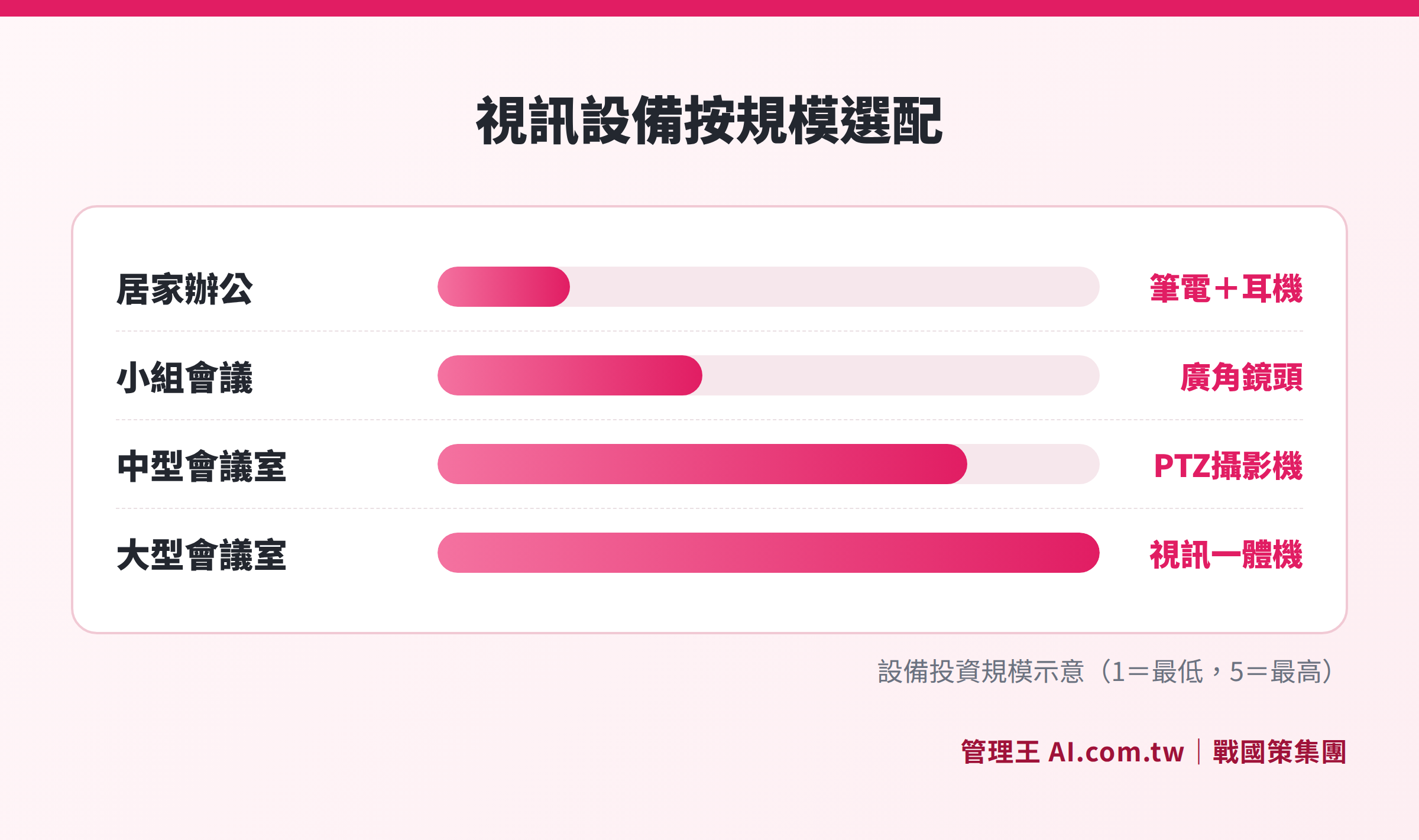
Choose suitable cameras, microphones, and speaker configurations based on the number of people in the meeting room
Table: Recommendations for Video Conferencing Equipment by Scale
| Meeting Scale | Recommended Equipment Configuration | Applicable Scenarios |
|---|---|---|
| 1 Person Working From Home | Built-in laptop camera + neck-mounted or wired headset | Individual remote work, one-on-one meetings with supervisors |
| 2 to 6 Person Small Group | USB wide-angle camera + omnidirectional microphone speaker | Small departmental meetings, supplier negotiations |
| 6 to 15 Person Conference Room | PTZ camera + ceiling or table array microphone | Cross-department weekly meetings, client proposal presentations |
| 15 Persons or More Large Conference Room | Video All-in-One Machine (AIO Bar) + extended microphone | All-hands meetings, board meetings, cross-national training |
Key Purchasing Reminders
- Camera: Resolution recommended to be above 1080p; choose wide-angle lenses with 90° or more for multi-person meetings
- Microphone: An omnidirectional microphone can pick up sound in 360°, suitable for multi-person seating; a direction-specific microphone can be chosen for a single person or host to reduce noise capture range
- Network Bandwidth: Generally, it is recommended that each video participant requires at least 1.5 Mbps upload speed; when multiple people are in a meeting, check if the total upload bandwidth in the office is sufficient
- Fill Light: No matter how good the camera is, it cannot correct backlight or dim environments; a ring light is the most cost-effective professional upgrade option
Complete Process of Online Meetings: Pre-meeting, During Meeting, and Post-meeting Stages
An effective video conference needs to be well-prepared before it starts, and follow-up after the meeting is equally important.
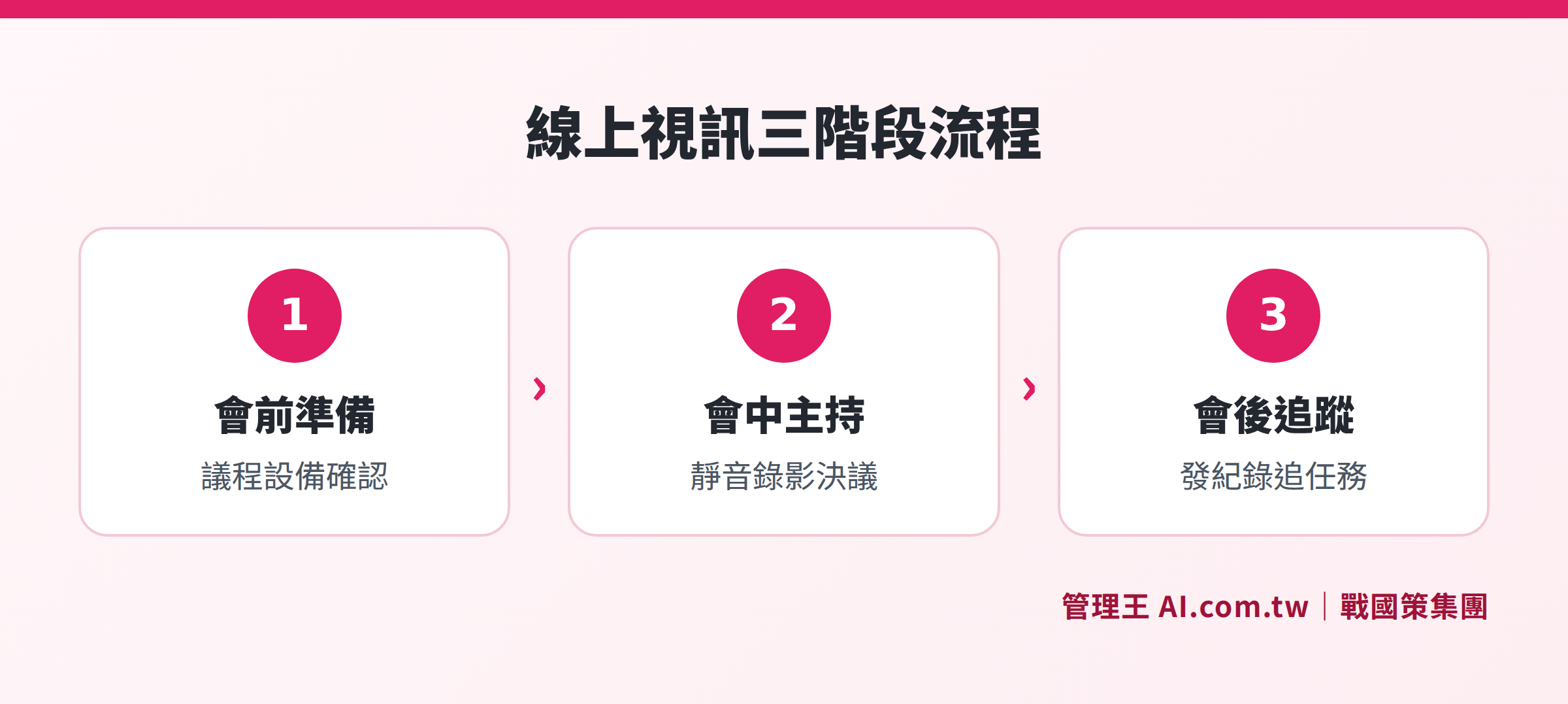
Standardized operational steps from pre-meeting preparation, meeting facilitation to post-meeting follow-up
Pre-meeting Preparation (15 Minutes Before Meeting)
- Confirm the agenda and objectives, and send them to all participants via email or messaging tools in advance
- Test the camera, microphone, and internet connection, ensuring that the documents or presentations to be shared are ready
- Organize the background or activate the virtual background to ensure a clean, professional backdrop
- Send meeting links and alternative connection methods to avoid delays due to technical issues
- Confirm recording and AI meeting notes functionalities are turned on (if needed)
During Meeting Facilitation
- Start on time, and the host should announce the agenda order and time allocation first
- Unmute before speaking, and keep the mute on when not speaking to reduce environmental noise interference
- At the end of each topic, clearly announce “What the resolution is, who is responsible, and when it will be completed”
- Close unrelated windows before screen sharing to avoid leaking confidential or personal information
- Reserve 5 minutes for open questions and conclude only after confirming no participants have questions
Post-meeting Follow-up
- Send out meeting minutes (including resolutions, action items, responsible persons, deadlines) within 24 hours after the meeting
- Enter the action items into the task management system, setting reminder times to avoid relying on memory for tracking
- Attach the cloud recording link for absentees to catch up or review later
Video Conferencing Etiquette: Seven Major Considerations and Solutions
Even with the right tools, poor meeting habits can significantly diminish efficiency. Here are the seven most common issues encountered by Taiwanese companies and recommended practices:
- Messy Background: Activate virtual backgrounds or tidy up the camera-visible area before meetings to avoid leaving an unprofessional impression on clients
- Audio Echo: When multiple people are in one room and each connects with their own computer, serious echo can occur; switch to one computer connected to the speakers, or ensure everyone wears headphones
- Unstable Connection: Close unnecessary cloud synchronization applications, conduct pre-tests, and when facing instability, prioritize turning off video and leaving only audio
- Late Entry: Hosts should enter the waiting room 2 minutes early to confirm everything is working properly; participants should enter punctually, with brief greetings at the start
- Distraction from Multitasking: Looking down at phones or replying to messages during video calls can be easily noticed; focus on the meeting and leave non-urgent messages until after
- No Host: Online meetings require a stronger facilitator compared to physical ones, or discussions can easily stray off-topic. Designate a host and clearly set time allocations for each agenda item in advance
- Ambiguous Resolutions: Clearly announce decisions at the end of each discussion point; “It’s vaguely settled like this” cannot be the conclusion, else participants may go their separate ways afterward
How to Conduct Online Video Conferencing with 管理王
管理王 AI.com.tw's online video conferencing is a zero-install tool that opens directly in a browser, requiring no third-party video service purchase and integrates natively with over 70 modules including CRM, tasks, and approvals, ensuring meeting information is no longer isolated.
Operational Steps
- Create a meeting in 管理王’s backend, with the invitation link sent to participants via LINE notifications or email; external clients do not need to install software
- External visitors enter the waiting room, and the host approves their access to ensure information security; this is suitable for scenarios like interviews or client presentations
- During the meeting, activate AI meeting notes, which will generate real-time transcripts, with voice recognition automatically linked to speakers' names
- When collaboration is needed, activate the online whiteboard with one click, allowing everyone to annotate on the same canvas, ensuring the context of discussions is recorded
- After the meeting, the AI automatically generates key summaries and action items, assigning them to corresponding members which enter the task management system for tracking
- The entire recording is stored in the cloud, retrievable at any time from 管理王’s backend, providing video evidence for important decisions
If you need to arrange physical meeting rooms along with online video conferencing, the meeting room booking system can help confirm timings and avoid conflicts. Daily asynchronous communication can be conducted through team instant messaging to minimize unnecessary ad-hoc video calls, ensuring every meeting has a clear purpose.
To learn which plans offer video conferencing features, please refer to the service plan page. The free plan can be used permanently, suitable for enterprises beginning to set up video conferencing processes at zero cost and assessing upgrades after familiarization.
管理王’s positioning is as an "all-in-one AI management system for SMEs," where video conferencing is just one module among nine systems. If the company also needs CRM, payroll, accounting, or customer service tools, integrating them on one platform saves time and costs in system integration, which is a common practice for Taiwanese SMEs to reduce IT subscription costs. 戰國策 Group serves over 30,000 enterprises; for more information, please refer to the complete comparison guide of enterprise communication software.
Free Trial of Online Video Conferencing, Integrated Management on 管理王’s Entire Platform
管理王's online video conferencing includes built-in AI notes, cloud recording, and native integration with the CRM task system, with consultants assisting completion within a day, and the free plan is permanently available.
Free consultation hotline: 0800-003-191
LINE official account: @119m
Official website: app.AI.com.tw
Free trial: Apply for 管理王 now
Frequently Asked Questions
Does online video conferencing require software installation?
Not necessarily. Tools like Google Meet and 管理王 AI.com.tw support conducting meetings directly in a browser without downloading or installing. External visitors only need to click the link to enter, suitable for scenarios requiring quick invitations to clients or suppliers. Some tools (like Zoom) offer more features in the desktop version, which is recommended for hosts to install; external attendees can use the browser version for occasional attendance.
How much internet bandwidth is needed for video conferencing?
A high-definition (1080p) one-on-one video requires about 2 Mbps for both upload and download. For each additional participant in multi-person video, about 1 Mbps of upload bandwidth is required. Most commercial fiber connections in Taiwan have sufficient upload bandwidth, and typical office environments usually do not pose problems. If facing unstable connections, you can first turn off your video and keep only audio, which significantly reduces required bandwidth.
Is the content discussed during video meetings safe?
Major platforms use TLS and AES encrypted transmission. If a company has concerns about data sovereignty, it should prioritize services with data storage located in Taiwan. 管理王 AI.com.tw stores its data in the 戰國策 Group's Taiwan data center and complies with ISO 27001 standards, suitable for enterprises that need local data security.
Can video meetings be recorded? What should be noted?
Most mainstream platforms support cloud recording, with files stored in the service provider's cloud space, which the host can retrieve later. Recording involves the personal images of participants, so all attendees should be informed that "this meeting will be recorded" before starting in compliance with personal data protection laws.
How can employees accept online video conferencing more quickly?
In the initial implementation stage, it is recommended to start with small internal meetings to help employees get familiar with operations in a relaxed environment. Providing a standard "pre-meeting checklist" (to check microphones, cameras, backgrounds, and links) can alleviate anxiety during first-time usage. Tools with 100% Traditional Chinese interfaces and intuitive operations have the shortest learning curve for employees. The free plan offered by 管理王 allows employees to try it out before deciding to formally adopt it, suitable for companies wishing to reduce implementation risks.
Data Sources
- Google Meet Official Support Center — Google Workspace official documentation, checked in October 2025
- Microsoft Teams Video Conferencing Official Page — Microsoft official documentation, checked in October 2025
- 管理王 Online Video Conferencing Features Page — 管理王 AI.com.tw official documentation, checked in October 2025
- 管理王 AI Meeting Notes Features Page — 管理王 AI.com.tw official documentation, checked in October 2025