Video Editing from Scratch: Software Selection, Process, and Publishing All in One Go|Video Editing Software Recommendations

Video editing is the process of organizing raw material into a finished product that can be released to the public. This article explains the five major editing steps, video specifications for various platforms, key points for software selection, and how to use 管理王 Video Editor to complete the full process from editing to multi-platform publishing, with a free plan for permanent use.
Video editing is the process of integrating raw footage, through segment trimming, order adjustments, adding subtitles, applying transition effects, and brand identification, into a polished product video that can be released to the public. For small business owners, marketers, or community editors, mastering the basics of video editing not only allows for independent production of social media short video content but also effectively reduces outsourcing costs and increases publishing frequency. This article starts with "What is video editing?" and comprehensively explains the five major steps of the production process, differences in platform specifications, key points for software selection, and effectiveness tracking after publication, so that readers with no foundation can follow along and learn it all at once.
What is Video Editing? Core Concepts and Common Uses
The core goal of video editing is to "select the best footage and present it to viewers in the most persuasive sequence." The raw material is usually much longer than the finished product—a two-minute product introduction video may have over twenty minutes of recorded footage; the editing job is to select the clearest and most expressive segments, remove error shots, lengthy pauses, and unnecessary backgrounds, ensuring a tight rhythm and clear message.
Common types of videos for businesses include:
- Brand Promotion Videos: Shape the company image, usually lasting 30 seconds to 2 minutes, suitable for homepage or advertising.
- Product Demonstration Videos: Showcase functions or operation processes, suitable for YouTube channels or product pages.
- Social Media Shorts: Reels, TikTok, YouTube Shorts, 15 seconds to 3 minutes, focusing primarily on algorithmic reach.
- Event and Exhibition Recordings: Capture real scenes, suitable for B2B brands to build trust.
- Training Videos: Internal training operation explanations or customer usage instructions.
In One Sentence
Video editing is about organizing messy footage into a persuasive story, allowing viewers to decide whether to continue watching within seconds.
Complete Video Editing Process: The Five Major Steps from Material to Publishing
Video editing is not just about "trimming segments and adding subtitles"; the complete process includes the following five stages:
Step 1: Organizing Material
Categorize all completed video files by scene or theme, delete visibly erroneous clips, and establish a clear folder structure. This step may seem simple, but it directly influences the efficiency of subsequent editing; the more footage there is, the more time needs to be spent on organization.
Step 2: Rough Cut
On the timeline of the editing software, arrange the selected segments in order according to the script or outline to create a basic framework for the video. The rough cut does not seek perfection in detail; the focus is on confirming whether the overall structure and rhythm meet expectations to give a clear direction for subsequent refinement.
Step 3: Fine Cut
Trimming the entry and exit points of each segment to make transitions more natural; adding transition effects, text subtitles, and annotations; balancing the sound volume between the segments. This step determines the actual viewing experience for the audience and is the most time-consuming yet most rewarding part of editing.
Step 4: Post-Production
This includes color correction (ensuring the tone of the whole video is consistent), adding brand identification at the beginning and end, confirming the position and font style of subtitles, and the overall sound effect matching. Post-production upgrades the video from "viewable" to "professionally looking."
Step 5: Export and Publish
Export the video according to the specifications required by the publication platform, selecting the corresponding resolution, aspect ratio, and compression format, then upload to the designated platform, setting the title, description, thumbnail, and tags to complete the entire process.
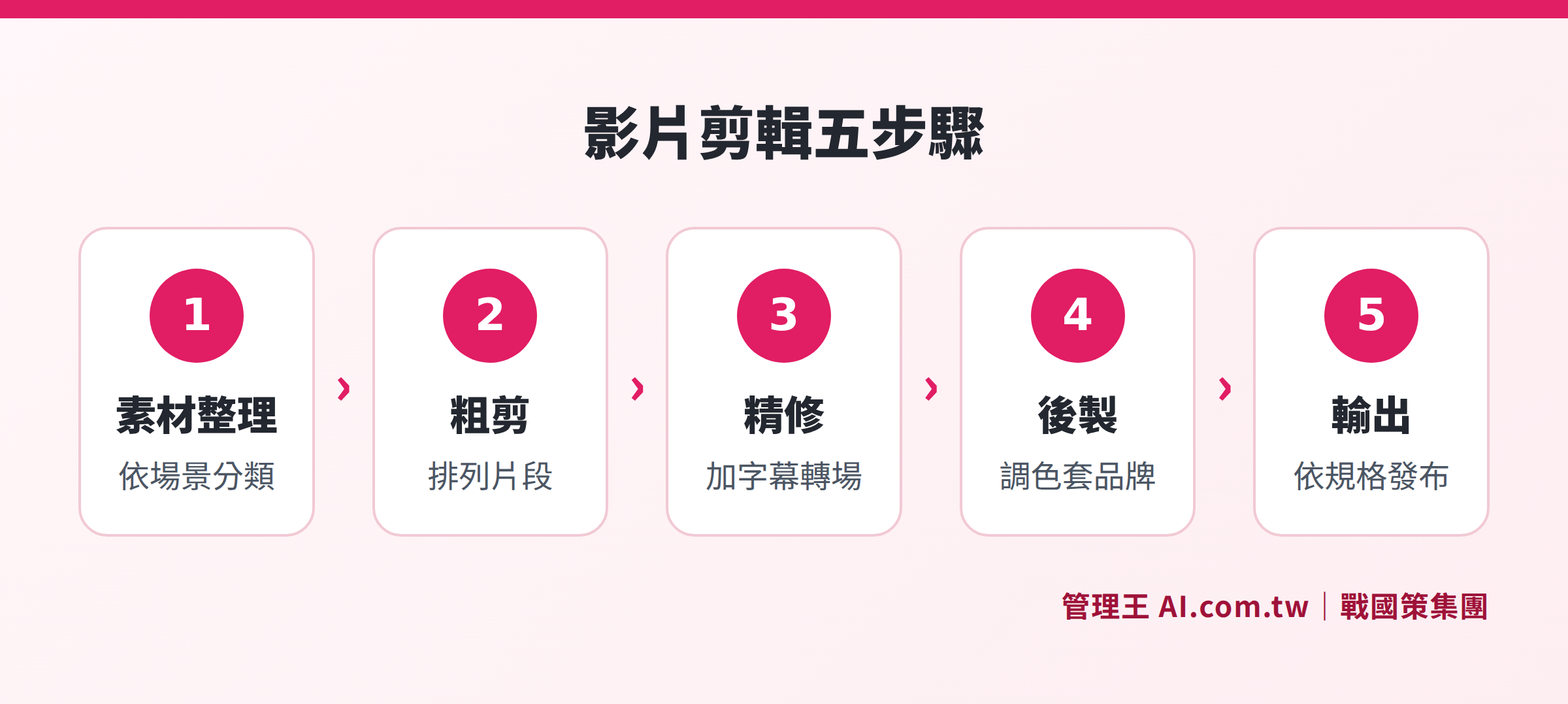
The complete production process from organizing material, rough cut, fine cut, post-production to export and publishing
Video Specifications for Each Platform: Must-Check Before Uploading
Different platforms have varying specifications for videos, so make sure to check before uploading, otherwise, images may be cropped or resolution lowered. Here are the official recommended specifications for mainstream social platforms in 2026:
Table: Comparison of Video Specifications for Major Social Platforms (2026)
| Platform | Recommended Ratio | Recommended Resolution | Maximum Duration | Maximum File Size | Supported Formats |
|---|---|---|---|---|---|
| YouTube Horizontal | 16:9 | 1920×1080 | 12 hours | 256 GB | MP4, MOV |
| YouTube Shorts | 9:16 | 1080×1920 | 3 minutes | 256 GB | MP4 |
| Instagram Reels | 9:16 | 1080×1920 | 20 minutes | 4 GB | MP4, MOV |
| TikTok | 9:16 | 1080×1920 | 60 minutes (upload) | 287.6 MB (iOS) | MP4, MOV |
| Facebook Videos | 9:16 or 16:9 | 1080×1920 | No limit | 4 GB | MP4, MOV |
Specifications for each platform are subject to the latest official announcements and may change with version updates.
For the Taiwanese market, it is recommended that LINE official account videos use MP4 format with a file size not exceeding 200 MB. If you need to publish across multiple platforms simultaneously, it is advised to shoot primarily in 9:16 portrait format and then crop for a 16:9 landscape version afterwards, which can reduce the time spent on repetitive re-editing.
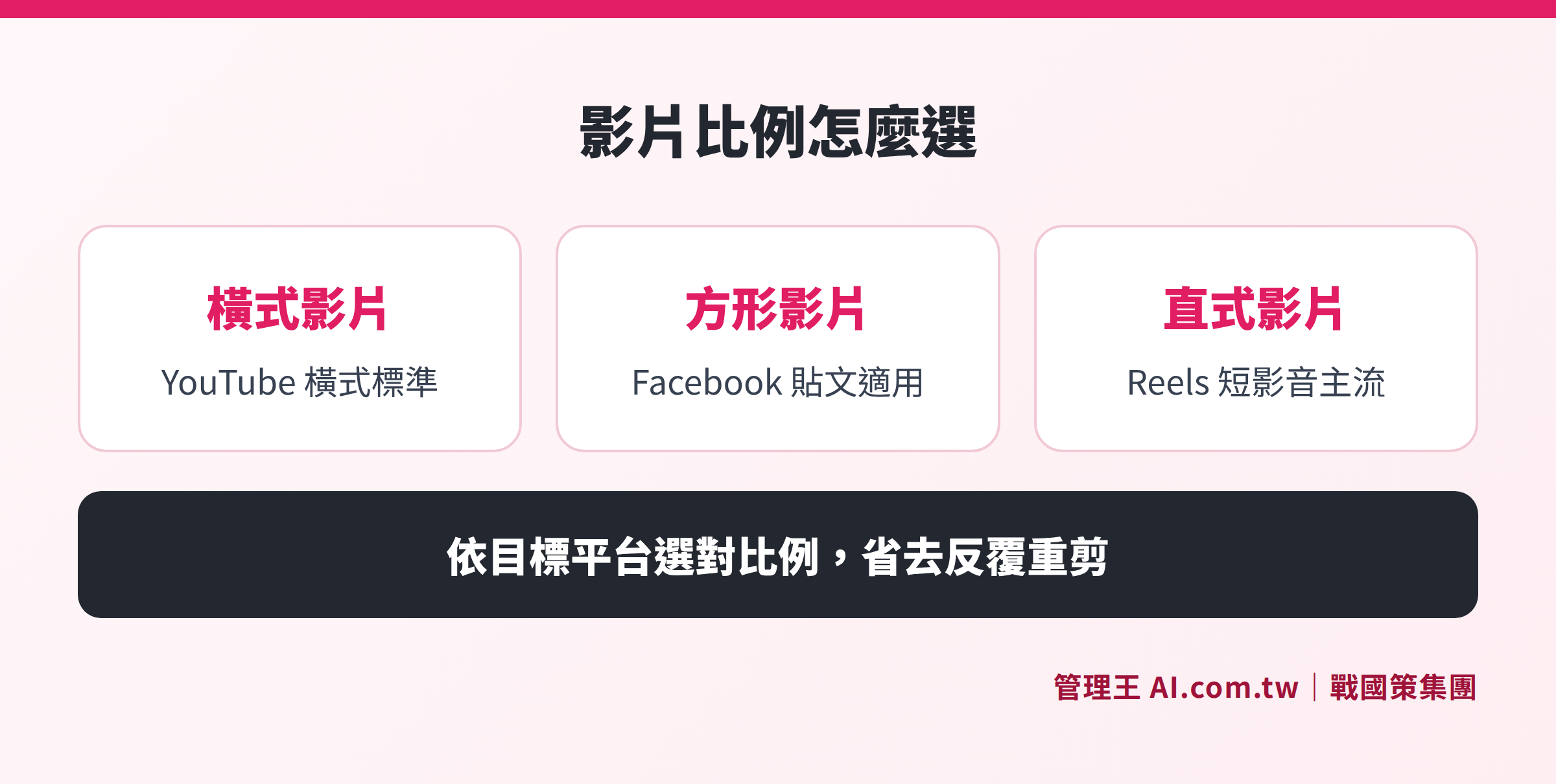
Comparison of applicable scenarios for 16:9 horizontal, 1:1 square, and 9:16 vertical formats on different social platforms like YouTube, Facebook, and Reels
How to Choose the Right Video Editing Software for You?
Video editing tools can be divided into three main types, suitable for different usage scenarios:
Professional Installed Version: Suitable for advanced users, with powerful features, supporting multi-track timelines and precise color correction; however, it requires a steep learning curve and some time to familiarize with the interface, making it appropriate for companies with time to delve into learning or hire dedicated editors.
Beginner Installed Version: Suitable for individuals or small teams starting out, intuitive operation to handle common editing needs, with some tools offering free versions, although advanced features are somewhat limited.
Cloud Online Version: Suitable for small and medium enterprises or team collaboration, operating directly in the browser, no need to download installation, and not restricted by personal computer specifications. Particularly useful for situations with limited hard drive space or when multiple team members need to complete the same project together.
When choosing software, it is advisable to ask yourself four questions:
- What are your main output platforms? Is it primarily YouTube horizontal or Reels/TikTok vertical?
- How many team members need to use it at the same time? The requirements for independent operation and team collaboration differ.
- Are the computer specifications sufficient to handle large video files? High-resolution materials have higher demands on CPU and storage space.
- What is your budget range? Free tools can cover most daily needs, and advanced professional features can be upgraded for a fee.
Table: Comparison of Three Types of Video Editing Software
| Type | Representative Tools | Suitable Audience | Main Advantages | Main Limitations |
|---|---|---|---|---|
| Professional Installed Version | Adobe Premiere Pro, DaVinci Resolve | Professional Editors | Comprehensive features, precise color grading | High learning cost, high hardware requirements |
| Beginner Installed Version | CapCut, 剪映, iMovie | Individual Creators | Intuitive operation, free or low cost | Advanced features are more limited |
| Cloud Online Version | 管理王 Video Editor | Small-Medium Business Teams | No downloads, easy for team collaboration | Requires a stable internet connection |
The Composition of Video Screens: Key to Keeping Viewers Engaged
Many beginners produce videos that are technically sound but cause viewers to leave halfway through. The reason is often not poor editing techniques, but rather neglecting several details that impact viewer willingness to continue watching.
Opening Hook in the First Three Seconds: Social platform algorithms use completion rates as an important metric, and viewers usually decide whether to continue watching within the first three seconds. The opening should directly present the most valuable part of the video or use a question, a conflict, or an exaggerated image to grab attention, avoiding starting with a logo or lengthy background explanations.
Rhythm Control: Quick editing does not necessarily mean it looks good; the key is that the length of each shot matches the weight of the content. Footage explaining important concepts can be slightly longer, giving viewers time to digest; transitions and connecting shots should be as concise as possible. If every shot in a video is of the same length, viewing can become monotonous.
Subtitle Position and Readability: Subtitles should appear within the safety area of the screen (usually the lower third), avoiding obstruction by the platform's interface elements (like like buttons, account names). The font size should be clearly visible on mobile screens, and the font color should have sufficient contrast with the background.
Consistency of Intro and Outro: Each video should use the same intro and outro templates, allowing viewers to instantly recognize the brand and guiding viewers to subscribe or move on to the next video at the end of each episode, forming a continuous viewing habit.
Video Content Planning: From Single Videos to Serialized Strategies
For small and medium enterprises, the most common issue in video marketing isn't "poor editing," but rather "not knowing what to shoot" or "not knowing what to shoot next after completing this one." Establishing a serialized content strategy can give video production a clearer direction and yield more significant results.
Plan Video Types According to Audience Journey: Different stages of potential customers require different content. Strangers newly exposed to the brand are suited to "introduction-type" videos (what your product category is, what problem it solves); potential customers who are already interested but comparing need "comparison-type" content (the differences between you and competitors); customers close to making a purchase need "persuasive-type" videos (customer testimonials, usage demonstrations).
Create a Thematic Playlist: Group multiple videos on the same theme into a playlist; YouTube playlists can increase watch time and make it easier for the algorithm to recommend your channel. Themes like “Attention E-commerce Owners” or “Introduction to Restaurant Management” attract interested viewers to watch multiple videos at once.
Content Repurposing: A long video can be cut into multiple short segments for batch release; an interview recording can be split into short videos for each question; live stream recordings can yield highlight clips. Such a repurposing strategy enables more content to be generated from a single shoot, significantly lowering the production costs per video.
Three Common Editing Pitfalls for Beginners
Pitfall One: Jumping into Editing Without a Script
Editing without a script is like puzzle pieces missing the picture on the box; it is easy to repeatedly revise. Before starting, having a simple text outline—"What is the core message of this video?" "Which footage best explains this matter?"—can greatly reduce the chance of rework in post-production.
Pitfall Two: Ignoring Users Who Watch Without Sound
A considerable portion of videos on social platforms is viewed in silent mode, especially in offices or public transport. If the subtitles are not clear enough, or written explanations are insufficient, the messages cannot be effectively communicated. It is advisable to always add clear subtitles to each video to ensure that viewers can grasp the key points even when silent.
Pitfall Three: Output Format Not Matching Platform Specifications
Uploading 16:9 horizontal content directly to Instagram Reels will show black bars at the top and bottom, appearing unprofessional visually. It is recommended to create a project according to the target platform’s ratio right from the beginning of editing to avoid remedial work later.
How to Use 管理王 from Editing to Multi-Platform Publishing
管理王 AI.com.tw’s professional video editor is a cloud-based online editing tool designed for small and medium enterprises in Taiwan, operable directly in the browser without installation and without consuming local disk space.
One-Click Ratio Switching: After importing the material, directly choose 16:9 (YouTube horizontal), 9:16 (Reels/TikTok vertical), or 1:1 (Facebook square), allowing the same material to easily adapt to multiple platforms without having to re-edit for each one.
Drag-and-Drop Editing on the Timeline: Segments and text cards stacked in layers can be adjusted in order and length by dragging with the mouse, seeing the results as you go, allowing even beginners to quickly master basic operations.
Brand Templates: Apply company logos, exclusive color schemes, and intro and outro templates for every video, maintaining consistent brand identity without needing to redesign each time.
Text Subtitles and Annotations: With multiple built-in text card styles, add titles, key subtitles, and explanatory annotations, ensuring that users watching without sound can still grasp the essential messaging.
Multi-Segment Trimming and Fine Tuning: Cut long videos into multiple segments, delete redundant scenes, and rearrange quickly to transform interviews, event recordings, or unboxing videos into brisk short clips.
Cloud Collaboration: All editing is done in the cloud, allowing multiple members to collaborate without needing to transfer large files between computers.
AI Short Video Studio further provides AI-generated script creation, subtitle recognition, and thumbnail title production, suitable for users who lack time for manual editing; just input the product or event theme, and AI can produce a complete draft for short videos.
Once the video production is completed, paired with Social Scheduling Management, you can schedule to publish simultaneously to multiple platforms like Facebook, Instagram, LINE official account, Threads, and Xiaohongshu; if you need to expand reach, you can also integrate Advertising Management for paid promotions or notify subscribed users through Newsletter System.
The free plan allows permanent access to basic editing functions, with advanced brand templates and AI features selectable for paid options as needed (view pricing plans).
Key Optimization Points After Video Publishing
The settings after a video is published directly affect outreach and search rankings; the following aspects are worth noting:
- Title and Description: Include core keywords presented in a naturally readable way, avoiding pure keyword stuffing.
- Custom Thumbnails: Self-made thumbnails generally have higher click rates than platform automatically captured ones; it is advisable to include clear main visuals or large text explanations.
- Tag Settings: Add 3 to 5 relevant tags on YouTube to help algorithms correctly categorize the video.
- Multi-Platform Simultaneous Sharing: After publishing, share short previews on platforms like LINE official account, FB fan pages, etc., directing traffic to the main video.
- Viewing Data Tracking: Regularly check average viewing duration and viewer drop-off points to identify segments causing viewers to leave, serving as a basis for improving the next video.
- SEO Integration: Use the AI SEO tool to help the video appear in Google search results, broadening organic traffic sources.
Let a Consultant Help You Double Your Reach Through Video Marketing
管理王 consultants assist in planning video content strategies, choosing appropriate editing tools, and carrying out the entire process from editing to multi-platform publishing, with free consultations available without limitations.
Free consultation hotline: 0800-003-191
LINE official account: @119m
Official website: app.AI.com.tw
Free trial: Apply for 管理王 now
Frequently Asked Questions
Do I Need Professional Equipment for Video Editing?
Not necessarily. Using a smartphone for shooting along with cloud editing tools can produce finished products that meet social platform requirements. For most small and medium enterprises, establishing a stable production rhythm with existing equipment is more practical than waiting to procure expensive equipment. Adequate lighting (near windows or using fill lights) and clear audio (a wired headset microphone is sufficient) are the two most critical factors affecting video quality, far outweighing upgrades to filming equipment.
How Much Time Does Video Editing Take?
The time required for editing varies greatly based on material volume, video length, and personal proficiency, with no fixed number. Generally, scripted short videos (30 seconds to 2 minutes) take less time than unscripted long ones; using tools with templates and brand formats is quicker than manually laying out from scratch. It is advisable to complete a few actual cuts to calculate your average time before deciding if adjustments to tools or processes are necessary.
Must Videos Be Cut into Vertical (9:16) to Gain Traffic?
Vertical videos have support from platform algorithms on Instagram Reels, TikTok, and YouTube Shorts, leading to relatively broader reach, particularly suitable for expanding unfamiliar audiences. However, if the main audience is on YouTube subscription channels, company websites, or B2B presentation scenarios, horizontal (16:9) remains the standard format. It is recommended to determine the main ratio based on the primary publication platform, with any remaining time used to create additional versions.
Can 管理王 Video Editor Be Used for Free?
Yes. The 管理王 free plan is permanently valid with no trial period limits, allowing the use of basic timeline editing, multi-segment trimming, text subtitles, and transition effects. Advanced features such as AI script generation and brand templates offer one-time experience points, and full use requires upgrading to a paid plan.
How Can I Get More People to See My Video Once It's Made?
Video visibility depends on platform settings and promotion strategies. In addition to setting up good titles, descriptions, and thumbnails when launching, you can integrate Advertising Management for paid promotions, share synchronized previews across multiple platforms through Social Scheduling Management, or optimize video search rankings with the AI SEO tool to reach a broader potential customer base.