Should You Take Video Editing Courses? A Cost Comparison Between Self-Learning and Classes|Video Editing Software Recommendations

Video editing courses depend on your goals: if you're just an amateur editing for YouTube, self-learning is sufficient; for a systematic understanding of Premiere Pro, consider Hahow or YOTTA courses (NT$1,400 to 4,800); for career transitions, consider physical vocational training classes (starting at NT$9,900, with government subsidies available). This article summarizes a cost comparison table of various courses and learning path recommendations.
Whether video editing courses are worth taking depends on your goals. If your need is to edit a 30-second marketing clip for a company, free YouTube tutorials are sufficient for entry; however, if your goal is to systematically master Premiere Pro or DaVinci Resolve, develop a side business in video production, or prepare to enter the post-production field, structured online courses (costing about NT$1,400 to 4,800) can significantly reduce the time it takes to learn. The main video editing courses in Taiwan are available on platforms like Hahow, YOTTA, various universities’ continuing education departments, and vocational training institutions, with fees ranging from free to over NT$10,000 per class. This article compiles the actual costs of various learning channels, suitable target audiences, and a comparison of self-learning versus classroom learning costs, helping you make the most beneficial decision.
What Level Can You Achieve Through Self-Learning Video Editing?
YouTube has a wealth of free video editing tutorials in Traditional Chinese, with popular channels including PAPAYA Computer Classroom (covering Premiere Pro, PowerDirector tutorials) and Six Fingers Huber (advanced After Effects applications). The self-learning path is entirely feasible, but there are several realities to face:
- Videos are scattered, and you need to plan your own learning sequence, which can lead to learning bits and pieces without solid foundations.
- While it’s easy to find answers to “how to achieve a certain effect,” understanding “why this editing rhythm is designed this way” is harder to grasp from fragmented tutorials.
- When encountering problems, you have to rely on searching; there’s no teacher to provide real-time answers.
- From zero to be able to edit above-standard commercial videos, self-learning usually requires several months of repeated practice.
Self-learning is best suited for those with time to slowly explore, aiming for amateur video editing or simple internal use, or those who already have some foundational knowledge and want to strengthen specific skills. If you’re new to editing and hope to produce competent videos within two to three months, structured courses are generally more efficient. It’s also worth noting that the quality of YouTube tutorials varies greatly across different software; Chinese resources for Premiere Pro and CapCut are the most abundant, while DaVinci Resolve has relatively fewer resources but is still sufficient for beginners.
In a Nutshell
The value of taking a video editing course depends on whether your time cost exceeds the course fee—self-learning saves money but takes time, while courses spend money but save time.
Video Editing Course Costs: A Comparison of Various Platforms
Major video editing courses in Taiwan fall into several categories, including online platform courses, university continuing education, vocational training classes, and private tutoring, with significant price differences. Below is a summary of public data collected in November 2026.
Table: Cost Comparison of Various Types of Video Editing Courses in Taiwan
| Course Type | Representative Course | Cost (NTD) | Hours | Features |
|---|---|---|---|---|
| YouTube Self-Learning | PAPAYA Computer Classroom, Six Fingers Huber | Free | Unlimited | Unstructured, requires self-planning |
| Online Platform Introductory | Hahow Video Production Introduction - 10 Lessons | NT$1,400 | 2.2 hours | Includes CapCut, iMovie operations, with 2,868 students enrolled |
| Online Platform Advanced | Hahow ASB Editing Technique | NT$2,600 | 5.2 hours | Offers completion certificate, rated 5.0 (699 reviews) |
| Online Platform Premiere | YOTTA Quick Start Premiere Pro CC | NT$3,000 | 7 hours | Includes ACA certification preparation materials, 53 modules |
| Independent Teacher Course | Eleanor Film Academy Editing Principles 2.0 | NT$4,800 | 18+ lessons + 8 live Q&A sessions | Includes LUT package, sound effect material package, 3 years of access |
| University Continuing Education | Chinese Culture University Continuing Education - Premiere Introductory Class | Starting at NT$4,750 | 15 hours | Hybrid (in-person + online), attendance certificate |
| Vocational Training Course | PC School AI Video Creation Practical Class | Starting at NT$9,900 | 18 hours | Eligible for applying for vocational training subsidies, includes AI tool integration |
| Private One-on-One | Platforms like AmazingTalker | Starting at NT$10,000 | As agreed | Customized learning path, maximum flexibility |
Data sources: Hahow, YOTTA, Eleanor Film Academy, Chinese Culture University Continuing Education, PC School, queried in November 2026.
The Adobe ACA certification exam fee is NT$3,200, issued by Adobe and valid for life. Some YOTTA and PC School courses include exam preparation materials; if you need certification for your job, this is a value-added item worth considering.
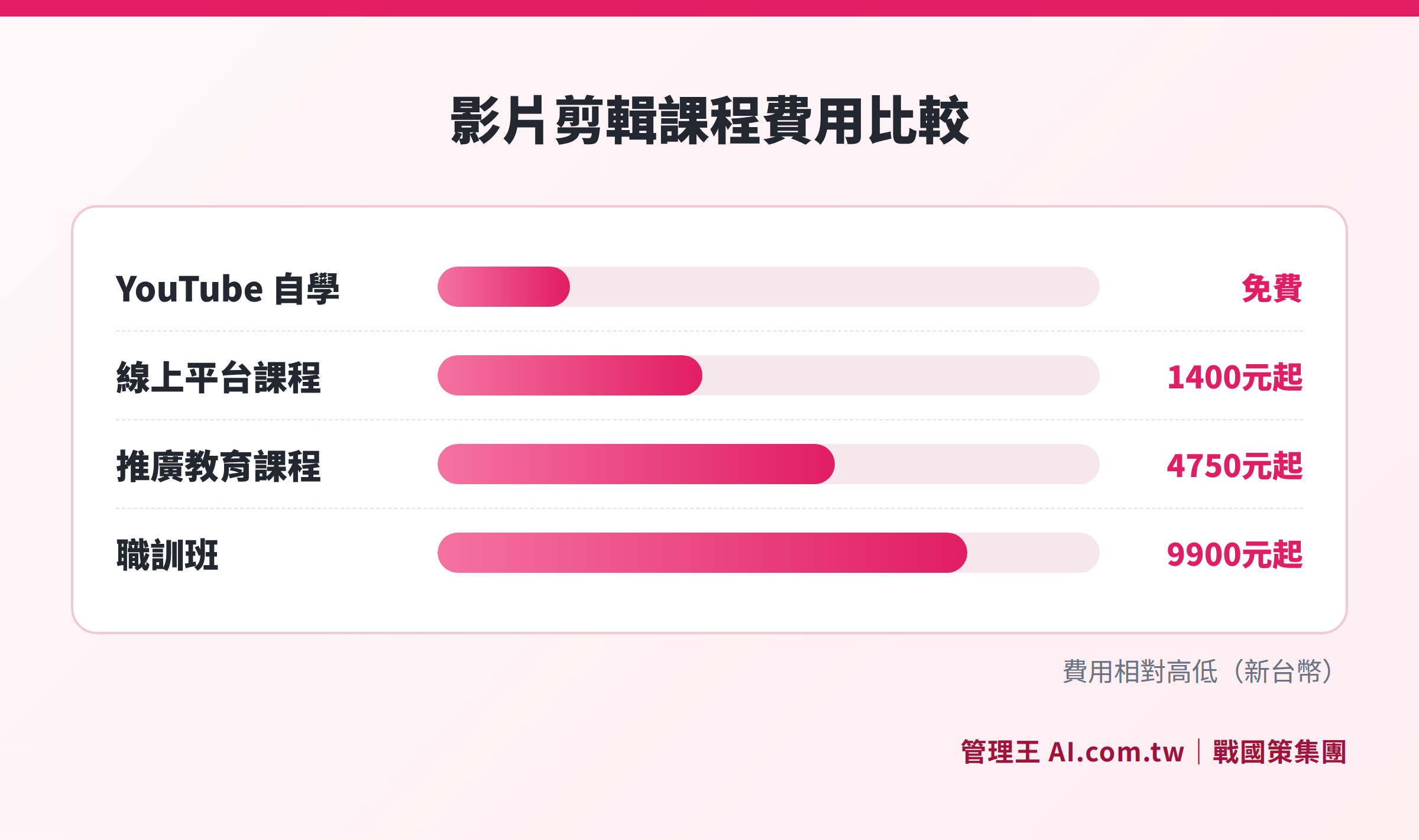
A layered representation of costs based on learning methods (self-learning, online platforms, continuing education, training courses) to help readers quickly assess budget choices.
Self-Learning vs. Classroom Learning: A Comprehensive Comparison of Time and Costs
Before choosing a learning method, it's advisable to factor in "time cost" as well. If your hourly wage equates to NT$500, spending an additional 100 hours self-learning is equivalent to giving up NT$50,000 in earnings. Costs are only part of the decision; efficiency is equally crucial.
Table: Six-Dimension Comparison of Self-Learning vs. Classroom Learning
| Comparison Dimension | YouTube Self-Learning | Online Platform Course | In-Person Continuing Education / Vocational Training Classes |
|---|---|---|---|
| Direct Cost | NT$0 | NT$1,400 to 4,800 | NT$4,750 to over 9,900 |
| Learning Structure | Low (need to integrate content yourself) | Medium (structured but self-paced) | High (fixed syllabus, guided by a teacher) |
| Interaction Level | None | Low (forums, comments for asking questions) | High (face-to-face or live online interaction) |
| Completion Certification | None | Some courses offer completion certificates | Attendance certificate or ACA certification preparation |
| Suitable Audience | Amateur editors, those with a foundation | Goal-oriented self-learners | Career changers or those with clear job requirements |
| Flexibility | Total flexibility, watch anytime | High flexibility (watch anytime) | Low (must attend scheduled classes) |
Key Reminder: Online platform courses (Hahow, YOTTA) typically follow a "one-time payment, lifetime access" model, unlike subscription-based course platforms that require ongoing payments. Confirm the viewing period before purchasing (for example, Eleanor Film Academy offers three years of access). Some courses also include resource packs, LUT color grading packs, or shortcut reference tables, which can sometimes be more practical than the course itself.
Learning Path Recommendations for Different Goals
Goal 1: Marketing for the Company, Editing Short Clips Yourself
It’s recommended to start with CapCut or PowerDirector, with YouTube tutorials being sufficient. If there are many videos and you need brand templates or cross-platform releases, consider a NT$1,400 to 2,000 introductory online course to build a foundation and save trial-and-error time.
Goal 2: Systematically Learn Premiere Pro, Interested in Freelancing or a Side Job
Consider the complete Premiere Pro courses from Hahow or YOTTA (NT$2,600 to 3,000), lasting about 5 to 7 hours and with a clear structure; if ACA certification is needed, the YOTTA quick start Premiere Pro course includes exam preparation content, with a separate registration fee of NT$3,200.
Goal 3: Transitioning into Video Post-Production
Consider physical vocational training classes (such as those from the Chinese Culture University Continuing Education or PC School). PC School courses may allow for applications for vocational training subsidies, with the subsidy proportion depending on qualification conditions, in line with the latest announcements from the Ministry of Labor’s Workforce Development Agency. Building a portfolio is more important than certification, to convince employers or clients with actual work.
Goal 4: Already Have a Foundation and Want to Improve Color Grading or Special Effects
The official DaVinci Resolve website (Blackmagic Design) offers free training resources in English; Six Fingers Huber channel provides advanced After Effects tutorials. At this stage, self-learning is actually more efficient, as there's no need to pay for structured courses again. It’s advisable to practice with real commercial projects, solving problems while working, which enhances practical abilities faster than repeatedly watching tutorial videos.
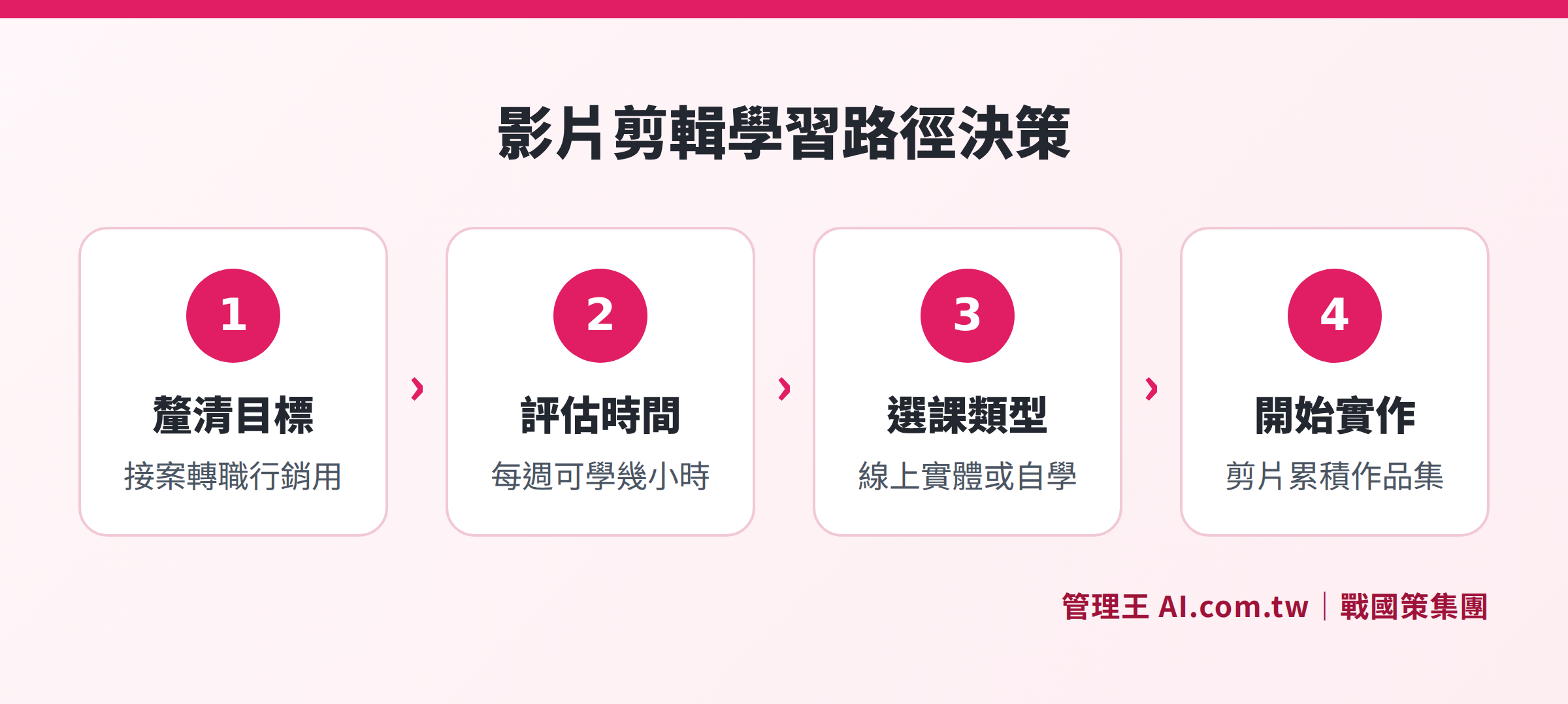
A four-step decision flow from clarifying goals to implementation, helping readers choose the most suitable learning method.
Which Software to Learn? Tool Selection Also Affects Learning Costs
The courses you should take often depend on which software you plan to use for editing. The costs and course support status of various tools are as follows:
- Adobe Premiere Pro: Most courses support it, with an ACA certification system, and the highest industry usage; subscription costs are as per Adobe's latest announcements.
- DaVinci Resolve: The free version is already quite comprehensive, industry-standard for color grading; rich Chinese tutorial resources on YouTube, low learning costs.
- Final Cut Pro: Exclusive to macOS, one-time license fee of NT$9,990; both Hahow and YOTTA have courses, high editing efficiency.
- CapCut (剪映): Usable on mobile or desktop, the preferred free entry option, high efficiency for short video production, no additional courses required.
If you’re on a budget, DaVinci Resolve (free version) + YouTube tutorials is the combination with the lowest learning cost; if your goal is to work in advertising or post-production companies, Adobe Premiere Pro is the most widely used choice in the industry. For designers or photographers working on Mac, Final Cut Pro offers high cost-effectiveness without needing to pay monthly subscription fees. In the introductory stage, there’s no need to overly fixate on software; the key is to first learn the editing mindset—sense of rhythm, narrative structure, sound mixing—these skills apply across any software.
For more software selection analyses, see: Video Editing Software Recommendations: Differences Between Free and Paid Features, Who Is DaVinci Editing For? Learning Thresholds and Alternatives, Computer Editing Software Comparison: Windows and Mac Hardware Requirements.
How to Use 管理王's Online Video Editor
If your need is for "company marketing videos" rather than "learning a specific editing technique," 管理王's professional video editor offers an alternative path: you can start operating directly in your browser without needing to complete a course first, suitable for small and medium enterprises to quickly produce marketing videos.
Main features include:
- Multi-Platform Aspect Ratio Switching: Switch easily between 16:9 (YouTube), 9:16 (Reels/TikTok), and 1:1 (Square), adapting the same material for all platforms without having to re-edit for each channel.
- Timeline Drag-and-Drop Editing: Layered arrangement of clips, text cards, and audio tracks, WYSIWYG (what you see is what you get), allowing quick onboarding even for those with no basic knowledge.
- Brand Templates: Pre-set enterprise logos, color schemes, intro and outro templates, maintaining consistent brand identity across all videos.
- Text Cards and Transitions: Add titles, key subtitles, and transition effects to cater to the viewing habits of silent browsing.
Combined with AI Short Video Studio, you can further use AI to automatically generate scripts and text cards; additionally, coupled with Social Scheduling Management, you can directly schedule the edited videos for release on platforms like FB, IG, and LINE, saving time from manual uploads.
The free plan can be used permanently, suitable for small businesses starting out to evaluate without immediately investing in expensive editing courses or software. For details on the plans, you can refer to 管理王 pricing page. To understand the complete entry-level video editing process, see the foundational article: Video Editing from Scratch: Learn Software Selection, Workflow, and Uploading All at Once.
Find the Most Suitable Video Editing Learning Path for You
管理王 consultants provide free consultations to help you evaluate course choices and video marketing tools, finding the most efficient video production solutions.
Free consultation hotline: 0800-003-191
LINE Official Account: @119m
Official Website: app.AI.com.tw
Free trial: Apply for 管理王 now
Frequently Asked Questions
How Much Should Video Editing Courses Cost to Be Considered Reasonable?
The reasonable fees vary based on learning goals. The mainstream pricing for online courses (Hahow, YOTTA) ranges between NT$1,400 to 4,800, with course hours typically around 2 to 7 hours; physical continuing education courses (Chinese Culture University) are about NT$4,750 to 6,200, with 15 to 18 hours including teacher interaction; vocational training classes (PC School) start at around NT$9,900, with some eligible for government subsidies. If you encounter a single course priced over NT$30,000, it's advisable to verify the course outline, instructor background, and student reviews before assessing further.
Can Self-Learning Achieve Freelancing Level?
Yes, but it requires more time. Most creators engaging in short video freelancing start by self-learning on YouTube, and the key is ample practice and building a portfolio. It’s recommended to set fixed weekly practice hours and actively seek materials (event documentation, product introductions, etc.) to practice, rather than just watching tutorial videos. The persuasion power of a portfolio typically outweighs any course certification.
Is It Worth Taking the Adobe ACA Certification?
If your goal is to enter an advertising or post-production company, or if you need credentials to persuade clients, the Adobe ACA Premiere Pro certification (exam fee NT$3,200, per the public information on 渠道網1111) is valid for life and is recognized by some companies in Taiwan. However, for personal projects or internal company use, the persuasive power of a portfolio is usually more direct, and the added value of certification is limited.
Do You Need to Take Courses for Mobile Editing Apps?
Mobile editing apps like CapCut are designed for beginners to quickly get started, and you can learn directly while using them without having to pay for additional courses. If you encounter specific difficulties (e.g., applying LUTs, multi-track audio mixing), YouTube’s Chinese tutorials usually can resolve these. For more mobile editing recommendations, see: Comparison of Video Editing Apps: What Content is Suitable for Mobile Editing.
What Government Subsidies Are Available for Video Editing Courses?
Vocational training courses (such as the AI Video Creation class from PC School) may allow applications for vocational training subsidies, with subsidy rates and qualifications set by the Ministry of Labor. It’s advisable to directly consult the course provider or visit the Ministry of Labor’s Workforce Development Agency website (wda.gov.tw) for current subsidization items available, as subsidy rates may vary greatly based on qualifications.
Data Sources
- Hahow - Post-Production Tool Course List
- YOTTA - Quick Start Premiere Pro CC Video Post-Production Course
- Eleanor Film Academy - Premiere Pro Editing Principles 2.0 Course Page
- Chinese Culture University Continuing Education - Course Search
- PC School - Film and Television Special Effects Design Course
- 1111 Continuing Education Network - Adobe ACA Premiere Pro Certification Information